
Got a tip for us?
Let us know
Become a MacRumors Supporter for $50/year with no ads, ability to filter front page stories, and private forums.
2018 i9 MacBook Pro throttling discussion [merged]
- Thread starter M.Rizk
- Start date
-
- Tags
- macbook performance pro
- Sort by reaction score
You are using an out of date browser. It may not display this or other websites correctly.
You should upgrade or use an alternative browser.
You should upgrade or use an alternative browser.
zshane1125
macrumors regular
If it's not too much to ask, and I completely understand if you don't. Would you be able to download Unreal Engine 4 from Epic Games and test a lighting render ? I'm interested in buying one of these machines as a game artist but I have no way of seeing how it performs with this software.
If you or anyone with a 13" is willing to test this out, please let me know so I can give the details.
I installed unreal engine, how do I do a lightning render?
This is my 2016 when watching a video on youtube, have transmission enabled. and around 10 tabs in my browser. Sitting with my computer (i7 2,9 Ghz) in my lap in bed.
IDle around 60 degrees is very high, will check my friends tomorrow, and mine next week.
IDle around 60 degrees is very high, will check my friends tomorrow, and mine next week.
Attachments


jeremiah256
macrumors 65816
If you decide to stay with Mac you could save a bunch of money by opting for the lowest clocked i7. A 6-core, 32 GB laptop will still be a powerhouse even at 2.2 GHz base clock and I really don't think you'll notice or care about the difference between that and the severely throttled 2.9 GHz model.
I’m not who your post was directed toward, but great advice. I’m just hoping that if the throttling is true, the six core i7s aren’t also affected.

zshane1125
macrumors regular
random test, installing 6 programs at once, downloading in background, with 10 tabs open.
will upload idle temps later

will upload idle temps later

Aea
macrumors 6502a
I can't compare with my 2014 (now in Apple's hands) MBP but yes. 60C is _very_ high. I took another gander after a few minutes of just browsing reddit and I'm seeing it closer to 50C now.
Not ideal but better. I'm 95% convinced that the fan curves are 100% FUBARed and need serious tweaking. Obviously the thermals are bad but the fans are not acting right here.
Not ideal but better. I'm 95% convinced that the fan curves are 100% FUBARed and need serious tweaking. Obviously the thermals are bad but the fans are not acting right here.
Attachments

zshane1125
macrumors regular
To the people here posting the results of a single cinebench run... the test takes 1 minute. And your screenshots indicate throttling below base.
Anyway...
I ran this test. Fans are set to MAX with Macs Fan Control and little other load (except for QT recording).
Test #1: 794
Test #2: 717
Test #3: 702
Test #4: 673
Test #5: 644
Total Test Time: 5 Minutes 15 Seconds
Screen Recording:
Make what you will of the results but I am seeing rather significant thermal throttling and performance degradation in a five minute test.
Ouch, that looks bad. You can really see the temps spike, freq slowed down, temps climb up, freq really slowed down, temps drop down, freq moves up, temps spike, .... The pattern repeats over and over and ...
I installed unreal engine, how do I do a lightning render?
Thanks mate!
Follow these steps, your interface might look a bit different than mine since I am showing you from Windows 10.
Click the Learn Tab and scroll to the bottom (or search) for the Project called Realistic Rendering.
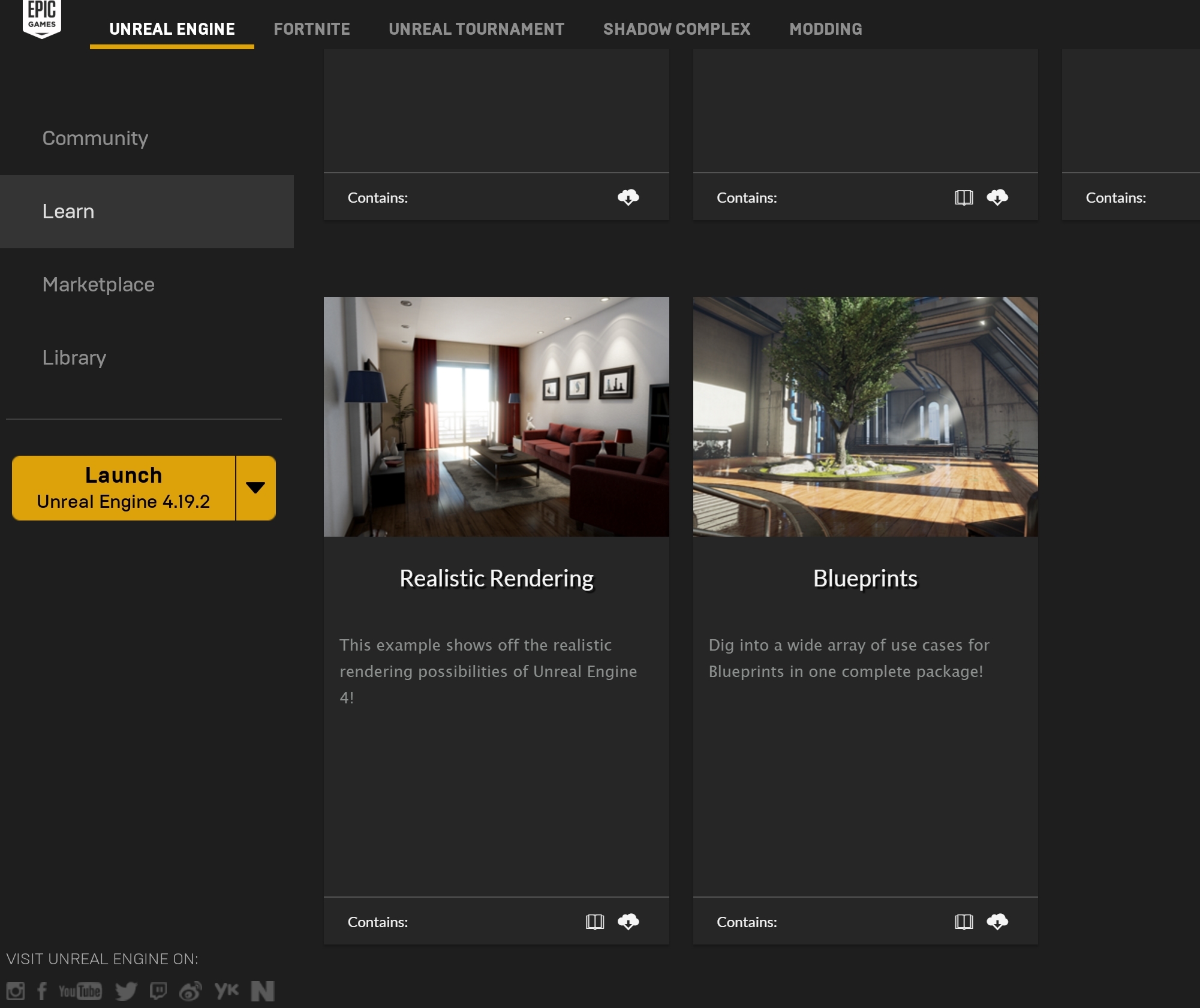
Once you select it, you will be brought to the next page where you can create the project.
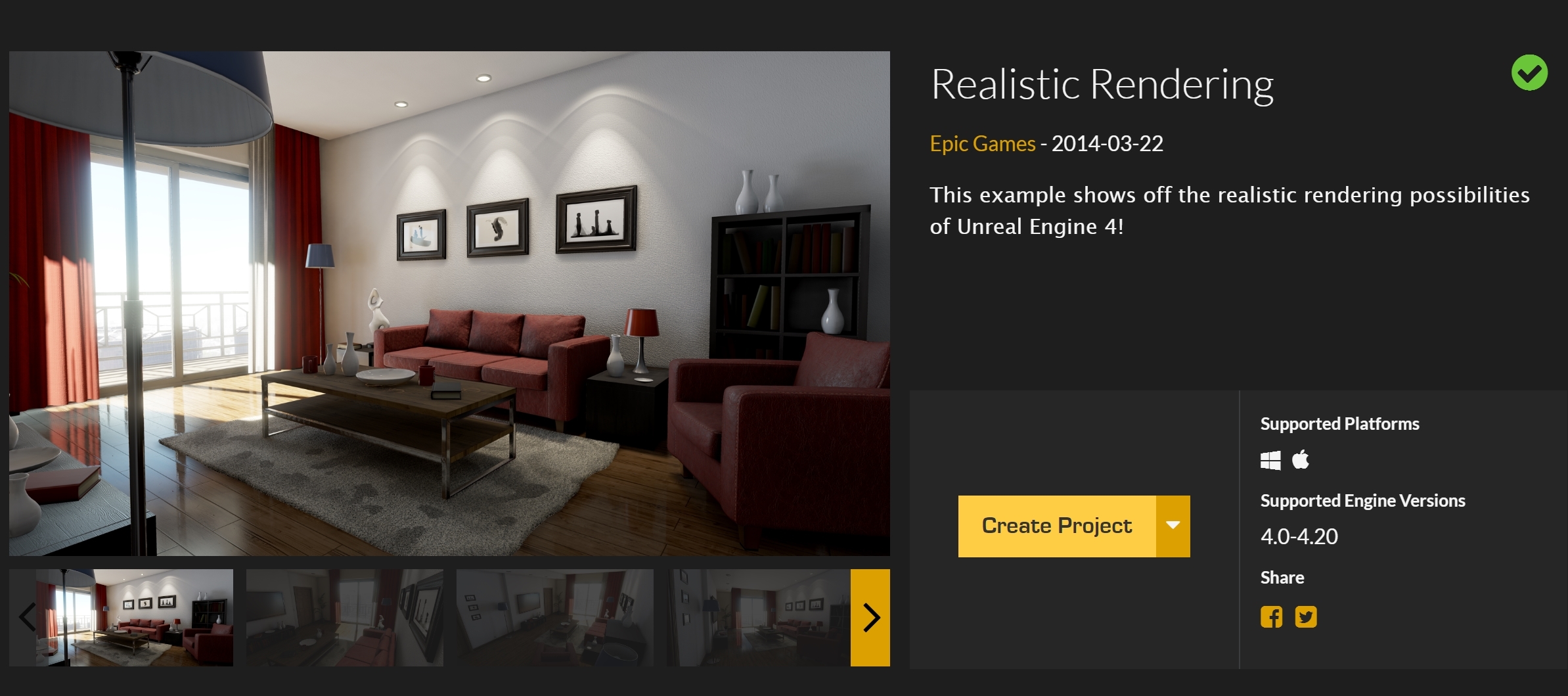
Once you have assigned the project to your directory, you can start it by finding the project in your Library tab.
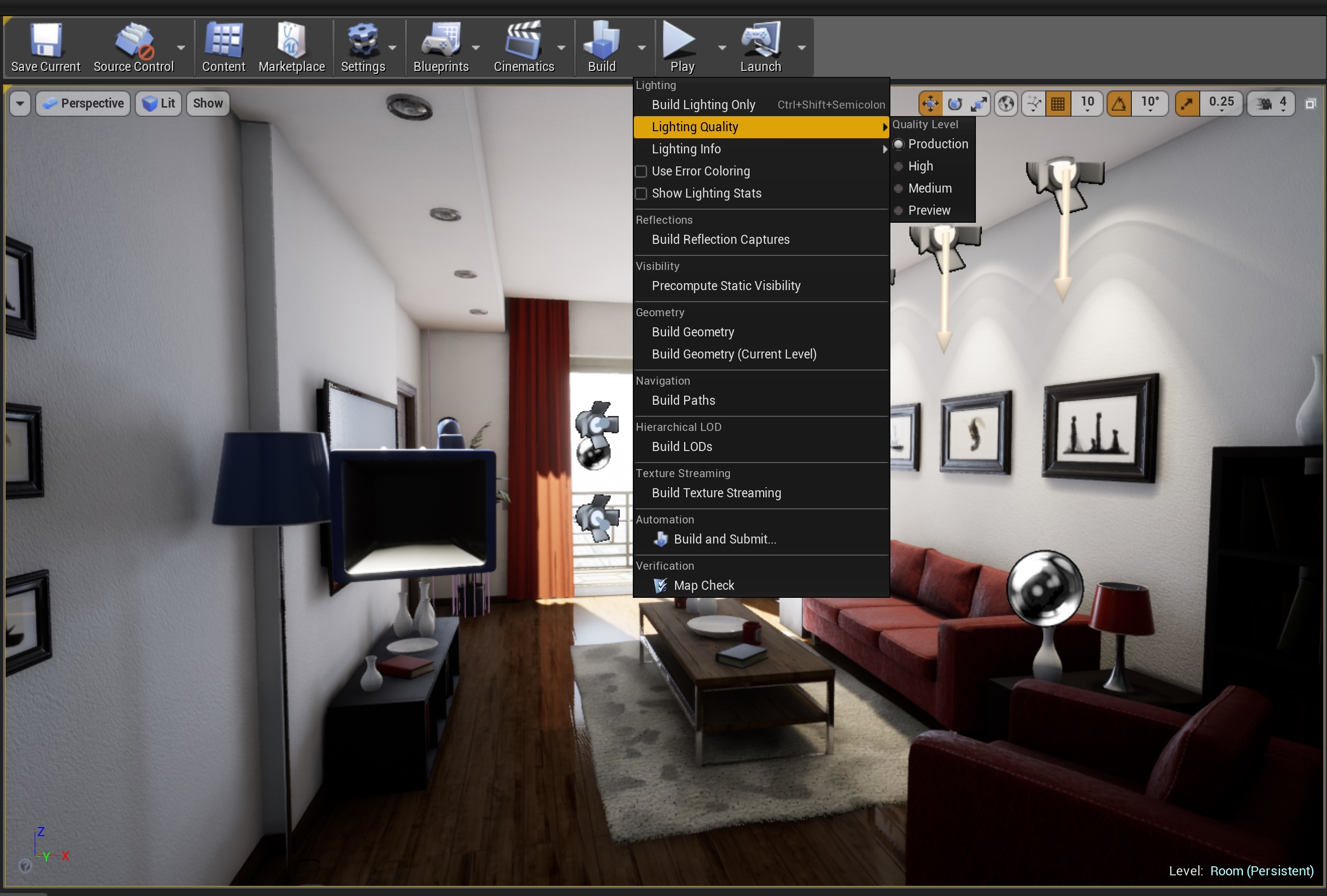
After the project has loaded, click the arrow next to build, select Lighting Quality and then select Production. After that click build Lighting Only and while that bakes you can record your CPU for throttling.
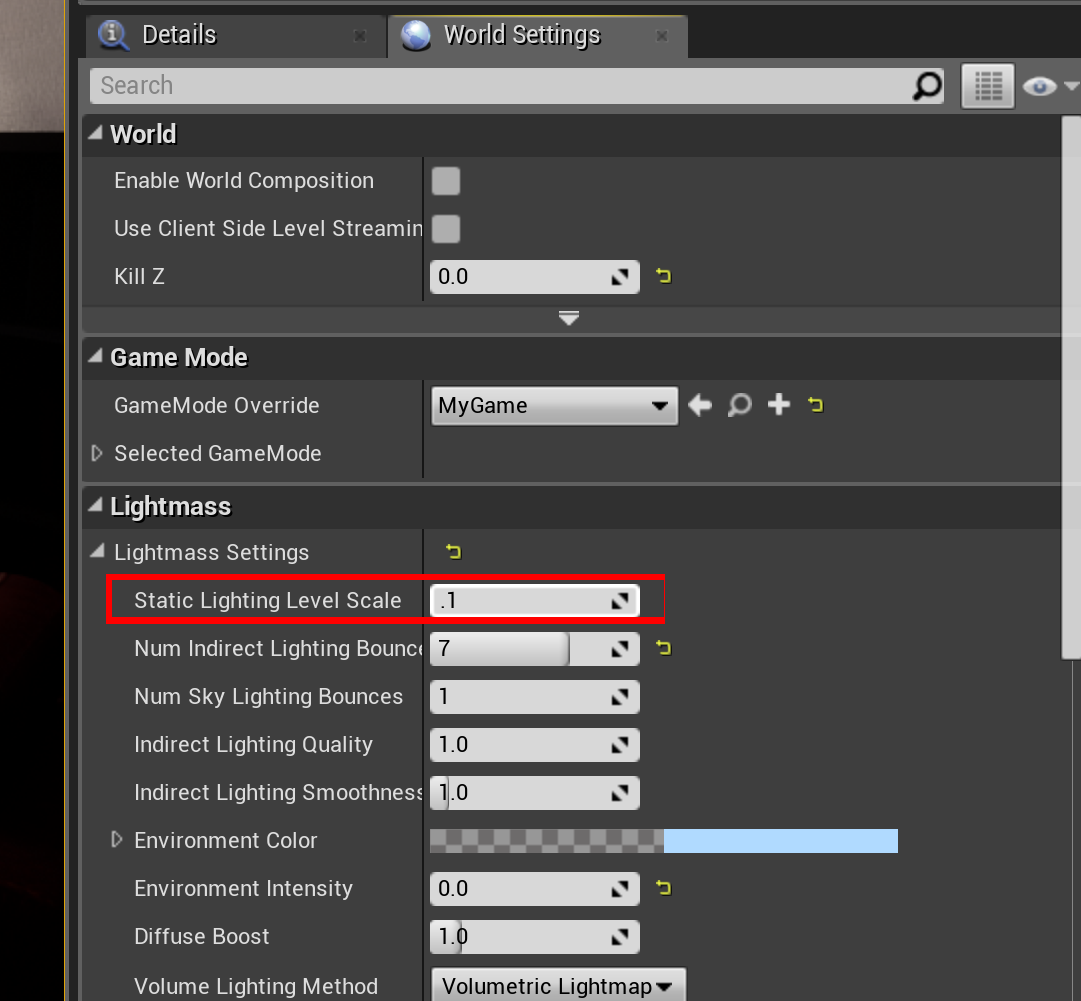
After that, there is another test you can do which will probably take a few moments longer. On the right hand side you should have 2 tabs, Details and World Settings. Click World Settings, and open the Lightmass Settings dropdown, change Static Lighting Level Scale to .1 and then Build Lighting once again and see if this throttles.
A BIG thank you for doing this @zshane1125 ! Lighting bakes will probably be the most CPU intensive part of my workflow and I am eager to see how this machine performs.
zshane1125
macrumors regular


jacklivehere
macrumors regular

koyoot
macrumors 603
Where do you see temperature around 60 degrees? And if so - of what?This is my 2016 when watching a video on youtube, have transmission enabled. and around 10 tabs in my browser. Sitting with my computer (i7 2,9 Ghz) in my lap in bed.
IDle around 60 degrees is very high, will check my friends tomorrow, and mine next week.
Average temperature you get there is under 40 degrees Celsius with single spike to 60 degrees.

Queen6
macrumors G5
Like every laptop that size. It's still really fast, and used by professionals in various fields around the world. Unless you're on these forums. Here, it's basically a fashion accessory wrapped up in a children's toy.
[doublepost=1531948676][/doublepost]
Yes, I don't know how a few of these % of benchmark scores will let you sleep at night.
You said it, these Pro notebooks should deliver as advertised, or is that too much to ask.
Q-6
Where do you see temperature around 60 degrees? And if so - of what?
Average temperature you get there is under 40 degrees Celsius with single spike to 60 degrees.
No, I meant for the guy who were showing his temps when he did cinebench 5 times in a row. His idle was 60. I meant that it is huge, compared to a maxed out 2016 model
Queen6
macrumors G5
To the people here posting the results of a single cinebench run... the test takes 1 minute. And your screenshots indicate throttling below base.
Anyway...
I ran this test. Fans are set to MAX with Macs Fan Control and little other load (except for QT recording).
Test #1: 794
Test #2: 717
Test #3: 702
Test #4: 673
Test #5: 644
Total Test Time: 5 Minutes 15 Seconds
Screen Recording:
Make what you will of the results but I am seeing rather significant thermal throttling and performance degradation in a five minute test.
That's worse than most notebooks with the 7700HQ quad core... 🙁
Q-6
zshane1125
macrumors regular
Results are in for Unreal Engine 4. Got really spiky for the last 5% of the rendering for both tests, 0.8-3.5ghz up and down.
Test 1

Test 2

Spike at the end

Test 1
Test 2
Spike at the end
Aea
macrumors 6502a
No, I meant for the guy who were showing his temps when he did cinebench 5 times in a row. His idle was 60. I meant that it is huge, compared to a maxed out 2016 model
I agree.
I ran the Unreal Engine benchmark. I don't know what my average CPU frequency was but I'm guessing around 1.4Ghz. Drops to 800 Mhz CONSTANTLY.
Here's the screen recording of the entire test:
And here's a screenshot if you don't care to watch the whole thing.
Attachments

koyoot
macrumors 603
Let me guys tell you something about Intel CPUs. Intel offers desktop, low-power CPUs somewhat similar to laptop ones.
There is 6C/12T Core i7-8700T. It is supposed to have 35W TDP.
It doesn't. Under load, like Cinebench the CPU draws AVERAGE of 82W of power, exceeding the TDP target over twice.
If you will power gate the CPU to 35W, you will not exceed 2.4 GHz in core clocks. And core i7-8700T has 500MHz lower stock speed than Core i9 from MBP, and 800 MHz lower Turbo Boost clock speed.
You cannot cheat physics. Those CPUs will throttle like a pigs. Of course Apple is not helping them, with their cooling solutions.
The only way you can slightly help this is by, increasing the fan speeds under load, and repasting the thermal paste on the laptops.
There might not be any other option.
There is 6C/12T Core i7-8700T. It is supposed to have 35W TDP.
It doesn't. Under load, like Cinebench the CPU draws AVERAGE of 82W of power, exceeding the TDP target over twice.
If you will power gate the CPU to 35W, you will not exceed 2.4 GHz in core clocks. And core i7-8700T has 500MHz lower stock speed than Core i9 from MBP, and 800 MHz lower Turbo Boost clock speed.
You cannot cheat physics. Those CPUs will throttle like a pigs. Of course Apple is not helping them, with their cooling solutions.
The only way you can slightly help this is by, increasing the fan speeds under load, and repasting the thermal paste on the laptops.
There might not be any other option.

Man, I just tried with 15inch 2.6ghz model, looks like it is getting hotter too. Can any one confirm if this is spread across all 15inch ?
Please share CPU clock stats with us as others do here. It is really helpful. Thanks 🙂
Aea
macrumors 6502a
Let me guys tell you something about Intel CPUs. Intel offers desktop, low-power CPUs somewhat similar to laptop ones.
There is 6C/12T Core i7-8700T. It is supposed to have 35W TDP.
It doesn't. Under load, like Cinebench the CPU draws AVERAGE of 82W of power, exceeding the TDP target over twice.
If you will power gate the CPU to 35W, you will not exceed 2.4 GHz in core clocks. And core i7-8700T has 500MHz lower stock speed than Core i9 from MBP, and 800 MHz lower Turbo Boost clock speed.
You cannot cheat physics. Those CPUs will throttle like a pigs. Of course Apple is not helping them, with their cooling solutions.
The only way you can slightly help this is by, increasing the fan speeds under load, and repasting the thermal paste on the laptops.
There might not be any other option.
I would be happy with 2.4 Ghz. Not happy with 800 Mhz.
Expect more from a $4500 machine honestly. Let alone from Apple.
koyoot
macrumors 603
Im afraid your only choice is to increase the fan speeds manually when you are doing something intensive and replace the thermal paste in the MBP.I would be happy with 2.4 Ghz. Not happy with 800 Mhz.
Expect more from a $4500 machine honestly. Let alone from Apple.
There is nothing that can be done. Core i9(and all 6 core CPUs from Intel) will have higher heat density, than previous generations and quad core CPU dies, because they are packed so tightly on the CPU package.

The red one is the main source of heat here. As you can see - it is very tight, and condensated.
Do not get me wrong here. Intel CPUs will get hot, and throttle if not cooled properly.
The problem is: Apple design is not helping them to be cooled properly.