Become a MacRumors Supporter for $50/year with no ads, ability to filter front page stories, and private forums.

cjgrode

macrumors newbie
Original poster
I have the new Studio Display XDR ordered for my work/gaming setup. I will be pairing it with a new MacBook Pro 16" (M5 Pro) as my current M1 Pro is finally getting long in the tooth.

I currently use the LG 27GX700A-B for my desktop gaming PC and my ps5 pro. I am trying to move away from a dual PC setup and was curious if anyone has used the new Studio Dispisplay XDR with a PS5 Pro. Ideally with 1440p/4k support @ 120hz. I have seen most of the YouTube videos and searched the forums here but haven't been able to find an answer. Any help plus cable recommendations would be awesome!
 
Hello,

I'm currently hesitating between the ASD and ASD XDR. I'll mainly use it for work (paired with my company MBP M4 pro) but I will also play games with it (Switch 2 / PS5 / Gaming PC). The only answer I could find is this post of someone who has managed to get 4k/120hz with the Switch 2 through the club-3d CAC-1335. Hopefully this one works with ps5 as well


  • Like
Reactions: iUserXDR
Hello,

I'm currently hesitating between the ASD and ASD XDR. I'll mainly use it for work (paired with my company MBP M4 pro) but I will also play games with it (Switch 2 / PS5 / Gaming PC). The only answer I could find is this post of someone who has managed to get 4k/120hz with the Switch 2 through the club-3d CAC-1335. Hopefully this one works with ps5 as well


Looks like a good sign. On paper it should work and the cable isn't expensive but my guess is audio wouldn't work through the XDR. I guess I will go on a testing spree lol
 
I’ve made some research, it looks like there’s just no way to output audio on apple displays from an hdmi source (unless you go with capture card => Mac => ASD but that’s going to add an unbearable 200ms latency). In this you’ll have to output audio somewhere else (bluetooth, jack or usb). Personally, I think I’ll buy a small sound bar that I’ll hide under my desk
 
I’ve made some research, it looks like there’s just no way to output audio on apple displays from an hdmi source (unless you go with capture card => Mac => ASD but that’s going to add an unbearable 200ms latency). In this you’ll have to output audio somewhere else (bluetooth, jack or usb). Personally, I think I’ll buy a small sound bar that I’ll hide under my desk
Is this because the Studio Display does not route the HDMI / DP audio stream to its speakers, like a normal monitor would? This means the only way to feed audio is from the host computer running Thunderbolt, and that the audio has to then have been fed into this computer audio input.

There have been devices such as a "HDMI optical audio splitter" that deals with similar issues like this, say someone wants audio out of a PS5, the HDMI is plugged to a monitor without neither speakers nor 3.5mm output jack. You put such a splitter between the two, it literally splits the video and audio output to different ports for you to route it out. That said, this always introduce problems on the HDMI side due to extra points of connection needing to handshake, and you likely lose the highest possible bandwidth from the host since the device likely supports a worse HDMI version. In the case of 5k120 this close to cutting edge bandwidth as far as display devices go.
 
I’m not sure, I think it’s due to the fact that hdmi => displayport adapter just don’t convert audio. There wouldn’t be any need for hdmi audio splitting since the ps5 can output audio through jack/usb. The issue is that all apple displays have only one thunderbolt input so you can’t input video and audio separately…
 
Hello,

I'm currently hesitating between the ASD and ASD XDR. I'll mainly use it for work (paired with my company MBP M4 pro) but I will also play games with it (Switch 2 / PS5 / Gaming PC). The only answer I could find is this post of someone who has managed to get 4k/120hz with the Switch 2 through the club-3d CAC-1335. Hopefully this one works with ps5 as well


Does the cable also work with 5k 120HZ when connecting to a RTX5080:5090?
 
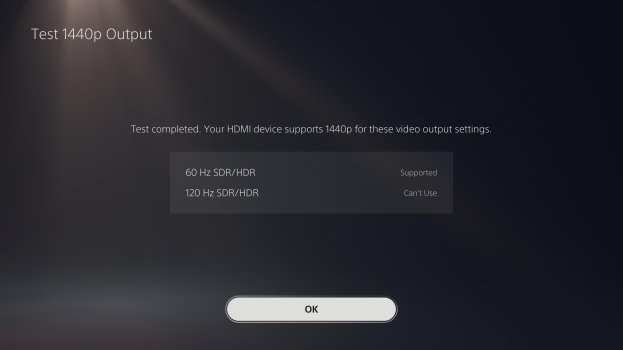
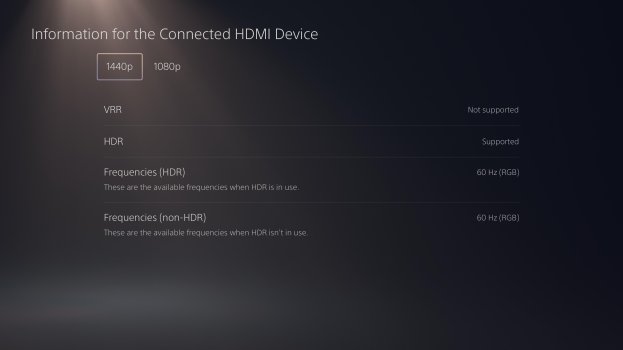
Yesterday I received my Studio Display XDR. It's amazing on Mac. Today I finally got the cables to hook up my PS5 Pro. I got a CAC-1335 → UGREEN 8K DP-to-USB-C adapter. It works, but it's limited to either 1080p 60Hz or 1440p 60Hz, both in HDR. I can't get 2160p or 120Hz to work, at least not for now. VRR doesn't work either, but I'm not expecting that to work given the PS5's picky implementation of the HDMI 2.1 standard. HDR does look stunning though! I've ordered some additional cables in the hope that one of them will get 4K 120Hz working.
 

Attachments

  • IMG_3554.JPG
    IMG_3554.JPG
    249.9 KB · Views: 49
  • IMG_3553.JPG
    IMG_3553.JPG
    278.2 KB · Views: 47
  • Like
Reactions: couscousboulette
Thanks a lot for the feedback! It reminds me issues people were having with the old 6k xdr display. I think you’ll need some kind of edid overide. This thread should help.
 
I've now tried the following:

- Club3D CAC-1335
- StarTech 148B-HDMI-DP-8K

Both with a UGREEN and StarTech DP-to-USB-C cable.

And:

- Club3D CAC-1336 with the included Apple Thunderbolt 5 cable

Every option maxes out at 1440p 60Hz HDR output. No 4K, no 120Hz, no VRR either.
HDR looks absolutely stunning on this display, but I didn't buy a PS5 Pro for just 1440p 60Hz gaming. A big disappointment.
 
I've now tried the following:

- Club3D CAC-1335
- StarTech 148B-HDMI-DP-8K

Both with a UGREEN and StarTech DP-to-USB-C cable.

And:

- Club3D CAC-1336 with the included Apple Thunderbolt 5 cable

Every option maxes out at 1440p 60Hz HDR output. No 4K, no 120Hz, no VRR either.
HDR looks absolutely stunning on this display, but I didn't buy a PS5 Pro for just 1440p 60Hz gaming. A big disappointment.
Found it, this edid adapter should get you 4k120Hz with HDR. It will trick your ps5 into thinking that it’s plugged into a compatible 4k120z hdr TV
 
  • Wow
Reactions: iUserXDR
Found it, this edid adapter should get you 4k120Hz with HDR. It will trick your ps5 into thinking that it’s plugged into a compatible 4k120z hdr TV
But I guess you can't use the cloning feature with the SD XDR? So it would fall back to one of the pre-stored resolutions. Would that still support HDR? The product description is a bit ambiguous here.

I used Claude to help me analyse the situation (so take the conclusions with a grain of salt), but it didn't seem very optimistic about the prospects (I can DM you the fully chat if you are interested). One interesting workaround it suggested would be to clone the EDID of a 4K120 HDR TV (if you have one). This could break colorimetry, though (since the primaries would likely be different between the TV and the XDR). Alternatively, the much more expensive Dr.HDMI can load custom EDID files.

If you end up ordering and testing the Lindy, please let us know your findings!
 
But I guess you can't use the cloning feature with the SD XDR? So it would fall back to one of the pre-stored resolutions. Would that still support HDR? The product description is a bit ambiguous here.

I used Claude to help me analyse the situation (so take the conclusions with a grain of salt), but it didn't seem very optimistic about the prospects (I can DM you the fully chat if you are interested). One interesting workaround it suggested would be to clone the EDID of a 4K120 HDR TV (if you have one). This could break colorimetry, though (since the primaries would likely be different between the TV and the XDR). Alternatively, the much more expensive Dr.HDMI can load custom EDID files.

If you end up ordering and testing the Lindy, please let us know your findings!
As far as I understand it, the plug would send a generic 4k120 edid that should be recognized as valid by the ps5. I have no idea about colorimetry
 
I have got a 1rst response from TESmart, the company that makes the KVM. It looks like the KVM switch will have some hardware limitations: only 5k60Hz with TB and 4k60hz with hdmi. Awesome for the standard ASD but not great for the ASD XDR.

1. Audio support for HDMI devices (PS5 / Switch)
Yes, HDMI devices such as PS5 and Nintendo Switch can output audio through the display. However, audio cannot be output through audio devices connected to the KVM itself.

2. Resolution and refresh rate support
The supported video specifications are as follows:
  • Input 1 (thunderbolt): 5120 × 2880 (5K) @ 60Hz, and also supports 3840 × 2160 @ 120Hz
  • Input 2 (hdmi + usb): up to 3840 × 2160 (4K) @ 60Hz
  • Input 3 (hdmi): up to 3840 × 2160 (4K) @ 60Hz
  • Input 4 (hdmi): up to 3840 × 2160 (4K) @ 60Hz
For HDMI inputs, 120Hz is supported at lower resolutions, such as 2560 × 1440 @ 120Hz. At 4K, HDMI inputs are limited to 60Hz.

3. HDR and VRR support
Input 1 supports HDR and VRR.


4. Release date and price
The product is currently expected to be available in May. The final price has not been confirmed yet.
 
  • Love
Reactions: iUserXDR
I have got a 1rst response from TESmart, the company that makes the KVM. It looks like the KVM switch will have some hardware limitations: only 5k60Hz with TB and 4k60hz with hdmi. Awesome for the standard ASD but not great for the ASD XDR.

1. Audio support for HDMI devices (PS5 / Switch)
Yes, HDMI devices such as PS5 and Nintendo Switch can output audio through the display. However, audio cannot be output through audio devices connected to the KVM itself.

2. Resolution and refresh rate support
The supported video specifications are as follows:
  • Input 1 (thunderbolt): 5120 × 2880 (5K) @ 60Hz, and also supports 3840 × 2160 @ 120Hz
  • Input 2 (hdmi + usb): up to 3840 × 2160 (4K) @ 60Hz
  • Input 3 (hdmi): up to 3840 × 2160 (4K) @ 60Hz
  • Input 4 (hdmi): up to 3840 × 2160 (4K) @ 60Hz
For HDMI inputs, 120Hz is supported at lower resolutions, such as 2560 × 1440 @ 120Hz. At 4K, HDMI inputs are limited to 60Hz.

3. HDR and VRR support
Input 1 supports HDR and VRR.


4. Release date and price
The product is currently expected to be available in May. The final price has not been confirmed yet.
Could you confirm with TESmart that HDMI inputs can do 4K @ 60Hz in HDR? That's the biggest unknown from their spec sheet. I am also assuming that it cannot do VRR (since no existing HDMI -> DP Alt Mode chip can do that as far as I know).
 
Last edited:
That's a bummer. Even though I would mainly use the monitor on Mac, not having this gorgeous HDR on PS5 feels like a waste.

I might go for the CAC-1336 + Dr HDMI 8K combination, then. This should in theory give me 4K60 HDR, and the programmable EDID emulator might let me experiment with 120Hz modes (with no guarantee of success here, although 1440p120 seems feasible since the TESmart advertises it).
 
Agreed good luck to you and let us know if it works. I haven’t made the purchase yet because I won’t be home for another 2 weeks. I think I’ll get the XDR to futureproof my setup (my last monitor is 12yo). I’ll probably go for the KVM switch that I’ll use for my hdmi devices only: I won’t get HDR (ouch) and VRR/120Hz (don’t care about these yet bc ps5 are at best 60fps for now) but at least I’m guaranteed 4k and audio on the display. Hopefully TESmart will release another kvm switch that would support TB 5K120 and HDMI 4K120 HDR (they have a nice trade in program).
 
  • Like
Reactions: iUserXDR
I'll wait until NAB show (next week) before pulling the trigger (just in case someone announces a worthy competitor), then I'll let you know.

I guess it shouldn't be too hard for TESmart to support HDR over HDMI with their current KVM. My understanding is that they would just need to add some additional EDID presets, which in principle could be done in a firmware update. But that's just my guess, and maybe there are more subtle issues that I am unaware of.
 
  • Like
Reactions: couscousboulette
Register on MacRumors! This sidebar will go away, and you'll see fewer ads.