For work, I frequently need to sign PDFs that I receive and email the signed PDF back in my reply.
The last couple of iterations of MacOs made this extremely easy with Mail/Preview. I could simply open the PDF from Mail (using Preview), add my signature in Preview, and then close the PDF document. Preview/Mail would then automatically ask me if I wanted to Save the File, Reply to the email with the signed PDF attached (without saving to my computer), or Delete this edited PDF copy. It was so easy!
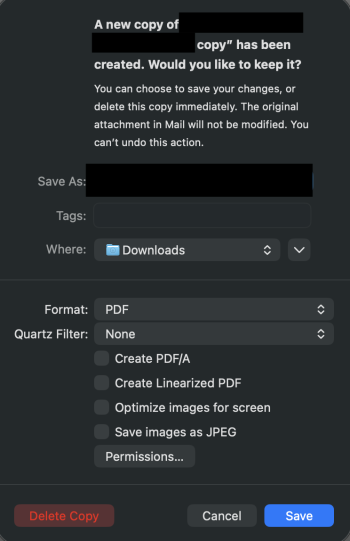
Since updating from 26.2 to 26.3, this option is no longer available. My only options are to Save the File, or Delete the copy. This adds an extra step while I'm also saving unnecessary files to my Mac.
Is there a Setting to turn that feature back on, or is it completely missing from 26.3? (Or is it still there and I just need to restart my computer, lol?)
The last couple of iterations of MacOs made this extremely easy with Mail/Preview. I could simply open the PDF from Mail (using Preview), add my signature in Preview, and then close the PDF document. Preview/Mail would then automatically ask me if I wanted to Save the File, Reply to the email with the signed PDF attached (without saving to my computer), or Delete this edited PDF copy. It was so easy!
Since updating from 26.2 to 26.3, this option is no longer available. My only options are to Save the File, or Delete the copy. This adds an extra step while I'm also saving unnecessary files to my Mac.
Is there a Setting to turn that feature back on, or is it completely missing from 26.3? (Or is it still there and I just need to restart my computer, lol?)