
Become a MacRumors Supporter for $50/year with no ads, ability to filter front page stories, and private forums.

dumiku

macrumors 6502
Original poster
I remember a couple years or less than 2 years ago, I was randomizing my wallpaper and the same wallpaper was always showing on each virtual desktop.
However I recently tried to do the same thing but nothing, each time it is a different wallpaper from the folder in each desktop.

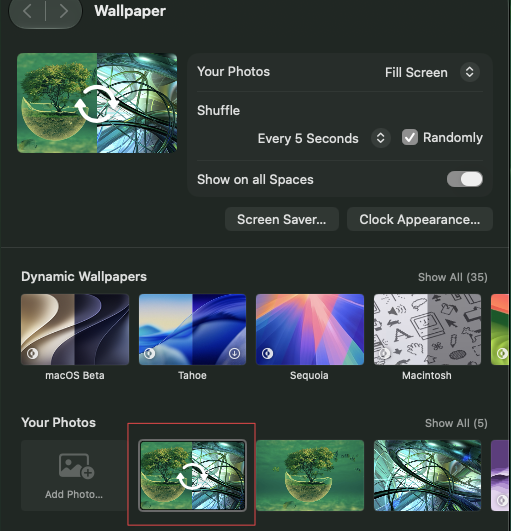
I do not know if it is new but, today I tried to change my wallpaper and saw this
1782388996207.png


I may have never noticed it but, it works as expected and show the same wallpaper across virtual desktop which is not the case for this part
1782389445073.png


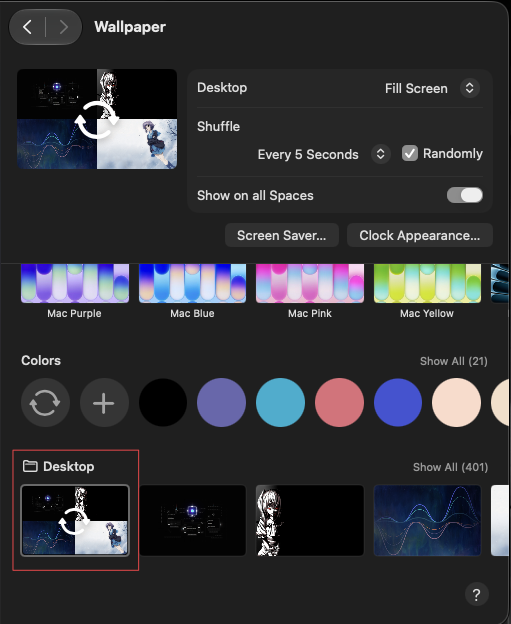
I used the add Photo above and selected a whole folder, it will be very inefficient for I to select all photos one by one so they can appears in Your Phones instead of down here.

Any advice, I do not want to use a dedicated app as I have 401 curated wallpapers that I downloaded all over the net.
 
It's kind of hard to follow your post or what you're trying to point out with your screenshots, but I am assuming you want multiple spaces shuffling through the same set of wallpapers but with different photos on each?

For me, I typically use different sets of photos for each space, but I did test by adding a few more spaces (which inherit the same wallpaper settings as the first space) and they all were shuffled differently.

This is what my wallpaper settings look like for the first space:
Screenshot 2026-06-25 at 9.28.24 AM.png


I have a folder called "1.shuffle" which contains all the photos I want it to shuffle through. I dragged and dropped it into the box on the left and set it to shuffle randomly. I never touch any of the other settings on the rest of that page.
 
  • Like
Reactions: dumiku
I am assuming you want multiple spaces shuffling through the same set of wallpapers but with different photos on each
Actually I want the opposite of this, same photo on each.
It's kind of hard to follow your post or what you're trying to point out with your screenshots
There typically two way to randomize your wallpaper

1- Right below the Dynamic Wallpapers list (screenshot 1)
- This works as I want but I have to add the photos one by one

2- Just below the Colors background (screenshot 2)
- here is the list of my photos inside a folder called Desktop, the reason it exists here it because I added a whole folder of photos and they are not showing in the list of photos in screenshot 1.
- selecting all photos here as shown in screenshot 2 will apply a different photo on each space.
I have a folder called "1.shuffle" which contains all the photos I want it to shuffle through. I dragged and dropped it into the box on the left and set it to shuffle randomly. I never touch any of the other settings on the rest of that page.
This is exactly what I am trying to describe in screenshot 2, I do not want that.

In screenshot 1, under Your Photos, if you select the random box, the wallpaper will be the same for all spaces
 
1- Already had a look at this, does not answer my question, I am more concern about why selecting the random box under Your Photos show the same wallpaper in all spaces.

2- And doing this "You can also drag an image from your desktop or a folder onto the thumbnail at the top of Wallpaper settings." show a different wallpaper on each space. (this is the behavior I confused about)

It was driving me nuts that I could not get 1 to work when I used to use it and then I tried it again yesterday.
 
Register on MacRumors! This sidebar will go away, and you'll see fewer ads.