Become a MacRumors Supporter for $50/year with no ads, ability to filter front page stories, and private forums.
Im not an owner but I have a question for owners: Is it possible to run an Apple Studio Display on a Windows 11 Pc? Or is it really only working well with a Mac and for Windows its best to avoid it?
I am using an ASD for ~3 years with a Windows 11 PC (via a Nvidia RTX 4090 card). Today the ASD is only my secondary display because the Kuycon G32P is the primary one.
 
  • Like
Reactions: TwinCitiesJHawk
Hey everyone, I purchased a used Studio Display that has some marks/discoloration on the bottom of the aluminum frame. Anyone know what this could be and what might get it out? The rest of the display is in great condition, so not a huge deal.

View attachment 2591296
Looks to me like someone splashed orange juice on the display! Ask me how I know…
 
Hey everyone, I purchased a used Studio Display that has some marks/discoloration on the bottom of the aluminum frame. Anyone know what this could be and what might get it out? The rest of the display is in great condition, so not a huge deal.

View attachment 2591296

For me, it's dust trapped in the small holes.
Every now and then I run a small brush over the grilles and every time a little dust comes out.
 
Last edited:
I’m trying to decide between buying a used Studio Display and a new Kuycon G32P or Tcolor L32660 (both 6K) monitor. If I could get a used Studio Display for $1200-1300, compared to $1800 for the Kuycon and $1000 for the Tcolor, would that be a deal worth taking?
 
I’m trying to decide between buying a used Studio Display and a new Kuycon G32P or Tcolor L32660 (both 6K) monitor. If I could get a used Studio Display for $1200-1300, compared to $1800 for the Kuycon and $1000 for the Tcolor, would that be a deal worth taking?
Before making a decision based on the price you should first decide between 27'' or 32'' imo, that's very different
 
  • Like
Reactions: Dark-Signature
Before making a decision based on the price you should first decide between 27'' or 32'' imo, that's very different
Strangely enough monitor size is not the most important factor in my case. I have the room for and will definitely work well with both 27-inch and 32-inch monitors, but the Pro Display XDR is out of my price range and I don’t think buying a brand new Studio Display for $1900 (non US) is worth it with a new model dropping any time.

So, what matters the most is value for money, whether that means an Apple branded 5K-display for $1200-1300 or some other branded 6K-display for $1000-1800, and I understand everyone might have different answers which is why I wanted your advice.
 
Slight oxidation/tarnishing of the aluminum: Aluminum can tarnish slightly in small areas, especially if moisture or skin oils come into contact with it.

But since it's only visible on the bottom, I wouldn't worry about it at all if the monitor is otherwise in very good condition. How much did you pay for it?

Paid $1,200, which in my area is pretty reasonable.
 
If we (all) would agree to use the year of the device as an extension for the name of the device we are talking about, this would simplify question and answers.

For example Studio Display 2022 or Studio Display XDR 2026.

Just a thought because with the new devices now available the confusion will get worse.
 
Also eBay sellers who hide serials or model codes so no idea if m2 or m5 Vision Pro. Weird how Apple doesn’t make better model names to distinguish
 
So the buzzing was in Studio Display gen 1 or the Studio Display xdr gen 1 which is the xdr Pro Display ?
The Studio Display 2022 has poor RF shielding. The Studio Display 2026 is seemingly unchanged outside of the new camera, but who knows. The Studio Display XDR 2026 has different internals and potentially better RF shielding less prone to electrical interference in homes with electricity issues. SO has anyone tested that yet?
 
My Studio Display'26 just delivered, using it for the last 3 hours and I have found it fantastic!

Nano Texture coating is a breeze. Makes the colors look like velvet smooth. Somehow, things seem to be smoother and crispier than the MacBook Pro-M3 Pro Display. Technically, it should have been the other way around. I guess?

Speakers are way better than I've expected.

A bit expensive? Yes. I've been yearning for an Apple Display for awhile, worth it. For my subjective taste obviously.
 
Is there any way to set Preview to work in sRGB instead of P3? It started doing P3 when I got the Studio Display Wednesday. Using P3 is causing some issues in Firefox, Signal and probably elsewhere.
 
I am using an ASD for ~3 years with a Windows 11 PC (via a Nvidia RTX 4090 card). Today the ASD is only my secondary display because the Kuycon G32P is the primary one.
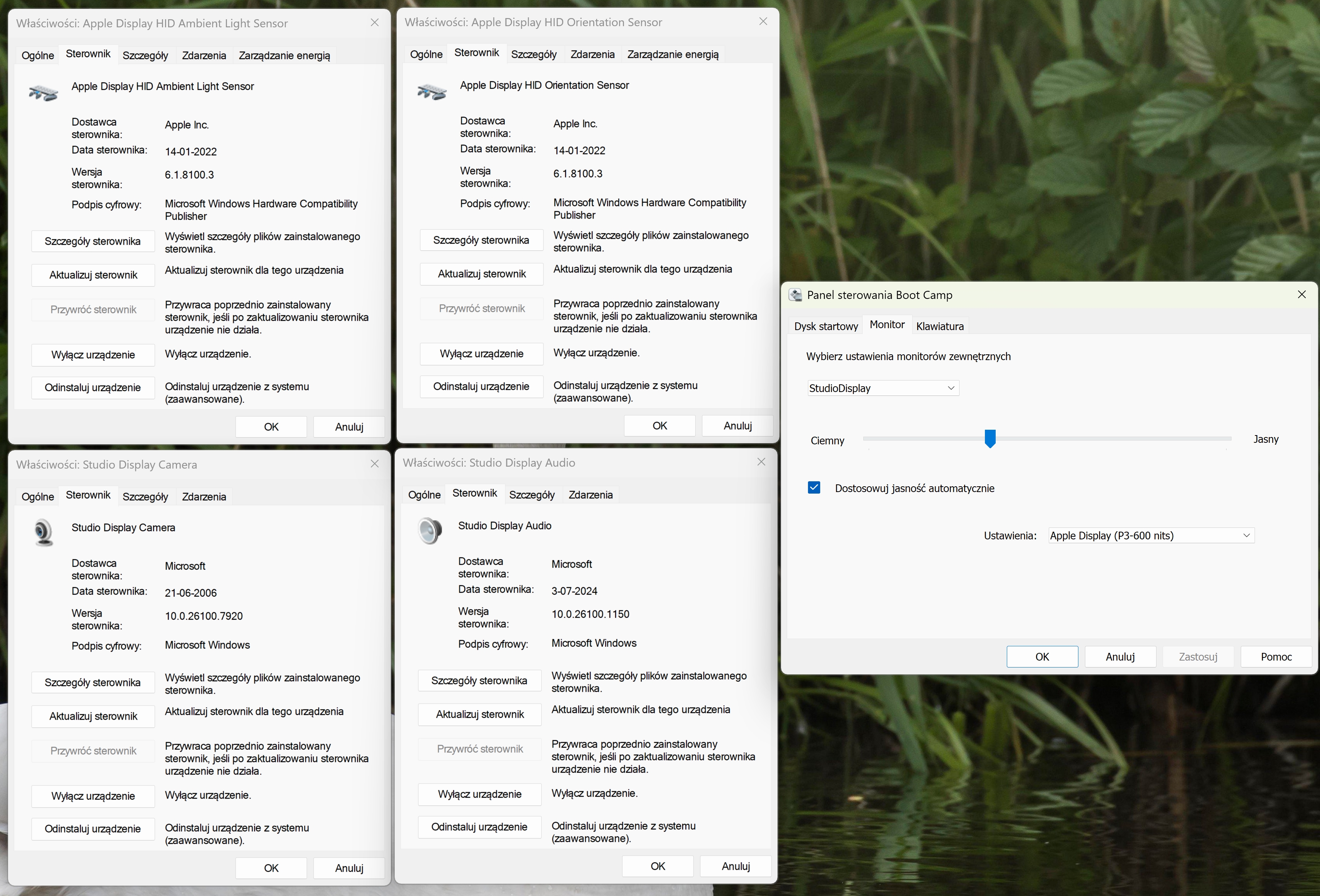
Make sure to use Apple keyboard on side to control brightness + all BootCamp drivers installed so automatic brightness also work.
 
Can you test Studio Display 26 under BootCamp? Maybe it uses the same drivers as the old one. That would be great.

I wouldn't even know where to start, I'm afraid. The only place I use Windows is in Parallels on my mid-2009 MacBook Pro, for calibrating my projector.
 
No, no Paralleles. Native Windows installed either via Rufus modified USB stick or BootCamp assistant.

I use my 1st gen Studio Display mostly under Windows 11 and love it.

Here are the drivers you need:
f89b8197-d1f7-4574-8129-ba0a976d2ba2
9e72b3fa8db9b.jpg


Some guys already showing it works on a PC, but need more info about drivers.
 

Attachments

  • 18WGrQC.jpeg
    18WGrQC.jpeg
    192.5 KB · Views: 54
Last edited:
  • Like
Reactions: Dark-Signature
Register on MacRumors! This sidebar will go away, and you'll see fewer ads.