
Got a tip for us?
Let us know
Become a MacRumors Supporter for $50/year with no ads, ability to filter front page stories, and private forums.
Apple Testing Two New iOS 27 Home Screen Customization Options
- Thread starter MacRumors
- Start date
- Sort by reaction score
You are using an out of date browser. It may not display this or other websites correctly.
You should upgrade or use an alternative browser.
You should upgrade or use an alternative browser.


tomtad
macrumors 68040
The whole Home Screen needs a rethink. I should be able to easily create pages for different things, say Work, Music, Fitness, and these pages should vertically scroll so I can throw as many apps, shortcuts and widgets as I want.

Nice trick!Just make a page for it, an exact copy, and hide it. If something happens, you still have it. Just long press and make it visible. Viola.

DocMultimedia
macrumors 68030
They used to let you do this in iTunes years ago. As they continued to update iOS and MacOS it faded away. I think it was when they started allowing folders in iOS.Why haven’t they added a program to macOS to allow us to create the home screens there and then transfer them to the devices? I want to try out different things but hate doing it on my iOS device.
The more features they add, the more creativity gets taken away from users. At least it seems that way.


adrianlondon
macrumors 604
Apple have spent the last few months unable to fix a bug on the Today View screen which means you can’t drag widgets to make a stack.
And the Control Center customisation is a joke.
Let’s see if they’re actually serious or capable of fixing their UI mess.
“Standby Mode” is another case in point. Awful design and can’t be customised unless phone is connected to power and landscape. And then it asks you to unlock, and fails.
And the Control Center customisation is a joke.
Let’s see if they’re actually serious or capable of fixing their UI mess.
“Standby Mode” is another case in point. Awful design and can’t be customised unless phone is connected to power and landscape. And then it asks you to unlock, and fails.

maxoakland
macrumors 68000
This article contradicts itself by saying it’s going to be like Snow Leopard while mentioning new features and apps Apple is including
And this is kind of the issue with Apple: poor management on the software side. They can’t focus. They don’t have the management ability to say “we’re really only focusing on fixing all the bugs glitches and technical debt” and it shows
And this is kind of the issue with Apple: poor management on the software side. They can’t focus. They don’t have the management ability to say “we’re really only focusing on fixing all the bugs glitches and technical debt” and it shows
maxoakland
macrumors 68000
That sounds like a nightmare. They’d be moving around, hard to findHow about an option for reordering your apps in order from most-used to least used beginning the Home Screen?...
maxoakland
macrumors 68000
Yes I hate the way they implemented being able to put apps anywhere (good) but tried to keep some of the old behavior (shuffling everything to top left)This. I had a photo of my daughter as a wallpaper and made a gap to see her face. Anytime I downloaded an up or moved one to the Home Screen it would jump to that space. Deleting or moving it all apps below would shuffle up. Drove me insane.
It was an awkward compromise that makes customizing the home screen more complicated and less reliable than it should be

usmaak
macrumors 65816
I appreciated the ability to arrange my screens however I want. It was one of the only things that I missed about Android, when I moved to the iPhone. It's too bad that their implementation isn't so good. There are a couple of issues that make it kind of useless.
- When I drag icons to arrange them, all of the other icons/widgets on the screen shift around and sometimes move between screens. It makes it difficult to arrange things just right. The best way to get a screen just right is to build it from scratch and plan out how you'll move things around.
- No matter what I do, I can't get my icons to stay put. If I have a widget in the middle of the screen, an icon on the far left and an icon on the far right, the far right icon will eventually move to between the widget and the left icon. I can put it back and it will stick for a while, but then it moves back again. It would be nice to have a way to freeze the screen so that no changes can be made to it until it is unfrozen.

Nightflyer720
macrumors member
While this may be useful for some, I think a far more pressing issue to address is why deleting a single icon from the Home Screen can throw nearby icons out of whack. Allowing icons we've deliberately arranged to be bounced out of their set positions is appallingly anti-user, and it can make moving them - as well as widgets and shortcuts - an infuriating experience.
Also baffling is the inability to show text labels beneath large Home Screen icons - especially when there's a completely unnecessary strip of wasted space above the dock. Whatever rationale motivates Apple to make these thoughtless, punitive UI choices is a mystery wrapped in an enigma.
Also baffling is the inability to show text labels beneath large Home Screen icons - especially when there's a completely unnecessary strip of wasted space above the dock. Whatever rationale motivates Apple to make these thoughtless, punitive UI choices is a mystery wrapped in an enigma.
Well, yeah they would move around based on most recent use, thereby collecting the most used ones at the front... and also, it would be an OPTION.That sounds like a nightmare. They’d be moving around, hard to find
Even if it were a 'one time sort' with the user able to lock the order and then fine tweak over time. e.g. move one app up to a different spot/easier to reach location etc.
Static Option
A static option would be like the current Home Screen Reset option in the Settings. The user could select 'Reset to most Frequently used' and then bam, all the icons sorted from most to least used with no regular changes.
Dynamic Option
At set intervals, the home screen changed to reflect the users current most used apps. This might change due to school term, going on holidays, a particular project requiring certain apps etc.
Regardless, the 'option' to customise would be the preference. Therefore, users could decide if they wanted to use their iPhone/iPad that way.
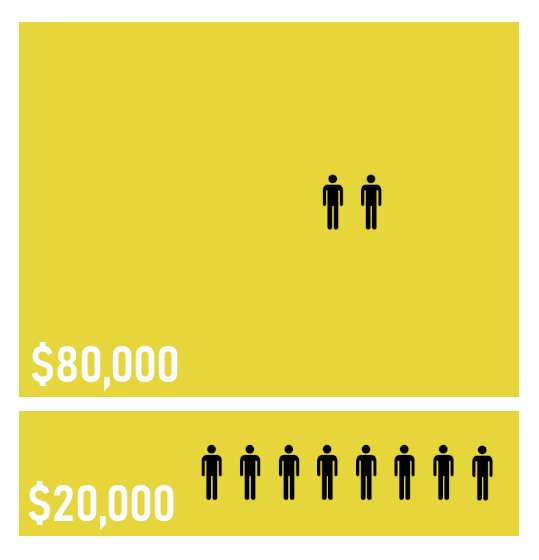
Background reading - Pareto Law: "also known as the 80:20 rule, the law of the vital few and the principle of factor sparsity states that, for many outcomes, roughly 80% of consequences come from 20% of causes (the "vital few")".
So what -> you would most likely find that for the number of apps on your phone, x, y, and z apps do most of the heavy lifting. Therefore, the front page of 24 apps (less any for widgets) would very likely not change at all.
Static Option
A static option would be like the current Home Screen Reset option in the Settings. The user could select 'Reset to most Frequently used' and then bam, all the icons sorted from most to least used with no regular changes.
Dynamic Option
At set intervals, the home screen changed to reflect the users current most used apps. This might change due to school term, going on holidays, a particular project requiring certain apps etc.
Regardless, the 'option' to customise would be the preference. Therefore, users could decide if they wanted to use their iPhone/iPad that way.
Background reading - Pareto Law: "also known as the 80:20 rule, the law of the vital few and the principle of factor sparsity states that, for many outcomes, roughly 80% of consequences come from 20% of causes (the "vital few")".
So what -> you would most likely find that for the number of apps on your phone, x, y, and z apps do most of the heavy lifting. Therefore, the front page of 24 apps (less any for widgets) would very likely not change at all.