

Become a MacRumors Supporter for $50/year with no ads, ability to filter front page stories, and private forums.

MacRumors

macrumors bot
Original poster


Popular Mac menu bar management app Bartender received an upgrade today with the launch of Bartender Pro. Bartender Pro adds a new Top Shelf feature to the Mac's notch, with access to multiple utility tools.

bartender-pro.jpg

Top Shelf can be used for clipboard access, storing files, controlling audio, and sending content over AirDrop. It supports widgets for calendar, weather, and music apps like Apple Music or Spotify. There's a full Now Playing music controller, and options to get alerts when scheduled events are coming up.
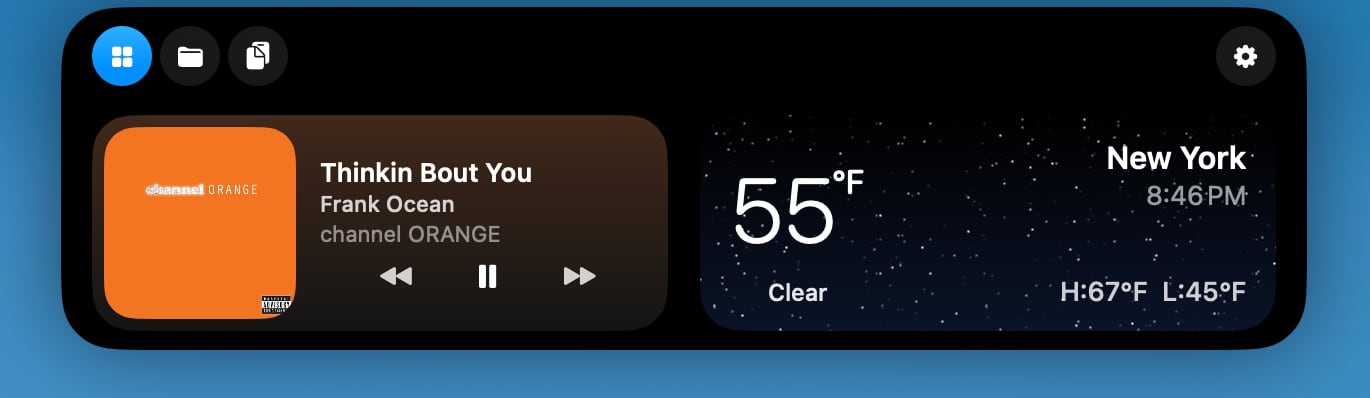
bartender-pro-widgets.jpg

Top Shelf expands the size of the notch, turning it into something like the iPhone's Dynamic Island. Users can drag files over to the notch to store them or send them via AirDrop, and access a clipboard. The clipboard can be set to automatically capture content that's copied, with options to ignore passwords. There are customizable duration options for both the clipboard and file storage.
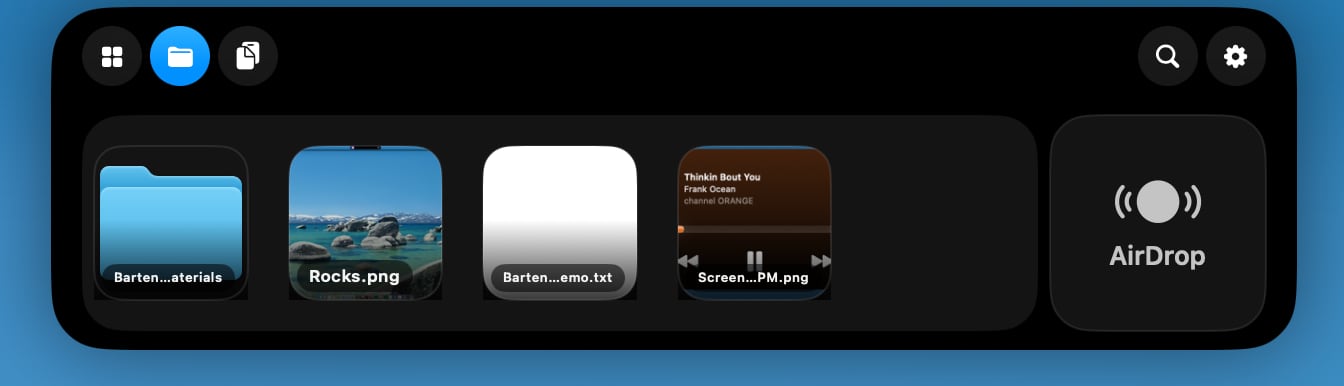
bartender-pro-files.jpg

Widgets in Top Shelf are customizable, and it supports a Live Activity-like tracking feature for AI agents like Codex and Claude Code. Info like volume, display brightness, and battery level is also available.

Top Shelf works alongside Bartender, and all of the standard Bartender features are available with Bartender Pro. When not in use, Top Shelf is tucked away much like Bartender, and it disappears when Bartender is expanded. While it is a tool designed around the notch, it also works on Macs that don't have one.

bartender-pro-idle-scaled.jpg

Bartender Pro is optional, and users who don't need the extra features can stick with Bartender 6.

Bartender Pro is priced at $15 per year. The subscription includes Bartender 6, all future upgrades for the subscription duration, and the Bartender Pro suite.

Bartender 6 is still available for a one-time $20 purchase, and the $80 Mega Supporter option continues to offer lifetime Bartender access with Bartender Pro included. Bartender Pro and Bartender 6 are available from the Bartender website.

Article Link: Bartender Pro Brings Widgets, Clipboard, and File Storage to the MacBook Notch
 
  • Haha
Reactions: Z-4195
I used to love Bartender, but since the ownership switch (and maybe also due to macOS 26), it's been so buggy that I no longer use it.
It didn't take bugs for me to nuke Bartender from my Macs. The permissions required by Bartender to function (accessibility and screen recording) are extremely sensitive due to the implications should an application wind up abusing them. Those permissions should be limited to highly trusted developers, and ideally the product is open-source to keep the developer honest. The way the acquisition was (mis)handled was plenty for me to switch to an alternative PDQ.

No mention of Bartender’s shady ownership switcheroo? Really?
MacRumors descends further into clickbait/sponcon slop with each passing month. If I felt like reading a reheated press release (which I don't), I'd just go to the source. Not that MacRumors was ever a bastion of great reporting, but still disappointing.
 
Notchnook does all of this for way cheaper, and they’re still iterating on their product.

I looked at Notchbook and it doesn’t seem to mimic what Bartender does in the menubar. I can’t see where it allows adding menu items and creating a second hidden menu you can bring up for rarely used menu bar items.


Popular Mac menu bar management app Bartender received an upgrade today with the launch of Bartender Pro. Bartender Pro adds a new Top Shelf feature to the Mac's notch, with access to multiple utility tools.

bartender-pro.jpg

Top Shelf can be used for clipboard access, storing files, controlling audio, and sending content over AirDrop. It supports widgets for calendar, weather, and music apps like Apple Music or Spotify. There's a full Now Playing music controller, and options to get alerts when scheduled events are coming up.

bartender-pro-widgets.jpg

Top Shelf expands the size of the notch, turning it into something like the iPhone's Dynamic Island. Users can drag files over to the notch to store them or send them via AirDrop, and access a clipboard. The clipboard can be set to automatically capture content that's copied, with options to ignore passwords. There are customizable duration options for both the clipboard and file storage.

bartender-pro-files.jpg

Widgets in Top Shelf are customizable, and it supports a Live Activity-like tracking feature for AI agents like Codex and Claude Code. Info like volume, display brightness, and battery level is also available.

Top Shelf works alongside Bartender, and all of the standard Bartender features are available with Bartender Pro. When not in use, Top Shelf is tucked away much like Bartender, and it disappears when Bartender is expanded. While it is a tool designed around the notch, it also works on Macs that don't have one.

bartender-pro-idle-scaled.jpg

Bartender Pro is optional, and users who don't need the extra features can stick with Bartender 6.

Bartender Pro is priced at $15 per year. The subscription includes Bartender 6, all future upgrades for the subscription duration, and the Bartender Pro suite.

Bartender 6 is still available for a one-time $20 purchase, and the $80 Mega Supporter option continues to offer lifetime Bartender access with Bartender Pro included. Bartender Pro and Bartender 6 are available from the Bartender website.

Article Link: Bartender Pro Brings Widgets, Clipboard, and File Storage to the MacBook Notch
That music widget reminds me… remember like 4 WWDCs ago when apple showed off a native Apple Music widget on Mac similar to iPad? Yeah , it’s still missing to this day. Cmon apple.
 
  • Like
Reactions: DaneLA
Though not going to buy it, it is good to see that there is still a one time option to purchase it. Don't like subscriptions.
 
  • Like
Reactions: mganu
Exactly! I switched because of this. To " HiddenBar" work great. Why Mac doesn't just offer this anyway is strange. But glad you posted the source it was sad to see it change hands.
You're expecting macOS to actually have features customers want? 😄 Apple most of the time does what it wants, even though there's been features customers have been wanting for decades -- like text message archiving.
 
Because its been 2 years, old/new owners offered a logical explanation and everything has been fine since then?
Seriously, articles don’t need a list detailing every wrong, real or perceived, made by a company. Otherwise we’d have mention of factory suicide nets on every Apple story. It takes little time for someone to research an app before they spend $15 on it.
 
You're expecting macOS to actually have features customers want? 😄 Apple most of the time does what it wants, even though there's been features customers have been wanting for decades -- like text message archiving.
I bet you’re the same person who will then complain when Apple “Sherlock’s” someone?
 
  • Like
Reactions: SBlue1
The last application to ever bricking my macos. Insanity. I left it a little late, but i left it for good, it was making my M1 Pro when not on power to run like ****. I moved to open source Ice, superb and lightweight, does what it says and needs.
 
Register on MacRumors! This sidebar will go away, and you'll see fewer ads.