Become a MacRumors Supporter for $50/year with no ads, ability to filter front page stories, and private forums.

MacRumors

macrumors bot
Original poster


153840-eyetv-1.jpg
153840-eyetv-2.jpg


Elgato Systems, the maker of TV software and tuners for the Mac, has announced that its EyeTV app is now available in the App Store. The app is made to work in conjunction with a Mac running the EyeTV software and its features are as follows:

- Watch live TV and change channels anywhere (Wi-Fi connection required)
- Watch your EyeTV recordings
- Browse the comprehensive Program Guide
- Start recordings back home on your Mac immediately or schedule them for later.
- View and edit your recording schedules


153840-eyetv-3.jpg
153840-eyetv-4.jpg


The companion Mac used with the app must be running the EyeTV software, version 3.2 - which was just released today - or higher and it must have a compatible TV tuner connected to it. In order to view streaming live TV on an iPhone with the EyeTV app, the companion Mac must have an Intel Core 2 Duo processor or better.

The EyeTV app costs $4.99 and can be found in the App Store here (link opens iTunes).

Article Link: EyeTV App Debuts in App Store
 
I like it so far - looks very slick and Live TV streaming is just great via home network.

the 'back to my EyeTV' service wouldn't work behind my router - haven't had time to manually set port forwarding up yet so I can't test it out while away from home.

Hope the App gets remote controll for EyeTV
 
I was surprised that Elgato is charging for this because I thought it would be a simple remote changing App, but live tv on my phone? Amazing. I'm getting it right now.
 
but live tv on my phone? Amazing. I'm getting it right now.

But that's only over your home wifi network, no?

So does this mean I can be at work and use my iPhone to schedule to record a programme that my sleeping mac will then wake-up and record?
 
question...

If I'm on a wifi network outside of my house, does my Mac need to be turned on and not in sleep mode at home in order for this to work? Can the Elgato device be turned on while the computer is off? (I don't have one of these, but have been considering getting one).
 
Wonder if the home TV must be watching what the iPhone is seeing, or if dual tuners could come into play???

Sounds like a pretty cool app...
 
If I'm on a wifi network outside of my house, does my Mac need to be turned on and not in sleep mode at home in order for this to work? Can the Elgato device be turned on while the computer is off? (I don't have one of these, but have been considering getting one).

I'm not sure of details about how this stuff works (though I do have the Elgato USB device) yet. But doubt this works if the Mac is off because the USB device requires a running OS for it to read data off the TV connection and process it.

I can say for sure the Elgato stuff is solid on my MBP and works well. Looking forward to seeing it serving as a proxy for my iPhone.
 
Not working for me - I'm getting "Router incompatible" even though Elgato says the Apple Airport Express is fine.

"Ensure NAT-PMP and UPnP are activated." Didn't realise I'd need an IT degree...
 
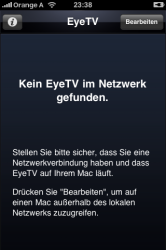
It does not work here. EyeTV 3.2 running on my MBP, iPhone access enabled in settings, WiFi okay, but I am only getting this message ("cannot find EyeTV in network") like in the screenshot. Rebooted iPhone twice: NADA.

Edit: Problem solved. Look here.
 

Attachments

  • IMG_1888.PNG
    IMG_1888.PNG
    55.1 KB · Views: 188
I've never owned a slingbox, and remote viewing is a cool feature I'll use only occasionally, but I've been VERY happy with my EyeTV Hybrid and EyeTV 2 and 3 software. I'll be buying this app for sure--I'm just waiting to let the early adopters be the guinea pigs for Eye TV 3.2 🙂
 
It does not work here. EyeTV 3.2 running on my MBP, iPhone access enabled in settings, WiFi okay, but I am only getting this message ("cannot find EyeTV in network") like in the screenshot. Rebooted iPhone twice: NADA.

Restart your mac.
 
Am I missing something or is this pretty useless for DirecTV customers? Don't get me wrong, I am sure this app is awesome. But I don't see how I would change channels via my iPhone since everything is through a box. Is there a workaround? I'd like the ability to use this, but without channel swapping abilities I'm afraid it's useless for satellite and cable box customers.
 
Works great here too. I'm currently streaming across AT&T's 3G network (eat that, AT&T).

I love El Gato. 🙂
 
Register on MacRumors! This sidebar will go away, and you'll see fewer ads.