Become a MacRumors Supporter for $50/year with no ads, ability to filter front page stories, and private forums.
Anyone figure this out?

Not working for me - I'm getting "Router incompatible" even though Elgato says the Apple Airport Express is fine.

"Ensure NAT-PMP and UPnP are activated." Didn't realise I'd need an IT degree...

Or did I just spend $4.99 for an app I cannot use?

Cannot believe that this will not work because I have an Airport Extreme Wireless base.
 
Am I missing something or is this pretty useless for DirecTV customers? Don't get me wrong, I am sure this app is awesome. But I don't see how I would change channels via my iPhone since everything is through a box. Is there a workaround? I'd like the ability to use this, but without channel swapping abilities I'm afraid it's useless for satellite and cable box customers.

Well, yes, I guess it would have to be since the eyetv hardware (which is required for this app btw) can only hook up a coaxial cable to a mac, and not a cable box to a mac. But they have their own interface for channel guides and DVR-ing and whatnot, so I don't really miss it myself. The only thing I really would miss might be channels on demand (we have comcast, not sure what directv calls them!) but I just use hulu for that type of content.

But yeah, just so you know (in case you didn't!) this isn't an app that can go with any setup or cable box..from what i can tell, it's just for use with their hardware, which doesn't support cable boxes. :eek:
 
Home network worked 'out of the box'

Seems I now have the 'back to my EyeTV' setup correctly too with a bit of port-forwarding on my router. Will test fully tomorrow.

Combined with Sleepover this is awesome. I can wake over LAN/Internet and then use EyeTV App to do as I will. Brilliant:D
 
Sweet! Does 3g unrestrictor work for this too??

Don't know what that is (going to assume it's a jailbroken app), but the EyeTV app works officially in both 3G and Wi-fi environments.

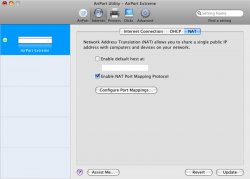
And for all the newbies that can't turn on NAT-PMP, a screen shot is attached. It's exactly the same for AirPort Express too. If you don't have an Apple router, turn on UPNP in your router's settings (it's probably turned on by default). This is the same technology that requires "Back to My Mac" to work.
 

Attachments

  • NAT 3232.jpg
    NAT 3232.jpg
    154.6 KB · Views: 154
Airport Extreme Router

Anyone had any luck getting this to work with an Airport Extreme Base
 
not running connect360, but just got it to work.

Did a full shutdown and restart and now seems to be working. I feel quite foolish for not having tried that before posting.
 
Am I missing something or is this pretty useless for DirecTV customers? Don't get me wrong, I am sure this app is awesome. But I don't see how I would change channels via my iPhone since everything is through a box. Is there a workaround? I'd like the ability to use this, but without channel swapping abilities I'm afraid it's useless for satellite and cable box customers.

The whole encoded channel DirectTV/cable box issue is actually pretty easy to solve, you just need to buy an extra item. The ZephIR software/hardware will let you easily change any set top box and is officially endorsed by Elgato. I actually use the EyeTV software with the Hauppauge HD capture box and ZephIR to control the cable box.
 
ExeTV vs Slingplayer

To watch Tv on the iPhone the Mac must be turned on?
So if I go at the office or somewhere else, to watch Tv on my iPhone my MAC at home must be turned on? I don`t think this is a good think! And if I am at home why I have to watch on the small iPhone screen (maybe when going to the toilet, but i cannot think some other home using) instead of a Tv or on my Mac?
I am using Slingplayer right now and the Mac and also the TV set are not required to be on!
 
To watch Tv on the iPhone the Mac must be turned on?
So if I go at the office or somewhere else, to watch Tv on my iPhone my MAC at home must be turned on? I don`t think this is a good think! And if I am at home why I have to watch on the small iPhone screen (maybe when going to the toilet, but i cannot think some other home using) instead of a Tv or on my Mac?
I am using Slingplayer right now and the Mac and also the TV set are not required to be on!

I have the same idea with you. Great! Thanks for sharing. :cool:
Glad to hear you're using this: I plan to keep it much more aggressively up-to-date than has been the case in the past, but don't hesitate to let me know if you find errors or need clarifications.
 
To watch Tv on the iPhone the Mac must be turned on?
So if I go at the office or somewhere else, to watch Tv on my iPhone my MAC at home must be turned on? I don`t think this is a good think! And if I am at home why I have to watch on the small iPhone screen (maybe when going to the toilet, but i cannot think some other home using) instead of a Tv or on my Mac?
I am using Slingplayer right now and the Mac and also the TV set are not required to be on!

There are a myriad of reasons. For instance, I live in a studio, and my girlfriend annoys me with her TV watchin' and her "favorite" shows seem to line up one after another. The problem is, I don't have nor want a TV in my space and use my machine. Solution? This. She watches her shows with headphones, I get work done.
 
I have a Linksys Wireless N router and I can't get it to work on mine. Anyone have clue what to do with a Linksys?
 
Don't know what that is (going to assume it's a jailbroken app), but the EyeTV app works officially in both 3G and Wi-fi environments.

Wait, you mean to say that they allowed an app that streams video content over 3g into the app store?! So that I could stream television stations to my iPhone when I'm not even connected to wifi? Seriously?!? I mean, wasn't that the whole problem with Sling? If that's the case then I'm really interested.

I myself have downloaded the app and have gotten video streaming to work on my home wifi network, but am having troubles "verifying my My Eyetv account" on my iPhone. And right now I'm wayyyy too tired to really deal with it. :p Anyone else having that issue??

Edit: And yes I know that they already have 3g video streaming (i.e., youtube) on the iPhone, but what I meant was...other similar apps have had issues in the past, so I'm just surprised that this got through so easily. Sorry, once again, I am *very* tired right now
 
I almost bought this and then realized I need a Core2Duo... I only have the CoreDuo. Oh well.

Slingbox it is!!!

Also, why would they enable you to watch Live TV from the iPhone but not from another computer? Seems dumb...
 
Wow.

Finally got it working and it looks great. Streaming HD (dunno if its 720 or 1080) over my AE network with only a small drop. Semlessly handles the resolutions switches (those who watch OTA HD know what I mean). Elgato raised the bar with this one. CPU usage is a little high with eyetv running as a BG process but if you have something like an Apple TV and run this nobody would know the difference.
 
I have the same idea with you. Great! Thanks for sharing. :cool:
Glad to hear you're using this: I plan to keep it much more aggressively up-to-date than has been the case in the past, but don't hesitate to let me know if you find errors or need clarifications.
Hi,
what kind of errors and clarifications? Also these are about the Slingplayer or the EyeTV? Are you French? I am Italian!
 
It's already possible (for free) to stream video content from the EyeTV over WiFi to the iPhone/iPod touch. All you needed to do is connect to the EyeTV server running on your Mac using Safari on the iPhone/iPod touch. However, you can't control the application remotely and you can't view live TV (only video that you had prerecorded) so the advantage to this new iPhone app is that it enables live TV viewing and control of the EyeTV application running on your Mac.

Now, if it really works over 3G without jailbreaking your iPhone then that would be something new.
 
Works perfectly

Just bought the app, within seconds, I could watch the tv on my iPhone. Using airport extreme, everything works out of the box, hassle free. Should have been perfect if iPhone Eyetv app can connect directly to HDHomeRun, no need to have the computer on all the time.

Edit: Required a reboot..
 
Okay, I just purchased the EyeTV app and it does allow you to stream pre-recorded video over the 3G connection. However, if you attempt to view live TV it says that requires a WiFi connection.

However, you can now record your own TV shows (or whatever) with the EyeTV hardware and view those same recordings with your iPhone over the 3G cellular network. On my first trial the image quality over 3G looks pretty bad, but it does play.

The quality over my local WiFi looks very good most of the time, but I did see some pauses and some random artifacts now and then. Also, the audio quality over WiFi seems a bit lacking, voices are okay but music sounds like you're under water (with significant and quite bad vibrato).
 
Register on MacRumors! This sidebar will go away, and you'll see fewer ads.