Moving away from silicon would be such a big change (industry wide, not just Apple) that it would rightfully get a very different name. Such a change (which I don't foresee) would be orders of magnitude bigger a change than going from Intel to ARM. I don't know it would be faster or not since I haven't been hearing realistic talk about non-silicon general use computers, but it sure would be way different.It's unfortunate that Apple went with the name "Apple silicon" since moving away from silicon as a material may be the next big leap. Silicon Valley would also need to be renamed. 🤣


Got a tip for us?
Let us know
Become a MacRumors Supporter for $50/year with no ads, ability to filter front page stories, and private forums.
Five Years of Apple Silicon: M1 to M5 Performance Comparison
- Thread starter MacRumors
- Start date
- Sort by reaction score
You are using an out of date browser. It may not display this or other websites correctly.
You should upgrade or use an alternative browser.
You should upgrade or use an alternative browser.

From Gemini, I didn't know this either.It's unfortunate that Apple went with the name "Apple silicon" since moving away from silicon as a material may be the next big leap. Silicon Valley would also need to be renamed. 🤣
Nanometer Node vs. Actual Distance
The "nanometer" rating of a process node no longer corresponds to any single physical dimension on the chip, such as the length of the gate or the distance between transistors.- In a 5nm or 3nm chip, the actual distance between critical circuit components (like the "metal pitch" or the "contacted poly pitch") is often in the tens of nanometers. For instance, the tightest metal pitch in a major 5nm process is around 28-30 nm, and in a 3nm process, it's approximately 22-24 nm.
- The "3nm" designation simply tells you that this technology is the successor to the 5nm technology, offering a generational jump in capability.
🚀 Comparison of 5nm vs. 3nm Technology
The transition from a 5nm node to a 3nm node provides three main benefits that are crucial for modern computing:| Feature | 5nm Chip Technology | 3nm Chip Technology (Newer) |
| Performance Gain | Base speed | 10-20% faster at the same power level |
| Power Efficiency | Standard power consumption | 25-45% lower power consumption at the same speed |
| Transistor Density | Lower density | Up to 1.7x higher density (more transistors in the same area) |
| Transistor Architecture | Primarily FinFET (Fin Field-Effect Transistor) | Often transitions to newer Gate-All-Around FET (GAAFET) or Nanosheet designs |

I am still on the M2 chip & M2 Max chips for my workloads everyday. I’ve got no complaints. Everything is buttery fluid. I am so scared to update to iPadOS 26 & macOS Tahoe because of performance hits.
Moving away from silicon would be such a big change (industry wide, not just Apple) that it would rightfully get a very different name. Such a change (which I don't foresee) would be orders of magnitude bigger a change than going from Intel to ARM. I don't know it would be faster or not since I haven't been hearing realistic talk about non-silicon general use computers, but it sure would be way different.
It's already happening. Graphene.
I heard they also use it in earbuds/headphones too? I forgot which one though.It's already happening. Graphene.

I still say it will be a good while before something like graphene replaces silicon. At best in the next several years it may show up more for specialized electronics that work in conjunction with silicon. And as I said, when it or something else does replace silicon it will be a WAY bigger change for Apple and everyone else than merely moving from Intel to their own silicon.It's already happening. Graphene.
My M1 Mac Mini (16GB, 1TB) is still going strong running macOS Tahoe and showing no obvious signs of slowing down or struggling that would push me towards considering an upgrade. It replaced a Core i5 mid 2011 Mac Mini so felt like a rocket ship by comparison when I got it.
I'm a M1 mini (16, 512) user and have been wondering if should update the OS to Tahoe. Is everything smooth? Just wanted to make sure.
No doubt there are some folks that actually need all the speed. But for the vast majority of folks there's a point where it simply becomes moot. If they could make me type faster, or think faster. But I'm usually the bottleneck.
Today marks the fifth anniversary of the Apple silicon chip that replaced Intel chips in Apple's Mac lineup. The first Apple silicon chip, the M1, was unveiled on November 10, 2020. The M1 debuted in the MacBook Air, Mac mini, and 13-inch MacBook Pro.
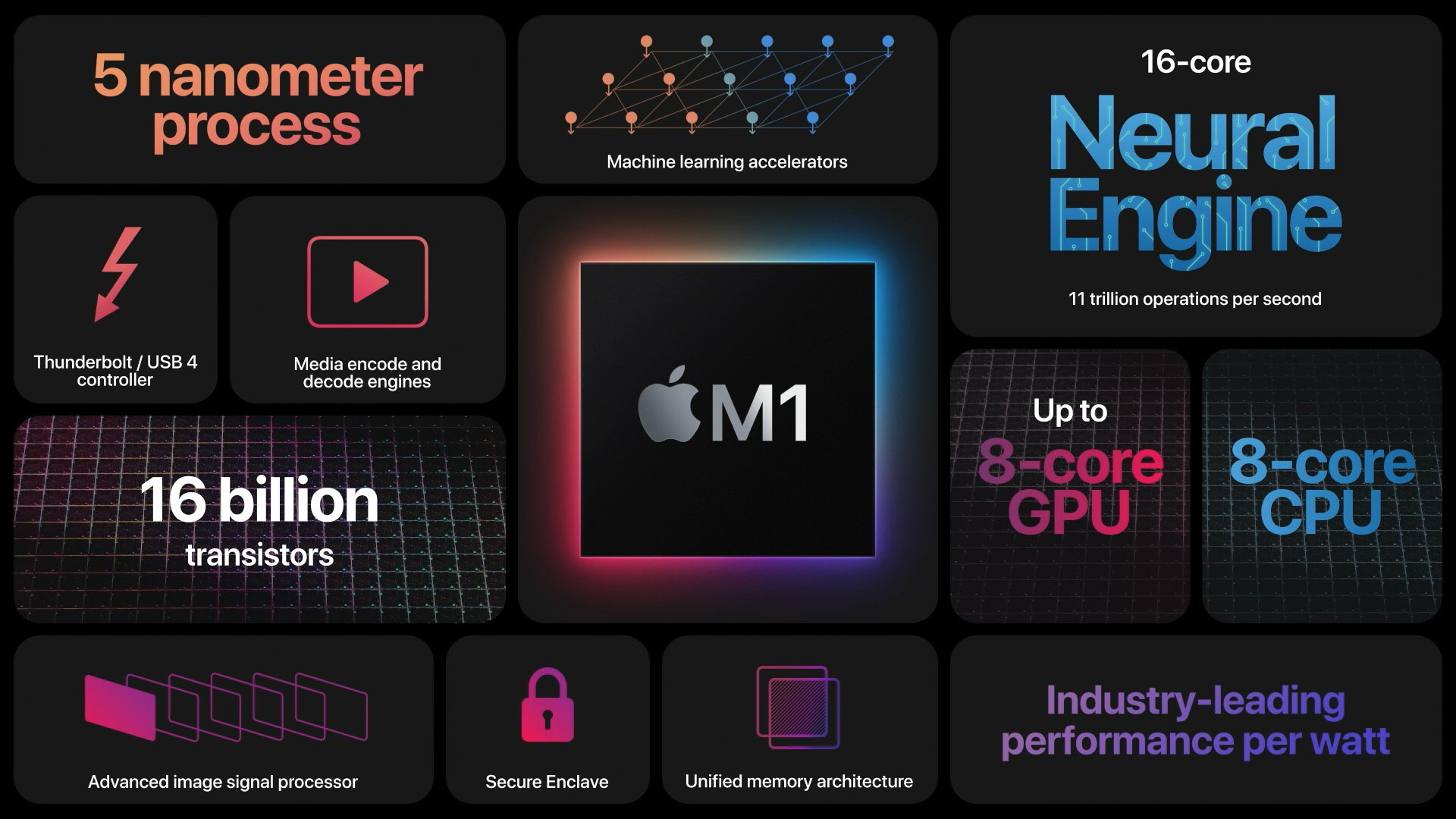
The M1 chip was impressive when it launched, featuring the "world's fastest CPU core" and industry-leading performance per watt, and it's only improved since then. We've had five total generations of Apple silicon chips, with the M5 unveiled in the 14-inch MacBook Pro just last month.
Here's how the M5 measures up to the M1, per Apple's M5 specs:
Geekbench comparison scores:
- 6x faster CPU/GPU performance
- 6x faster AI performance
- 7.7x faster AI video processing
- 6.8x faster 3D rendering
- 2.6x faster gaming performance
- 2.1x faster code compiling
Both CPU and GPU performance have increased significantly over the past five years, and Apple has boosted AI and gaming performance too with add-ons like hardware-accelerated ray tracing and an ever-improving Neural Engine.
- M1 single-core - 2,320
- M5 single-core - 4,263
- M1 multi-core - 8,175
- M5 multi-core - 17,862
- M1 Metal - 33,041
- M5 Metal - 75,637
M1 Chip M5 Chip Made with TSMC's 5nm process (N5) Made TSMC's third-generation 3nm process (N3P) Based on A14 Bionic Pro chip from iPhone 12 Based on A19 Pro chip from iPhone 17 Pro 8-core CPU, 8-core GPU 10-core CPU, 10-core GPU 3.2 GHz CPU clock speed 4.61 GHz CPU clock speed No integrated Neural Accelerators Integrated Neural Accelerator in every GPU core No ray tracing engine Third-generation ray tracing engine No dynamic caching Second-generation dynamic caching Support for up to 16GB unified memory Support for up to 32GB unified memory 68.25 GB/s unified memory bandwidth 153 GB/s unified memory bandwidth
Apple sold Apple silicon Macs alongside Intel Macs for three years, but phased out the final Intel Mac in June 2023 when the 2019 Mac Pro was discontinued. Now all of Apple's devices have Apple chips, and we're even hitting the end of the road for Intel Mac software support. Intel Macs won't get software updates after macOS Tahoe.
Over the next five years, Apple silicon chip technology will continue to evolve. Apple supplier TSMC is already working on 2nm chips that could make an appearance as soon as 2026, offering a 10 to 15 percent speed improvement and a 25 to 30 percent power reduction. 1.4nm chips could follow as soon as 2028 for even more power and efficiency.
Article Link: Five Years of Apple Silicon: M1 to M5 Performance Comparison

I suppose it depends on what you do but for me I barely notice I moved to Tahoe. The liquid glass stuff is way more subtle than the iPhone and in general things just run as they did.I'm a M1 mini (16, 512) user and have been wondering if should update the OS to Tahoe. Is everything smooth? Just wanted to make sure.
The keynote was so exciting. Had a fairly new MacBook Pro (intel) that I traded in that brought the M1 MBA down to $149. With that card 12 month thing, that made it $12.42 a month for 12 months. Was amazing. I remember the morning UPS dropped it off.
And like many of my other sentimental apple products, I wish I'd kept it.
Don’t you just love it when the courier passes you your new shiny gadget haha
No doubt there are some folks that actually need all the speed. But for the vast majority of folks there's a point where it simply becomes moot. If they could make me type faster, or think faster. But I'm usually the bottleneck.
Yes I could do with a ram upgrade in my brain to be honest 😂

Love my M1 MacBook Air and plan to keep it for another 5 years. I got almost 10 years out of my previous MacBooks so I don't expect anything less with this one.
The performance of Apple Silicon is very impressive, but it is not the reason I will be upgrading to new systems as a main driver, as the performance of the M1 Max is still very strong. I am looking for the following:
- Double the storage/ram for the same price (I know good luck...lol...)...and fast storage
- OLED in Macbook Pro
- Cellular in the MacBook lineup
- FaceID (what is taking so long!!!!)
- > 32" Studio Display or iMac with 120hz and at least mini-led
- Touchscreen (although not a need but it will be cool)
- Thinner 14" MBP (I actually wouldn't mind no HDMI for another Thunderbolt port but I know others would)
- If the new monitors require Thunderbolt 5 which they likely will, I will probably upgrade for that
- Wifi 7 and Bluetooth 6
- Would also love a new take on an ultraportable with an OLED screen ala the old 12" Macbook
* RAM and storage limits (some of which were my fault since I bought enough, but not enough of course) will get me to upgrade way before the performance of the M1/M2 lineup feels not performant enough.
That said, Apple Silicon has been AMAZING and the overall best thing for the Mac in a very long time.
- Double the storage/ram for the same price (I know good luck...lol...)...and fast storage
- OLED in Macbook Pro
- Cellular in the MacBook lineup
- FaceID (what is taking so long!!!!)
- > 32" Studio Display or iMac with 120hz and at least mini-led
- Touchscreen (although not a need but it will be cool)
- Thinner 14" MBP (I actually wouldn't mind no HDMI for another Thunderbolt port but I know others would)
- If the new monitors require Thunderbolt 5 which they likely will, I will probably upgrade for that
- Wifi 7 and Bluetooth 6
- Would also love a new take on an ultraportable with an OLED screen ala the old 12" Macbook
* RAM and storage limits (some of which were my fault since I bought enough, but not enough of course) will get me to upgrade way before the performance of the M1/M2 lineup feels not performant enough.
That said, Apple Silicon has been AMAZING and the overall best thing for the Mac in a very long time.
Last edited:

Intel Mac’s were fast, and so hot that you could cook an egg on the keyboard!Does anybody need faster than an Intel Mac?
My biggest Apple Silicon upgrade was when I went from M1 to M2 Max. Second greatest was connecting a 4K 120Hz display to the M2 Max -- now that made a difference for my work. My next planned Apple Silicon upgrade will be going "Retina PPI" on the M2 Max by switching to Apple's Studio Display next year, 27" 5K 120Hz. Voila, upgrade path charted.
Last edited:

I heard they also use it in earbuds/headphones too? I forgot which one though.
Yes for both, but it doesn't really do anything special there. It's primarily a coating for the driver diaphragm to make it more rigid.
It's still unbelievable how good these Macs have been and for how long they're lasting. My M1 Pro still handles almost anything thrown at it very well. Only reason I want to upgrade is to speed up some my video editing process and get a machine with more RAM and internal storage.
I'm still using my M1 MBA base with 16GB RAM daily. I've been stuck at 81% battery health for seemingly two years, but besides that, there's zero reason for me to upgrade for at least another 2-3 years.
This post feels like an Apple marketing stunt to prompt M1 owners to upgrade in the wake of Liquid Glass as a tactic to slow down older Apple Silicon with unnecessary ******** 3D effects.

It says the M5 is 6x improvement over the M1 CPU/GPU but the number show just a little over twice. Am i reading that wrong?
my mid-2010 MBP continues to function (yes I switched to opera with os10.13) it opens web pages, and I can write software (gcc compiler suite). I'll upgrade when/if I decide to do so. as for os software bloat - as long as hardware is
relatively cheaper than producing tight code bloatware will continue ( I think the trend started in the 80's when memory address limits increased sharply)
relatively cheaper than producing tight code bloatware will continue ( I think the trend started in the 80's when memory address limits increased sharply)
no, different metrics often give different results - the key is your application needs ( personally I've always been concerned with FLOPS comparison which I suspect in the 2.1 times faster metric)It says the M5 is 6x improvement over the M1 CPU/GPU but the number show just a little over twice. Am i reading that wrong?

Yeah the M1 MBA was an incredible little machine, still using that and an M1 iMac, though I do have an M2 pro mini for more demanding tasksThe (base) M1 MBA is amazing. The M5's numbers are impressive, but aside from "using" the CPU and GPU I don't do any of the other things listed. That's why I'm typing this from my (base) M1 MBA with no plans to upgrade. (I can wait till the MBA gets an OLED display. 🤤 )
Regarding OLED, I hope they always keep an option for LCD for those of us that like it better. I don’t need pure blacks on a laptop, and I’d rather have a screen that can’t burn in, since I don’t like to hide the menu bar or dock
This made me curious for some real world results. In this case compiling code since that's what I tend to do. Here's a result I found doing a search:no, different metrics often give different results - the key is your application needs ( personally I've always been concerned with FLOPS comparison which I suspect in the 2.1 times faster metric)
| Chip | Test/Workload | Time | Comparison Notes | Source |
| M4 Pro | Firefox codebase build (Xcode 16) | 10m 53s | 11% faster than M3 Pro, 33% faster than M1 Pro | |
| M3 Pro | Firefox codebase build (Xcode 16) | 12m 16s | 7% faster than M2 Pro, 24% faster than M1 Pro | |
| M2 Pro | Firefox codebase build (Xcode 16) | 13m 10s | 19% faster than M1 Pro | |
| M1 Pro | Firefox codebase build (Xcode 16) | 16m 16s | Baseline for Pro models | |
| M4 (Base) | Xcode Benchmark build | 141s | 45% faster than M1 base | |
| M1 (Base) | Xcode Benchmark build | 258s | Baseline for base models |
I suspect the differences between chips is much greater when doing graphics intensive things like video editing but clearly just incremental for compiling code.
Register on MacRumors! This sidebar will go away, and you'll see fewer ads.