
Got a tip for us?
Let us know
Become a MacRumors Supporter for $50/year with no ads, ability to filter front page stories, and private forums.
Great new mail notifications. THNX MacRumors!
- Thread starter m4v3r1ck
- Start date
- Sort by reaction score
You are using an out of date browser. It may not display this or other websites correctly.
You should upgrade or use an alternative browser.
You should upgrade or use an alternative browser.


Apple_Robert
Contributor
Where can I find the quote notification add-on that you use here? I would like to use it where I admin. Can someone please pm me the information?

maflynn
macrumors Broadwell
Where can I find the quote notification add-on that you use here? I would like to use it where I admin. Can someone please pm me the information?
Submit a contact us link and an admin will reach out to discuss this with you.
Apple_Robert
Contributor


They suck to read on a mobile device.
They should be better now on mobile.
arn
maflynn
macrumors Broadwell
Thank you.
Don't thank me, thank arn and the admins - I'm just a lowly moderator 🙂

Scepticalscribe
macrumors Haswell
They actually do look rather attractive; more to the point, they are clear and legible, which is an even bigger bonus. Well done, and thanks.

Donka
macrumors 68030
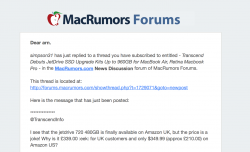
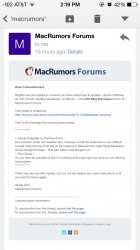
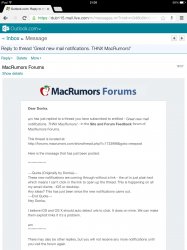
These new notifications are coming through without a link - the url is just plain text which means I can't click in the link to open up the thread. This is happening on all my email clients - IOS or desktop.
Any ideas? This has just been since the new notifications came out.
Any ideas? This has just been since the new notifications came out.
These new notifications are coming through without a link - the url is just plain text which means I can't click in the link to open up the thread. This is happening on all my email clients - IOS or desktop.
Any ideas? This has just been since the new notifications came out.
Hey Donka,
I believe iOS and OS X should auto detect urls to click. It does on mine. We can make them explicit links if it's a problem.
arn
Attachments

richwoodrocket
macrumors 68020
Donka
macrumors 68030
Hey Donka,
I believe iOS and OS X should auto detect urls to click. It does on mine. We can make them explicit links if it's a problem.
arn
I'm not sure what is going on. I thought it may have been a Chrome thing because it was the same with Chrome on my Works laptop but just tried Safari on the iPad and it is the same - see attached.
Attachments
Apple_Robert
Contributor
Don't thank me, thank arn and the admins - I'm just a lowly moderator 🙂
I used the contact link you provided (2 days ago) and I haven't been contacted by an admin, yet.

S.B.G
Moderator emeritus
I used the contact link you provided (2 days ago) and I haven't been contacted by an admin, yet.
Sometimes it takes several days before you hear a response via that method. We ask that you be patient, and be assured that you will receive a response. 🙂
Apple_Robert
Contributor
Sometimes it takes several days before you hear a response via that method. We ask that you be patient, and be assured that you will receive a response. 🙂
Thank you. 🙂 I will wait my turn.


englishman
macrumors 6502a
URL plain text not clickable
As others have stated any chance of making the urls clickable again rather than plain text
The formatting makes it look like a phishing scam
As others have stated any chance of making the urls clickable again rather than plain text
The formatting makes it look like a phishing scam
maflynn
macrumors Broadwell
As others have stated any chance of making the urls clickable again rather than plain text
The formatting makes it look like a phishing scam
They show up as URLS for me.
What mail app are you using?
As others have stated any chance of making the urls clickable again rather than plain text
The formatting makes it look like a phishing scam
They show up as URLS for me.
What mail app are you using?
I'm not sure what is going on. I thought it may have been a Chrome thing because it was the same with Chrome on my Works laptop but just tried Safari on the iPad and it is the same - see attached.
seems some email clients don't auto-link urls. I've wrapped the url of the subscription notification email in a link tag.
let me know if that works for you, and I'll extend it to the others.
arn
englishman
macrumors 6502a
seems some email clients don't auto-link urls. I've wrapped the url of the subscription notification email in a link tag.
let me know if that works for you, and I'll extend it to the others.
arn
Hi - It is odd. My main browser is FFox (OSX or W7) and it happened in both (yahoo mail).
But I noticed yesterday on my Android phone using the Android mail client 1 out of 2 of the notifications had the link - 6.46 uk time one not working - the later 8.01 uk time worked.
Just noticed that in FFox the later one is working now too.
Good stuff. 🙂