Become a MacRumors Supporter for $50/year with no ads, ability to filter front page stories, and private forums.
I'm getting stuck at loading from open firmware after selecting the usb drive probe-usb usb2 /disk:1,\\:tbxi it says cant open than hangs. True I have a 64gb flash drive. I can't find anything older in local-stores and I won't pay big amount for shipping a flashdrive.... the dvd sees the drive fin in disk utility 10.5, I can even install the osx there,but it just won't boot from it, however info in disk utility says bootable....very confusing
 
Last edited:
I'm getting stuck at loading from open firmware after selecting the usb drive probe-usb usb2 /disk:1,\\:taxi it says cant open than hangs. True I have a 64gb flash drive. I can't find anything older in local-stores and I won't pay big amount for shipping a flashdrive.... the dvd sees the drive fin in disk utility 10.5, I can even install the osx there,but it just won't boot from it, however info in disk utility says bootable....very confusing
I would try to avoid new USB drives in general with older hardware, especially any that large. I'd try to go with a 16GB capacity. This problem happened with some USB drives with i.e. a PS2 because the USB1.1 support in the USB drive wasn't really compatible with USB 1.1. I know, not the same thing, but maybe it could help here.

Also kind of unrelated, but Wallmart sells 16GB flash drives for literally $3, I have a ton of them. And they work even with a PS2 (which is extremely picky as mentioned above). I would try one of those.

As someone who has never, not once gotten a PowerPC Mac to boot anything from USB, I am excited to give this a try. Thanks OP for recognizing this issue is real (there was much debate on these forums years ago about if it was even possible).
 
Very cool thread. I used a similar method to boot from USB https://petergodwin.wordpress.com/2014/05/18/booting-os-x-from-usb-through-openfirmware/ and I was curious if anyone here knew a good way in openfirmware to get the installer to recognize USB drives as the next disks in multiple disc installers?
I successfully to booted a PowerBook G4 to a Tiger disc in the 4 CD version and even in the most minimal installation it requires stuff off of the second disc to complete.
People in this thread appear to be using the single disc DVDs but using the method I was trying i.e. confirming the usb drive is readable before booting, doesn't seem to work when I use the Tiger DVD image, it might be incompatible with this computer? I'm not sure. It doesn't show the disk partition when I run "dev / ls" despite plugging into the same port that I booted from the CD version of Tiger.
Anyways if anyone has ideas on how to proceed that would be so helpful. While I was researching how to boot from usb on these old computers in the first place, I saw one other user on a stack-something thread suggest aliasing 'cd' to the usb port and that's the only lead I have so far.
The disc drive on this laptop is broken so the only way to load data in is through either a USB or firewire ports but I don't have firewire stuff around.
 
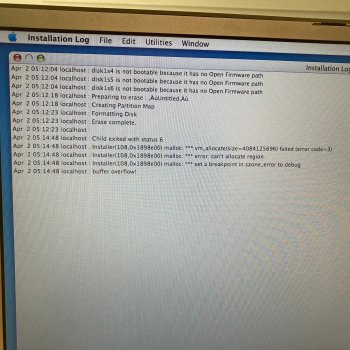
So I attempted to use a USB with the 4 CDs each having their own partition and it threw some sort of error during installation, which is interesting because it wasn't the same error that I got when I only had the single CD image on a single partition. With the single partition one it asked for a disc to be inserted and wouldn't let me proceed with anything.
I also realized with this that only certain USB sticks get recognized in open firmware with these older computers. I was trying to use a different one of the same size for the DVD version and it wasn't being detected and I realized now that it was the USB stick itself and not necessarily the image being incompatible, though that could still certainly be the case.
Interestingly I got what appeared to be the same error log, a buffer overflow, when using the 4 partitioned USB regardless of whether I aliased 'cd' to the next to be installed partition.
Either way I'll see if I can squeak by with a single DVD installer for this particular laptop.
I still would like to know if there's a solution, some of the Macs don't have DVD drives and would require the multiple disc installers, right?
 

Attachments

  • IMG_4203.jpeg
    IMG_4203.jpeg
    3.6 MB · Views: 28
Anybody have luck USB booting on a last-run iMac G4 1.25? Got a 20" with a busted DVD drive so USB booting is my only way to do anything further. I did a dual install of Tiger and 10.6.8a via my PMG5 before putting the SSD in, but now that it's sealed up I'd rather not go through the insanity of taking it apart again just to try a new OS. FWIW, these things sure run cooler without that drive in there!
 
Anybody have luck USB booting on a last-run iMac G4 1.25? Got a 20" with a busted DVD drive so USB booting is my only way to do anything further. I did a dual install of Tiger and 10.6.8a via my PMG5 before putting the SSD in, but now that it's sealed up I'd rather not go through the insanity of taking it apart again just to try a new OS. FWIW, these things sure run cooler without that drive in there!
You can buy a USB CD drive, press C key on boot, and it will use the USB drive if all else fails.
 
Register on MacRumors! This sidebar will go away, and you'll see fewer ads.