
Got a tip for us?
Let us know
Become a MacRumors Supporter for $50/year with no ads, ability to filter front page stories, and private forums.
High Sierra breaks iMessage?
- Thread starter Risco
- Start date
- Sort by reaction score
You are using an out of date browser. It may not display this or other websites correctly.
You should upgrade or use an alternative browser.
You should upgrade or use an alternative browser.


Try going into iMessages, go to File: Preferences, click Accounts Tab
Make sure you are signed it, and all the appropriate boxes area checked.
Note, the tab "Enable iMessages on iCloud is not working yet...
tried all that, can't understand what is happening?

ryxn
macrumors regular
Go to your iPhone and verify all the correct settings are enabled. Some were deselected on my iPhone 7 when I installed High Sierra.tried all that, can't understand what is happening?
Go to your iPhone and verify all the correct settings are enabled. Some were deselected on my iPhone 7 when I installed High Sierra.
Which settings are you referring to? I have all options on for iCloud?
ryxn
macrumors regular
Handoff, enabling messaging and text forwarding to other devices, etc.Which settings are you referring to? I have all options on for iCloud?

fischersd
macrumors 603
Sorry, had this happen to me - just saw your thread. I suspect it's a race condition when you have some Mac's running Sierra and some running High Sierra with the same iCloud account - it can mess up the credentials.
Presuming you have 2FA enabled (everyone should) - go to the appleID page: https://appleid.apple.com/
You're going to need to sign all (well, all but one initially) out of iCloud and remove them from your list of devices on the appleID page. You leave the one authorized / signed in, so it can authorize your 2FA. Once you've cycled through all but one, then do the same with that last device.
Note: iCloud may make you change your AppleID password (yes, I know, onerous) - it did with me (so it obviously knew something was out of sync).
Now that you fixed your iCloud credentials, just make sure that all of your iMessage setups are using your AppleID as well as your cell number (with your cell selected as start new conversations from).
Presuming you have 2FA enabled (everyone should) - go to the appleID page: https://appleid.apple.com/
You're going to need to sign all (well, all but one initially) out of iCloud and remove them from your list of devices on the appleID page. You leave the one authorized / signed in, so it can authorize your 2FA. Once you've cycled through all but one, then do the same with that last device.
Note: iCloud may make you change your AppleID password (yes, I know, onerous) - it did with me (so it obviously knew something was out of sync).
Now that you fixed your iCloud credentials, just make sure that all of your iMessage setups are using your AppleID as well as your cell number (with your cell selected as start new conversations from).
shrubberyuk
macrumors newbie
Sorry, had this happen to me - just saw your thread. I suspect it's a race condition when you have some Mac's running Sierra and some running High Sierra with the same iCloud account - it can mess up the credentials.
Presuming you have 2FA enabled (everyone should) - go to the appleID page: https://appleid.apple.com/
You're going to need to sign all (well, all but one initially) out of iCloud and remove them from your list of devices on the appleID page. You leave the one authorized / signed in, so it can authorize your 2FA. Once you've cycled through all but one, then do the same with that last device.
Note: iCloud may make you change your AppleID password (yes, I know, onerous) - it did with me (so it obviously knew something was out of sync).
Now that you fixed your iCloud credentials, just make sure that all of your iMessage setups are using your AppleID as well as your cell number (with your cell selected as start new conversations from).
Unfortunately this doesn't fix the issues for me.
I have a mixture of iOS10, iOS11, macOS10.12 and macOS10.13 and iMessages cannot be sent from the macOS10.13 machine. They can however be received and standard SMS can be received and sent...
Sorry, had this happen to me - just saw your thread. I suspect it's a race condition when you have some Mac's running Sierra and some running High Sierra with the same iCloud account - it can mess up the credentials.
Presuming you have 2FA enabled (everyone should) - go to the appleID page: https://appleid.apple.com/
You're going to need to sign all (well, all but one initially) out of iCloud and remove them from your list of devices on the appleID page. You leave the one authorized / signed in, so it can authorize your 2FA. Once you've cycled through all but one, then do the same with that last device.
Note: iCloud may make you change your AppleID password (yes, I know, onerous) - it did with me (so it obviously knew something was out of sync).
Now that you fixed your iCloud credentials, just make sure that all of your iMessage setups are using your AppleID as well as your cell number (with your cell selected as start new conversations from).
I fixed it last night by going to using time machine to a date before I installed the beta. As a precaution I have also removed all devices as suggested. All seems well so far.
fischersd
macrumors 603
You're still running in what I'll call "mixed mode" - devices running the new iMessage and not. When this happened, the two MacBooks I had upgraded to 10.13 were removed from my AppleID devices and not brought back (rolled one of them back to 10.12 due to what 10.13 broke on it) - the other one hasn't been turned back on yet (and will be rolled back when it is - so it doesn't recreate the problem).Unfortunately this doesn't fix the issues for me.
I have a mixture of iOS10, iOS11, macOS10.12 and macOS10.13 and iMessages cannot be sent from the macOS10.13 machine. They can however be received and standard SMS can be received and sent...
If you're officially on the beta, then you should send this in as a bug.
Me, I'll hold off on DP2 - wait for the public beta (as it wasn't announced the same day, guessing it may be a newer build).
fischersd
macrumors 603
Did you upgrade everything else to iOS 11 and 10.13 yet? Like I said - it seems there's a race condition when you're running a mix of old and new iMessage clients that messes up your iCloud authentication. I would have upgraded the iOS devices first, then the Macs.
If the other devices are working (and upgraded) and it's just this one, remove it from your iCloud account. You'll have to go through and login everywhere on it again, but it should hopefully fix it.
If the other devices are working (and upgraded) and it's just this one, remove it from your iCloud account. You'll have to go through and login everywhere on it again, but it should hopefully fix it.

DJTaurus
macrumors 68000
Did you upgrade everything else to iOS 11 and 10.13 yet? Like I said - it seems there's a race condition when you're running a mix of old and new iMessage clients that messes up your iCloud authentication. I would have upgraded the iOS devices first, then the Macs.
If the other devices are working (and upgraded) and it's just this one, remove it from your iCloud account. You'll have to go through and login everywhere on it again, but it should hopefully fix it.
I removed Mac from device list on appleid page and then logged in on my icloud of Mac and still imessage not working.
I get the message an error occurred in authentication.
fischersd
macrumors 603
You need to get everything on the same rev of iMessage to make sure you don't get corruption. (everything iOS 11 and MacOS 10.13)I removed Mac from device list on appleid page and then logged in on my icloud of Mac and still imessage not working.
I get the message an error occurred in authentication.
If you delete all of your devices back to just your iPhone being the only authorized device in iCloud, does iMessage function properly on that iPhone?
(you don't want to go back to 0 devices, as you won't be able to do 2FA).
Did you upgrade everything else to iOS 11 and 10.13 yet? Like I said - it seems there's a race condition when you're running a mix of old and new iMessage clients that messes up your iCloud authentication. I would have upgraded the iOS devices first, then the Macs.
If the other devices are working (and upgraded) and it's just this one, remove it from your iCloud account. You'll have to go through and login everywhere on it again, but it should hopefully fix it.
When I did what you said, I nearly lost my entire iCloud Photo library. My iPhone and other devices would not sync phots and stuck on updating on iPhone.
In addition it broke iMessage on iPhone, I had to google a trick of turning short name on and off. Apple have seriously screwed up something.
DJTaurus
macrumors 68000
You need to get everything on the same rev of iMessage to make sure you don't get corruption. (everything iOS 11 and MacOS 10.13)
If you delete all of your devices back to just your iPhone being the only authorized device in iCloud, does iMessage function properly on that iPhone?
(you don't want to go back to 0 devices, as you won't be able to do 2FA).
Obviously i am on 10.13 on Mac and ios 11 on iphone. I deleted all of my devices from Apple ID. Started loggin back in to mac and then iphone.
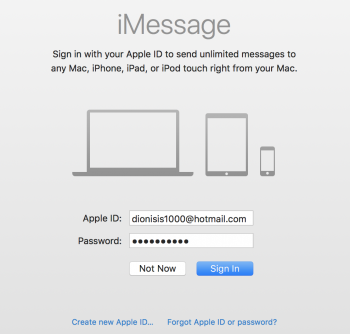
Still cannot sign in on iMessages of Mac. W. T. F. is going on?
Also facetime on Mac cannot log in.
Everything works fine on iPhone.
Attachments
fischersd
macrumors 603
I'd be starting with the iPhone - make sure that everything works properly on it (iMessages, iCloud, Find my iPhone, FaceTime).
Then you slowly, one by one, add your other devices (again, I'd do iOS devices first).
You guys are removing the devices from the Apple ID site, right? (not find my iPhone).
Then you slowly, one by one, add your other devices (again, I'd do iOS devices first).
You guys are removing the devices from the Apple ID site, right? (not find my iPhone).
DJTaurus
macrumors 68000
I'd be starting with the iPhone - make sure that everything works properly on it (iMessages, iCloud, Find my iPhone, FaceTime).
Then you slowly, one by one, add your other devices (again, I'd do iOS devices first).
You guys are removing the devices from the Apple ID site, right? (not find my iPhone).
I did a cmd/alt P,R on Mac and now it connected on Facetime and on iMessage... its active again but i still dont get names on contacts only numbers. I send imessages on my friends its ok but contacts appear plain numbers....pffffff

I'd be starting with the iPhone - make sure that everything works properly on it (iMessages, iCloud, Find my iPhone, FaceTime).
Then you slowly, one by one, add your other devices (again, I'd do iOS devices first).
You guys are removing the devices from the Apple ID site, right? (not find my iPhone).
Yup removing completely, too risky to try again and lose my photos. Its a regional setting problem somewhere.
https://forums.macrumors.com/threads/imessage-on-mac-not-showing-contact-names.2045918/
fischersd
macrumors 603
Well, they seem to have broken continuity too. Messages aren't regularly showing up on all devices anymore (though they did in iOS 10/MacOS Sierra). They're often delayed and not come in order (though the order is displayed correctly when they come in).
iCloud forced me to change my password 4 times when I was doing beta testing this time around - never had it do that before. Royal PITA.
iCloud forced me to change my password 4 times when I was doing beta testing this time around - never had it do that before. Royal PITA.
DJTaurus
macrumors 68000
After 6-7 hours iPhone iMessage was back online and activated. Everything works fine on iPhone iMessage and FaceTime.
I did a clean install on Mac and here is what is going on right now. Each conversation I start on iPhone syncs with Mac iMessage. Also notification works fine. But i view most of the contacts on iMessage on Mac with Numbers and I cannot start Sms dialogs from Mac as i did before.
I did a clean install on Mac and here is what is going on right now. Each conversation I start on iPhone syncs with Mac iMessage. Also notification works fine. But i view most of the contacts on iMessage on Mac with Numbers and I cannot start Sms dialogs from Mac as i did before.
DJTaurus
macrumors 68000
Here is the fix guys.
https://forums.macrumors.com/thread...ng-contact-names.2045918/page-4#post-25172402
https://forums.macrumors.com/thread...ng-contact-names.2045918/page-4#post-25172402