Become a MacRumors Supporter for $50/year with no ads, ability to filter front page stories, and private forums.

Paradoxally

macrumors 68020
Original poster
I installed Yosemite DP3 because I feel that it's good enough for my daily usage in terms of development (using Xcode and other tools).

However, I do not like the visual changes. I can deal with the new dock, but the system font is hideous. I can barely stand it on stock iOS (that's why I install Bytafont right away after a JB), and seeing it on the desktop is not good. Lucida Grande was fine.

In previous versions of OS X there used to be a way to replace certain files and basically use any font you like (the now deceased MacThemes used to have a huge thread for this). I'm just wondering if it would work to get 10.9's system font files and replace Helvetica Neue once and for all. If not, I'll just downgrade to Mavericks. Thanks!
 
I'm also curious to see what font the OP is now using. When I run tinker tool on Mavericks, it shows Helvetica as being my default - not Lucida Grande. Anyone else show this?
 
I'm also curious to see what font the OP is now using. When I run tinker tool on Mavericks, it shows Helvetica as being my default - not Lucida Grande. Anyone else show this?

Yes. I changed it to Helvetica Neue, logged out, and when I logged back it it looks like any traces of Lucida Grande were changed to Helvetica/Helvetica Neue.

Make sure if you do this that you change back the systemversion.plist back after doing this or else your computer will not function up to par. I recommend changing it before rebooting.
 
Main issue with fonts is not the style but the way they are rendered. It seems Yosemite makes them some how not as clear as older os X

They look over bolded and feels bit fuzzy it is very ugly i guess they think it's fine and may be that how will be of now on.
 
Turn off LCD Font smoothing (in general system prefs). Makes the typeface lighter and less "bulky". Makes a big difference.
 
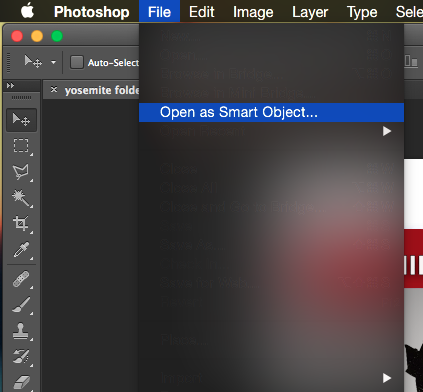
How i can change the fonts in adobe photoshop to white. The text is not readable in dark modus 😡

Bildschirmfoto%202014-07-13%20um%2012.26.20.png
 
Turn off LCD Font smoothing (in general system prefs). Makes the typeface lighter and less "bulky". Makes a big difference.
I know. I already have it off but still look way too bolded.
Still hope they will do something about it.
 
Last edited:
How i can change the fonts in adobe photoshop to white. The text is not readable in dark modus 😡

Image

Drives me crazy! I have no idea how to change it, and fear it will be up to Adobe. Unless anyone knows a plist file that sets font settings, I'm guessing that's in the code.
 
Thanks for this! Looks much better.

I didn't install the Bold file so that the text on the menu bar remains aligned. It just means all Bold fonts will display as Helvetica Neue.

You're welcome. In case you hadn't noticed the install instructions changed slightly to solve a system font error. Quite an easy fix, as per following URL amended install notes in green...

https://github.com/jenskutilek/FiraSystemFontReplacement/commit/438cd0e3ca929c1830f84d82fc09907e2d3a6812
 
You're welcome. In case you hadn't noticed the install instructions changed slightly to solve a system font error. Quite an easy fix, as per following URL amended install notes in green...

https://github.com/jenskutilek/FiraSystemFontReplacement/commit/438cd0e3ca929c1830f84d82fc09907e2d3a6812

Bravo Jens! This is the smartest solution I've found all over the Internet. Unfortunately the fix doesn't work and the aligment issue remains (i'm on Mac 27" - 2013)
Any ideas?

BTW, there is any way we mortals can select a different font?
 

Attachments

  • menu font aligment issue.png
    menu font aligment issue.png
    9.2 KB · Views: 6,458
help

Hi

I have another font related issue... just installed Yosomite on a macbook pro and on the startup I'm getting X in a box under the icons where the words should be.

I was told by my IT that this was a missing font issue...

see screenshot

any suggestions??

10703917_10152768711965590_1679355979384939649_n.jpg
 
Register on MacRumors! This sidebar will go away, and you'll see fewer ads.