Become a MacRumors Supporter for $50/year with no ads, ability to filter front page stories, and private forums.

maorattias

macrumors member
Original poster
Hello Everyone,
I have iMac 5k mid 2017 and i would like to convert it to an external monitor for my macbook pro m1 max or later macbook pros.
I want to use the maximum 5k 60hz screen resolution and frame rate.
Also the built-in speakers and the camera of the iMac
What board should i get fory needs?

Thanks for your help.
 
Looks to look at here - the same link as I posted the last time you asked the same question in your earlier thread:

I'm afraid it is not possible to use your iMac's existing FaceTime camera as it needs a PCIe logic board to connect to, which is impossible too do without the original logic board.
But you can incorporate a (lesser quality) USB webcam - or use an iPhone with Continuity Camera.

Once you see something you think is appropriate ask any questions you may have at the end of the thread.
The results are excellent. 😀

EDIT: There's this video:
 
Last edited:
  • Love
Reactions: Student of Life
Looks to look at here - the same link as I posted the last time you asked the same question in your earlier thread:

I'm afraid it is not possible to use your iMac's existing FaceTime camera as it needs a PCIe logic board to connect to, which is impossible too do without the original logic board.
But you can incorporate a (lesser quality) USB webcam - or use an iPhone with Continuity Camera.

Once you see something you think is appropriate ask any questions you may have at the end of the thread.
The results are excellent. 😀

EDIT: There's this video:
There is an sa1 board on aliexpress with 2 options to choose from.
What should i get?
LM270QQ1 Or LM270QQ2?
And what is the difference?
 
@maorattias
Hi. The LM270QQ1 is the screen panel in the iMac 5K, and the LM270QQ2 is the panel in the LG 5K Ultrafine.
Apple fitted the 2017 iMac 5K with a LM270QQ1 SD(C1) panel.

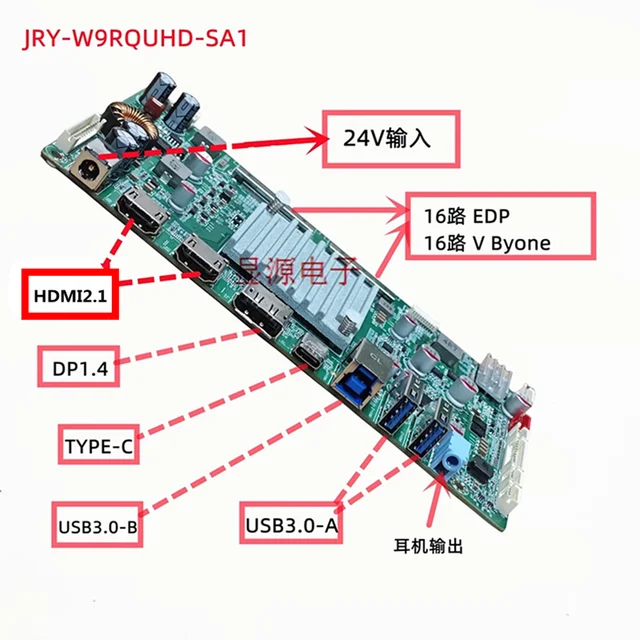
The JRY-W9RQUHD-SA1 board gives good results, and if you intend to use 3D printed mounting brackets, there is more choice of different items for the SA1 board - though choosing which to use is a haphazard process unless you can modify the designs yourself.

But if you are concerned about audio through the speakers in your monitor, also consider the new R1820 board.
This has a much better amplifier for improved sound, and also has a remote control, but is only ~$30 more:
 
Last edited:
  • Like
Reactions: Nguyen Duc Hieu
@maorattias
Hi. The LM270QQ1 is the screen panel in the iMac 5K, and the LM270QQ2 is the panel in the LG 5K Ultrafine.
Apple fitted the 2017 iMac 5K with a LM270QQ1 SD(C1) panel.

The JRY-W9RQUHD-SA1 board gives good results, and if you intend to use 3D printed mounting brackets, there is more choice of different items for the SA1 board - though choosing which to use is a haphazard process unless you can modify the designs yourself.

But if you are concerned about audio through the speakers in your monitor, also consider the new R1820 board.
This has a much better amplifier for improved sound, and also has a remote control, but is only ~$30 more:
Im not sure with package to pick from your link. Also, what is crossover?

If im getting this board?

Can i also use the speakers?
Is it fit and get the most resolution and 60hz from my 2017 5k imac?
 
Yes the SA1 board gives an excellent 5K/60 10 bit picture, as good as the iMac logic board.
The R1820 is the same.
The crossover is the connection from the new board to the speakers, and a pair are needed for the conversion.

You will need a new 24v power supply if you want to use USB-C to charge a Mac laptop from the monitor.

So the different kits include a PSU and crossovers. Most people usually use a better PSU which they buy separately.
 
Yes the SA1 board gives an excellent 5K/60 10 bit picture, as good as the iMac logic board.
The R1820 is the same.
The crossover is the connection from the new board to the speakers, and a pair are needed for the conversion.

You will need a new 24v power supply if you want to use USB-C to charge a Mac laptop from the monitor.

So the different kits include a PSU and crossovers. Most people usually use a better PSU which they buy separately.
Thank you so much for your answer.

So the sa1 dont have crossover?
Only the R1820?

Can i use the built in camera & speakers in the sa1?
And if im buying the sa1 from this link?
Wich one do i have to choose from the aliexpress options?
LM270QQ1 Or LM270QQ2?

Thanks again for your help!
 
@maorattias
You need LM270QQ1 version.
Tell them you are using a LM270QQ1 SD(C1) panel.

You do need a pair of crossovers (for any board) to connect the speakers.

You can NOT use the original Webcam.
Fitting a USB one is quite fiddly but it can be done.
 
@maorattias
You need LM270QQ1 version.
Tell them you are using a LM270QQ1 SD(C1) panel.

You do need a pair of crossovers (for any board) to connect the speakers.

You can NOT use the original Webcam.
Fitting a USB one is quite fiddly but it can be done.
Wow thanks you!
Where do i get crossover?
 
@maorattias
Either crossover will connect a SA1 board to the speakers. The AliExpress ones are slightly easier to set up.

The best cable between you MBP M1Max and the SA1 board is a Thunderbolt 3/4/5 cable or a USB-C 8K video-capable cable.
This will give best quality picture quality, and also allow charging of your MBP at up to 90W - if you power the SA1 board with a 24V 7-8A power supply.

If you don't want to charge your MBP this way, then you must connect your MBP to the SA1 using a USB-C to DisplayPort 8K adapter cable.
Both inputs give 5K/60 10 bits.

Using an HDMI cable from the MBP to the SA1 may not give quite as good a picture quality, maybe 5K/60 8 bits.
 
@ADGrant "It's a pity there isn't software available to turn the 27" iMac into a Studio Monitor..."
If only it was that easy...😕

The thing about software is it needs appropriate hardware to run on, and the iMac's logic board had its focus on the other direction of information travel compared to a monitor.
Apple originally ceased Target Display mode when they introduced the 5K screen, because to achieve that needed significant additional hardware to enable it, and they chose to not implement that...

Also the massive power consumption of the Intel/AMD driven logic board it very impractical in a monitor, whereas the much more efficient A19x chip in the Studio display can have all its unnecessary features turned off in the Studio Display configuration.

From an engineering standpoint removing the much larger PSU and logic board, and replacing them with a low cost, highly efficient and specialised video driver board matched to the screen panel is by far the best solution for creating a much more usable 'Studio Display'-equivalent monitor.
With the addition of DP and HDMI input ports as well as USB-C...
 
Last edited:
  • Like
Reactions: Ausdauersportler
From and engineering standpoint removing the much larger PSU and logic board, and replacing them with a low cost, highly efficient and specialised video driver board matched to the screen panel is by far the best solution for creating a much more usable 'Studio Display'-equivalent monitor.
With the addition of DP and HDMI input ports as well as USB-C...

Not if I still want to use the iMac as a Mac and don't care about HDMI or DP input.
 
So I can’t get any machines to detect the display after connecting things up, using the exact version discussed above.

I can see the menu from the driver board so the backlight seems on and I set things to auto. I also hear the MacBook detect usb, but no option to add a second display. Any thoughts? Thanks!
 
@maorattias
Hi. The LM270QQ1 is the screen panel in the iMac 5K, and the LM270QQ2 is the panel in the LG 5K Ultrafine.
Apple fitted the 2017 iMac 5K with a LM270QQ1 SD(C1) panel.
Off-topic, but this made me curious. It's often said the Ultrafine uses the same panel as the iMac. But what you wrote indicates that, at least for the 2017 5k iMac, they aren't exactly identical.

Even though they are different model numbers, are the two panels at least functionally identical*, differering only in, e.g., their connectors?

And is the panel in my 2019 iMac also an LM270QQ1?

[*I know the finished products are functionally different, since the iMac's screen has much better anti-reflective properties than the Ultrafine's. But I believe that's due to the respective AR coatings they use on the panels, rather than any functional difference in the panels themselves]
 
Last edited:
@theorist9 "It's often said the Ultrafine uses the same panel as the iMac. But what you wrote indicates that, at least for the 2017 5k iMac, they aren't exactly identical."

Apple commissioned the bespoke design of the 2014+ 5K iMac screen from Parade Technologies (for the panel T-Con chipset) and LG, (as manufacturer).
To provide a 5K monitor for the 2013 Mac Pro 6.1, Apple partnered with Dell for them to make the UP2715K 5K monitor, which used a version of the LG iMac panel, without the glass front flanges that were unique to iMac construction.
This requires two DP 1.2 cables to connect to the Mac Pro (or Win PCs).

When the 2017 iMac (and MBPs) were fitted with USB-C ports, LG was permitted by Apple to to produce their own 5K Ultrafine monitor, which used an updated version of the Dell 5K panel - which uses the same metal edge fastenings, rather than the iMac's glass flange design.
This relies on Apple software to connect to USB-C Macs using a dual-stream DP 1.2 protocol using a single TB 3 cable.

"...are the two panels at least functionally identical..."
The Dell/LG Ultrafine screen panels were electronically identical to the iMac panels, but LG only used one internal backlight connector on the bottom of their LM270QQ2 panel.
Apple iMac LM270QQ1 screens have two backlight connection points, at each side of the bottom of the panel.
A splitter cable connects the single logic board backlight connection point to both panel connectors.

"...is the panel in my 2019 iMac also an LM270QQ1?"
Yes, it's a LM270QQ1 SD(E1) panel.
Basically all panels after Apple introduced the 2017 iMac Pro's LM270QQ1 SD(D1) panel have the best Display P3 performance, and a better AR coating.

The 2020 iMac is different - in that it's LM270QQ1 SD(F1) panel has the FaceTime camera as part of the screen - like the iMac Pro's. Earlier iMacs has a FaceTime camera attached to the case.

LG updated the earlier TB 3-only 5K Ultrafine in about 2018-9 and later suffix A or B monitors can also use a USB-C Alt-Mode DP 1.4 cable, but this only gives 4K/60, rather than the TB 3 dual stream mode that continues to give 5K/60.

 
Last edited:
  • Love
Reactions: theorist9
@theorist9

"...are the two panels at least functionally identical..."
The Dell/LG Ultrafine screen panels were electronically identical to the iMac panels, but LG only used one internal backlight connector on the bottom of their LM270QQ2 panel.
Apple iMac LM270QQ1 screens have two backlight connection points, at each side of the bottom of the panel.
A splitter cable connects the single logic board backlight connection point to both panel connectors.
Thanks! Does that difference in internal backlight connectors explain why the iMac had better lighting uniformity than the LG Ultrafine? Or was that simply a difference in QC?
@theorist9

"...is the panel in my 2019 iMac also an LM270QQ1?"
Yes, it's a LM270QQ1 SD(E1) panel.
Basically all panels after Apple introduced the 2017 iMac Pro's LM270QQ1 SD(D1) panel have the best Display P3 performance, and a better AR coating.

I've long been curious Apple's AR coating.....

The AR coating on my glossy 2019 27" iMac is superb—I'm in a very brightly-lit room, yet never have any issues with reflection.

Yet reviews of the LG Ultrafine indicate that panel reflection is a significant issue, indicating they're not using the same AR coating as Apple. That's curious, since one would think LG would want to use such an obviously superior coating on their own panels, making me wonder if Apple used a coating that was not available to LG.

Did Apple have LG make the panel without the coating, and then have the coating applied elsewhere? Or does Apple have exclusive rights to that AR coating, which they provided to LG for use on Apple's displays only? Or was the coating available to LG, but simply too expensive to buy or apply?

The glossy version of the Kucoyn 32" 6k (G32P), which uses a glossy LG IPS Black panel, has the same issue—the reflections are too prominent.
 
Last edited:
Register on MacRumors! This sidebar will go away, and you'll see fewer ads.