Become a MacRumors Supporter for $50/year with no ads, ability to filter front page stories, and private forums.
I cant set an alarm for reminders.
The urgent toggle simply isn’t there for me
I have the same issue. I've updated both iPhone and Mac to 26.2, and neither have the Urgent toggle. I've enabled the Alarms toggle for "Allow Reminders to Access", and the reminder is saved to iCloud.

Strangely, I noticed that if I restart my iPhone and open Reminders, the toggle shows up for about 1 second and then disappears, and that is reproducible the first launch of Reminders after each restart.
 
  • Haha
Reactions: Computers 4 U LLC
The does it finally have the smart Siri from the Bella Ramsey ad announced with the iPhone 16?

Now you now damn well it doesn’t

The worst iOS ever,
Heavy translucency, Background bleed-through, Color contamination (like that blue tint bleeding into the keyboard you’re seeing) Less visual separation between foreground and background

It looks slick in marketing videos—but in real daily use: It reduces readability, It causes visual noise, It’s fatiguing, especially for eyes that value contrast and structure.

As ppl are saying there are def some massive customization options if default Liquid Glass doesn’t work for you.

But….Liquid Glass is bae 🩵💙🩵🤍🩶. Ugh she is so FINE!!!

If Liquid Glass is so good and impressive, why does it need settings?

It doesn’t….PEOPLE do. And yeah, options are good, yes or no??

And to continue this line of thought: do we now have toy-like settings where we adjust the UI ourselves to make it ‘just right,’ like on toy Android? Apple’s core principle has always been clarity and simplicity, not introducing millions of toggles and options to customize like on mess-Android. Apple has truly lost its way big time.

And that core simplicity is still here in iOS 26. If it wasn’t, Apple wouldn’t push it out knowing they still have a massive amount of elderly ppl that they must serve!

Trust me, everything’s gonna be alright. Apple is amazing and the hardware and software together are a true force of nature. Airplane mode baby!!!
 
  • Like
Reactions: Sami13496
I want a really innovative feature : I want my phone to actually ring when I get a call or txt.

Before you comment - Yes the ringer volume is up, No the phone is NOT in vibrate or silent mode. I've done nothing to disable the ringer(s) from working, yet I miss calls all the time because my phone is dead silent and doesn't vibrate. In the past at least apple watch would vibrate alert a call or text but even that is not working anymore with various iOS / watch updates. Get the basics to work, then worry about "new features" I'll never remember are there or use because they are placed obscurely amongst the clutter of all the other features. When you have to use search to find settings, you have a major organization problem in your UI - like the random order of settings rather than alphabetical order.
 
Actually, no. The only ones who have ever complained about the lack of openness are Android users who wouldn’t use Apple even if it became “open.” Real Apple users don’t want so-called openness, which in reality is just chaos. User interfaces should be designed by designers. As for this new feature, it’s pathetic that users now have to fix poor UI themselves through a bunch of toggles in the settings. Absolutely pathetic.
Nebulous claim. 'Real Apple' users is a sweeping sentiment. Plenty of users wanted customisation even without any interest in switching to Android.

Whilst too much choice can be paradoxical, choice should nevertheless always be offered to let people express their individuality.

I for one prefer having the option to do this

new-iphone-lockscreen-ios-26.jpg

Than being restricted to these

iOS-18-Quick-acess-tools.jpeg
photo.png
 
Last edited:
I tried it last night for an hour drive and it didn’t disconnect. I’ll try it out again today.

But there are still multiple CarPlay bugs.

UPDATE: It’s fixed in iOS26.2.
Hoping the next release fixes the remaining bugs.
Yes - updated to 26.2 and was just in the car. It seems ok so far, but I’ll wait to see after a few drives.
 
It also fixed searching in calendar app which stopped working with iOS26
If you do not mention it is a bug and you fix it.. Did it ever happen :)
Just updating Tahoe 26.2 now see if the Mac OS fixed although never a bug.

Tahoe 26.2 Calendar searching is still broken.. Apple be nothing to see hear look Liquid Glass cool
 
Last edited:
  • Haha
Reactions: Computers 4 U LLC
@Steve01234 Yep. Same issue. Phone not vibrating when in vibrate mode. Alarms not vibrating when in vibrate mode. Insane. Phone not working on smartphone. So many visual UI bugs… disappearing bottom half of email screen when phone turned in landscape orientation then back to portrait, also happens randomly in messages. iOS 26 felt like alpha software. Will try 26.2 tonight. I suppose it could get worse but been using iPhones exclusively since the 3G and this is, without question, the most problem ridden OS version I can recall. As many have noted the “it just works” factor seems to be increasingly a thing of the past.
 
  • Haha
Reactions: Computers 4 U LLC
I have the same issue. I've updated both iPhone and Mac to 26.2, and neither have the Urgent toggle. I've enabled the Alarms toggle for "Allow Reminders to Access", and the reminder is saved to iCloud.

Strangely, I noticed that if I restart my iPhone and open Reminders, the toggle shows up for about 1 second and then disappears, and that is reproducible the first launch of Reminders after each restart.
Has to be a bug. Same issue on my mac also.
Multiple people on reddit having same issue too.
 
  • Haha
Reactions: Computers 4 U LLC
Well, having a bright screen is good and impressive, yet we can toggle screen brightness.
That’s not a comparison, and you know it. The user interface should be designed so that it doesn’t require this kind of fiddling from the user when it has nothing to do with actual functionality. Poorly designed and implemented Liquid mush is now being patched up through user settings.
 
Nebulous claim. 'Real Apple' users is a sweeping sentiment. Plenty of users wanted customisation even without any interest in switching to Android.

Whilst too much choice can be paradoxical, choice should nevertheless always be offered to let people express their individuality.

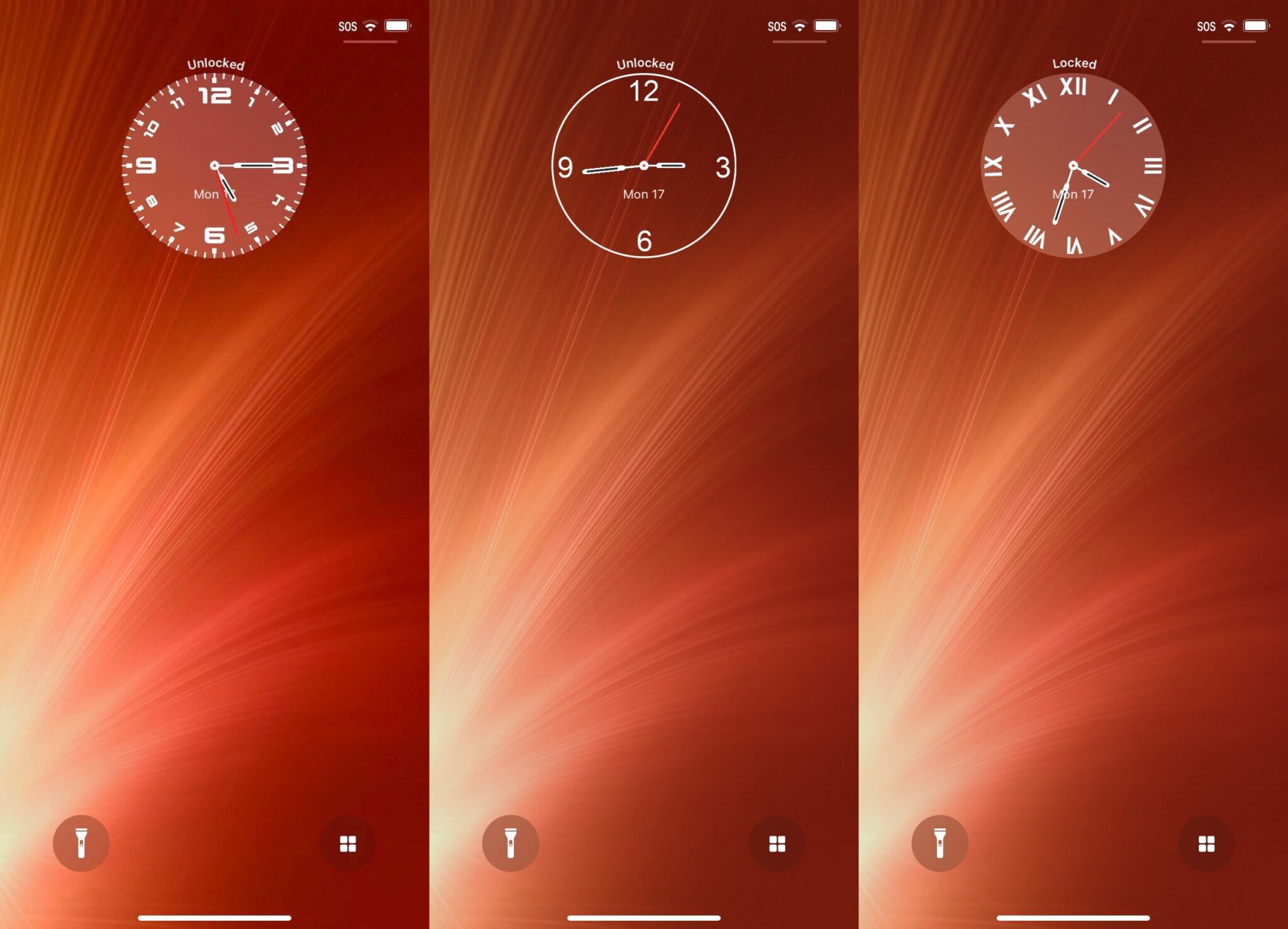
I for one prefer having the option to do this

View attachment 2587563

Than being restricted to these

View attachment 2587565
View attachment 2587629

I'd rather get the option for an analogue clock.

Analog-2048x1477.jpg
 
Still has the inexcusably bad UX that the “Ok” checkmark takes on the color of what’s underneath and so sometimes you tap a green checkmark, but sometimes it’s blue or yellow or even red, which means that first of all you have to search the screen to find the checkmark since you don’t know what color it is, and then sometimes it’s a red checkmark that looks like delete or cancel or stop as opposed to “Ok”. It’s just … bad.
EDIT: someone above mentioned turning email to landscape then portrait and losing half the display. Yup, I’ve got that. And why oh why does it put curved corners for cropping grips when you take a screenshot, only to immediately switch to (the correct) 90° angles when you do anything? It’s just … bad.
 
Since upgrading to 26.2 I’ve lost the ability to play Dolby Atmos tracks in Apple Music, am I the only one? 10 days before Christmas, great…I just hope they fix it before that, support should call me back tomorrow. Well done Apple, well done :(
 
  • Haha
Reactions: Computers 4 U LLC
It’s a rather underwhelming update, no?
I was looking forward to the flash alerts but they’re very buggy, they keep resetting my iPhone Air brightness to very low after the alert has gone off.
 
  • Haha
Reactions: Computers 4 U LLC
That’s not a comparison, and you know it. The user interface should be designed so that it doesn’t require this kind of fiddling from the user when it has nothing to do with actual functionality. Poorly designed and implemented Liquid mush is now being patched up through user settings.
Wait, you don't think screen brightness is "user interface"?

May I ask how you interact with your iPhone, if not through the screen.

I'll wait.

Thank you.
 
... and when is the Camera Control > "Require Screen On" actually going to work? I can't believe this isn't mentioned more here.
Wow, this used to work for me. I had no idea until reading your post, and agree it’s broken now: I can open the camera from the control without having the screen on despite having the setting.
 
  • Haha
Reactions: Computers 4 U LLC
Wait, you don't think screen brightness is "user interface"?

May I ask how you interact with your iPhone, if not through the screen.

I'll wait.

Thank you.
Of course the screen is part of the interface, but that’s not the point. Brightness is a presentation and accessibility control that adapts the device to different environments. Liquid Glass settings are compensating for a design that doesn’t stand on its own unless users tweak it. Good UI should work by default; accessibility and environmental adjustments are a different category entirely.
 
  • Haha
Reactions: Computers 4 U LLC
Register on MacRumors! This sidebar will go away, and you'll see fewer ads.