Become a MacRumors Supporter for $50/year with no ads, ability to filter front page stories, and private forums.

TumbleDryer

macrumors 603
Original poster
Since updating to 26.3 last night my iPhone refuses to retrieve emails from the server. I've reset all settings in Mail, restarted etc, even used different ports and the furthest I can get is 'checking for mail...' and nothing ever comes through. Anyone else seeing this?

ISP provider says everything is fine. Phone gets REALLY hot too. I've also had to look up how to hard reset the phone because even that is not simple anymore. I really am sick of the crap Apple keeps putting out.
 
Last edited by a moderator:
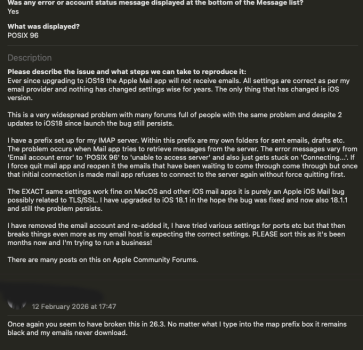
It looks like it's because... yet again... the settings don't stick when you change them. I have an IMAP prefix and no matter what you type and save into the box as soon as you go back to the previous screen the prefix is removed and is blank again. I can't believe how many times they break this!!!!!
 
  • Like
Reactions: adrianlondon
This happens every few updates Apple puts out. It's not the VPN. I've had to delete the whole account and re add it and now because it's a prefix problem all my folder structures are broken and I can't see 90% of my emails because whatever you type into the prefix box doesn't save. They break it all the time but I can't find an alternative that's free that's any good.

I've gone to give them 'feedback' yet again and my last message to them was when it went tits up on iOS18 so I've just added to that thread in the feedback assistant. They're totally useless these days. Im trying to run a business and they keep making things more difficult with everything they put out these days.

Note: Excuse the turd brown Tahoe likes to apply to the window when using Darkmode on a green background.
 

Attachments

  • Screenshot 2026-02-12 at 17.58.20.png
    Screenshot 2026-02-12 at 17.58.20.png
    126.8 KB · Views: 96
Last edited by a moderator:
Never experienced this, using IMAP tho.
If you using MAPI it might be a better idea to have a look at the proper Outlook client?
 
Thanks but I don't want to create a Microsoft account just to access my emails, nor do I want to be bombarded by adverts.
 
I'm having the same issue with my Gmail account using Apples Mail client. Sometimes I get an empty Inbox. Back out then back in and my emails are there. As for my 'labels' they are all gone. I only have access to Inbox (I've seen it happen with my iCloud account as well). When I try to refresh my Inbox I also get the 'too many connections' error. Definitely something broken.
 
  • Like
Reactions: TumbleDryer
I'm having the same issue with my Gmail account using Apples Mail client. Sometimes I get an empty Inbox. Back out then back in and my emails are there. As for my 'labels' they are all gone. I only have access to Inbox (I've seen it happen with my iCloud account as well). When I try to refresh my Inbox I also get the 'too many connections' error. Definitely something broken.
Brace yourself because last time it took about 4 months for it to get fixed and similar time frame when it happened before that. All you can do is keep force quitting Mail and reopen it. It will then connect and download what's waiting but you have to do that EVERY time you want to check for mail.
 
Thanks but I don't want to create a Microsoft account just to access my emails, nor do I want to be bombarded by adverts.
Sry, missread, was sure you wrote MAPI but your wrote IMAP.
I'm using IMAP with the native app and haven't had any issues.
Who's your email provider?
 
Sry, missread, was sure you wrote MAPI but your wrote IMAP.
I'm using IMAP with the native app and haven't had any issues.
Who's your email provider?
Its fasthosts in the uk. Its not an issue with them. Their settings have remained the same for donkeys years. Everytime this happens the only thing that changes is iOS. It takes about 3 or 4 iOS updates and then it starts worling again. Every other email client ive used works fine with exact same settings. Its something Apple keep doing and breaking the same thing over and over.
 
Register on MacRumors! This sidebar will go away, and you'll see fewer ads.