Become a MacRumors Supporter for $50/year with no ads, ability to filter front page stories, and private forums.
Awesome! Thanks for setting up this thread! I’ve been putting together my iOS 27 wishlist (a yearly tradition of mine), and I will share it soon! 👍🏻
 
  • Like
Reactions: NBKindaGirl
As promised, here’s my wishlist, also found in the wishlist thread! 👍🏻. Some already seem probable from current speculation. I could definitely see iOS getting an iPad style App Dock, especially with the foldable iPhone unfolding into essentially an iPad Mini. A few others too, like Apple Intelligence/Siri enhancements are obvious. It will be interesting to look back here and see how many of these may be included in iPadOS and iOS 27 when they drop at WWDC26! 🙂👍🏻

iPadOS 27:

  • Some improvements to extended display support such as clamshell mode (I don’t really care about this, but others do, so I’m including it), Control Center displayed on extended display when clicked on the extended display, and ability to save customized wallpaper and widget configurations for extended displays.
  • Improved Apple Intelligence features with deeper system integration and more Siri Shortcuts actions and automations.
  • Multiple user accounts/ guest mode. I also don’t personally care much about this, but it’s an often requested feature, and could be useful for those who wish to provide curated access to their devices for children and such with a combo of age appropriate apps and restrictions.
  • Manual eject option for external storage drives in Files. This would give some users greater peace of mind when disconnecting storage drives from the iPad. And it could also potentially allow for dynamic caching between the drive and the computer to enhance performance.
  • Continued enhancements and iteration for the Liquid Glass UI, perhaps with additional theming options.
  • Automatic or manual controller mapping for games that don’t currently support controllers. Essentially either automatically mapping on-screen controls to physical gamepads, and/or providing a manual system for users to map such controls. This would be a big improvement for gaming with an extend display.
  • Better keyboard shortcut customization for the system and for third-party app functions. Since the new Siri will likely be able to access individual features within apps at some point, this could be tied to that functionality, providing full keyboard shortcut customization for triggering app functions. But aside from that, just a unified system for customization of app keyboard shortcuts that apps could tap into would be good. 👍🏻
  • Font Book app. Or at least the functionality of Font Book within the Settings app. Good alternatives like iFont do exist, but a better first-party font installation system that allows simple downloading of fonts from the web would be better. And also Font Book’s font categorization and organization functionality would be great for creatives using the iPad. 👍🏻
  • Enhanced Spotlight features including system clipboard. But DO NOT replace App Library with the Spotlight Apps page from macOS, that would be a major regression.
  • Instead, provide more manual customization options for App Library, with different views for it that can be set as default, and bring that new App Library system to macOS 27 as well to REPLACE the dumb Spotlight Apps page where a search bar isn’t easily identifiable as a search bar, and categories are basically useless because none of the apps in the categories are visible without opening them, so they’re a guessing game…
  • Sidecar and Universal Control type features between iPads. Use one iPad as a second display for another iPad. And allow users to use the cursor on their iPad Magic Keyboard Case to adjust something on their nearby iPhone as well, such as music playback and such.
  • AirPlay Receiver that works between iPhone and iPad. So a user could AirPlay from an iPhone to an iPad’s larger display.
  • iPhone Mirroring.
  • Continuity Camera between iPhone and iPad.
  • Greater unification of the app ecosystem (not really an iPadOS 27 item in particular, but a broader developer facing initiative).
  • Added permissions in Privacy & Security settings to allow third-party apps access to on-screen content, like the Screen & System Audio Recording permission on macOS.
  • Possibly support for alternative browser engines if it can be done while still maintaining security and privacy.

iOS 27:

  • Better App Dock like on iPadOS, with ability to swipe it up when in app, use it when in the App Switcher, and pin the App Library to it.
  • Spotlight enhancements with system clipboard and such.
  • Siri and Apple Intelligence enhancements.
  • Potentially vertical Split View apps.
  • Continued enhancements and improvements for Liquid Glass UI, with additional theming options possibly.
  • Customization options for App Library.
  • Added permissions in Security & Privacy for third-party apps to access Screen & System Audio Recording.

And there you have it, that’s my list for iPadOS and iOS 27! This list may change, but that’s my wishlist for now. 👍🏻
 
I'd say from a purely predictive standpoint (not a wishlist, but a speculation of what they will most likely do):

Two-thirds of the WWDC keynote is probably Apple Intelligence v2. Siri gets talked about a lot. New ads about how great it is. Some (perhaps misleading) charts showing how it is so much smarter than what ChatGPT could do in iOS 18. Actual hands-on demos and a promised release window for updates.
  • I don't expect Siri to be able to handle complex, multi-part commands yet. If you ask it to do two things in one command, it is just going to eat sand. (Example: Set a timer for 30 minutes and remind me when 5 minutes are remaining.)
  • Siri will have some improved functionality as far as knowing more about you from your email, texts, and calendar (as long as those are all in Apple's apps - don't expect Siri to know anything about my Gmail app). I don't expect it to be able to know about you from your photos like the recent Gemini Personal Intelligence, but they may tease that as something coming within the next year.
  • You can talk to Siri in a conversational manner and it will understand that better.
  • A Siri chatbot is just part of the Type to Siri gesture. Not expecting a separate app.
  • ChatGPT support removed. Those types of requests are just answered by the Siri/Gemini hybrid.
  • Some demo about better dictation.
  • Visual Intelligence is smarter and not just an image search.
  • Better AI photo cleanup.
  • Strong possibility of seeing some kind of AI daily summary (maybe when you turn off your alarm in the morning). Like what Google was trying to do with the Daily Hub before they turned off the preview.
Don't think they will talk about Liquid Glass or the aesthetics of design one bit. They will continue to refine, but don't want to make it a talking point as they know it is polarizing. Any big changes are still MIA. No sign of Steve Lemay in the keynote. I just don't think he's ready to say anything yet.
 
Last edited:
  • Like
Reactions: NBKindaGirl
  • ChatGPT support removed. ...
Maybe -- but maybe not. We know that the frivolous lawsuits are already ongoing, and likely more are forthcoming... and Apple has alluded to potentially supporting more than just one LLM. So, I find myself wondering if Apple might possibly be planning to set up a plug-and-play interface which allows the user to connect to and choose whichever LLM flavor most suits them... at least for some things. Of course, for this to cater to the least common denominator, Apple would have to start users off with the cheapest (read: free) option... which is probably the real reason that the initial efforts are being supported by Google's Gemini; Apple was able to cut a deal with them.
 
One point of speculation of mine, which is definitely iOS 27 related, but mostly about macOS 27. Warning, this may trigger some or be an unpopular idea here, but I really am hoping for it, and think there’s actually a pretty good chance for it hopefully! 👍🏻

So for years now I’ve been thinking Apple should change the app icon for the Finder app on the Mac to a new one that actually communicates the app’s purpose. Newcomers to the platform don’t look at a smiley face icon and think “oh look, there’s the file manager app!”. I certainly didn’t when I first picked up a Mac several years ago. I literally had to google it. And I’m not alone, basically everyone else in my immediate circle who moved to a Mac I have had to explain to them where the file manager app is, because it didn’t occur to any of them that a smiley face was supposed to represent a file manager either. It just is not intuitive at all…

I get there’s nostalgia tied to the smiley face for some longtime Mac users, but it’s failing to clearly communicate the purpose of the app to new users, which is a problem in my opinion. I’ve seen many others lament about this issue as well in recent years.

But macOS 27 could fix this. Because recent rumors and reports suggest Apple is testing an animated version of the Finder smiley face to be the new face for Siri. That just makes a lot of sense, because what most people I know do think when they see that smiley face icon is “that’s an AI search assistant”. It makes far more sense, it would give Siri more personality. And it would actually more closely align with the Finder smiley face’s original purpose and intent.

Meanwhile, the file manager for macOS 27 could be rebranded as Files with the same Files app icon from every other Apple platform, making it far more approachable and instantly recognizable as the file manager for the Mac.

That would be a win win in my opinion. Siri gains more fun and personality, and people could finally find the file manager on macOS without having to take the time to google it! 🙂👍🏻
 
Last edited:
Maybe -- but maybe not. We know that the frivolous lawsuits are already ongoing, and likely more are forthcoming... and Apple has alluded to potentially supporting more than just one LLM. So, I find myself wondering if Apple might possibly be planning to set up a plug-and-play interface which allows the user to connect to and choose whichever LLM flavor most suits them... at least for some things. Of course, for this to cater to the least common denominator, Apple would have to start users off with the cheapest (read: free) option... which is probably the real reason that the initial efforts are being supported by Google's Gemini; Apple was able to cut a deal with them.
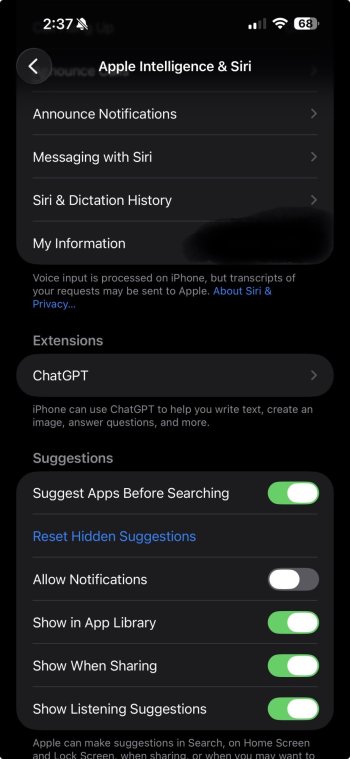
I absolutely agree, and I believe there’s already visible evidence that this is Apple’s plan, for plug-and-play Siri extensions. It’s quite literally a section in the Settings page for Siri called Extensions. ChatGPT is currently the only listed extension option, but with a dedicated section for it, I think chances are very high that Apple is working towards more options there. 👍🏻
 

Attachments

  • IMG_0205.jpeg
    IMG_0205.jpeg
    153.1 KB · Views: 102
... I’ve been thinking Apple should change the app icon for the Finder app on the Mac to a new one that actually communicates the app’s purpose. ...

... recent rumors and reports suggest Apple is testing an animated version of the Finder smiley face to be the new face for Siri. ...
An interesting proposition -- though, speaking as a long-time MacHead, I have to say I've never actually heard anyone complain about that, until now. (Not that I object, mind you.)

Interesting background history for you: The original Finder icon had nothing at all to do with file management. It was actually just a bit of decoration which popped up when you logged into powered on your Mac, and it looked like this little guy:


happymac_closeup.jpg


So, it was really a more literal interpretation of the computer itself... and the fact that it was smiling at you meant that your computer had successfully gotten past the initial hardware tests and was booting the OS successfully.

The icon changed subtly over time, and was at one point reimagined as a more "modern" and less literal boot screen, that looked something like this:

macos753-3-1.png


Starting to look familiar? Well, in the meantime, another (non-smiling) variant of the icon got you to the "File Manager" -- but only by proxy; back when the concept of the "Multi-Finder" became a thing (and you finally had enough memory that you could open more than one app at the same time) the non-smiling version became representative of the interface that you would use to manage the computer itself, as opposed to the different apps you were running. It still didn't really represent "where your files were"; that was represented by icons that generally resembled some sort of disk, and those disk icons lived directly on the desktop itself, instead of hiding inside of a "File Manager" as they did in Windows or Unix computers.

mpw_4.png


Well... as many of you likely already know, Apple went fully into the Unix world with the transition to Mac OS X, back in 2001. And while Apple still to this day maintains legacy options to display the hard drives on the desktop... that's no longer really where those disks live. And that's when the icon we're all familiar with today became a more direct link to file management.

....... Crap. That was full on a quarter of a century ago.

Damn, I'm old.
 
Last edited:
Crazy to think that we are discussing IOS 27. It feels like I just switched to IOS 26, I switched to it once beta updates rolled out.
Yeah, same here, I hopped onto the 26 beta train as soon as the first dev beta was available. Time flies when you’re having fun! 🙂👍🏻. I’m excited about 26.4, it will be interesting to see the new enhanced Siri and Apple Intelligence features. But 27 is really intriguing to me for its potential for some of these smaller quality of life enhancements, like an improved App Dock like iPadOS, etc. I’m excited to see what iOS 27 will bring. Probably not as many big and flashy features, but lots of room for smaller improvements and features that could really add up. 👍🏻
 
I de-Googled my life a few years back and have no interest in using anything Google-related ever again, so my concern here may not be specific to iOS 27. That said, it would be really disappointing if Apple abandons its commitment to on-device models in favor of Gemini (relying on Google's servers). I fully understand they can't fit a full LLM into an iPhone yet, but I believe there's a future in highly fine-tuned SLMs. If Apple gives up on that direction: A) they'd be squandering a real opportunity to remain the champions of on-device AI, and B) I won't use Apple Intelligence at all, because I refuse to feed any of my data to the Google machine.
 
I de-Googled my life a few years back and have no interest in using anything Google-related ever again, so my concern here may not be specific to iOS 27. That said, it would be really disappointing if Apple abandons its commitment to on-device models in favor of Gemini (relying on Google's servers). I fully understand they can't fit a full LLM into an iPhone yet, but I believe there's a future in highly fine-tuned SLMs. If Apple gives up on that direction: A) they'd be squandering a real opportunity to remain the champions of on-device AI, and B) I won't use Apple Intelligence at all, because I refuse to feed any of my data to the Google machine.
If it’s any comfort, I doubt they’re going to abandon on-device AI. What they’re talking about doing right now is incorporating custom models from Google into the stack. So Apple is still fully in charge, and many of these custom models are likely either running on-device, or integrating with Apple’s on-device models. So Apple doesn’t seem to be giving up on on-device models anytime real soon.

Also, on-device models would be required for Personal Context and integration with Siri Shortcuts and other device features. 👍🏻
 
If it’s any comfort, I doubt they’re going to abandon on-device AI. What they’re talking about doing right now is incorporating custom models from Google into the stack. ...
Yeah... Apple is aiming for a hybrid model that allows some form of Siri to continue providing meaningful responses while the user is offline. What that's really going to look like has yet to be revealed... but I'm optimistic, personally. Anything they do on-device is by default going to be more secure and more private.

And Apple will no doubt hype up their cloud security offerings, when the time comes to make their actual-no-kidding-we're-finally-shipping-something-and-we-swear-its-not-vaporware-this-time announcement -- which all signs are indicating will happen at this years WWDC. The real question on the minds of security focused users is: how long before it gets hacked? Because we all know there is some potential for that, every single time you invoke the cloud.

Apple's response to that sentiment will be crucial to determining how successfully this rolls out.
 
If it’s any comfort, I doubt they’re going to abandon on-device AI. What they’re talking about doing right now is incorporating custom models from Google into the stack. So Apple is still fully in charge, and many of these custom models are likely either running on-device, or integrating with Apple’s on-device models. So Apple doesn’t seem to be giving up on on-device models anytime real soon.

Also, on-device models would be required for Personal Context and integration with Siri Shortcuts and other device features. 👍🏻

Let's hope so! Considering they've done liquid glass, one can expect any weird direction from Apple these days.
 
  • Like
Reactions: NBKindaGirl
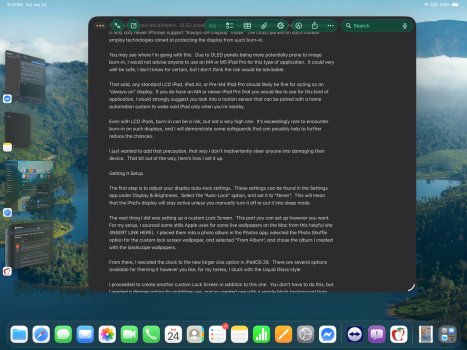
I was thinking about this earlier, an option for tinting the Liquid Glass buttons systemwide (similar to the tinted app icons) could be pretty cool. I made a mockup to demonstrate what I’m talking about on iPadOS. To be honest, I don’t know that I would really use it much, but it could still be pretty cool. I wonder if Apple may add something like that in 27 as an expansion of the “Tinted” option for Liquid Glass in Display & Brightness settings?
 

Attachments

  • IMG_0430.jpeg
    IMG_0430.jpeg
    404.1 KB · Views: 134
I was thinking about this earlier, an option for tinting the Liquid Glass buttons systemwide (similar to the tinted app icons) could be pretty cool. I made a mockup to demonstrate what I’m talking about on iPadOS. To be honest, I don’t know that I would really use it much, but it could still be pretty cool. I wonder if Apple may add something like that in 27 as an expansion of the “Tinted” option for Liquid Glass in Display & Brightness settings?
I am hoping they figure out icon tinting. Using tinted icons on lower opacities it’s either low legibility or a tad over saturated, plus folders will look incongruous at times on Mac (AKA too dark, or just a different hue.)
 
Oh! There’s an iOS 27 speculation thread already! Let’s hope it is a kinda Snow Leopard release with focus on performance, speed, efficiency and, especially, bug fixes.
 
  • Like
Reactions: Kal Madda
Register on MacRumors! This sidebar will go away, and you'll see fewer ads.