
Got a tip for us?
Let us know
Become a MacRumors Supporter for $50/year with no ads, ability to filter front page stories, and private forums.
iPad as a laptop replacement
- Thread starter Omar Comin' Yo
- WikiPost WikiPost
- Start date
- Sort by reaction score
You are using an out of date browser. It may not display this or other websites correctly.
You should upgrade or use an alternative browser.
You should upgrade or use an alternative browser.
- Status
- The first post of this thread is a WikiPost and can be edited by anyone with the appropiate permissions. Your edits will be public.

vanilla_prison
macrumors regular
Many people still swear by their M1 iPads and Macs. The M3 iPad Air came out last year and will receive software updates and support until 2032/2033. It’ll be a good device for yearsDoes anyone here have the iPad Air M3 and is able to testify about its longevity? Will it be useable (and still feel fast) for the next 3 years or is it already showing its age?
Der_mit_dem_langen
macrumors member
Thank you for your answer. I heard the battery is very bad when using the Apple Pencil? My main purpose would be using the iPad as a digital notepad…Many people still swear by their M1 iPads and Macs. The M3 iPad Air came out last year and will receive software updates and support until 2032/2033. It’ll be a good device for years

Kal Madda
macrumors 603
I don’t own an M3 iPad Air (I have an M4 iPad Pro), but I’ve never heard any reports of really bad battery runtime on the M3 iPad Air. I used an 11” M1 iPad Pro for many years, and never had any issues with battery life. 👍🏻Thank you for your answer. I heard the battery is very bad when using the Apple Pencil? My main purpose would be using the iPad as a digital notepad…
I don’t have a foldable keyboard, but I’ve heard ProtoArc is a good option. 👍🏻. I don’t know how it stacks up against the Magic Keyboard, but I’ve seen a number of reviewers from sources like 9to5Mac recommend it. 👍🏻
Funny enough the ones I tried a few years ago were PhotoArc brand. There aren't a lot of foldable Bluetooth keyboards on Amazon, so slim pickings. They were great when folded but the typing experience was horrific. I don't believe you can make a foldable keyboard without sacrificing the typing experience and key feel. Even though my mechanical weighs 4lbs, it may be worth bringing it with you for the unmatched typing experience.

I7guy
macrumors Westmere
A friend has a PhotoArc keyboard, she likes it. I was looking for foldable keyboard. I looked on Amazon and ended up getting a SAMSERS. Never heard of them, but I took a chance. Has an integrated touchpad and three Bluetooth connections. Scissor type keyboard, which I really enjoy typing on. It was $60 and seems solid and comes with a microsuede or something bag to carry the keyboard.Funny enough the ones I tried a few years ago were PhotoArc brand. There aren't a lot of foldable Bluetooth keyboards on Amazon, so slim pickings. They were great when folded but the typing experience was horrific. I don't believe you can make a foldable keyboard without sacrificing the typing experience and key feel. Even though my mechanical weighs 4lbs, it may be worth bringing it with you for the unmatched typing experience.

flobach
macrumors regular
From my experience with my 11“ iPad Pros (M2 & M5) the battery does take a decent hit when using the Apple Pencil in apple notes, but then again charging the device is quick and easy.Thank you for your answer. I heard the battery is very bad when using the Apple Pencil? My main purpose would be using the iPad as a digital notepad…
JamesMay82
macrumors 68000
Yeah, the cursor is one of them. It shows up on the iPad proper but doesn’t show up when connecting to the external monitor. If I disconnect the external keyboard and reconnect, the cursor comes back to the external monitor.
Another is the wallpaper doesn’t show on the external monitor when I boot up. If I disconnect from the external monitor and reconnect, the wallpaper shows.
The File app crashes when trying to open on external monitor but not on iPad proper. Have not found workaround for this yet.
Screen vid captures still blank on the external monitor but fine on the iPad proper.
Trying to delete photos or vids from the Photos app on the external monitor crashes the Photos app every time. Not so on the iPad proper.
Edit: Sometimes opening a new tab to a website also crashes Safari on external monitor, but never on iPad proper.
Can’t use emojis on the external monitor but fine on the iPad proper.
When I try to access History in the sidebar in Safari while on the external monitor, Safari just crashes…..every time. Works fine on the iPad proper.
There are some more and I’ll try to remember to list them here as they happen. Just can’t remember them all now. They all only happen on the external monitor. 27 is perfect with no problems so far on the iPad proper. Really hoping for fixes for my external monitor problems. I use my iPad with an external monitor at home 95%+ of the time, and it’s really annoying to have to move the window from the external monitor to the iPad screen just to avoid the glitches.
Edit: Just to be clear, none of this happened on 26 from the very first betas right up through 26.5 for me. I have reported all this in the Feedback app.
Edit: 27 is working fine on my iPad 9. I reduced motion, use solid icons as opposed to Liquid Glass, and have it set to “full screen apps”. It’s very zippy and haven’t run into any glitches so far.👌🏻🙂
When you mention about file app crashing it always makes me worry about accidental deletions in the cloud and them syncing across my other devices.
My biggest gripe with iPad was the files app and how it handled external drives. I’ve had it where for some reason it’s corrupted a drive and made it unreadable on a Mac afterwards and that’s always made me weary.
I was hoping it would get better in the upcoming 27… hopefully they get these bugs sorted
Kal Madda
macrumors 603
Yeah, perhaps that was with earlier versions of iPadOS like 13? Sorry to hear you encountered that issue. Personally, in the 5-6 years I’ve been using my iPad as my primary computer, I’ve never encountered any such issues in Files, it’s always been super stable for me. 🙂👍🏻When you mention about file app crashing it always makes me worry about accidental deletions in the cloud and them syncing across my other devices.
My biggest gripe with iPad was the files app and how it handled external drives. I’ve had it where for some reason it’s corrupted a drive and made it unreadable on a Mac afterwards and that’s always made me weary.
I was hoping it would get better in the upcoming 27… hopefully they get these bugs sorted

bondr006
macrumors 68040
When you mention about file app crashing it always makes me worry about accidental deletions in the cloud and them syncing across my other devices.
My biggest gripe with iPad was the files app and how it handled external drives. I’ve had it where for some reason it’s corrupted a drive and made it unreadable on a Mac afterwards and that’s always made me weary.
I was hoping it would get better in the upcoming 27… hopefully they get these bugs sorted
Just to reiterate, these bugs only happen when extended to an external monitor. When used with my Logitech Combo Touch and no external monitor, there are no problems that I have found….so far. I hope that whatever is making me have problems when using an external monitor gets sorted out, since I use an external monitor a lot…
Using latest PB. Expected a new one this week.

Beefbowl
macrumors regular
Yeah, perhaps that was with earlier versions of iPadOS like 13? Sorry to hear you encountered that issue. Personally, in the 5-6 years I’ve been using my iPad as my primary computer, I’ve never encountered any such issues in Files, it’s always been super stable for me. 🙂👍🏻
Files was stable if you were using an Apple file system. It had reports of being flakey with exFAT devices and people who used that file system so they could move their drives between platforms reported some instances of data loss. Never hit that one, myself. I mostly use apfs drives and maybe I got lucky.
It could also get into a weird state with network shares where it would lose connection to a network share but would be "stuck" on a blank file browser until you rebooted the iPad - even hard-closing Files didn't unstick it. Hit that one plenty of times.
I don't think either has been a real issue lately and it has become pretty mature over the years. It took Apple ages to add stuff like a "format" option but they did get there eventually.
I just wish it had an "eject disk" button.
In "exactly the opposite of using an iPad WITH an external monitor" I have been really getting mileage from being able to use my iPad in Sidecar mode recently. I've been learning vi and it's been very handy to have the iPad as a smaller display where my vi session can run while I watch a tutorial on the main screen. It's possibly the least cost-effective portable monitor ever but it's a neat party trick.
(Technically I have been using vi for like 40 years, but just for quick edits to small things. I have never needed to do things like work with multiple files before)
Beefbowl
macrumors regular
A friend has a PhotoArc keyboard, she likes it. I was looking for foldable keyboard. I looked on Amazon and ended up getting a SAMSERS. Never heard of them, but I took a chance. Has an integrated touchpad and three Bluetooth connections. Scissor type keyboard, which I really enjoy typing on. It was $60 and seems solid and comes with a microsuede or something bag to carry the keyboard.
There's a lot of weird only-on-Amazon brands. I wouldn't use a charger or a USB-C cable from any of them but I've also taken a chance on random peripherals like that in the past and generally been happy with what eventually came in the mail.
It's not quite the same level as ya-pays-ya-money-and-ya-takes-yer-chances as AliExpress at least 🙂
OMG. I cannot believe it. For years this has been the Deal Breaker for the iPad Pro as a Laptop replacement in the Mobile Photo World. No joke, no fairytale. We finally have received AI Denoise in LR Mobile. The Key Function that required you to use an Mac as main Photo Platform and did render the iPad Pro as a nice to have gadget.
It is finally here: AI Denoise for LR Mobile for iPad!
B
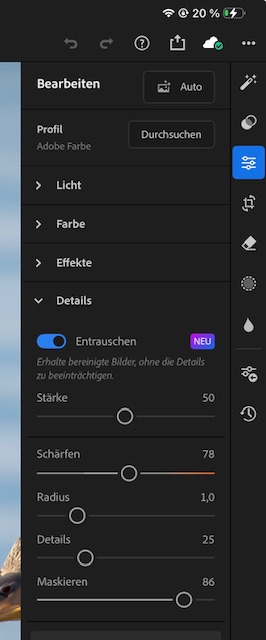
It is finally here: AI Denoise for LR Mobile for iPad!
B
Last edited:
OMG. I cannot believe it. For years this has been the Deal Breaker for the iPad Pro as a Laptop replacement in the Mobile Photo World. No joke, no fairytale. We finally have received AI Denoise in LR Mobile. The Key Function that required you to use an Mac as main Photo Platform and did render the iPad Pro as a nice to have gadget.
It is finally here: AI Denoise for LR Mobile for iPad!
BView attachment 2651716
That's great - I wasn't aware it happened.
Just tried it - I was surprised by how quick it was on my 13" 1TB M5 Pro. It blows away my PC - I had to compare the results on both to convince myself it actually worked on the iPad.
Last edited:

1BadManVan
macrumors 68040
I tried for awhile now to use an iPad as a secondary laptop replacement and I just can't get used to how the os handles certain things, even just for basic usage. I have an M1 air with the Magic Keyboard, it's plenty fast but just don't like how things flow when trying to multitask with it. I also don't have any use for using an Apple Pencil with it which I know is a huge plus with these.
Selling it tonight to someone and going to take the funds from it and get a used M1 MacBook instead to have at work.
My kids love their iPads and use them daily, I just never could find the right fit for my usage and how I like to use them I guess.
Selling it tonight to someone and going to take the funds from it and get a used M1 MacBook instead to have at work.
My kids love their iPads and use them daily, I just never could find the right fit for my usage and how I like to use them I guess.
is anyone (besides me) still trying to use a non-base model iPad as their computer AND who doesn't need/doesn't have a pencil? I'm interested how many of us are left, if indeed the numbers are decreasing - I don't know. I'm really considering throwing in the towel on the iPad after close to 7 years of using them (Pro and Air) in lieu of a laptop. In that time it's got so much better and software is kind of all but a minor gripe for me personally. For me it's more the form factor.
Kal Madda
macrumors 603
I’m using a non-base model iPad as my primary computer, but I do use the Apple Pencil extensively and need it for my graphic design and digital art work. If you’re talking about the number of people using an iPad as primary computer, I think that number has increased from what I’ve seen in the community. If you’re talking about people who specifically don’t like the Apple Pencil and the iPad’s form-factor who are also trying to use it as a primary computer, I would imagine that would be a fairly small number of people. I don’t know why anyone would use a device they dislike the form factor of as their primary device. But maybe I’m not understanding correctly?is anyone (besides me) still trying to use a non-base model iPad as their computer AND who doesn't need/doesn't have a pencil? I'm interested how many of us are left, if indeed the numbers are decreasing - I don't know. I'm really considering throwing in the towel on the iPad after close to 7 years of using them (Pro and Air) in lieu of a laptop. In that time it's got so much better and software is kind of all but a minor gripe for me personally. For me it's more the form factor.
is anyone (besides me) still trying to use a non-base model iPad as their computer AND who doesn't need/doesn't have a pencil? I'm interested how many of us are left, if indeed the numbers are decreasing - I don't know. I'm really considering throwing in the towel on the iPad after close to 7 years of using them (Pro and Air) in lieu of a laptop. In that time it's got so much better and software is kind of all but a minor gripe for me personally. For me it's more the form factor.
I use a 13" 1TB M5 Pro with MKB in lieu of my laptop these days and while I have a Pencil, I never use it.
ah interesting. I guess I'm just wondering whether any movement of people is falling out of love with the form factor.I’m using a non-base model iPad as my primary computer, but I do use the Apple Pencil extensively and need it for my graphic design and digital art work. If you’re talking about the number of people using an iPad as primary computer, I think that number has increased from what I’ve seen in the community. If you’re talking about people who specifically don’t like the Apple Pencil and the iPad’s form-factor who are also trying to use it as a primary computer, I would imagine that would be a fairly small number of people. I don’t know why anyone would use a device they dislike the form factor of as their primary device. But maybe I’m not understanding correctly?
bondr006
macrumors 68040
I use my iPad Pro as my primary computer also for my real estate and property management work. I love the form factor over a laptop. To me it is the most flexible device Apple has ever made. For me it fills the need of laptop, desktop, and tablet….all very well. I take it on the go with me, I use it on my desk with external monitor, I use it to sketch floor plans and property dimensions, I use it to take notes with the Apple Pencil, I use it to fill pdf’s and forms. And, last but not least, I use it for browsing, news, and entertainment. Most flexible device ever, and I love iPad OS.ah interesting. I guess I'm just wondering whether any movement of people is falling out of love with the form factor.
I chose to go for 11". Since I still have my MacBook Pro 14" in case I need a bigger screen, I didn't feel the need to spend the extra money on the 13". I did now get the Apple Pencil and it is good indeed. I'm not using it as much as I thought I would, but when I do it is really good.Awesome! Which size are you using, the 11” or 13”? Both definitely have their perks. 👍🏻. If you do digital art, the Apple Pencil will be a major improvement, and I really like the squeeze gesture on the new pencil. I’m glad it’s been working out well for you! 👍🏻
In the past month, I have only felt a need to use my laptop twice. One time I couldn't figure out how to change colors in a table in the Notes app. The other time was editing an Excel file that isn't stored in OneDrive (I have nothing in OneDrive). I should probably switch to Pages as that will more seamlessly integrate with where I store files.
Kal Madda
macrumors 603
Awesome! 👍🏻. I think the 11” is a nice balance of portability and capability, and it is definitely cheaper. I would definitely recommend switching to Pages and Numbers. I used to use Microsoft Word and Excel, but ended up making the switch to iWork apps initially when I switched to the Mac, and then again after I switched to the iPad. The Mac versions of Word and Excel were somewhat okayish, but Microsoft doesn’t support it as well as the Windows version, so never really got fully into it on the Mac, and when I switched to the iPad, I just dropped Word and Excel altogether in favor of Pages and Numbers because the iPad versions of them are just far better and are actually desktop-class, unlike MS Word and Excel. And I just got really tired and frustrated with Microsoft’s terrible support. So I would definitely give Pages and Numbers a try, and see how they work out for you. 👍🏻I chose to go for 11". Since I still have my MacBook Pro 14" in case I need a bigger screen, I didn't feel the need to spend the extra money on the 13". I did now get the Apple Pencil and it is good indeed. I'm not using it as much as I thought I would, but when I do it is really good.
In the past month, I have only felt a need to use my laptop twice. One time I couldn't figure out how to change colors in a table in the Notes app. The other time was editing an Excel file that isn't stored in OneDrive (I have nothing in OneDrive). I should probably switch to Pages as that will more seamlessly integrate with where I store files.
I hope you continue to enjoy your experience with the iPad, welcome aboard!
CSAppleFan
macrumors member
I have the m5 11 inch iPad Pro right now. I also have a 14 inch m5 MacBook Pro base model. I have the itch to sell both devices and go all in on a 13 inch iPad Pro. I tried it back in 2022 but went back to a MacBook but i think it is in a better spot now with the revamped os. I’m still hesitant since i like having a MacBook to use as well but would love the simplicity of having one device.
When you tried it before did you use the Magic Keyboard case?I have the m5 11 inch iPad Pro right now. I also have a 14 inch m5 MacBook Pro base model. I have the itch to sell both devices and go all in on a 13 inch iPad Pro. I tried it back in 2022 but went back to a MacBook but i think it is in a better spot now with the revamped os. I’m still hesitant since i like having a MacBook to use as well but would love the simplicity of having one device.
CSAppleFan
macrumors member
Yes, i had that and the 11 inch M1 iPad Air at the time.When you tried it before did you use the Magic Keyboard case?