
Become a MacRumors Supporter for $50/year with no ads, ability to filter front page stories, and private forums.

Ocias

macrumors newbie
Original poster
A year ago my iPad Pro’s screen started un-sticking from the frame, and since then the charging port has deformed to form a gap, and continues to grow bigger.
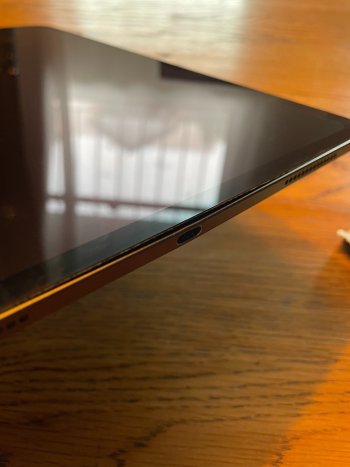
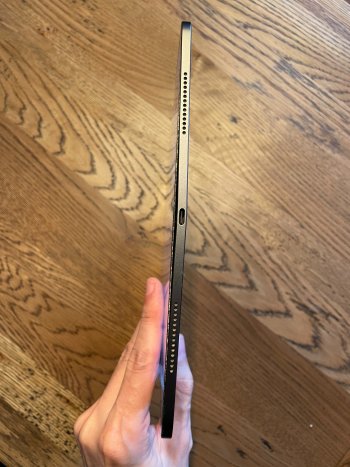
IMG_3969.jpgIMG_3970.jpg

I went to the genius bar with it and they told me not to worry, and that it’s completely safe to continue using… but also said it is physically impossible for this to occur, and that it would have had to have been run over by a car or placed in a fire(?)

Hasn’t ever been inside any case, only peripherals used is an LG Ultrafine it's been plugged into most of the time. 486 cycle count with 80% limit, but haven’t been rough with it in any way.

Has anyone else encountered this? Any idea what could be happening?
 
  • Wow
Reactions: kitKAC
Probably sending a lot of power through the port, slowly burning away the adhesive, and eventually breaks as you see.
 
I think the Genius Bar was not nice with you. Go back again but different one if you can. Mention there is a hazardous risk, like being electrocuted. Ask for a replacement. You can try via the phone too, but you’ll have to pass the first level. They can allow you to send pictures. Just be nice but firm, mention also that you would expect better quality control and that you use official charging device for it.
 
i would try a different genius as suggested by gigatoaster.

i do not know if you are close to two apple stores if you are try the other store.

i also think too much heat when charging unsealed the screen.

tell them you fear a lithium battery fire 🔥 and do not want people to get hurt.
 
  • Like
Reactions: Christopher Kim
Do you have Applecare?

What makes the iPads a bit trickier, is that anything battery related (and for many repairs), they just give you a new (refurb) device, rather than trying to repair it. So they are much more stingy about doing so.

I agree, you should go in again (hopefully different store but at min a different genius), and be nice but firm. Once you start mentioning that you’re concerned about potential fire hazard, etc. I think it’ll become more escalated. Would recommend you do not take an “entitled” attitude - Apple geniuses (and managers) have a decent amount of leeway in how they can help, and you don’t want to give them a reason not to help you (whether you’re in the right or not).

Part of the consideration here is if they do agree to repair/replace, how it’s covered and who pays for it. Assuming you don’t have AppleCare, and it’s outside the 1yr warranty, I think the “goal” should be to be able to pay the battery replacement fee, and basically get a new (refurb) device. I think the fee is a $179 for the 13” M4 iPP. Not nothing, but not bad to basically get a new device.
 
  • Like
Reactions: philipma1957
Do you have Applecare?

What makes the iPads a bit trickier, is that anything battery related (and for many repairs), they just give you a new (refurb) device, rather than trying to repair it. So they are much more stingy about doing so.

I agree, you should go in again (hopefully different store but at min a different genius), and be nice but firm. Once you start mentioning that you’re concerned about potential fire hazard, etc. I think it’ll become more escalated. Would recommend you do not take an “entitled” attitude - Apple geniuses (and managers) have a decent amount of leeway in how they can help, and you don’t want to give them a reason not to help you (whether you’re in the right or not).

Part of the consideration here is if they do agree to repair/replace, how it’s covered and who pays for it. Assuming you don’t have AppleCare, and it’s outside the 1yr warranty, I think the “goal” should be to be able to pay the battery replacement fee, and basically get a new (refurb) device. I think the fee is a $179 for the 13” M4 iPP. Not nothing, but not bad to basically get a new device.


yeah i have a cousin that is a NEW YORK CITY fireman he deals with lithium batteries on a steady basis including iphones and ipads.

the op needs to press for a fix saying he fears for safety of himself and others.
 
Hearing your views, I'm thinking yeah I must have failed to impress my safety concerns on them enough.

It was difficult as they were adamant that I had physically bent it myself, that they didn't believe it could be a battery issue. After pleading with them to believe me, they begrudgingly agreed to send a report to engineering, but perhaps I should just try to get help at another store.

(I don't have applecare, but I am in Australia, so I think the consumer laws protect devices like this fairly well...)
 
Mate, did you get any luck the second time?
I haven't been to a second store... but I did receive a follow up call from the first store with their response from engineering, who repeat the claim that I must have caused the deformation rather than a hardware failure, but also say they have no theory on how it could have possibly happened.
 
  • Sad
Reactions: _Mitchan1999
Sorry to hear that. I would try a new support case on the phone with Apple. It’s not comparable but I had an issue one day and by trying 3 times, I got the right person and he took care of everything.
 
It isn't. There are no dangerous voltages inside an iPad.
Is that because the wall adapter portion of the plug is already doing the converting, so the power being carried from the source is already regulated past that point?

and fair, but I still wouldn't want that thing on a plane with me! Swelling batteries are no joke!
 
The AC adapter will indeed provide up to a maximum of 20 Volts DC to the iPad, so there is no risk of an electric shock.
 
Is it just me? Does it look like the iPad got bent? You'd expect the screen to shatter before separating like that. Never seen that before.

No it's not safe to continue using an iPad like that - stuff will get inside and it's going to cause problems. The charging port "deformed" to cause a gap? The only thing that I know that swells in an iPad is a battery.
 
Last edited:
Register on MacRumors! This sidebar will go away, and you'll see fewer ads.