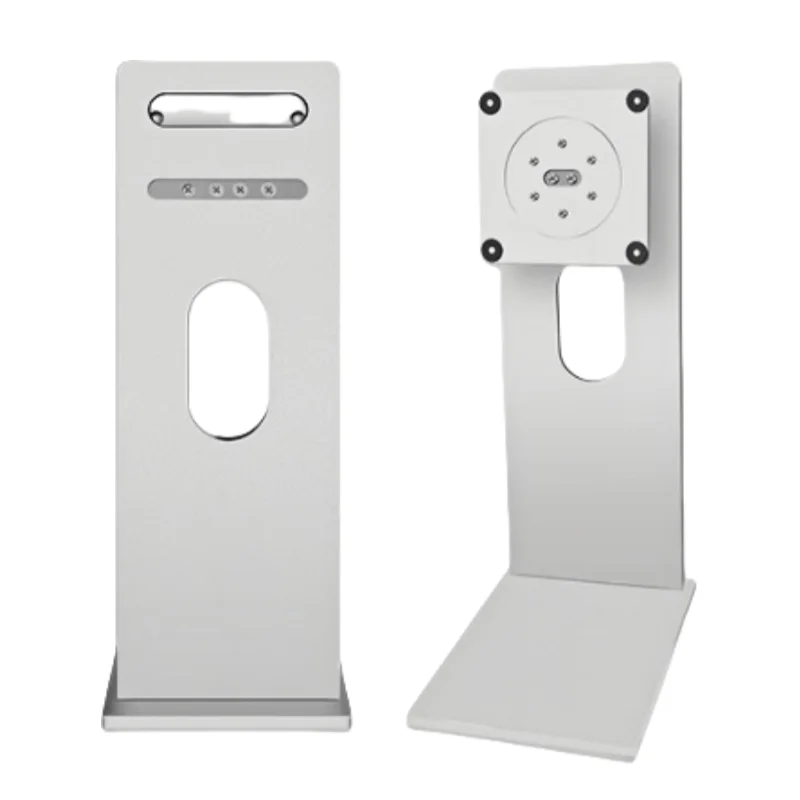
That Chinese aluminum Apple knockoff stand is a great match to the LG UltraFine 6K.
View attachment 2578224
Base top surface and bottom surface. Four screws attach it to the main part of the stand. Screw holes are recessed.
View attachment 2578212View attachment 2578211
As you can see, the base comes with pads to protect the surface of the table. They are in partially recessed cutouts.
It turns out I didn't need the spacers/washers I bought for the VESA mount. The standoffs I mentioned before on the LG 6K monitor inside the VESA mount cutout don't interfere with the mounting plate of the stand. Contrary to the schematics on the website listing, the stand does NOT have a 12 cm mounting plate. It's ~11.5 cm, and those standoffs are each ~2.5 mm wide, so it's an exact fit between the standoffs. Is 11.5 cm a standard size for such mounting plates? Cuz it looks like those standoffs were designed specifically to align the mounting plate. Note that it did not come with those protective washers for the VESA screw mounts, and I didn't bother to add any.
Stand showing the VESA mount and the lift design. The closeup of it partially mounted shows the standoff aligning the plate.
The stand came with thumb screws. The screw holes are recessed, and the collars of the thumb screws fit inside.
View attachment 2578213View attachment 2578215
Monitor lowered
View attachment 2578216View attachment 2578219
Monitor raised. In the first pic you can see those standoffs again on either side of the mounting plate.
View attachment 2578218View attachment 2578217
Highest vs lowest, front view
View attachment 2578244View attachment 2578221
At minimum height the monitor's bottom edge is 3.75" above the table, and the monitor's top edge is 20" above the table. That means I was able to lower the monitor 1.6 inches compared to the stock stand.
Rotated
View attachment 2578222
New vs stock
View attachment 2578223
Thumb screw type. That collar is narrower so it fits inside the recessed part of the screw holes.
View attachment 2578225
It stays put after raising or lowering it. If your table is not stable the monitor can wobble a bit, but it seems pretty stable in my setup. The hinge tilt mechanism isn't the smoothest, but it works fine.
It arrived in 8 calendar days from China, and I didn't get hit with any additional fees (so far) even though it was supposed to be a DAP shipment. I paid US$82 shipped, but it seems I got very lucky because now it's ~US$130 (to Canada at least) with the same Alibaba Premium shipping method, or ~US$115 with Standard shipping.
27inch 32inch All Aluminum Alloy Stand Xdr Style Monitor Cnc Rotating Lift Table Vesa Bracket For Desktop Computer Screen - Buy Factory Wholesale 24 27 32 34 Inches Monitor Lift Swivel Stand Desktop Computer Screen Vesa Bracket desktop Computer Full Set Used 22-27 Inch New Computer Monitor...

www.alibaba.com