
Become a MacRumors Supporter for $50/year with no ads, ability to filter front page stories, and private forums.

prog99

macrumors regular
Original poster
Hi, got a very strange one here.
M2 MBA on 26.5
Noticed that the battery has started draining quickly. However it's not consistent. I've attached the stats.

Nothing unusual in my usage (just safari on a handful of sites) in either period as shown. Just dont get it at all as to why after resuming from sleep it drains much quicker. Checked processes and nothing looks strange.

Any ideas of where else to look?

Thanks.
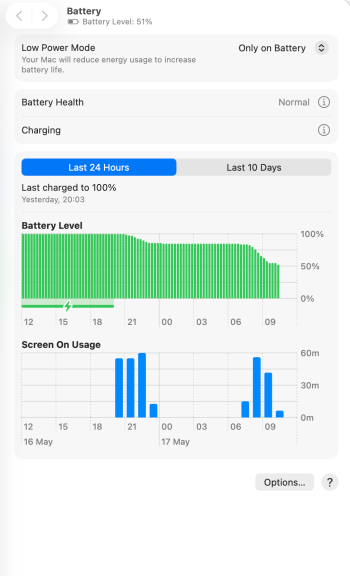
Screenshot 2026-05-17 at 10.26.09.png
 
Activity Monitor certainly.

In real-time it’ll show good information on the CPU tab. But the Energy tab can give clues even when the drain isn’t happening “right now.”
Thanks , yes been through all of that (it shows safari using power unsurprisingly). But nothing untoward hammering it.

I just dont get the difference in how quickly it drained this morning over last night with identical usage.
 
Safari extensions or plug-ins would be my first guess.

If you don't have any, restart the Mac and then launch Safari while holding a Shift key, to get a clean load.
 
Safari extensions or plug-ins would be my first guess.

If you don't have any, restart the Mac and then launch Safari while holding a Shift key, to get a clean load.
Thanks, that didnt help unfortunately.

However I found the smoking gun.
Last update must have reset my screen brightness to dynamic. Moved it back to my own personal setting and battery life looks good again(I hope).
I realised that 1st thing in the morning where it plummeted at this time of the year has the sun streaming straight into the room and the display increased its brightness as a result. In the evening where it didnt plummet the light in the room is more subdued.
 
Register on MacRumors! This sidebar will go away, and you'll see fewer ads.