
Got a tip for us?
Let us know
Become a MacRumors Supporter for $50/year with no ads, ability to filter front page stories, and private forums.
Mac OS X 10.3 (Panther) Shipping
- Thread starter MacRumors
- Start date
- Sort by reaction score
You are using an out of date browser. It may not display this or other websites correctly.
You should upgrade or use an alternative browser.
You should upgrade or use an alternative browser.

hesitaliandad
macrumors member
Originally posted by jkeithh
Just wondering if anybody else has been told by FedEx that their Panther would not arrive today even though it was scheduled for delivery today? As some of you remember, I am also the one that Airborne lost my Powerbook last month. I am done with ordering directly from Apple as everything I have ever ordered from them has had a problem.
i feel your pain. fedex f#@$%d me by sitting on my copy in both oakland and memphis now i am not getting it until monday. i think from now on i am gonna find out what brown can do for me. stupid fedex. 😡
It's like a whole new machine!
I'll just run down the list...
FASTER FASTER FASTER
Exposé - holy cow
Mail - threads are great
the look is very sophisticated
The fast user switch rotating cube is just fun to play with
Apps launch much faster
Finder - now it all makes sense
did I say FASTER?
I'll just run down the list...
FASTER FASTER FASTER
Exposé - holy cow
Mail - threads are great
the look is very sophisticated
The fast user switch rotating cube is just fun to play with
Apps launch much faster
Finder - now it all makes sense
did I say FASTER?
markeleven
macrumors newbie
Mac OSX 10.3 shipping
Installed panther on my crash test dummy ( bondi blue iMac 233 ) and it is working very well. Much snappier than 10.2.6, greatly decreased latency when switching apps, Expose is just what the doctor ordered. Really don't mind buying this one.
Installed panther on my crash test dummy ( bondi blue iMac 233 ) and it is working very well. Much snappier than 10.2.6, greatly decreased latency when switching apps, Expose is just what the doctor ordered. Really don't mind buying this one.
Just thought Id add a followup to my earlier post.
According to the fedex tracking system my package was picked up around 12:30 from RANCHO CORDOVA CA (3:30pm local time for me) and the new estimated delivery date is monday by noon (the original date was today at noon).
As a note, I guess fedex's web tracking system isnt real time since I only found the update recently and Ive been checking every hour or so.
Im a little dissappointed that I wont be able to get it installed and play with this weekend but its probably a good thing since Ive got way too much school work to get done anyways 🙂
According to the fedex tracking system my package was picked up around 12:30 from RANCHO CORDOVA CA (3:30pm local time for me) and the new estimated delivery date is monday by noon (the original date was today at noon).
As a note, I guess fedex's web tracking system isnt real time since I only found the update recently and Ive been checking every hour or so.
Im a little dissappointed that I wont be able to get it installed and play with this weekend but its probably a good thing since Ive got way too much school work to get done anyways 🙂
Re: It's like a whole new machine!
Iv'e just got back from the NYC Apple Store with my family pack. How did you install? Just the upgrade option or archive and install?
Cheers.
Originally posted by primalman
I'll just run down the list...
FASTER FASTER FASTER
Exposé - holy cow
Mail - threads are great
the look is very sophisticated
The fast user switch rotating cube is just fun to play with
Apps launch much faster
Finder - now it all makes sense
did I say FASTER?
Iv'e just got back from the NYC Apple Store with my family pack. How did you install? Just the upgrade option or archive and install?
Cheers.
Re: Re: It's like a whole new machine!
Just backed up for saftey, and used the default Upgrade thing. Took about 1 hour. Super.
Did I say Faster?
Originally posted by Noiseboy
Iv'e just got back from the NYC Apple Store with my family pack. How did you install? Just the upgrade option or archive and install?
Cheers.
Just backed up for saftey, and used the default Upgrade thing. Took about 1 hour. Super.
Did I say Faster?
Address Book.
While I'm waiting for the install, has anybody noticed whether it's possible to print out a single entry from Address Book, a feature very sadly lacking from Jag. Our home office iMac has to use Palm desktop just because of this.
Yeehaa, nearly finished disk 2 now.
While I'm waiting for the install, has anybody noticed whether it's possible to print out a single entry from Address Book, a feature very sadly lacking from Jag. Our home office iMac has to use Palm desktop just because of this.
Yeehaa, nearly finished disk 2 now.
coumerelli
macrumors 6502
Re: Address Book.
Yes! And you choose what fields to print. -And you can add 'spouse' now and many other fields by default. So you don't have to keep adding fields to each and every card. funfunfun
Originally posted by Noiseboy
While I'm waiting for the install, has anybody noticed whether it's possible to print out a single entry from Address Book, a feature very sadly lacking from Jag. Our home office iMac has to use Palm desktop just because of this.
Yeehaa, nearly finished disk 2 now.
Yes! And you choose what fields to print. -And you can add 'spouse' now and many other fields by default. So you don't have to keep adding fields to each and every card. funfunfun
mactarheel
macrumors newbie
Panther shipping via update option
Has anyone else ordered Panther 1.3 through the update option provided by Apple for $19.95 for consumers who have recently purchased new qualifying computers? I sent my form in via fax and called later to receive a reference number. Called Apple (directed to Indiana location) yesterday and they stated that these started shipping yesterday. I just checked and my credit card hasn't been charged yet so I know mine hasn't shipped. A little disappointed but my G5 shipped day one. Given the choice I'd rather have a delay on Panther than on my G5. My understanding is that these orders will arrive via USPS. Does anyone out there have an update on this type of order? Thanks!
Has anyone else ordered Panther 1.3 through the update option provided by Apple for $19.95 for consumers who have recently purchased new qualifying computers? I sent my form in via fax and called later to receive a reference number. Called Apple (directed to Indiana location) yesterday and they stated that these started shipping yesterday. I just checked and my credit card hasn't been charged yet so I know mine hasn't shipped. A little disappointed but my G5 shipped day one. Given the choice I'd rather have a delay on Panther than on my G5. My understanding is that these orders will arrive via USPS. Does anyone out there have an update on this type of order? Thanks!
mactarheel
macrumors newbie
Panther Thread
Thanks Genie! If you happen to see the other thread please let me know. I looked but couldn't find it. Have you received any information on when you might receive yours?
I remember you received your G5 about the same time I received mine. Great pics! At least we received them really fast.
Thanks Genie! If you happen to see the other thread please let me know. I looked but couldn't find it. Have you received any information on when you might receive yours?
I remember you received your G5 about the same time I received mine. Great pics! At least we received them really fast.
vienna_one
macrumors newbie
well, finally I installed panther today
anyone has experience with long startup time?
2nd boot took nearly twice as long as with 10.2.8.
Maybe or better hopefully it will get better
form austrian point of view:
1. finally they managed to get german specific characters into bookmarks of safari
2. also apple got rid with one of the silliest translations of tabs in safari (Titel!?)
also of interest:
suprise, suprise you will find a new entry in your adress book: the apple representation of your country ; )
anyone has experience with long startup time?
2nd boot took nearly twice as long as with 10.2.8.
Maybe or better hopefully it will get better
form austrian point of view:
1. finally they managed to get german specific characters into bookmarks of safari
2. also apple got rid with one of the silliest translations of tabs in safari (Titel!?)
also of interest:
suprise, suprise you will find a new entry in your adress book: the apple representation of your country ; )

Genie
macrumors 6502a
Re: Panther Thread

Genie says try this one:
https://forums.macrumors.com/showthread.php?s=&threadid=43208
Originally posted by mactarheel
Thanks Genie! If you happen to see the other thread please let me know. I looked but couldn't find it. Have you received any information on when you might receive yours?
I remember you received your G5 about the same time I received mine. Great pics! At least we received them really fast.
Genie says try this one:
https://forums.macrumors.com/showthread.php?s=&threadid=43208

zync
macrumors 68000
Anyone with a 15" PowerBook (possibly any PowerBook)...
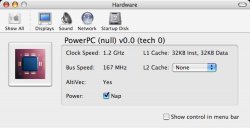
Does anyone have a Hardware section in their sys prefs that shows the G4 icon without the "G4" written on it and when you click it it lists things about the processor. The only option it saves on my machine is whether NAP is on or off....it seems to be stuck on "none" for my L2 cache and 1.2 GHz for my speed even if processor is set to highest...I don't see how the software of the OS can affect something built into the hardware but I guess it can stop sending functions to that hardware....I'm not sure if it's really affecting my system though because it's not terribly slow...I'll have to run some benchmarks to see what's up...Xbench should report the 512k....I'm not sure why this pane exists....but if you don't have it for some reason, here's what it looks like....
Does anyone have a Hardware section in their sys prefs that shows the G4 icon without the "G4" written on it and when you click it it lists things about the processor. The only option it saves on my machine is whether NAP is on or off....it seems to be stuck on "none" for my L2 cache and 1.2 GHz for my speed even if processor is set to highest...I don't see how the software of the OS can affect something built into the hardware but I guess it can stop sending functions to that hardware....I'm not sure if it's really affecting my system though because it's not terribly slow...I'll have to run some benchmarks to see what's up...Xbench should report the 512k....I'm not sure why this pane exists....but if you don't have it for some reason, here's what it looks like....
Attachments

Powerbook G5
macrumors 68040
I have that too, it is installed when you install Xcode because it wasn't there until I did install it at a later time. It doesn't seem to do anything and it does always list L2 as "none" and the processor as a lower speed, but Xbench reports everything is golden.

Phil Of Mac
macrumors 68020
Re: Anyone with a 15" PowerBook (possibly any PowerBook)...
This was extensively discussed in this thread:
https://forums.macrumors.com/showthread.php?s=&threadid=43508
Originally posted by zync
Does anyone have a Hardware section in their sys prefs that shows the G4 icon without the "G4" written on it and when you click it it lists things about the processor. The only option it saves on my machine is whether NAP is on or off....it seems to be stuck on "none" for my L2 cache and 1.2 GHz for my speed even if processor is set to highest...I don't see how the software of the OS can affect something built into the hardware but I guess it can stop sending functions to that hardware....I'm not sure if it's really affecting my system though because it's not terribly slow...I'll have to run some benchmarks to see what's up...Xbench should report the 512k....I'm not sure why this pane exists....but if you don't have it for some reason, here's what it looks like....
This was extensively discussed in this thread:
https://forums.macrumors.com/showthread.php?s=&threadid=43508
