Is OP referring to entry Pro 2019 model?
I haven't seen AR coating issues yet but I haven't cleaned the screen with other than wiping off the dust with microfibre cloth and used my breath for one fingerprint I managed to make lower left corner.
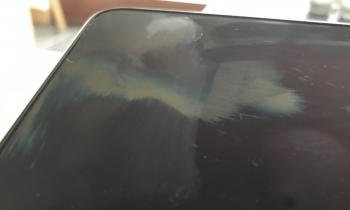
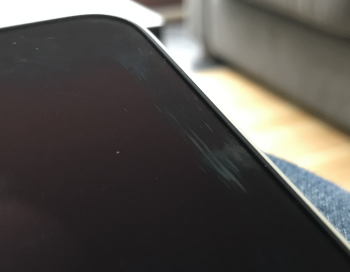
Anyways is surface of the screen very soft? I noticed that there are two short hairline scratches on my screen. I'm pretty sure they weren't there from the factory but I could be wrong. I inspected the screen pretty carefully when I got my machine and I did not notice them then. However couple days ago I noticed first small only about 1/3" long hairline scratch on screen. Then maybe day later I noticed about the same size hairline scratch about identical position at the opposite side of the screen. My cleaning method has been that I have been just lightly swabbing the dust off the screen maybe once a day. I do not rub the screen hard with microfibre cloth, I just fold it to about half of a postcard size and then hold on the edge and use it like a spatula to wipe the screen very lightly.
I was wondering if that would be enough to scratch the screen? I have used that method to my other laptop screens, TV's and I have cleaned my iPad screen also by rubbing harder sometimes to clean some stubborn stains off the screen and none of them have any scratch from that. Is coating on the MBP so soft that this could cause scratches or were those scratches there from the factory but I just did not see them until now? Because strokes I made during wiping off the dust were much longer and always all the way to the edge of the screen but these scratches did not reach the edge, so I wonder if that would be even possible. Anyway I have experienced with my previous iPhone 7 that screen coating was so soft that it would scratch from just wiping it with microfibre cloth, even when there was no dirt on the screen (I pulled off protective film before installing the tempered glass screen protector and I noticed that wiping the screen with microfibre cloth caused hairline scratches I was wondering if the new MBP screen is like that too).
They are not very obvious and can be seen with light coming from certain angles, so there is a possibility I did not just notice them until now, but now when I know where they are I find them easily. They do not show up in normal use, so not a big thing but I want to make sure I don't get more. Would it be wiser to avoid wiping the screen and use compressed air or similar to clean the screen without actually touching it with anything? Also does the surface of the screen touch keyboard or upper case parts when lid is closed? I do not carry my MBP with me so I don't have any additional pressure on the lid when it is closed. Or would it be better to let some dust remain on the screen? I thought if there is not much clearance between the screen and chassis when lid is closed the dust on the screen surface would rub the screen causing the possible marks. But if that is not possible then I guess I should not bother to clean it so often anyways.