
Got a tip for us?
Let us know
Become a MacRumors Supporter for $50/year with no ads, ability to filter front page stories, and private forums.
macOS 10.12 Sierra Unsupported Macs Thread
- Thread starter redheeler
- WikiPost WikiPost
- Start date
- Sort by reaction score
You are using an out of date browser. It may not display this or other websites correctly.
You should upgrade or use an alternative browser.
You should upgrade or use an alternative browser.
- Status
- The first post of this thread is a WikiPost and can be edited by anyone with the appropiate permissions. Your edits will be public.


JColling
macrumors newbie
I would like to kindly update my activity concerning the latest version of OS Sierra (Nov 5, 2016). I decided to give it a try, so I upgraded (with my fingers crossed). I am using a Macbook Pro laptop, mid-2012, 13" model. I am using a 500gb sata hdd with 16gb ram. the vid card is the intel 4000 proprietary.
As a side note, I upgraded while having 100gb free on my HDD and no open apps running. I completed the upgrade successfully from start to finish. So far, all apps are working without issue.
Apple Mail app works.
Maya 2016 works.
Photoshop CC 2015 works
Lightroom 5 works
Illustrator CC 2015 works
Aftereffects CS6 works
Premiere Pro CS6 works
Word 2016 works.
Day One works.
The above apps are the most important to me at this time concerning my day to day workflow. I've got more apps on my system, so I will check back if any apps on my system have any trouble(s). I have not had to use SIRI for anything as of yet. I am not going to call it useless, but for my workflow, it is not useful...Which is fine. The main reason I wanted to upgrade was for Pages 5 app, which is working great.
One thing about photoshop is zoom-scrolling with the middle mouse wheel seems jumpy/glitchy. The zoom is way too dramatic and not smooth like it used to be with EL CAPITAN. Hopefully, that issue will be addressed and fixed soon. It's not much of a problem switching to the zoom tool - takes an extra 5 seconds or so but that's no prob, I'm versatile. 😀 It would still be nice if I could use the mouse wheel like I used too....It's much easier and faster, of course, but I digress.
So all in all, everything on my system including the wifi - works well. No issues at this time. My only gripe is the performance seems somewhat slower than El Capitan in various scenarios. I know some people will disagree, but this is what I am experiencing on my specific system, which I why I outlined the hardware specs for my system before typing anything else in this post. 😛
I hope the next update speeds things up a bit overall! 😀
As a side note, I upgraded while having 100gb free on my HDD and no open apps running. I completed the upgrade successfully from start to finish. So far, all apps are working without issue.
Apple Mail app works.
Maya 2016 works.
Photoshop CC 2015 works
Lightroom 5 works
Illustrator CC 2015 works
Aftereffects CS6 works
Premiere Pro CS6 works
Word 2016 works.
Day One works.
The above apps are the most important to me at this time concerning my day to day workflow. I've got more apps on my system, so I will check back if any apps on my system have any trouble(s). I have not had to use SIRI for anything as of yet. I am not going to call it useless, but for my workflow, it is not useful...Which is fine. The main reason I wanted to upgrade was for Pages 5 app, which is working great.
One thing about photoshop is zoom-scrolling with the middle mouse wheel seems jumpy/glitchy. The zoom is way too dramatic and not smooth like it used to be with EL CAPITAN. Hopefully, that issue will be addressed and fixed soon. It's not much of a problem switching to the zoom tool - takes an extra 5 seconds or so but that's no prob, I'm versatile. 😀 It would still be nice if I could use the mouse wheel like I used too....It's much easier and faster, of course, but I digress.
So all in all, everything on my system including the wifi - works well. No issues at this time. My only gripe is the performance seems somewhat slower than El Capitan in various scenarios. I know some people will disagree, but this is what I am experiencing on my specific system, which I why I outlined the hardware specs for my system before typing anything else in this post. 😛
I hope the next update speeds things up a bit overall! 😀

Sedulous
macrumors 68030
Thanks for sharing. Not to nitpick but this thread is more about installing and running OS 10.12 "Sierra" on unsupported Macs. Your Mac can run OS 10.12 natively so no need to use patched installer.I would like to kindly update my activity concerning the latest version of OS Sierra (Nov 5, 2016). I decided to give it a try, so I upgraded (with my fingers crossed). I am using a Macbook Pro laptop, mid-2012, 13" model. I am using a 500gb sata hdd with 16gb ram. the vid card is the intel 4000 proprietary.
As a side note, I upgraded while having 100gb free on my HDD and no open apps running. I completed the upgrade successfully from start to finish. So far, all apps are working without issue.
Apple Mail app works.
Maya 2016 works.
Photoshop CC 2015 works
Lightroom 5 works
Illustrator CC 2015 works
Aftereffects CS6 works
Premiere Pro CS6 works
Word 2016 works.
Day One works.
The above apps are the most important to me at this time concerning my day to day workflow. I've got more apps on my system, so I will check back if any apps on my system have any trouble(s). I have not had to use SIRI for anything as of yet. I am not going to call it useless, but for my workflow, it is not useful...Which is fine. The main reason I wanted to upgrade was for Pages 5 app, which is working great.
One thing about photoshop is zoom-scrolling with the middle mouse wheel seems jumpy/glitchy. The zoom is way too dramatic and not smooth like it used to be with EL CAPITAN. Hopefully, that issue will be addressed and fixed soon. It's not much of a problem switching to the zoom tool - takes an extra 5 seconds or so but that's no prob, I'm versatile. 😀 It would still be nice if I could use the mouse wheel like I used too....It's much easier and faster, of course, but I digress.
So all in all, everything on my system including the wifi - works well. No issues at this time. My only gripe is the performance seems somewhat slower than El Capitan in various scenarios. I know some people will disagree, but this is what I am experiencing on my specific system, which I why I outlined the hardware specs for my system before typing anything else in this post. 😛
I hope the next update speeds things up a bit overall! 😀
[doublepost=1478361999][/doublepost]
Yes, that would be frustrating. Are you sure nothing is resetting machine power? Perhaps the battery on the logic board is dead? That might reset nvram to defaults and cause this problem after every shutdown (I think).Volumen Control on iMac is gone again.
Postinstall can run as often as I want. It's not working.
I do not care now. Because I prefer to buy a new Mac than this back and forth. Once USB does not go, only after a new installation, now the volume does not go again.
I just want to share that even though I wasn't experiencing any issues I decided to go back to El Capitan. I think Sierra needs I little more polishing, at this time the performance is a little worse than El Capitan at least on my Macbook Pro 5,5, often I experienced little freezings when on heavy load of apps, not to mention that battery life was also worse. El Capitan just don't have these issues, it just flows perfectly. I'll probably update again when .2 or .3 update arrives.
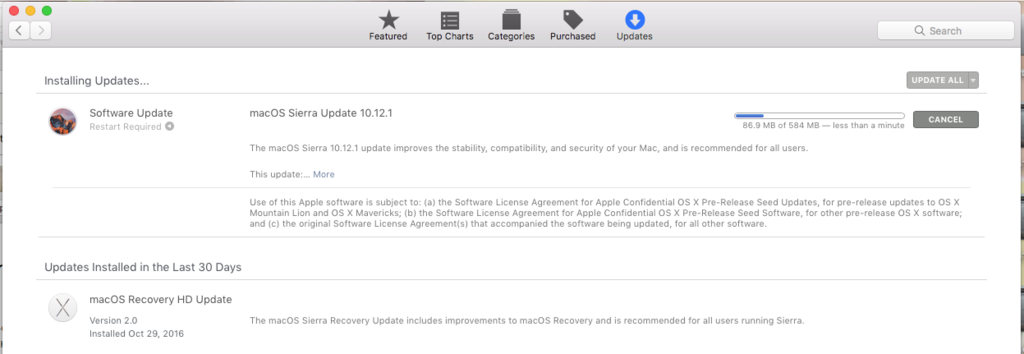
The AUSenabler doesn't show the update for me... it always shows a Twitter update, but I don't have the twitter app installed....Thanks all, after I'm using the AUS I'm update to 10.12.1

FilthyMuppetInnuendo
macrumors regular
Anyone else having problems with iBooks? PDFs open fine (because Preview), but any ePUB files of any sort are… invisible.
First time opening the application in Sierra; hadn’t noticed until now. Only the rim and shadow of the window show up.

First time opening the application in Sierra; hadn’t noticed until now. Only the rim and shadow of the window show up.
Last edited:
Sedulous
macrumors 68030
I had been trying to figure this out for a while. Simple answer: run post install but this time include "recovery patch". Easy as that.I tried to boot into the recovery partition by holding down command and R on boot up but it does the circle with a line through it. How do you install the recovery partition?
[doublepost=1478404020][/doublepost]
Weird. Works fine for me.Anyone else having problems with iBooks? PDFs open fine (because Preview), but any ePUB files of any sort are… invisible.
First time opening the application in Sierra; hadn’t noticed until now. Only the rim and shadow of the window show up.

otiselevatorguy
macrumors newbie
Hey, I have used 10.12.1 for a while on my late-2008 MacBook and it's been fine, despite a little bit slow.
Today, I went and got myself a 120GB Patriot Blast SSD and decided to make a clean install of macOS Sierra + dosdude1's patcher tool.
However I went into some problems when I try to install it,
First of all, the USB install drive isn't detected if I put the unpartitioned SSD. (This is fixed by using a rEFIt CD and boot the USB install drive.
Then I went to another problem which stops me here. After I formatted the disk to macOS Journaled and GUID and hit install, the install screen stuck at "11 minutes remaining". When I have a look at the installer log, here's what happened.
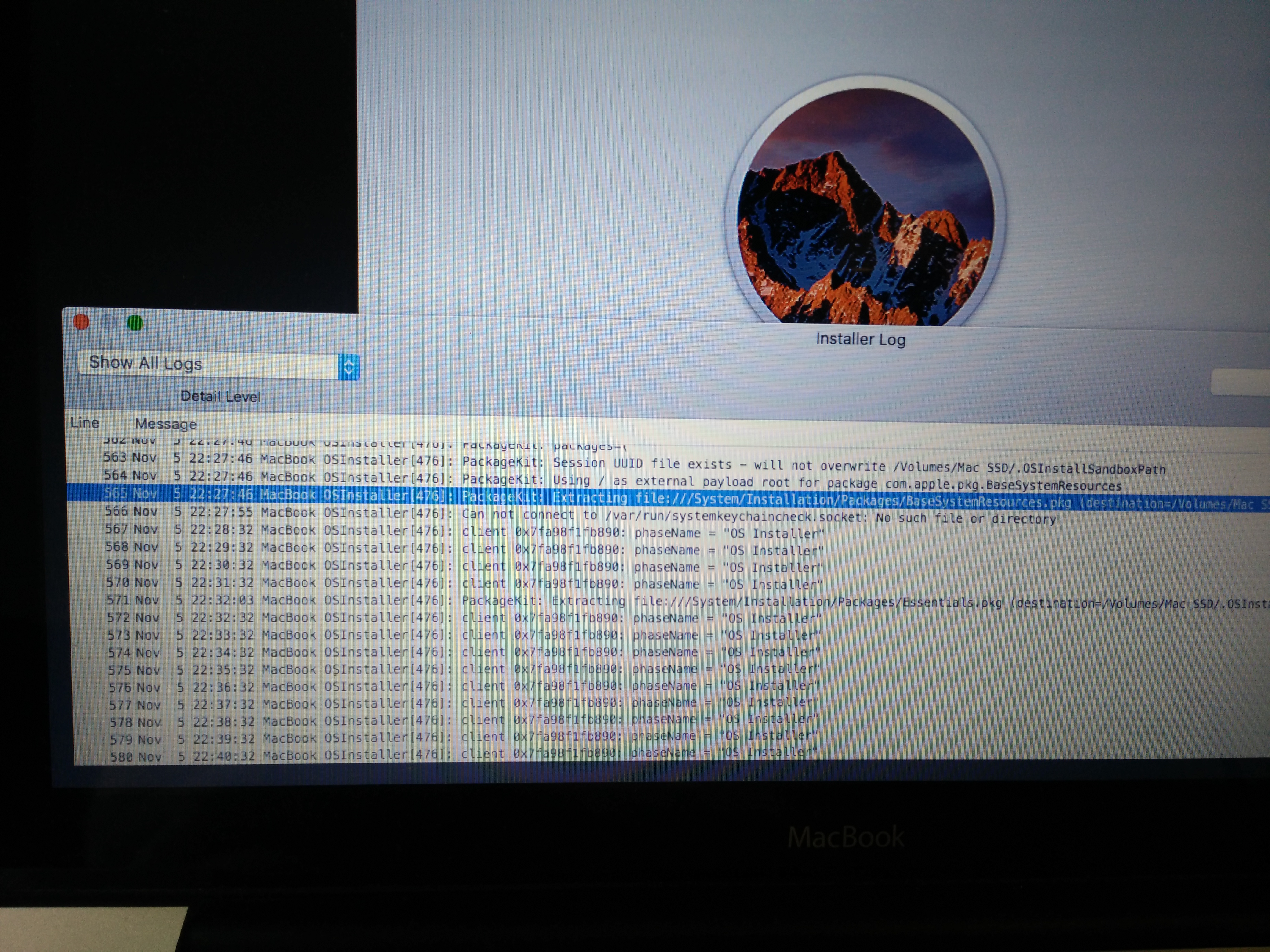
It's just there and periodically saying " MacBook OSInstaller[476]: client 0x7fa98f1fb890: phase name= "OS Installer".
And then it just stuck there and it never finished setup anyway.....😡
Then I decided to do a force shutdown and it turns out that it shows that folder icon with a question mark.
But when I used the stock 250GB HDD, it seems to install fine without problems?
Is there anything wrong with the SSD? Or it's just not compatible and Installer doesn't like the SSD?
I tried installing Windows 7 on it with the same MacBook and it seems to work fine, installed bootcamp drivers and it works great, but not with macOS Sierra.
Today, I went and got myself a 120GB Patriot Blast SSD and decided to make a clean install of macOS Sierra + dosdude1's patcher tool.
However I went into some problems when I try to install it,
First of all, the USB install drive isn't detected if I put the unpartitioned SSD. (This is fixed by using a rEFIt CD and boot the USB install drive.
Then I went to another problem which stops me here. After I formatted the disk to macOS Journaled and GUID and hit install, the install screen stuck at "11 minutes remaining". When I have a look at the installer log, here's what happened.
It's just there and periodically saying " MacBook OSInstaller[476]: client 0x7fa98f1fb890: phase name= "OS Installer".
And then it just stuck there and it never finished setup anyway.....😡
Then I decided to do a force shutdown and it turns out that it shows that folder icon with a question mark.
But when I used the stock 250GB HDD, it seems to install fine without problems?
Is there anything wrong with the SSD? Or it's just not compatible and Installer doesn't like the SSD?
I tried installing Windows 7 on it with the same MacBook and it seems to work fine, installed bootcamp drivers and it works great, but not with macOS Sierra.
Last edited:
limpiacristales
macrumors newbie
Hello people
I performed a cleaned installation of 10.12.1 using dosdude1 tool on my MBP 15" mid 2009. Just to inform you that everything is working smooth.
does the integrated webcam works in your MBP 15"?
mine's gone (when upgraded from snow leopard)
if so, i will do a clean install, as you did.
Sedulous
macrumors 68030
Did you try to use Sierra Patcher on OS 10.12 or 10.12.1? I don't think it works on 10.12.1 (even the current patcher v 4.1.9).Hey, I have used 10.12.1 for a while on my late-2008 MacBook and it's been fine, despite a little bit slow.
Today, I went and got myself a 120GB Patriot Blast SSD and decided to make a clean install of macOS Sierra + dosdude1's patcher tool.
However I went into some problems when I try to install it,
First of all, the USB install drive isn't detected if I put the unpartitioned SSD. (This is fixed by using a rEFIt CD and boot the USB install drive.
Then I went to another problem which stops me here. After I formatted the disk to macOS Journaled and GUID and hit install, the install screen stuck at "11 minutes remaining". When I have a look at the installer log, here's what happened.
It's just there and periodically saying " MacBook OSInstaller[476]: client 0x7fa98f1fb890: phase name= "OS Installer".
And then it just stuck there and it never finished setup anyway.....😡
Then I decided to do a force shutdown and it turns out that it shows that folder icon with a question mark.
But when I used the stock 250GB HDD, it seems to install fine without problems?
Is there anything wrong with the SSD? Or it's just not compatible and Installer doesn't like the SSD?
I tried installing Windows 7 on it with the same MacBook and it seems to work fine, installed bootcamp drivers and it works great, but not with macOS Sierra.
[doublepost=1478463527][/doublepost]I too am having problems installing sierra on a Macbook 5,2. It boots off the external USB drive and starts to install and then says it cannot be installed on your computer. This does have an SSD drive in it as well, so I will Have to investigate. It was being installed over an el capitan install. I have successfully installed on 2x imac 8,1 at school so we will be able to use more of our iMacs on Sierra and extend their usefulness. any thoughts on ssd and sierra on old macsHey, I have used 10.12.1 for a while on my late-2008 MacBook and it's been fine, despite a little bit slow.
Today, I went and got myself a 120GB Patriot Blast SSD and decided to make a clean install of macOS Sierra + dosdude1's patcher tool.
However I went into some problems when I try to install it,
First of all, the USB install drive isn't detected if I put the unpartitioned SSD. (This is fixed by using a rEFIt CD and boot the USB install drive.
Then I went to another problem which stops me here. After I formatted the disk to macOS Journaled and GUID and hit install, the install screen stuck at "11 minutes remaining". When I have a look at the installer log, here's what happened.
It's just there and periodically saying " MacBook OSInstaller[476]: client 0x7fa98f1fb890: phase name= "OS Installer".
And then it just stuck there and it never finished setup anyway.....😡
Then I decided to do a force shutdown and it turns out that it shows that folder icon with a question mark.
But when I used the stock 250GB HDD, it seems to install fine without problems?
Is there anything wrong with the SSD? Or it's just not compatible and Installer doesn't like the SSD?
I tried installing Windows 7 on it with the same MacBook and it seems to work fine, installed bootcamp drivers and it works great, but not with macOS Sierra.
[doublepost=1478463527][/doublepost]I too am having problems installing sierra on a Macbook 5,2. It boots off the external USB drive and starts to install and then says it cannot be installed on your computer. This does have an SSD drive in it as well, so I will Have to investigate. It was being installed over an el capitan install. I have successfully installed on 2x imac 8,1 at school so we will be able to use more of our iMacs on Sierra and extend their usefulness. any thoughts on ssd and sierra on old macs
Have tried installing onto a 160 HD and it doesnt work, so for some reason 5,2 macbooks dont appear compatible. Any thoughts
Sedulous
macrumors 68030
While I cannot confirm whether MacBook 5,2 is incompatible, I can confirm two things. 1: Patched OS 10.12 will install fine on SSD. 2: Sierra Patcher DOES NOT successfully patch OS 10.12.1. I know dosdude1's Sierra Patcher v4.1.9 says it is compatible with OS 10.12.1 but it is not. Patch OS 10.12 and use AUSEnabler to upgrade to OS 10.12.1.[doublepost=1478463527][/doublepost]I too am having problems installing sierra on a Macbook 5,2. It boots off the external USB drive and starts to install and then says it cannot be installed on your computer. This does have an SSD drive in it as well, so I will Have to investigate. It was being installed over an el capitan install. I have successfully installed on 2x imac 8,1 at school so we will be able to use more of our iMacs on Sierra and extend their usefulness. any thoughts on ssd and sierra on old macs
I am pretty sure MacBook 5,2 is supported with caveats about touchpad as seen in first post #1
[doublepost=1478471025][/doublepost]
My previous response to you (mahurangi) may also be of interest.Have tried installing onto a 160 HD and it doesnt work, so for some reason 5,2 macbooks dont appear compatible. Any thoughts
Last edited:
FilthyMuppetInnuendo
macrumors regular
The iBooks problem above seems to be a serious bug, but something I’m sure I’m just overlooking is that the “Look Up” function doesn’t have a dictionary anymore. What good is “looking up” something if you’re only given Wikipedia and “web videos”?
Sedulous
macrumors 68030
Really? That seems like a strange bug. "Look Up" still works here (MBP5,2).The iBooks problem above seems to be a serious bug, but something I’m sure I’m just overlooking is that the “Look Up” function doesn’t have a dictionary anymore. What good is “looking up” something if you’re only given Wikipedia and “web videos”?
Attachments

Thanks for your reply. So I rebuilt another installer and it has now worked on 2 Macbook 5,2s -one an ordinary drive, the other an SSD. Strange as the installer I made friday upgraded an imac 8,1 fine. ThanksWhile I cannot confirm whether MacBook 5,2 is incompatible, I can confirm two things. 1: Patched OS 10.12 will install fine on SSD. 2: Sierra Patcher DOES NOT successfully patch OS 10.12.1. I know dosdude1's Sierra Patcher v4.1.9 says it is compatible with OS 10.12.1 but it is not. Patch OS 10.12 and use AUSEnabler to upgrade to OS 10.12.1.
I am pretty sure MacBook 5,2 is supported with caveats about touchpad as seen in first post #1
[doublepost=1478471025][/doublepost]
My response to mahurangi may also be of interest to you.
otiselevatorguy
macrumors newbie
It's a 10.12 install USB I created back in September, so that means I was installing 10.11 on the Patriot SSD without success.Did you try to use Sierra Patcher on OS 10.12 or 10.12.1? I don't think it works on 10.12.1 (even the current patcher v 4.1.9).
10.12.1 has nothing to do with the problem I am having, FYI.

Madikan
macrumors newbie
Thanks ! Just downloaded it but it won't install, says I'm running an incompatible version (currently running macOS 10.12.1 old build).Apple actually notes that to get that build, you have to manually download it.
https://developer.apple.com/library/content/releasenotes/DeveloperTools/RN-Xcode/Introduction.html
"Note: To develop apps that use Touch Bar, you must run Xcode 8.1 on macOS 10.12.1 build 12B2657 or later. If you want to develop for Touch Bar, check your macOS build number using the system's About This Mac dialog. If you do not have macOS 12B2657 or later, install the macOS Sierra 10.12.1 Update from https://support.apple.com/kb/dl1897."
What could I do to install it anyway ?

dosdude1
macrumors 68030
What exactly happens when using the 10.12.1 installer with my tool? I'm testing it as I'm writing this, and so far it's successfully completed half of the installation process on my iMac 8,1.While I cannot confirm whether MacBook 5,2 is incompatible, I can confirm two things. 1: Patched OS 10.12 will install fine on SSD. 2: Sierra Patcher DOES NOT successfully patch OS 10.12.1. I know dosdude1's Sierra Patcher v4.1.9 says it is compatible with OS 10.12.1 but it is not. Patch OS 10.12 and use AUSEnabler to upgrade to OS 10.12.1.
I am pretty sure MacBook 5,2 is supported with caveats about touchpad as seen in first post #1
[doublepost=1478471025][/doublepost]
My previous response to you (mahurangi) may also be of interest.
dosdude1
macrumors 68030
Change the line that reads "if( cpuFeatures == "VMM" )" to "if(1==1)" (making that if statement always true). That will in turn return true on the system check, and allow the package to be installed.Alright guys in response to what I wrote earlier, I just dumped the "Distribution" file of the installation's .pkg (new build).
Here it is : https://drive.google.com/open?id=0B1E8oZKUFJNAOGtkS3lVaWtlYUE
Could someone see if it's possible to edit the file so that we could inject it in the pkg and install it anyway ?
Thanks !