Become a MacRumors Supporter for $50/year with no ads, ability to filter front page stories, and private forums.
That's crazy that a restore didn't fix it because it implies that the machine truly did break at the hardware level. The only explanation I can think of is fluke coincidence, but that seems extra unlikely since the machine had been working perfectly for 4 years. I mean, extremely unlikely events do occur all the time. Idk. Either way, that sucks.
 
You did not read his post properly. He said he managed to get it working again using Apple Configurator and DFU Blaster Pro.
 
Commenting to share my experience. M2 Max MBP. Failed to boot days after 26.4.1 update. I couldn't get it to show up DFU in Configurator on my Mac mini. Tech in store tried a revive which failed (did not know it needed to be prior version, I had not seen this thread yet). I was quoted $767 for a logic board replacement. My MBP was a custom config so logic board was backordered. Finally got a call today (on day 24) that it was ready for pickup. Was told that they were able to revive it, and they now know how to do it without failing (meaning they are reviving these machines in store using the older firmware now so it succeeds). The backordered logic board worked in my favor, otherwise I would have been out $800 since the tech had already noted that the revive failed.
 
  • Like
Reactions: CMMChris
Hopefully they will share this information with other stores, make Apple HQ aware of the issue and maybe even inform authorized service providers. It's a shame that people affected by this issue are still mainly offered a logic board replacement.
 
aj wrote in reply 105 above:
"Commenting to share my experience. M2 Max MBP. Failed to boot days after 26.4.1 update. I couldn't get it to show up DFU in Configurator on my Mac mini."

I'm going to repeat this again:
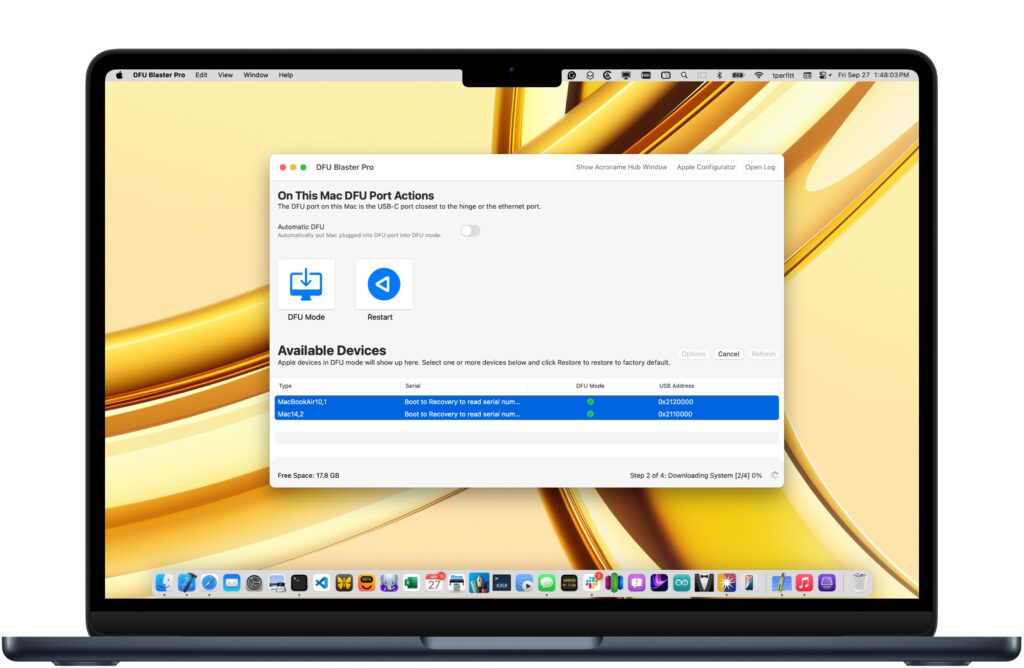
If you are having problems getting a Mac into DFU mode, then download and try DFU Blaster.
Get it here:
You can download it for free.
It's "pay-for" software to use all the features,
BUT...
It also offers a "free mode" as well (with limited features).


The free mode is all you need to "get into DFU mode".
DFU Blaster makes it easy -- no fooling with distorted finger contortions or "counting down".

I highly recommend trying it.
 
Last edited:
Hopefully they will share this information with other stores, make Apple HQ aware of the issue and maybe even inform authorized service providers. It's a shame that people affected by this issue are still mainly offered a logic board replacement.
Apple service providers have access to a tech note that does detail this, but 26.5 also fixes the problem so the issue should be going away.
 
  • Like
Reactions: CMMChris
Apple service providers have access to a tech note that does detail this, but 26.5 also fixes the problem so the issue should be going away.
Awesome! However, I’m not too sure if it's really fixed in 26.5. So far have seen two reports of people claiming it happened to them after the update to 26.5.
 
  • Like
Reactions: creativesmith
Just wanted to report that I successfully updated to 26.5. I have a M1 iMac that I thought had been bricked on a 26.4 update. Thanks to this thread, I revived it using Configurator and 26.3.1. I skipped the subsequent 26.4.x updates, but decided to roll the dice and update the M1 iMac to 26.5. Aside from the 5-minute preparing update estimate not being anywhere close to 5 minutes (it was more like 25-30 minutes), it updated successfully. I have a M5 Air that I had already updated to 26.5 before that without any issue as well.
 
I had the same issue with my M2 MacBook Pro after 26.4, was completely dead.

Thought I have to take it to repair tomorrow but found this , I have my M1 from my Job and was able to boot the M2 into DFU and use the M1 to restore the image.

After the restore the computer came back to life, thanks everyone for the tips.
 
  • Love
  • Like
Reactions: aj8690 and CMMChris
Guys, are you updating to 26.5?
Yep, I did last week and there was no issues. I even did an extra reboot after and no issue for me.
This time I took a full backup before applying the update just in case.

Also, that was my first update since I got my Mac back from Apple which came with 26.4.1 already applied.
 
Register on MacRumors! This sidebar will go away, and you'll see fewer ads.