
Got a tip for us?
Let us know
Become a MacRumors Supporter for $50/year with no ads, ability to filter front page stories, and private forums.
macOS Golden Gate 27.0 Beta 2 - What’s New?
- Thread starter WilliApple
- WikiPost WikiPost
- Start date
- Sort by reaction score
You are using an out of date browser. It may not display this or other websites correctly.
You should upgrade or use an alternative browser.
You should upgrade or use an alternative browser.
- Status
- The first post of this thread is a WikiPost and can be edited by anyone with the appropiate permissions. Your edits will be public.

nortonandreev
macrumors 68040
UI doesn't feel much more legible than Tahoe to me...

Also a bug with the list view:

Also a bug with the list view:


eddie_ducking
macrumors regular
Notifications on DB2 are appearing too far up the screen and are now hiding under the Menu Bar (or at least they are for muggins)
eddie_ducking
macrumors regular
I can't say about Vmware Fusion, but I've presently got a virtual MacOS 26.5.1 guest running under UTM on DB2 .. the only issue I've got is that a single mouse click randomly gets treated as a double click (but that was happening on DB1 and possibly on 26.5.1 and earlier too) and was "solved" by VNC'ing to the guest and not using the UTM console ... what DB2 does seem to have broken for me is that the Screen Sharing client is very very slow, to the point of being unusable.Anyone know if virtualization works? Vmware Fusion?

Jakimo
macrumors 6502a
Crossover seems to behave normally for meAnyone know if virtualization works? Vmware Fusion?


smithrh
macrumors 68030
Still having odd networking issues (since beta 1), and now issues with one OS process consuming high CPU% and another continuously hanging/restarting.
No big deal, it's early days in the beta, already reported to Apple.
It's nowhere near being ready to commit a daily driver or production machine to yet.
No big deal, it's early days in the beta, already reported to Apple.
It's nowhere near being ready to commit a daily driver or production machine to yet.

MeasterHD
macrumors regular
This is for me new. Automatic creation of clickable folder. if you have more files on the desktop. Didn't notice that before.
Broken Hope
macrumors 68020
App launcher is pretty buggy to open, most of the time it just opens spotlight, once you've opened an app via spotlight then it seems to work better.
MeasterHD
macrumors regular
App launcher is pretty buggy to open, most of the time it just opens spotlight, once you've opened an app via spotlight then it seems to work better.
Don’t have any problems with apps launcher. It appeared on B1 but on B2 it works perfectly.
nortonandreev
macrumors 68040
View attachment 2640439
This is for me new. Automatic creation of clickable folder. if you have more files on the desktop. Didn't notice that before.
It's been around for a long time. It's the use stacks option.
Jakimo
macrumors 6502a
It's running beautifully for me.. but I did run a clean install. Had one glitch pop up, reinstalled again.. and it's certainly my daily driver. Love it, easy and fast.. definitely better than macOS 26 ever was, for meIt's nowhere near being ready to commit a daily driver or production machine to yet.

dumiku
macrumors 6502
Mine sometime does not show, either swiping from left or clicking the clock icon.View attachment 2640362
Notifications on DB2 are appearing too far up the screen and are now hiding under the Menu Bar (or at least they are for muggins)
dumiku
macrumors 6502
Parallels works but, it seems like the performance has been downgraded, the UI look blurish like, it hurt my eyes to look at the screen, it is linux VMAnyone know if virtualization works? Vmware Fusion?
dumiku
macrumors 6502
The Generative model size has increased again by 40% on my M4 Pro MBP
Update: After a reboot the size decrease from 30GB+ to 24GB+ before it was 22GB+
Update: After a reboot the size decrease from 30GB+ to 24GB+ before it was 22GB+
Last edited:

Cobalt Blizzard
macrumors 6502a
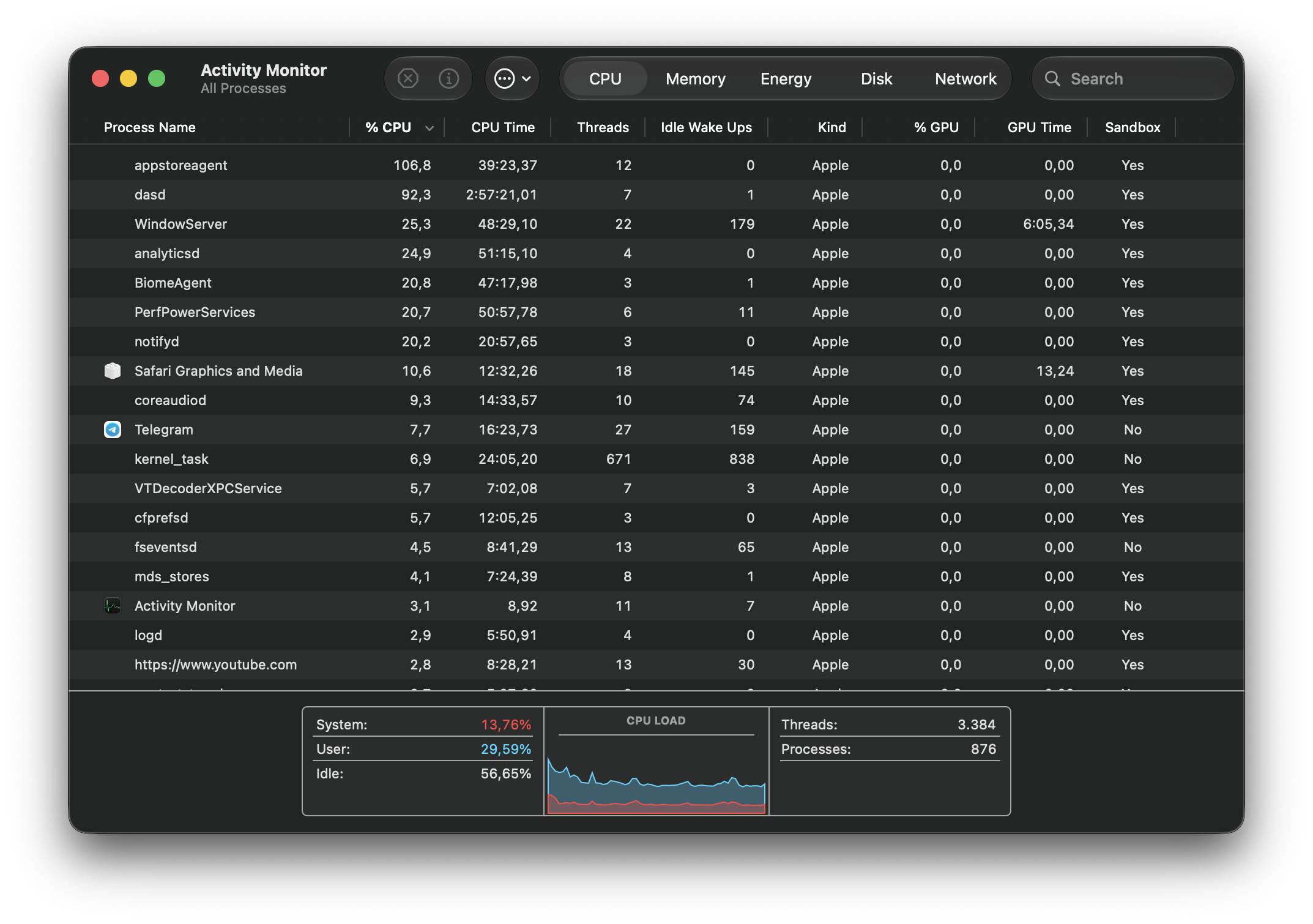
I have that appstoreagent (and dasd?) process running constantly in background consuming a lot of CPU and draining battery on my MacBook Air M4 🙁

jwm
macrumors 6502a
I can't speak for VMware Fusion, but I've been using Parallels since beta one. The only issue being that Touch ID doesn't work for logging in.Anyone know if virtualization works? Vmware Fusion?

CDPlayer
Suspended
I miss OS X System Preferences. I cannot stand the iOS style. It's cumbersome and inelegant even if you can simply search for your specific settings. I really dislike the UX/UI changes with 26, not just liquid glass but all of it. I miss OS X so much.System Settings is still illogical.
The UI is still a mix of all of Apple’s designs. I don’t foresee Apple making any big changes. Golden Gate is paralyzed in its current state because the macOS UI is now tied to whatever nonsense is happening with its other operating systems.
Better than Tahoe, worse than Sonoma. Happy to be wrong by official release.


CrabQueenInc
macrumors 6502
Same here. All these years later and I still don’t understand System Settings. Nothing ever seems as it should be. The Wallpaper control layout is cumbersome, and energy settings in the Lock Screen makes no sense to me. I really miss the Schedule settings in the old Energy Saver.I miss OS X System Preferences. I cannot stand the iOS style. It's cumbersome and inelegant even if you can simply search for your specific settings. I really dislike the UX/UI changes with 26, not just liquid glass but all of it. I miss OS X so much.
View attachment 2640524
Unfortunately for us, Apple is not going to come back to its senses and release a thoughtful System Settings/Preferences in the near future. Maybe in the 2030s.

johnsawyercjs
macrumors 68000
On my 2021 Macbook Pro, the Siri app chatbot has been very intermittent. Until yesterday, it wasn't responding to any of my prompts with anything other than things like "Sorry, something went wrong", until I tried several Terminal commands suggested to me by the Gemini chatbot, which fixed some underlying issues with the Siri AI files having not loaded or unpacked and initializing properly, but the chatbot still wasn't working until I restarted the Macbook into Safe Mode. After I restarted back into Normal Mode, it was still working, until this afternoon when I tried it again.
I worked with Gemini again to try get the Siri chatbot to work again, but nothing worked this time. Gemini suggested that beta 1 and 2 still aren't ready to fully support the Siri chatbot, and that I'd have to wait until some later beta release. Gemini also suggested that beta 1 and 2 essentially drop the Siri chatbot files from memory and break its connection with those files, after an unspecified timeout period during which the user isn't using the chatbot. The Siri chatbot app is working on my iPhone 17 Pro Max, but it's currently pretty limited in what it can discuss.
"Normal" Siri seems to be working on my Macbook, since it can find things on my Macbook's SSD, and it can do simple things like change the volume level.
I worked with Gemini again to try get the Siri chatbot to work again, but nothing worked this time. Gemini suggested that beta 1 and 2 still aren't ready to fully support the Siri chatbot, and that I'd have to wait until some later beta release. Gemini also suggested that beta 1 and 2 essentially drop the Siri chatbot files from memory and break its connection with those files, after an unspecified timeout period during which the user isn't using the chatbot. The Siri chatbot app is working on my iPhone 17 Pro Max, but it's currently pretty limited in what it can discuss.
"Normal" Siri seems to be working on my Macbook, since it can find things on my Macbook's SSD, and it can do simple things like change the volume level.
