Got a tip for us?
Let us know
Become a MacRumors Supporter for $50/year with no ads, ability to filter front page stories, and private forums.
macOS High Sierra (10.13) Unsupported Macs Thread
- Thread starter foxlet
- WikiPost WikiPost
- Start date
- Sort by reaction score
You are using an out of date browser. It may not display this or other websites correctly.
You should upgrade or use an alternative browser.
You should upgrade or use an alternative browser.
- Status
- The first post of this thread is a WikiPost and can be edited by anyone with the appropiate permissions. Your edits will be public.

jbarley
macrumors 601
Maybe a full restore using your Time Machine backup from just before you installed the 002 security update, then just forget the update until it gets sorted out.Hi, i'm writing from a 5,1 Macbook with HS. I have just modified and installed the 002 patch (ending with an error), and after reboot, i have reinstalled the nightshift patch from patch updater. I got 17G3025 in about this mac. Everything seemed to be ok until I realised that Bettertouchtool won't start (it says "bettertouchtool cant be open").
I tried to start the app using terminal, but it says:
/Applications/BetterTouchTool.app/Contents/MacOS/BetterTouchTool
dyld: Symbol not found: _OBJC_CLASS_$_CBTrueToneClient
Referenced from: /System/Library/PrivateFrameworks/UniversalAccess.framework/Versions/A/UniversalAccess
Expected in: /System/Library/PrivateFrameworks/CoreBrightness.framework/Versions/A/CoreBrightness
in /System/Library/PrivateFrameworks/UniversalAccess.framework/Versions/A/UniversalAccess
Abort trap: 6
What can I do? Will a complete reinstall using a installation disk using dosdude1 app fix the problem? Or should I recover the corebrightness framework from my time machine?
TY in advance.
This is the route many users including myself have chosen to follow, just way too many issues with this 2018-002 High Sierra update on both supported and unsupported machines.
Hi all,
Was wondering if anyone can help me out here as I'm not sure what else I can do.
I'm on a Mac Pro Early 2008 (3,1) and recently upgraded to High Sierra 10.13.6 via the dosdude1 method. The main install and post install seemed to go okay and I also installed the latest Nvidia Web Driver.
So when I restarted it with my GTX 960 installed (for the upgrade I went back to the ATI 5770) I'm seeing a lot of flickering and slow refreshing like this (from another user):
I swapped the 960 for a 1050 TI to see if this solved the issue - it didn't. Tried connecting over HDMI instead of DisplayPort - same problem. Uninstalled and reinstalled the Nvidia Web Driver - no change.
In another thread by that other user (GTX 1050 & Mac Pro 3,1 GFX really bad) they mentioned removing an AMD patch that the dosdude1 patcher includes(?). I tried the shell script he attached but again there was no difference.
So yeah, I'm not really sure what else do here 🙁 If anyone can help me out that would be much appreciated.
Thanks in advance.
Was wondering if anyone can help me out here as I'm not sure what else I can do.
I'm on a Mac Pro Early 2008 (3,1) and recently upgraded to High Sierra 10.13.6 via the dosdude1 method. The main install and post install seemed to go okay and I also installed the latest Nvidia Web Driver.
So when I restarted it with my GTX 960 installed (for the upgrade I went back to the ATI 5770) I'm seeing a lot of flickering and slow refreshing like this (from another user):
I swapped the 960 for a 1050 TI to see if this solved the issue - it didn't. Tried connecting over HDMI instead of DisplayPort - same problem. Uninstalled and reinstalled the Nvidia Web Driver - no change.
In another thread by that other user (GTX 1050 & Mac Pro 3,1 GFX really bad) they mentioned removing an AMD patch that the dosdude1 patcher includes(?). I tried the shell script he attached but again there was no difference.
So yeah, I'm not really sure what else do here 🙁 If anyone can help me out that would be much appreciated.
Thanks in advance.

juliusmaximus
macrumors newbie
For anyone trying to get the bcm4321 working in High Sierra, I finally got it to work (MacBook Pro 4,1) and it was relatively simple.
I did the following:
I did the following:
- Download Kext Utility
- Download OSX combo update 10.10.5
- Download Pacifist
- Extract the IO80211family.kext from the 10.10.5 package using Pacifist
- Load the Kext using Kext Utility


Sko
macrumors 6502
Amazing. Working as advertised.For anyone trying to get the bcm4321 working in High Sierra, I finally got it to work (MacBook Pro 4,1) and it was relatively simple.
As support for El Capitan ended with the release of Mojave, I was eager to update my MacBook Air 2,1 to High Sierra. A laptop without WLAN is basically useless, so this was crucial.
Thank you so much for figuring this out and sharing it.
PS: I installed 10.13.6, applied your patch and everything was fine, but SU 2018-002 messed things up a lot, unrelated to your patch most probably. Time Machine for the rescue and trying again.
juliusmaximus
macrumors newbie
Amazing. Working as advertised.
As support for El Capitan ended with the release of Mojave, I was eager to update my MacBook Air 2,1 to High Sierra. A laptop without WLAN is basically useless, so this was crucial.
Thank you so much for figuring this out and sharing it.
PS: I installed 10.13.6, applied your patch and everything was fine, but SU 2018-002 messed things up a lot, unrelated to your patch most probably. Time Machine for the rescue and trying again.
Glad it worked for you! Let me know how it goes. I've been holding off on patching for that exact reason but I should have some time to test this weekend, will be interesting to see if we get the same result.
Hy folks,
i had the following issue ,
i want to creat a macos high sierra install stick (wih dosduesds patch)
i had several times formatted the stck but every time
i had creat thee patch it failed wit he fololwing
An error occurred while restoring the BaseSystem image to the target volume.
I had installed macos mojave with dosdudes patch.
What caan i do to create the sick?
Thank you
i had the following issue ,
i want to creat a macos high sierra install stick (wih dosduesds patch)
i had several times formatted the stck but every time
i had creat thee patch it failed wit he fololwing
An error occurred while restoring the BaseSystem image to the target volume.
I had installed macos mojave with dosdudes patch.
What caan i do to create the sick?
Thank you
Sko
macrumors 6502
Something weird happened today. After restoring my Time Machine backup and only updating iWork and Safari, I've forgotten to disable automatic OS and security updates.Let me know how it goes.
When I woke my MacBook Air 2,1 this evening, it took a very long time to log me in. System Version is now 17G3025, albeit it doesn't show an installed SU 2018-002 in App Store or System Profiler. But it does show 'macOS Installer Notification' and 'MRTConfigData' installs one day after the Safari update. I didn't issue those and they were never shown in App Store. SU 2018-002 is no longer available for me in App Store.
WiFi was broken again, but I just had to reinstall IO80211.kext from 10.10.5. Everything else seems fine for now, had issues with Finder sidebar only showing one item on the last attempt. And kernel panics every other minute.
I'm not 100% sure, but it looks like my firmware was updated, too! I'm pretty positive it read along the lines of '1.34f8' just like the SMC version - not sure about the exact numbers, but the formatting was the same - now it is MBA21.0075.B03. I don't trust my memory here, maybe it was like this all the time. Should have taken a screenshot.
Since 1989, this is by far the strangest update I've ever experienced, even on supported machines (Mac Pro 5,1).
[doublepost=1542562094][/doublepost]
Try a different USB stick.What caan i do to create the sick?
Last edited:
Something weird happened today. After restoring my Time Machine backup and only updating iWork and Safari, I've forgotten to disable automatic OS and security updates.
When I woke my MacBook Air 2,1 this evening, it took a very long time to log me in. System Version is now 17G3025, albeit it doesn't show an installed SU 2018-002 in App Store or System Profiler. But it does show 'macOS Installer Notification' and 'MRTConfigData' installs one day after the Safari update. I didn't issue those and they were never shown in App Store. SU 2018-002 is no longer available for me in App Store.
WiFi was broken again, but I just had to reinstall IO80211.kext from 10.10.5. Everything else seems fine for now, had issues with Finder sidebar only showing one item on the last attempt. And kernel panics every other minute.
I'm not 100% sure, but it looks like my firmware was updated, too! I'm pretty positive it read along the lines of '1.34f8' just like the SMC version - not sure about the exact numbers, but the formatting was the same - now it is MBA21.0075.B03. I don't trust my memory here, maybe it was like this all the time. Should have taken a screenshot.
Since 1989, this is by far the strangest update I've ever experienced, even on supported machines (Mac Pro 5,1).
[doublepost=1542562094][/doublepost]Try a different USB stick.
Something weird happened today. After restoring my Time Machine backup and only updating iWork and Safari, I've forgotten to disable automatic OS and security updates.
When I woke my MacBook Air 2,1 this evening, it took a very long time to log me in. System Version is now 17G3025, albeit it doesn't show an installed SU 2018-002 in App Store or System Profiler. But it does show 'macOS Installer Notification' and 'MRTConfigData' installs one day after the Safari update. I didn't issue those and they were never shown in App Store. SU 2018-002 is no longer available for me in App Store.
WiFi was broken again, but I just had to reinstall IO80211.kext from 10.10.5. Everything else seems fine for now, had issues with Finder sidebar only showing one item on the last attempt. And kernel panics every other minute.
I'm not 100% sure, but it looks like my firmware was updated, too! I'm pretty positive it read along the lines of '1.34f8' just like the SMC version - not sure about the exact numbers, but the formatting was the same - now it is MBA21.0075.B03. I don't trust my memory here, maybe it was like this all the time. Should have taken a screenshot.
Since 1989, this is by far the strangest update I've ever experienced, even on supported machines (Mac Pro 5,1).
[doublepost=1542562094][/doublepost]Try a different USB stick.
Something weird happened today. After restoring my Time Machine backup and only updating iWork and Safari, I've forgotten to disable automatic OS and security updates.
When I woke my MacBook Air 2,1 this evening, it took a very long time to log me in. System Version is now 17G3025, albeit it doesn't show an installed SU 2018-002 in App Store or System Profiler. But it does show 'macOS Installer Notification' and 'MRTConfigData' installs one day after the Safari update. I didn't issue those and they were never shown in App Store. SU 2018-002 is no longer available for me in App Store.
WiFi was broken again, but I just had to reinstall IO80211.kext from 10.10.5. Everything else seems fine for now, had issues with Finder sidebar only showing one item on the last attempt. And kernel panics every other minute.
I'm not d100% sure, but it looks like my firmware was updated, too! I'm pretty positive it read along the lines of '1.34f8' just like the SMC version - not sure about the exact numbers, but the formatting was the same - now it is MBA21.0075.B03. I don't trust my memory here, maybe it was like this all the time. Should have taken a screenshot.
Since 1989, this is by far the strangest update I've ever experienced, even on supported machines (Mac Pro 5,1).
[doublepost=1542562094][/doublepost]Try a different USB stick.
Ive tried another USB stick wih the same result ;-(Something weird happened today. After restoring my Time Machine backup and only updating iWork and Safari, I've forgotten to disable automatic OS and security updates.
When I woke my MacBook Air 2,1 this evening, it took a very long time to log me in. System Version is now 17G3025, albeit it doesn't show an installed SU 2018-002 in App Store or System Profiler. But it does show 'macOS Installer Notification' and 'MRTConfigData' installs one day after the Safari update. I didn't issue those and they were never shown in App Store. SU 2018-002 is no longer available for me in App Store.
WiFi was broken again, but I just had to reinstall IO80211.kext from 10.10.5. Everything else seems fine for now, had issues with Finder sidebar only showing one item on the last attempt. And kernel panics every other minute.
I'm not 100% sure, but it looks like my firmware was updated, too! I'm pretty positive it read along the lines of '1.34f8' just like the SMC version - not sure about the exact numbers, but the formatting was the same - now it is MBA21.0075.B03. I don't trust my memory here, maybe it was like this all the time. Should have taken a screenshot.
Since 1989, this is by far the strangest update I've ever experienced, even on supported machines (Mac Pro 5,1).
[doublepost=1542562094][/doublepost]Try a different USB stick.
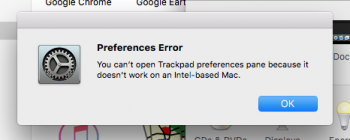
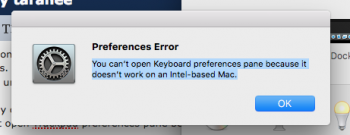
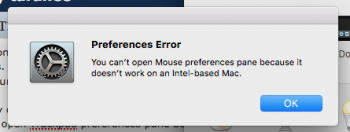
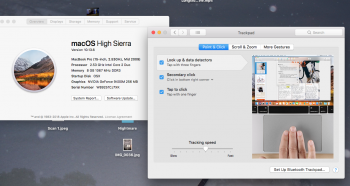
ok for some reason i cant get in to the mouse track pad or keyboard preference panes. when i click on them i get this. it was working fine tell now. only thing i did was install mojave on a 2nd partitions. this is under 10,13,6
and this is for any one doing a search as the only result i came up with was in Mojave unsupported thread.
You can’t open Trackpad preferences pane because it doesn’t work on an Intel-based Mac.
You can’t open Keyboard preferences pane because it doesn’t work on an Intel-based Mac.
You can’t open Mouse preferences pane because it doesn’t work on an Intel-based Mac.
Last edited:
jbarley
macrumors 601
Go back in this thread and read post #4237, you'll find the cause and cure for this problem there.View attachment 805187 View attachment 805188 View attachment 805189
ok for some reason i cant get in to the mouse track pad or keyboard preference panes. when i click on them i get this. it was working fine tell now. only thing i did was install mojave on a 2nd partitions. this is under 10,13,6
and this is for any one doing a search as the only result i came up with was in Mojave unsupported thread.
You can’t open Trackpad preferences pane because it doesn’t work on an Intel-based Mac.
You can’t open Keyboard preferences pane because it doesn’t work on an Intel-based Mac.
You can’t open Mouse preferences pane because it doesn’t work on an Intel-based Mac.

BartmanEH
macrumors member
9/10 times it's a faulty (or incompatible) USB stick. Try a 3rd different type. You may want to re-download the image the patch tool is working with too--use the tool's image downloader menu item.Ive tried another USB stick wih the same result ;-(

aaronNW
macrumors newbie
I searched the thread and didn't find an answer to this question:
Will a flashed NVIDIA GTX 960 work in a Mac Pro 3,1 running High Sierra using dosdude1's patcher?
I've read some instances of cards that don't play nice even when flashed (slow, blocky refreshing, flicker, etc.)
Will a flashed NVIDIA GTX 960 work in a Mac Pro 3,1 running High Sierra using dosdude1's patcher?
I've read some instances of cards that don't play nice even when flashed (slow, blocky refreshing, flicker, etc.)
one of the main problem is it all worked fine till now. i even reinstalled 10,13 on another partition to confirm and that one works fine as will. with night shift. i looked at the post but they pretty much just settled on night shift not working. me i liked night shift and i want it all working like it used to. not shure why im suddenly having this problem out of no where.Go back in this thread and read post #4237, you'll find the cause and cure for this problem there.
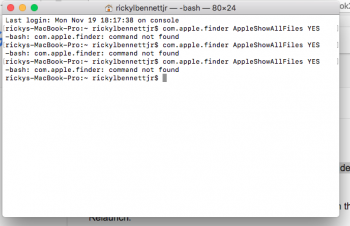
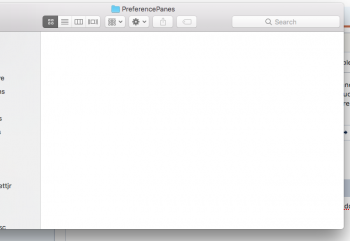
[doublepost=1542669907][/doublepost]um am i doing this wrong ? or is this just not right ? i was trying to show the hiddon system files
Last edited:
BartmanEH
macrumors member
There are many reports of the first time machine backup after an OS upgrade taking a very long time like >6 hours. Have you left it overnight to see if it completes?Why after upgrading to High Sierra Time Machine is very slow? it hangs on preparing backup every time...
There are many reports of the first time machine backup after an OS upgrade taking a very long time like >6 hours. Have you left it overnight to see if it completes?
Yes..i have passed to High Sierra since the last Month...and every time it has to do a backup, it hangs too much time on "preparing backup"...and only after many minutes it starts to do the backup...with Sierra this operation was more quick!
View attachment 805187 View attachment 805188 View attachment 805189
ok for some reason i cant get in to the mouse track pad or keyboard preference panes. when i click on them i get this. it was working fine tell now. only thing i did was install mojave on a 2nd partitions. this is under 10,13,6
and this is for any one doing a search as the only result i came up with was in Mojave unsupported thread.
You can’t open Trackpad preferences pane because it doesn’t work on an Intel-based Mac.
You can’t open Keyboard preferences pane because it doesn’t work on an Intel-based Mac.
You can’t open Mouse preferences pane because it doesn’t work on an Intel-based Mac.
Go back in this thread and read post #4237, you'll find the cause and cure for this problem there.
and solved with a real fix. not no work around.
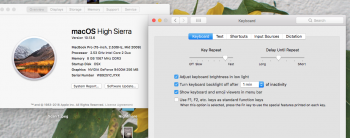
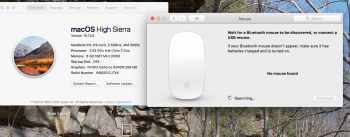
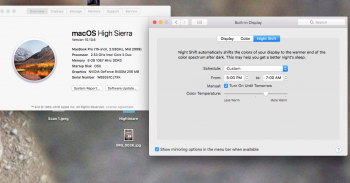
now hears how to really fix it the right way not a work around. make a time machine backup just in case. download and make a more updated flash installer. and without erasing the drive. just reinstall the os. once done apply patches and boot to 10,13. then apply the night shift patch. and reboot if it says there is no keyboard or mouse then just hard reboot and done. night shift and all preference pane fully working again.
juliusmaximus
macrumors newbie
Something weird happened today. After restoring my Time Machine backup and only updating iWork and Safari, I've forgotten to disable automatic OS and security updates.
When I woke my MacBook Air 2,1 this evening, it took a very long time to log me in. System Version is now 17G3025, albeit it doesn't show an installed SU 2018-002 in App Store or System Profiler. But it does show 'macOS Installer Notification' and 'MRTConfigData' installs one day after the Safari update. I didn't issue those and they were never shown in App Store. SU 2018-002 is no longer available for me in App Store.
WiFi was broken again, but I just had to reinstall IO80211.kext from 10.10.5. Everything else seems fine for now, had issues with Finder sidebar only showing one item on the last attempt. And kernel panics every other minute.
I'm not 100% sure, but it looks like my firmware was updated, too! I'm pretty positive it read along the lines of '1.34f8' just like the SMC version - not sure about the exact numbers, but the formatting was the same - now it is MBA21.0075.B03. I don't trust my memory here, maybe it was like this all the time. Should have taken a screenshot.
Since 1989, this is by far the strangest update I've ever experienced, even on supported machines (Mac Pro 5,1).
[doublepost=1542562094][/doublepost]Try a different USB stick.
I had an almost identical experience as you. The update doesn't show as installed however it clearly is. I'll grab some more details tomorrow evening and update this thread.
Bizarre indeed!!!

EugW
macrumors P6
How do we check to see if it's installed if it's not listed as being installed?I had an almost identical experience as you. The update doesn't show as installed however it clearly is. I'll grab some more details tomorrow evening and update this thread.
Bizarre indeed!!!

Caesar_091
macrumors 6502
Hi all,
is there a way to get the App Store to work after a successful installation of 10.13.6 (17G65) (update from El Capitan, not a clean install) on a late 2008 MacBook 13" Aluminium (MacBook5,1)?
Whean I open the "App Store" app I can browse the Featured, Top Chart, Categories and Purchased tabs but when i click on Updates it just crush.
TIA
[doublepost=1542868264][/doublepost]I'm not able to list or update using the terminal app neither (softwareupdate -l / -i) and I already tried to reboot from the USB patched installation disk to force cache rebuild and also tried "sudo softwareupdate --clear-catalog" as well as Onyx Maintainance function.
Any suggestion?
is there a way to get the App Store to work after a successful installation of 10.13.6 (17G65) (update from El Capitan, not a clean install) on a late 2008 MacBook 13" Aluminium (MacBook5,1)?
Whean I open the "App Store" app I can browse the Featured, Top Chart, Categories and Purchased tabs but when i click on Updates it just crush.
TIA
[doublepost=1542868264][/doublepost]I'm not able to list or update using the terminal app neither (softwareupdate -l / -i) and I already tried to reboot from the USB patched installation disk to force cache rebuild and also tried "sudo softwareupdate --clear-catalog" as well as Onyx Maintainance function.
Any suggestion?
and solved with a real fix. not no work around.
now hears how to really fix it the right way not a work around. make a time machine backup just in case. download and make a more updated flash installer. and without erasing the drive. just reinstall the os. once done apply patches and boot to 10,13. then apply the night shift patch. and reboot if it says there is no keyboard or mouse then just hard reboot and done. night shift and all preference pane fully working again.
View attachment 805550View attachment 805550 View attachment 805551 View attachment 805552 View attachment 805553
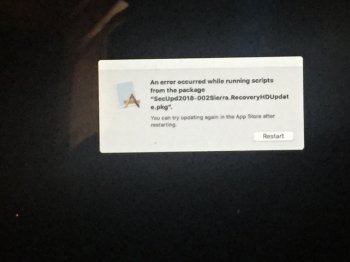
ok so all was working fine untell today when it installed this update. then keyboard and all broke again. so DO NOT INSTALL THIS UPDATE
https://support.apple.com/en-us/HT201222
also on install reboot. this error poped.