
Become a MacRumors Supporter for $50/year with no ads, ability to filter front page stories, and private forums.
Status
The first post of this thread is a WikiPost and can be edited by anyone with the appropiate permissions. Your edits will be public.
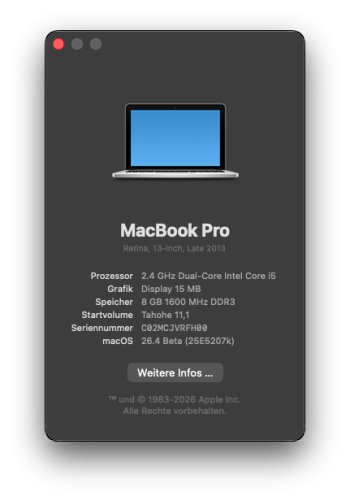
MBP11,1: updated to 26.3 from .2 on external SSD, using USB installer and OCLP 300 nightly (4 Dec 25) for EFI.
Runs well enough to post this (no post install patching). Cable Ethernet available.

A peculiarity on this machine with Tahoe (since first betas): it KPs when shutting down. Doesn't really matter, manual power off/restart needed after each phase of installer, or when shutting down the running Tahoe.

So the MBP11,1 is now as up-to-date as possible: Sequoia 15.7.4 with OCLP 2.4.1 on internal SSD,Tahoe 26.3 with OCLP macos-next 3.0.0n (EFI only) on USB SSD.

Thank you developers!
MBP11,1: updated to 26.4b1 from .3, on external SSD, like before to .3. No new observations, works well enough to write this post.
I'm using what deeveedee recommended in post #1288 (reduced transparency+motion, disabled solarium).

No problem with the HFS+ partition (holding the installer) on my external SSD used for this installation. After booting, Tahoe 26.4b1 complained briefly about this partition being corrupted, but it looks quite alright and was mounted automatically to the desktop.
 

Attachments
  • thissys.png
    thissys.png
    49.2 KB · Views: 216
Last edited:
@hvds On older Macs, changing the Wall Paper to a color may also reduce Tahoe resource demand.
  • System Settings > Wall Paper > Colors
i usualy don’t post just lurk but I have found many of your posts helpful. Have you considered disabling certain processes using the launchctl Terminal commands? I have been doing this since Monterey. Each successive release has increased the background process number. One excellent use of AI has made it easier to determine the function of these processes and highlight the ones that should never be disabled.
Sadly, there are Apple Intelligence processes running on Intel which definitely can be disabled. For example, both Spotlight and Siri processes are ones I target immediately after a clean install.
 
I'd love to see your steps for disabling unnecessary background processes.
Open Actuvity Montor to check process use of CPU and Memory.

Use the following Terminal commands:
sudo launchctl bootout gui/501/$user
sudo launchctl disable gui/501/$user

where $user = com.apple.$process
where $process = Activity Monitor/top process name, may be exceptions to this so check Terminal command “launchctl list”

Example of Spotlight and Siri processes from Sequoia, likely still in Tahoe:
Spotlight, corespotlightd, managedcorespotlightd, siriinferenced, siriactions, siriknowledged, knowledge-agent, sirittsd, assistantd, parsecd

Also need to disable system process for Spotlight:
sudo launchctl bootout system/com.apple.metadata.mds
sudo launchctl disable system/com.apple.metadata.mds

Use “enable” keyword in command above and reboot to enable processes. Use OnyX utility to rebuild launchctl database or a Terminal command which I haven’t used. After alot of expermentation, I have disabled many proceesses and still kept a functional Mac installation.
 
Just got a early 2015 MacBook pro with the 3.1 i7 and 16gb ram and a 512g ssd for an absolute steal last night of $30.00. It has monterey on it and works perfect except for needing a battery, if it gets cold from being transported... it forgets it has a battery and the charger looks like a mouse chewed it. Was hoping to put tahoe on it, but guess sequoia will have to do.
 
@hvds On older Macs, changing the Wall Paper to a color may also reduce Tahoe resource demand.
  • System Settings > Wall Paper > Colors
Yes, thanks, I have chosen a colour which resembles that of Lake Tahoe - in my imagination...
(It is not the first time that the name of a macOS version is motivation for a journey.)
 
  • Like
Reactions: deeveedee
It seems that Apple does not support its HFS+ file system, which is simply stupid.
If only because many people have various archives on HDD drives in the HFS+ file system.
The new OCLP-mod 3.1.5 is available, so there is a chance that it will be continued 😃
 
It seems that Apple does not support its HFS+ file system, which is simply stupid.
Can you elaborate?
This is a bug. macOS 26.4 beta 1 has issues mounting HFS+ drives. It's listed in the release notes as a "known issue". You can still get the drives to mount using the terminal. They are presumably going to fix it, hopefully in the next beta.
 
This is a bug. macOS 26.4 beta 1 has issues mounting HFS+ drives. It's listed in the release notes as a "known issue". You can still get the drives to mount using the terminal. They are presumably going to fix it, hopefully in the next beta.
Yes I hope that it is a bug... A time ago Apple deprecated raid support - left only terminal command.
Mount HFS drive via terminal is not a comfortable option (
 
I have a strange thing I can't figure out. I have a MacBook Air 2019 (intel) bought new in 2019 Just noticed after I installed 26.4.1 beta the about this Mac shows it is M4 with 16gb ram. Several commcentors suggested it might me an OpenCore Legacy issue, but I don't seem to have that installed. I rebooted holding on switch down to see any strange login issues and didn't see any. I then went on Apples web site and entered the serial number on the bottom of the case and it send it had M4 with 16gb and was bought in March 2025. I purchased it new from Best Buy in 2020. Anyone have any suggestions.
 
  • Like
Reactions: notabitail
I have a strange thing I can't figure out. I have a MacBook Air 2019 (intel) bought new in 2019 Just noticed after I installed 26.4.1 beta the about this Mac shows it is M4 with 16gb ram. Several commcentors suggested it might me an OpenCore Legacy issue, but I don't seem to have that installed. I rebooted holding on switch down to see any strange login issues and didn't see any. I then went on Apples web site and entered the serial number on the bottom of the case and it send it had M4 with 16gb and was bought in March 2025. I purchased it new from Best Buy in 2020. Anyone have any suggestions.
Try running an Apple Silicon app. Seems weird.
 
  • Like
Reactions: hackintosh_user
I have a strange thing I can't figure out. I have a MacBook Air 2019 (intel) bought new in 2019 Just noticed after I installed 26.4.1 beta the about this Mac shows it is M4 with 16gb ram. Several commcentors suggested it might me an OpenCore Legacy issue, but I don't seem to have that installed. I rebooted holding on switch down to see any strange login issues and didn't see any. I then went on Apples web site and entered the serial number on the bottom of the case and it send it had M4 with 16gb and was bought in March 2025. I purchased it new from Best Buy in 2020. Anyone have any suggestions.
In 2020, the Intel and the M1 came in the tapered MBA form of previous years, and only these were available. The non-tapered MBA wasn't available until the M2-MBA. You must have your dates mixed up. The divergence is far too great. Surely you must have recognised the form factor of the MBA. Totally different from the M4-MBA from 2025. YOU, have to be wrong, sorry. If you bought it in 2019, you bought the tapered version AND it was Intel. It doesn't change to the M4-type shape overnight. Pull the other one.
 
Last edited:
Just got a early 2015 MacBook pro with the 3.1 i7 and 16gb ram and a 512g ssd for an absolute steal last night of $30.00. It has monterey on it and works perfect except for needing a battery, if it gets cold from being transported... it forgets it has a battery and the charger looks like a mouse chewed it. Was hoping to put tahoe on it, but guess sequoia will have to do.
Just stay with the Sequoia. Not worth the headache of Tahoe. I am black, so I can't turn green - with envy. That's a very good machine. I had one.
 
  • Like
Reactions: chevyboy60013
In 2020, the Intel and the M1 came in the tapered MBA form of previous years, and only these were available. The non-tapered MBA wasn't available until the M2-MBA. You must have your dates mixed up. The divergence is far too great. Surely you must have recognised the form factor of the MBA. Totally different from the M4-MBA from 2025. YOU, have to be wrong, sorry. If you bought it in 2019, you bought the tapered version AND it was Intel. It doesn't change to the M4-type shape overnight. Pull the other one.
Well color me embarrassed I bought it through Apple in March. totally forgot traded my intel in. I kept getting messages from apple on how all my intel based apps would quit working. Been a stressful couple of years and too many birthdays. thanks for all that responded
 
  • Like
Reactions: olad and notabitail
Well color me embarrassed I bought it through Apple in March. totally forgot traded my intel in. I kept getting messages from apple on how all my intel based apps would quit working. Been a stressful couple of years and too many birthdays. thanks for all that responded
Anyone can make mistakes. My bad; I thought you were pulling our collective legs. I hope the coming years are less stressful. For what it's worth, you didn't have to admit anything. But you did. Kudos to you.
 
  • Like
Reactions: notabitail
Well color me embarrassed I bought it through Apple in March. totally forgot traded my intel in. I kept getting messages from apple on how all my intel based apps would quit working. Been a stressful couple of years and too many birthdays. thanks for all that responded

I wish I could forget I got a new Mac no such look here lol enjoy I was away recently with someone that had a M3 MacBook Pro for work most impressive was that battery life compared to my Intel seemed to go on forever.
 
Register on MacRumors! This sidebar will go away, and you'll see fewer ads.