Become a MacRumors Supporter for $50/year with no ads, ability to filter front page stories, and private forums.
Need another Key after the Update

Ive installed the Office 2008 for Mac update (SP 2) today.. but after the update.. the software ask me for a new key...??
so i guess the old is not working no more,...:-(
:mad::mad::mad::mad::mad:
 
No worries mate, Snow Leopard's on it's way. It will fully support MS Exchange right through Apple's mail and Calendar and you won't be slave to Entourage. :)

I've been waiting for Snow Leopard since the second Apple announced Exchange support.

Apple: PLEASE get it delivered!
 
What do you mean by turning little snitch on?

Little Snitch is an app which provides a dialogue box whenever an application attempts to "phone home" to it's developer's site. It would appear that the poster has/knows someone who has a "less than legit" version of the suite and MS asks the app to "phone home" to MS during the install. As such, it would be able to disable any suite which did not have a valid serial.

Hence, turn on Little Snitch so you would know when the Office updater was trying to dial home to Redmond, thus allowing the user to shut down the connection.

Anyone w/ a legit version has nothing to worry about.
 
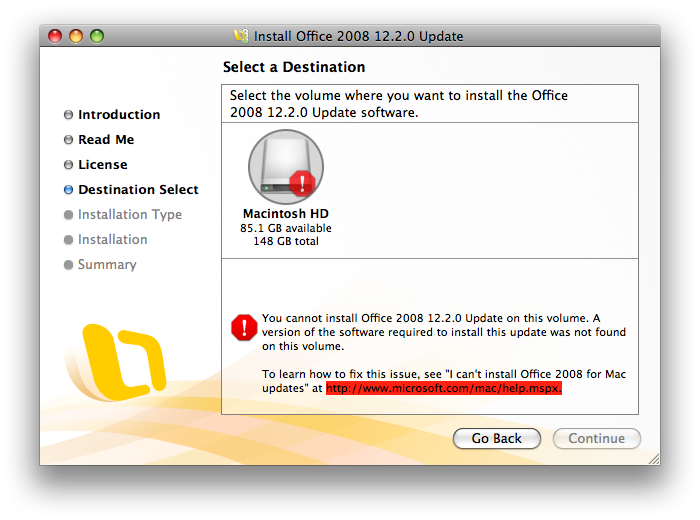
what the hell i keep getting an error message each time i try and update.... can someone help me i have a legit version on office if that helps

qq4bd1.png
 
It introduces a new application called the Microsoft Document Connection, to work with files that are located on a SharePoint site or Microsoft Office Live Workspace.

Please don't disappoint me Microsoft...it'd be great to have better functionality between Mac Office and Sharepoint. I've been waiting for it!
 
Ive installed the Office 2008 for Mac update (SP 2) today.. but after the update.. the software ask me for a new key...??
so i guess the old is not working no more,...:-(
:mad::mad::mad::mad::mad:

It doesn't matter if it is the legit key or non-legit key, it tends to happen once in a while. Just follow the instructions that MS provided on that help link, which is to delete the OfficePID.plist and MS Setting file and reboot the pc. you'll get a chance to re-enter your legit key again.
 
They still didn't fixed the problems wih equations written with 2007.....

Being an engineering student that's a major pain in the ....

I'll sure be switching to LaTeX when I'll be doing my master's thesis. I can't stand Word's bugs anymore.
 
Does anyone have any educated guesses on when the next MS Office for Mac will come out? Late 2009? Early 2010? Late 2010? Later?

Our normal release cycle is 2-3 years. Office 2008 wasn't a normal release due to the Intel switch, not to mention the massive code changes that we had already planned before having to switch processors and development environments: new file formats, a new graphics engine, etc. I don't have an exact date to share yet, so I'll just say that Office 2008 came out in January 2008.

Luke1robb said:
Now, is there any chance MS will release Office 10 (for Windows) at the same time as the Mac Version?

Office 10? That was Office v.X, which we released for OS X a few years ago. Office 2008 is Office 12, Entourage for Web Services is Office 13, so the next version is Office 14. :)

We are not going to release the next versions of Windows Office and Office:Mac simultaneously. We're on different development cycles.

commander.data said:
I was hoping though that you would clarify the Office 2004 support issue since I still use it alongside Office 2008 for VBA support.

You quoted the support lifecycle for business and developer products. Office:Mac 2004 is a consumer product, so we're following the support lifecycle for that. We'll have some more details to share for VBA users in a couple of months. I honestly don't know more than that -- I'm on the technical team, so stuff like that is far outside what I work on. :)

mikeruoc said:
Still no Entourage EWS!! Come one MS. You have had the beta since Jan. Release the thing already!!

Soon. :)

DELLsFan said:
So for those of us used to using the Office 2007 suite ... can someone explain why M$ decided NOT to put in a similar UI (e.g. Ribbon) for the mainstay apps on Office 2008 for Mac?

I wrote a blog post to Mac Mojo, the MacBU team blog, about this: evolution at work.

ntrigue said:
Once agin the update is failing because I deleted Messenger.

You should do a custom installation to not install the pieces that you don't want. To get around this in the short-term, you can install Messenger to the Office 2008 folder.

vinzsanity said:
Ive installed the Office 2008 for Mac update (SP 2) today.. but after the update.. the software ask me for a new key...??
so i guess the old is not working no more,...:-(

You need to get a legitimate key for Office 2008. You can purchase a copy of Office 2008 at your friendly local Apple Store, or online from a site like Amazon.

mrmayor92 said:
what the hell i keep getting an error message each time i try and update.... can someone help me i have a legit version on office if that helps

The most likely causes of the installation not working are:
1. You have moved the Office 2008 folder out of Applications. Move it back, and try the update again.
2. You have manually deleted something in the Office 2008 folder. You're going to have to uninstall and reinstall. When you reinstall, do a custom install so that you don't install the pieces you don't need.
3. You have run an app like Xslimmer or Monolingual. You'll also have to uninstall and reinstall, do a custom install to save the few MB that the language files take up, and then make sure that you exclude the Office folder if you run one of these apps again.
4. Your key isn't legitimate. Get a legitimate product key from your friendly local Apple Store, Amazon, or wherever else you buy software from. Then delete these two files:
~/Library/Preferences/Microsoft/Office 2008/Microsoft Office 2008 Settings.plist
/Applications/Microsoft Office 2008/Office/OfficePID.plist
When you launch an Office app again, it will ask you to enter your key. It's printed on the back of the DVD sleeve. (And be careful reading it: the B and 8 are kinda hard to tell apart.)

Regards,
Nadyne.

 
The most likely causes of the installation not working are:
1. You have moved the Office 2008 folder out of Applications. Move it back, and try the update again.
2. You have manually deleted something in the Office 2008 folder. You're going to have to uninstall and reinstall. When you reinstall, do a custom install so that you don't install the pieces you don't need.
3. You have run an app like Xslimmer or Monolingual. You'll also have to uninstall and reinstall, do a custom install to save the few MB that the language files take up, and then make sure that you exclude the Office folder if you run one of these apps again.
4. Your key isn't legitimate. Get a legitimate product key from your friendly local Apple Store, Amazon, or wherever else you buy software from. Then delete these two files:
~/Library/Preferences/Microsoft/Office 2008/Microsoft Office 2008 Settings.plist
/Applications/Microsoft Office 2008/Office/OfficePID.plist
When you launch an Office app again, it will ask you to enter your key. It's printed on the back of the DVD sleeve. (And be careful reading it: the B and 8 are kinda hard to tell apart.)

Regards,
Nadyne.

yeah i ran monolingual..... crap i hate installing stuff haha
 
you can download a keygen for it.... if you need a link PM i would post it here but its against forum rules

That in itself is against the rules.

what the hell i keep getting an error message each time i try and update.... can someone help me i have a legit version on office if that helps

qq4bd1.png

I got that too, if you never installed SP1 then do that then try the update again. I had to do that and then the update went through. :confused:
 
They still didn't fixed the problems wih equations written with 2007.....

Being an engineering student that's a major pain in the ....

I'll sure be switching to LaTeX when I'll be doing my master's thesis. I can't stand Word's bugs anymore.

Have you tried LaTeXiT. I use it to put the formulas in my powerpoint slides.

The only pity: LinkBack is not working with Office :(
 
How can someone vote this as a negative?

It seems like positive news all around and they added more than just one or two fixes.

Is it just because it is Microsoft?
 
Have you tried LaTeXiT. I use it to put the formulas in my powerpoint slides.

The only pity: LinkBack is not working with Office :(

Not yet. But I gathered some books and I plan to use XeTeX under TeXShop. I'm from Quebec so typing accents under plain LaTeX isn't fun, that's why I'm going for XeTeX and full unicode support.

I'll be learning to typeset during the next few months.
 
Not yet. But I gathered some books and I plan to use XeTeX under TeXShop. I'm from Quebec so typing accents under plain LaTeX isn't fun, that's why I'm going for XeTeX and full unicode support.

I'll be learning to typeset during the next few months.

No need for unicode support. You just have to import the right packages into your Latex document:

\usepackage[french]{babel} /*may be optional*/
\usepackage[latin1]{inputenc}
\usepackage{lmodern}

in your preamble should let you typeset plain french.

ups, forgot: You also have to set your editor (TeXShop, or anything else) to use Latin1 text-encoding!
 
So for those of us used to using the Office 2007 suite ... can someone explain why M$ decided NOT to put in a similar UI (e.g. Ribbon) for the mainstay apps on Office 2008 for Mac?

Apple is very big on the consistency of its UI, and I don't know how Microsoft can put the ribbon in there and maintain that consistency. Office 2010 looks closer to achieving that goal than 2007.
 
It looks like it (the next Office release) falls under whichever is longer. 5 years is longer than 2. ;)

You betcha! 2012 by my figurin'. That means before we see the next Office release, Sarah Palin will be president. *wink, wink*

On a more serious note, I saw some numbers recently and was surprised by how Office sales revenue has become such a large chunk of Microsoft's income.
 
I'm a relatively typical user of Microsoft Office. I use Word more than any other application, followed by Excel then PowerPoint. To put it bluntly, I had to stop using Microsoft Word as my go-to program for writing because it was slower than hell.

I have an iMac Core 2 Duo 2.8 GHz with 4 gigabytes of RAM. I have a 1TB 7200 RPM HD, and for some reason Microsoft Word 2008 took eons to load. It was so aggravating to watch the icon bounce in the dock that I eventually gave up and started using Pages to jot down my thoughts, especially since I prefer to quit programs when I am not using them. (Perhaps an old habit, but it does make it easier to Apple-Tab to programs in use)

This has all changed thanks to the Office 2008 SP2 update. I installed it earlier today and it opens extremely quickly - about as fast as Pages, a far, far less powerful application.

This is the first time I have been genuinely excited by a Microsoft product. Thank you, Mac BU team. If you make the next iteration of Microsoft Office products run as fast or even more quickly, I'll be sure to thank you by purchasing a fleets of your software for my company and for every company I consult for.
 
No need for unicode support. You just have to import the right packages into your Latex document:

\usepackage[french]{babel}
\usepackage[latin1]{inputenc}
\usepackage{lmodern}

in your preamble should let you typeset plain french.

I'll look into that. It'll probably help with compatibility. Thanks :)
 
Speed? for what?

I mean, I do not type 3000 words per second, I am not calculating the size of the world in Excel.

I still using 2004 I believe and I would like some better compatibility here and there but ¿speed?
 
Downloaded and installed it. Installation was smooth and quick, and atleast Word opens noticeably quicker (haven't tried the others yet). Good job, M$! :D
 
Downloading atm looking forward to these performance improvements. iWork is quite frankly a sad joke in comparison to Office 2008. I'm also one of the few mac users who is quite happy using Entourage with an exchange server. :)
 
Register on MacRumors! This sidebar will go away, and you'll see fewer ads.