

Got a tip for us?
Let us know
Become a MacRumors Supporter for $50/year with no ads, ability to filter front page stories, and private forums.
MintPPC project
- Thread starter Jeroen Diederen
- Start date
- Sort by reaction score
You are using an out of date browser. It may not display this or other websites correctly.
You should upgrade or use an alternative browser.
You should upgrade or use an alternative browser.

Use http for preseeding please, it works much better with Debian-installer.Yes, I can confirm a smooth installation on g4. Sometimes the installer just doesn't accept the https of configuration file and I have to change it to http...
As a matter of fact, I had to revert my repository to http as a possibility to be able to make debian-installer accept it. The installer borks at packages hosted with https. If you click the following link you will see that the MintPPC32 repo may be read in an unsecured (http) way. This is intentional for the installer to work properly. The rest of the website (Wordpress) is redirected to ssl (https).
Last edited:
47.2-2 is now available with in-tree ICU. We no longer need old libicu libs which are long gone from Debian sid.

MacMaverick855
macrumors 6502
Oooookay! I'm back!
After trying many more distros to see what the most modern and functional Linux OS I could install on my Cheesegrater G5, I've come back to MintPPC64. I am currently installing the system.
My biggest problem with other distros is(was), software installs and updates. I found that older distros' repoes were inaccessible. So, knowing Deb 12/Mintppc worked before, I decided to come back. My next job after the install is completed per the instructions, will be to see how to either access software and/or update the sources.list to reflect the
current locations of Deb 12 software. I also need to go back and read the previous 31 pages to refresh my memory on some of the things that have gone on since I've been distro-hopping.
Honestly, if there is anyone out there looking to breathe the freshest of life into an old finicky G5, this is where you want to be.
Also, I discovered as part of my distro hopping that trying to drive two monitors from a Radeon 9600XT is limited by the maximum screen size of 2560x2560 so trying to drive a 1920x1024 and a 1280x1024 monitor won't work. What I haven't figured out is why the Linux distros I tried won't run on an Apple Cinema or Studio display alone. I tried all of the boot parameters ever discovered for the Radeon GFX card and could never get past the black screen. No worries, I'm driving a DVI 1920x1024 flatscreen which provides all the real estate I need.
Good to be back!
MacMav855
After trying many more distros to see what the most modern and functional Linux OS I could install on my Cheesegrater G5, I've come back to MintPPC64. I am currently installing the system.
My biggest problem with other distros is(was), software installs and updates. I found that older distros' repoes were inaccessible. So, knowing Deb 12/Mintppc worked before, I decided to come back. My next job after the install is completed per the instructions, will be to see how to either access software and/or update the sources.list to reflect the
current locations of Deb 12 software. I also need to go back and read the previous 31 pages to refresh my memory on some of the things that have gone on since I've been distro-hopping.
Honestly, if there is anyone out there looking to breathe the freshest of life into an old finicky G5, this is where you want to be.
Also, I discovered as part of my distro hopping that trying to drive two monitors from a Radeon 9600XT is limited by the maximum screen size of 2560x2560 so trying to drive a 1920x1024 and a 1280x1024 monitor won't work. What I haven't figured out is why the Linux distros I tried won't run on an Apple Cinema or Studio display alone. I tried all of the boot parameters ever discovered for the Radeon GFX card and could never get past the black screen. No worries, I'm driving a DVI 1920x1024 flatscreen which provides all the real estate I need.
Good to be back!
MacMav855
Last edited:
MacMaverick855
macrumors 6502
@Jeroen Diederen, Ok, things are going well, downloaded the Airport b43 files, arcticfox and sealion. On restart, I saw that the firmware for the radeon card is not installed, yet my desktop looks ok.
The error states that "direct firmware load for radeon/R300_cp.bin failed". It goes on to state acceleration is disabled.
Airport card working great!
Just a beautiful system!
MacMaverick855
The error states that "direct firmware load for radeon/R300_cp.bin failed". It goes on to state acceleration is disabled.
Airport card working great!
Just a beautiful system!
MacMaverick855
Last edited:
Make sure you have firmware-amd-graphics installed. It should be installed, if not:
You also might want to downgrade mesa:
Code:
sudo apt install firmware-amd-graphicsYou also might want to downgrade mesa:
It would be nice if you send me the installation log file. I am interested in errors.Make sure you have firmware-amd-graphics installed. It should be installed, if not:
Code:sudo apt install firmware-amd-graphics
You also might want to downgrade mesa:
/var/log/syslog
Last edited:
MacMaverick855
macrumors 6502
Installed firmware-amd-graphics and the original error was gone, however there was some hiccup about amdgpu and something about DSTD or something.
I had installed the firmware, and restarted before I read your request for journalctl. I don't suppose there is an archive of journalctl from earlier today? I just remembered it's chronological and can be searched by date and time, although I forget how to do that, so I'm starting at June 12th and will look for anything related to the GPU.
The system is running well right now. Sending this via Sealion (Mintified)!
I had installed the firmware, and restarted before I read your request for journalctl. I don't suppose there is an archive of journalctl from earlier today? I just remembered it's chronological and can be searched by date and time, although I forget how to do that, so I'm starting at June 12th and will look for anything related to the GPU.
The system is running well right now. Sending this via Sealion (Mintified)!
Last edited:
MacMaverick855
macrumors 6502
I don't recall what you discovered about the LibreOffice Suite. It won't start up. Do I recall you stating it won't work in MintPPC?
I went through the journalctl and other than seeing that, after I loaded the b43 firmware for my Airport card I had wireless, the addition of the amd-graphics firmware didn't seem the change the radeon error codes on startup. I will say this however: prior to loading the amd-graphics firmware, when ever I went to a tty and returned to the desktop, the screen had a yellow hue and wouldn't go away unless I restarted. Now I can go to a tty screen and come back to the same beautiful desktop, so it did something!
Thanks for the quick feedback and hope your family is well and your new house is working out!
MacMaverick855
I went through the journalctl and other than seeing that, after I loaded the b43 firmware for my Airport card I had wireless, the addition of the amd-graphics firmware didn't seem the change the radeon error codes on startup. I will say this however: prior to loading the amd-graphics firmware, when ever I went to a tty and returned to the desktop, the screen had a yellow hue and wouldn't go away unless I restarted. Now I can go to a tty screen and come back to the same beautiful desktop, so it did something!
Thanks for the quick feedback and hope your family is well and your new house is working out!
MacMaverick855
I heard other people reporting problems with launching LibreOffice from LXDE as well. The only solution found was to run it as root:
!!! Be careful with that option as you now have root access to everything and you may accidentally change or delete important files. !!!
You can also install XFCE4 and launch it from that desktop.
Code:
sudo libreoffice!!! Be careful with that option as you now have root access to everything and you may accidentally change or delete important files. !!!
You can also install XFCE4 and launch it from that desktop.
Last edited:
Another solution from within a Mint-LXDE session:
This will force the use of a generic (X11) backend for its graphical user interface. It will look outdated but it works at least from within LXDE.
If you want to make this option permanent, edit ~/.bashrc and add this line at the end
force reload ~/.bashrc:
Now launch libreoffice the usual way from the console:
Code:
SAL_USE_VCLPLUGIN=gen libreofficeThis will force the use of a generic (X11) backend for its graphical user interface. It will look outdated but it works at least from within LXDE.
If you want to make this option permanent, edit ~/.bashrc and add this line at the end
Code:
export SAL_USE_VCLPLUGIN=genforce reload ~/.bashrc:
Code:
source ~/.bashrcNow launch libreoffice the usual way from the console:
Code:
libreoffice
Last edited:
Another solution from within a Mint-LXDE session:
Code:SAL_USE_VCLPLUGIN=gen libreoffice
This will force the use of a generic (X11) backend for its graphical user interface. It will look outdated but it works at least from within LXDE.
If you want to make this option permanent, edit ~/.bashrc and add this line at the end
Code:export SAL_USE_VCLPLUGIN=gen
force reload ~/.bashrc:
Code:source ~/.bashrc
Now launch libreoffice the usual way from the console:
Code:libreoffice
If you want to make it work for the generic Libreoffice in the Menu, edit /usr/share/applications/libreoffice-startcenter.desktop and make the Exec line look like this:
Code:
Exec=env SAL_USE_VCLPLUGIN=gen libreoffice %FYou can also do it for the Writer, Calc, Base, Impress and Math desktop files.
I made some editorial changes to the manual installation page as well as the Debian sid LXDE page. It should be more up to date now. I know there are folks who install MintPPC manually, this is for them.
A new version of fs-uae-launcher and python3-lhafile are available. It took me a while to get it working. I will make the source a bit better and then publish it. It was not trivial to make it work.
I am now at version 3.2.35-5 for fs-uae-launcher and 0.3.3 for python3-lhafile. Source and binaries are in the repo.
I am now at version 3.2.35-5 for fs-uae-launcher and 0.3.3 for python3-lhafile. Source and binaries are in the repo.
Last edited:
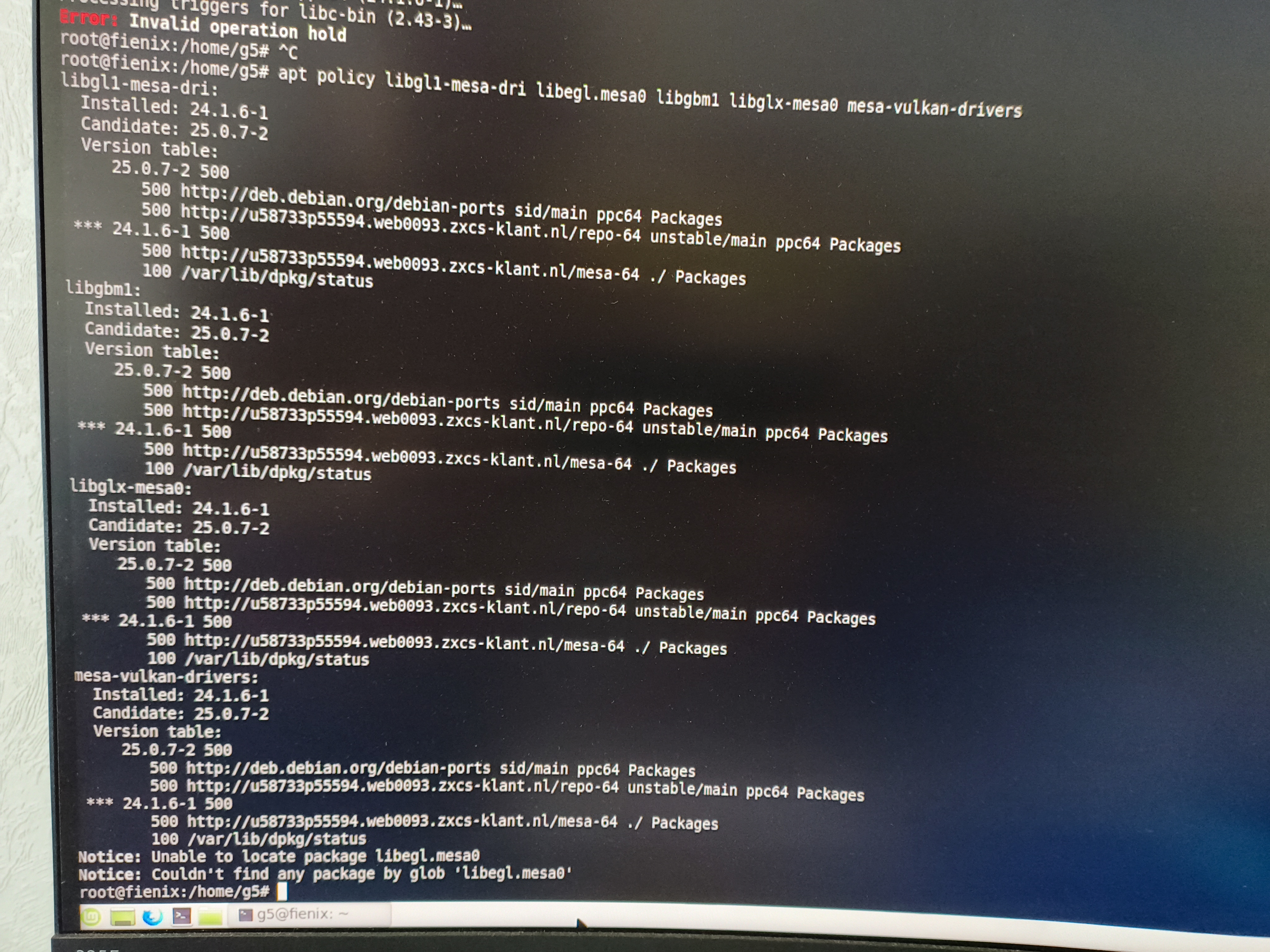
I'm trying to downgrade mesa on fresh mintppc64 installation but getting this:
.....
dpkg: warning: downgrading mesa-va-drivers: ppc64 (25.0.7-2)
Preparing to unpack .../7-mesa-va-drivers_24.1.6-1_ppc64.deb...
Unpacking mesa-va-drivers😛pc64 (24.1.6-1) over (25.0.7-2)..
dpkg: warning: downgrading mesa-vdpau-drivers: ppc64 (25.0.7-
Preparing to unpack .../8-mesa-vdpau-drivers_24.1.6-1_ppc64.del
Unpacking mesa-vdpau-drivers😛pc64 (24.1.6-1) over (25.0.7-2
dpkg: warning: downgrading mesa-vulkan-drivers😛pc64 (25.0.7
Preparing to unpack .../9-mesa-vulkan-drivers_24.1.6-1_ppc64.de Unpacking mesa-vulkan-drivers😛pc64 (24.1.6-1) over (25.0.7-2
Setting up libgbm1😛pc64 (24.1.6-1)... Setting up libllvm17t64😛pc64 (1:17.0.6-23+b2)....
Setting up libglapi-mesa😛pc64 (24.1.6-1)...
Setting up libxcb-dri2-0😛pc64 (1.17.0-2+b2)...
Setting up mesa-va-drivers😛pc64 (24.1.6-1)...
Setting up mesa-vulkan-drivers😛pc64 (24.1.6-1)..
Setting up mesa-vdpau-drivers😛pc64 (24.1.6-1)...
Setting up libgl1-mesa-dri😛pc64 (24.1.6-1)...
Setting up libegl-mesao😛pc64 (24.156-1)....
Setting up libglx-mesao😛pc64 (24.1.6-1)...
Processing triggers for libc-bin (2.43-3)...
Error: Invalid operation hold root@fienix:/home/g5#
And this:
.....
dpkg: warning: downgrading mesa-va-drivers: ppc64 (25.0.7-2)
Preparing to unpack .../7-mesa-va-drivers_24.1.6-1_ppc64.deb...
Unpacking mesa-va-drivers😛pc64 (24.1.6-1) over (25.0.7-2)..
dpkg: warning: downgrading mesa-vdpau-drivers: ppc64 (25.0.7-
Preparing to unpack .../8-mesa-vdpau-drivers_24.1.6-1_ppc64.del
Unpacking mesa-vdpau-drivers😛pc64 (24.1.6-1) over (25.0.7-2
dpkg: warning: downgrading mesa-vulkan-drivers😛pc64 (25.0.7
Preparing to unpack .../9-mesa-vulkan-drivers_24.1.6-1_ppc64.de Unpacking mesa-vulkan-drivers😛pc64 (24.1.6-1) over (25.0.7-2
Setting up libgbm1😛pc64 (24.1.6-1)... Setting up libllvm17t64😛pc64 (1:17.0.6-23+b2)....
Setting up libglapi-mesa😛pc64 (24.1.6-1)...
Setting up libxcb-dri2-0😛pc64 (1.17.0-2+b2)...
Setting up mesa-va-drivers😛pc64 (24.1.6-1)...
Setting up mesa-vulkan-drivers😛pc64 (24.1.6-1)..
Setting up mesa-vdpau-drivers😛pc64 (24.1.6-1)...
Setting up libgl1-mesa-dri😛pc64 (24.1.6-1)...
Setting up libegl-mesao😛pc64 (24.156-1)....
Setting up libglx-mesao😛pc64 (24.1.6-1)...
Processing triggers for libc-bin (2.43-3)...
Error: Invalid operation hold root@fienix:/home/g5#
And this:
Last edited:
I will soon look into this.
I see that it says that it can’t find libegl.mesa0. That is because the package is called libegl-mesa0…
I see that it says that it can’t find libegl.mesa0. That is because the package is called libegl-mesa0…
Last edited:
Oops, my bad.I will soon look into this.
I see that it says that it can’t find libegl.mesa0. That is because the package is called libegl-mesa0…
Btw, after another update/upgrade start working now 🤔
Mesa installed and is working? No more problems?Oops, my bad.
Btw, after another update/upgrade start working now 🤔
I had a look at the mesa-64 script and there is a mistake in it. Funny that I only now find this out. At the end it says:
sudo apt hold package1 package2 etc
It should read:
apt-mark hold package1 package2 etc
I will correct the script and upload it.
In your case you just have to do (as root):
To see which packages are on hold:
sudo apt hold package1 package2 etc
It should read:
apt-mark hold package1 package2 etc
I will correct the script and upload it.
In your case you just have to do (as root):
Code:
apt-mark hold libegl-mesa0=24.1.6-1 libgbm1=24.1.6-1 libgl1-mesa-dri=24.1.6-1 \
libglx-mesa0=24.1.6-1 mesa-va-drivers=24.1.6-1 mesa-vdpau-drivers=24.1.6-1 \
mesa-vulkan-drivers=24.1.6-1
To see which packages are on hold:
Code:
apt-mark showhold
Last edited:
Yes, it started working. I tried downgrading MESA again and got the same "hold" error. Then I updated using the built-in update manager, not through the terminal, and it worked. Besides, as you know, I check for problems with the mintppc installation every month or two, but this time I got the "hold" error.Mesa installed and is working? No more problems?