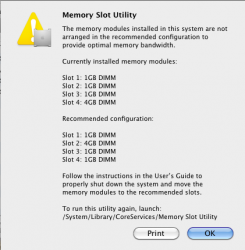
Well I installed my RAM last night and everything seems to be working just fine. I ordered 3x4GB sticks from OWC for my new 2010 Mac Pro 3.2GHz, which came stock with 3x1GB sticks from Apple.
What I did was pull the original sticks, and install the new 3 in the first three slots. Then I installed one of the old 1GB sticks in the 4th slot. I powered it up, got the "Ram Modules installed in the recommended locations" message, and was a happy camper.
Further checking revealed 13GB of RAM in the About This Mac window and in System Profiler.
Then I did some stress testing. I fired up all my daily apps...Safari, Mail, iCal, iTunes, Adium, Transmit, Xcode, and a few others. I started up World of Warcraft for good measure, and left that sitting idle. Then I started Aperture and actually did a little editing work. By now I was down to about 3-4GB of free RAM. I wanted to max it out, so I started Photoshop and started a Photomerge operation to create a panarama. With 20 pictures the panarama finished quickly, but it was enough to max out the RAM.
While it was in this state I tested everything out. All the other programs seemed fine, Aperture performed well. Even World of Warcraft was pushing 200 FPS while all this was going on. When the panarama finished aligning and blending it looked good and was very responsive to zoom in and look around on.
So in conclusion I believe that everything here works as we expected. You most likely get triple channel performance from the 12GB, and single channel from the 1 or 2GB at the end. That being said, this is obviously not a scientific test. I didn't do any memory read/write tests or anything like that. But in a real world usage scenario, I don't see why adding that 4th stick will do you any harm whatsoever.