Become a MacRumors Supporter for $50/year with no ads, ability to filter front page stories, and private forums.
Unless you have any other inquiries regarding the 5870, I'll go back to my 680 in 10 mins or so...
 
Unless you have any other inquiries regarding the 5870, I'll go back to my 680 in 10 mins or so...

By all means..thanks for wasting your time with the 5870 🙂
I'm jealous of your working 680....
 
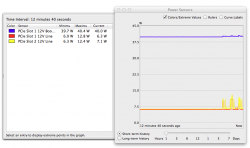
'So just how did ATI drop the Radeon HD 5870’s idle power to 27W' from a review...and I'm idling at 55w, drawing 40 from the slot itself...
Now I'm thinking its the logic board🙁
 

Attachments

  • Screen Shot 2013-05-07 at 5.20.08 PM.png
    Screen Shot 2013-05-07 at 5.20.08 PM.png
    73.2 KB · Views: 86
Two...and I just disconnected one and still the same...its actually pretty loud as well...right now its idling at about 62watts...🙁
 
Off to apple store tomorrow....
Thanks for helping out....very much appreciated 🙂
 
Hi Kunia,

When you flashed your card, did you get a message from NVFLASH about the boards being different and having to press Y twice to be able to do the firmware flash?

Cheers,

Moley
 
Hi Kunia,

When you flashed your card, did you get a message from NVFLASH about the boards being different and having to press Y twice to be able to do the firmware flash?

Cheers,

Moley

Yeah...
but from what I've read I was flashing a reference card, model 2680
which should work
 
Update

Just got back from the Apple store...they did the tests and it passed.

And after reinstalling everything, my 5870 is running at 11.5W from the PCI and 3.1+3.3W from 6-pin power cables....

so....

two lemon GTX 680 !?
 
That's entirely possible, even if it's not very likely and doesn't explain the 5870's idling behaviour. However, it's come back from Apple with a clean bill of health. That would reassure me enough to try again, especially as everyone else is reporting success.

Maybe there was some tarnish on the PCIe slot connector that just needed "scrubbing off" by reseating a card repeatedly. I've certainly seen that problem with RAM slots more than once in the past.
 
That's entirely possible, even if it's not very likely and doesn't explain the 5870's idling behaviour. However, it's come back from Apple with a clean bill of health. That would reassure me enough to try again, especially as everyone else is reporting success.

Maybe there was some tarnish on the PCIe slot connector that just needed "scrubbing off" by reseating a card repeatedly. I've certainly seen that problem with RAM slots more than once in the past.


with just one hard drive and clean os x 10.8.3, the 5870 (at the apple store) was idling at about 17 watts - 11w from the PCI slot, and 3 watts per each 6-pin connector. They ran the ASD on it, and all components passed. We specifically looked at all the power/voltage on the slots...again, all good.
 
Register on MacRumors! This sidebar will go away, and you'll see fewer ads.