Wow! A blast from the past and for the longest time, I wanted to try this editor but couldn't get it to install back in the early 2000's. Now, I'll give it try on my Powerbook G4 to see how well it performs.

Got a tip for us?
Let us know
Become a MacRumors Supporter for $50/year with no ads, ability to filter front page stories, and private forums.
Open-source software currently supported on macOS PowerPC
- Thread starter barracuda156
- WikiPost WikiPost
- Start date
-
- Tags
- opensource powerpc
- Sort by reaction score
You are using an out of date browser. It may not display this or other websites correctly.
You should upgrade or use an alternative browser.
You should upgrade or use an alternative browser.
- Status
- The first post of this thread is a WikiPost and can be edited by anyone with the appropiate permissions. Your edits will be public.

Anyone interested to try a new anime streaming app (ani-cli):

 github.com
 github.com
It is very basic, but it works (tested on 10.6 ppc).
fzfpp: new port in sysutils · macos-powerpc/powerpc-ports@edb627a
Overlay repo with fixes to use with MacPorts on macOS PowerPC - fzfpp: new port in sysutils · macos-powerpc/powerpc-ports@edb627a
github.com
ani-cli: new port · macos-powerpc/powerpc-ports@824c995
Overlay repo with fixes to use with MacPorts on macOS PowerPC - ani-cli: new port · macos-powerpc/powerpc-ports@824c995
github.com
It is very basic, but it works (tested on 10.6 ppc).
I gave ani-cli a try and it seems to work but the video plays slow as expected since it's using MPV but will try it with Mplayer to see if it works better.Anyone interested to try a new anime streaming app (ani-cli):
fzfpp: new port in sysutils · macos-powerpc/powerpc-ports@edb627a
Overlay repo with fixes to use with MacPorts on macOS PowerPC - fzfpp: new port in sysutils · macos-powerpc/powerpc-ports@edb627aani-cli: new port · macos-powerpc/powerpc-ports@824c995
Overlay repo with fixes to use with MacPorts on macOS PowerPC - ani-cli: new port · macos-powerpc/powerpc-ports@824c995
It is very basic, but it works (tested on 10.6 ppc).

Andrew-R
macrumors 6502
Not as cool as above, but I compiled mesa-demos 8.5.0 with freeglut from macports! (this enables a lot more demos, need X server). Many can print fps and pretend to be benchmark!
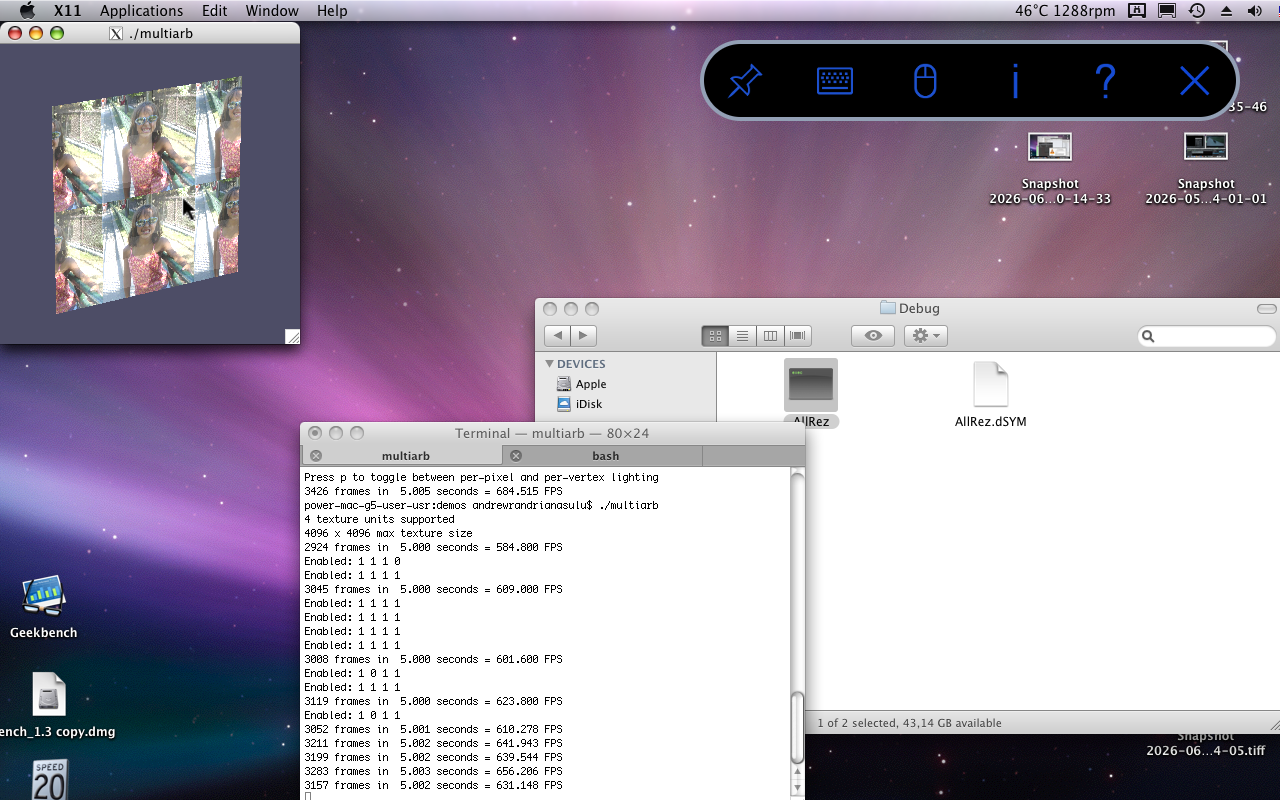
Code:
LDFLAGS=-L/opt/local/lib CPPFLAGS=-I/opt/local/include/ ./configure --enable-autotools --with-glut=/opt/local/lib/Not as cool as above, but I compiled mesa-demos 8.5.0 with freeglut from macports! (this enables a lot more demos, need X server). Many can print fps and pretend to be benchmark!
Code:LDFLAGS=-L/opt/local/lib CPPFLAGS=-I/opt/local/include/ ./configure --enable-autotools --with-glut=/opt/local/lib/
View attachment 2636918
Which version of mesa is used btw?
Andrew-R
macrumors 6502
Which version of mesa is used btw?
Code:
name of display: :0
display: :0  screen: 0                                                                             direct rendering: Yes
server glx vendor string: SGI
server glx version string: 1.4
server glx extensions:
GLX_SGIX_fbconfig, GLX_SGIS_multisample, GLX_ARB_multisample,   GLX_EXT_visual_info, GLX_EXT_import_context
client glx vendor string: Mesa Project and SGI                                     client glx version string: 1.4
client glx extensions:
GLX_ARB_get_proc_address, GLX_ARB_multisample, GLX_EXT_visual_rating,          GLX_SGIX_fbconfig, GLX_INTEL_swap_event
GLX version: 1.4
GLX extensions:
GLX_ARB_get_proc_address, GLX_ARB_multisample, GLX_EXT_visual_rating,      GLX_SGIX_fbconfig
OpenGL vendor string: NVIDIA Corporation
OpenGL renderer string: NVIDIA GeForce 6600 LE OpenGL Engine   OpenGL version string: 2.0 NVIDIA-1.5.48
OpenGL shading language version string: 1.20
OpenGL extensions:
A bit hard to say, because Mesa apparently only does glx part, actual OpenGL driver is hw accelerated proprietary Nvidia! Never saw this before, but may be Windows version of mesa can do this, too?
Code:
  otool -L ./src/demos/multiarb   ./src/demos/multiarb:
 /opt/local/lib/libglut.3.dylib (compatibility version 3.0.0, current version 3.13.0)
/opt/local/lib/libGLU.1.dylib (compatibility version 5.0.0, current version 5.1.0)
/opt/local/lib/libGL.1.dylib (compatibility version 4.0.0, current version 4.0.0)
/usr/lib/libSystem.B.dylib (compatibility version 1.0.0, current version 111.1.7)
/usr/lib/libgcc_s.1.dylib (compatibility version 1.0.0, current version 1.0.0)A bit hard to say, because Mesa apparently only does glx part
I assumed you know what mesa you have installed, but in any case:
Code:
port -v installed mesaAnd if it is not sure which port provides a given library, then:
Code:
port provides /opt/local/lib/libGL.1.dylibAndrew-R
macrumors 6502
thanks, for me as relative novice to macports this kind of help is valuable (I use macports on my accidently hackintoshed laptop, but for now mostly in frozen-in-time mode)I assumed you know what mesa you have installed, but in any case:
Code:port -v installed mesa
And if it is not sure which port provides a given library, then:
Code:port provides /opt/local/lib/libGL.1.dylib
I also found runtime libevent disable switch for links :
Code:
alias links=links\ -no-libeventso now it works on 10.5 🙂
I also found runtime libevent disable switch for links :
Code:alias links=links\ -no-libevent
so now it works on 10.5 🙂
What was up with libevent? I recall you mentioned it but don’t remember what was the error.
Upd. N/m, I checked that.
Upd2. Fixed building against libev, looks like that works now. See: https://github.com/macos-powerpc/powerpc-ports/commit/379609a43c65aedde3294f5bf726ab6e5bdbf773
Last edited:
Andrew-R
macrumors 6502
Tested QEMU emulator version 2.3.1 with pre-installed Windows XP 😛
Best line was
Not sure if any usb (OHCI, UHCI) works normally here - I got some very long boot times if I add it
adding network card ne2k_pci seems to be more harmless, but not sure if it ever worked - Explorer crashed 😀

Tested Bochs git a bit, OHCI controller there seems to work better than UHCI ? (on Win98SE)
 github.com
I think I left "What you did with PowerpC today?" thread alone because my tests relatively mundane ?
Bochs and qemu definitely not new software, but making them work reliably on OSX PPC is not as trivial as on x86 Linux, it seems!
Edit: networks seems to work, too, just anything using mshtml, even just for text file from ftp crashes??

Edit 2: even stranger, my self-compiled qemu 2.2.0 does NOT have weird delay, plays direct music test, and iexplorer does not crash!

May be 2.3.1 had regression, or just miscompiled ?
Best line was
Code:
qemu-system-x86_64 -cpu pentium3 -m 512 -vga cirrus -hda VMs/2gb_xp-compressed.img -M pc-0.10 -soundhw ac97Not sure if any usb (OHCI, UHCI) works normally here - I got some very long boot times if I add it
adding network card ne2k_pci seems to be more harmless, but not sure if it ever worked - Explorer crashed 😀
Tested Bochs git a bit, OHCI controller there seems to work better than UHCI ? (on Win98SE)
Does usb tablet work on BE hosts? · Issue #769 · bochs-emu/Bochs
Copied my win98 install from Termux (aarch64, LE) to Leopard (ppc32, BE). In general things works But for some reason OHCI (edit: it was UHCI) USB tablet does not work, even if it used to work on s...
github.com
I think I left "What you did with PowerpC today?" thread alone because my tests relatively mundane ?
Bochs and qemu definitely not new software, but making them work reliably on OSX PPC is not as trivial as on x86 Linux, it seems!
Edit: networks seems to work, too, just anything using mshtml, even just for text file from ftp crashes??
Code:
qemu-system-x86_64 -cpu pentium3 -m 512 -vga cirrus -hda VMs/2gb_xp-compressed.img -M pc-0.10 -soundhw ac97 -netdev user,id=myslirp -device rtl8139,netdev=myslirp -cdrom ~/win98/Windows_98_Second_Edition.ver.4.10.2222.Russian.isoEdit 2: even stranger, my self-compiled qemu 2.2.0 does NOT have weird delay, plays direct music test, and iexplorer does not crash!
Code:
~/src/qemu2/qemu-2.2.0/i386-softmmu/qemu-system-i386 -cpu pentium3 -m 512 -vga cirrus -hda VMs/2gb_xp-compressed.img -M pc-0.10 -soundhw ac97 -netdev user,id=myslirp -device rtl8139,netdev=myslirp -cdrom ~/win98/Windows_98_Second_Edition.ver.4.10.2222.Russian.isoMay be 2.3.1 had regression, or just miscompiled ?
Last edited:
Tested QEMU emulator version 2.3.1 with pre-installed Windows XP 😛
Best line was
Code:qemu-system-x86_64 -cpu pentium3 -m 512 -vga cirrus -hda VMs/2gb_xp-compressed.img -M pc-0.10 -soundhw ac97
Not sure if any usb (OHCI, UHCI) works normally here - I got some very long boot times if I add it
adding network card ne2k_pci seems to be more harmless, but not sure if it ever worked - Explorer crashed 😀
Tested Bochs git a bit, OHCI controller there seems to work better than UHCI ? (on Win98SE)
Does usb tablet work on BE hosts? · Issue #769 · bochs-emu/Bochs
Copied my win98 install from Termux (aarch64, LE) to Leopard (ppc32, BE). In general things works But for some reason OHCI (edit: it was UHCI) USB tablet does not work, even if it used to work on s...
I think I left "What you did with PowerpC today?" thread alone because my tests relatively mundane ?
Bochs and qemu definitely not new software, but making them work reliably on OSX PPC is not as trivial as on x86 Linux, it seems!
Edit: networks seems to work, too, just anything using mshtml, even just for text file from ftp crashes??
Code:qemu-system-x86_64 -cpu pentium3 -m 512 -vga cirrus -hda VMs/2gb_xp-compressed.img -M pc-0.10 -soundhw ac97 -netdev user,id=myslirp -device rtl8139,netdev=myslirp -cdrom ~/win98/Windows_98_Second_Edition.ver.4.10.2222.Russian.iso
Edit 2: even stranger, my self-compiled qemu 2.2.0 does NOT have weird delay, plays direct music test, and iexplorer does not crash!
Code:~/src/qemu2/qemu-2.2.0/i386-softmmu/qemu-system-i386 -cpu pentium3 -m 512 -vga cirrus -hda VMs/2gb_xp-compressed.img -M pc-0.10 -soundhw ac97 -netdev user,id=myslirp -device rtl8139,netdev=myslirp -cdrom ~/win98/Windows_98_Second_Edition.ver.4.10.2222.Russian.iso
May be 2.3.1 had regression, or just miscompiled ?
You can check configure options in the port. The only patch added in 2.3.1 is a no-op for 10.5. What did change was a switch from Xcode gcc to modern one (required due to thread local storage need). This is 2.2.0 when it was initially added.
AFAICT, the port in effect uses unmodified upstream source on 10.5 (and on 10.6 falls back to 10.5 behavior in one code block). So if there are apparent regressions, those may be due to:
– actual regressions in upstream code;
– suboptimal configure args;
– usage of modern gcc over Apple one (can be relevant for ObjC code, in most cases fine).
You can try compiling 2.3.1 without the port (assuming you did it for 2.2.0, nothing much changed). If you get identical behavior with 2.3.1 from ports, it is either a bug in upstream code or regression brought about by gcc. If you get the outcome as with 2.2.0, then something is not quite right in the portfile (either from original port or from my update to it).
P. S. Давненько я не видел винду с русифицированным гуем )
Andrew-R
macrumors 6502
You can check configure options in the port. The only patch added in 2.3.1 is a no-op for 10.5. What did change was a switch from Xcode gcc to modern one (required due to thread local storage need). This is 2.2.0 when it was initially added.
AFAICT, the port in effect uses unmodified upstream source on 10.5 (and on 10.6 falls back to 10.5 behavior in one code block). So if there are apparent regressions, those may be due to:
– actual regressions in upstream code;
– suboptimal configure args;
– usage of modern gcc over Apple one (can be relevant for ObjC code, in most cases fine).
You can try compiling 2.3.1 without the port (assuming you did it for 2.2.0, nothing much changed). If you get identical behavior with 2.3.1 from ports, it is either a bug in upstream code or regression brought about by gcc. If you get the outcome as with 2.2.0, then something is not quite right in the portfile (either from original port or from my update to it).
P. S. Давненько я не видел винду с русифицированным гуем )
Yeah, for now I get qemu 6.1.1 from 6.1 branch working (x86-64 and ppc) on Bonslack:
I suspect there might be problem with ggc 15.20's lto (saw some link failures with apitrace) but this idea need testing here, and more qemu rebuilds on Leo side 🙂
Build itself is not time consuming (25-30 min) but making many, many builds adds up, so I try to batch my time on Linux and OSX sides
Yeah, for now I get qemu 6.1.1 from 6.1 branch working (x86-64 and ppc) on Bonslack:
I guess more recent qemu will have broken cocoa, but something like sdl or gtk may work on macOS.
I suspect there might be problem with ggc 15.20's lto (saw some link failures with apitrace) but this idea need testing here, and more qemu rebuilds on Leo side 🙂
LTO can always be disabled.
Besides, why do you use gcc15? You can, of course, but that’s overriding ppcports defaults at the moment, and nothing is tested with gcc15.
Andrew-R
macrumors 6502
I guess more recent qemu will have broken cocoa, but something like sdl or gtk may work on macOS.
LTO can always be disabled.
Besides, why do you use gcc15? You can, of course, but that’s overriding ppcports defaults at the moment, and nothing is tested with gcc15.
Sorry, I mean Bonslack's default is gcc 15.2.0 - I am trying to separate general problems on ppc from specific to osx/ppcports by building same software here and there.
On OSX it will be PPCPorts gcc14 of course
Andrew-R
macrumors 6502
I guess more recent qemu will have broken cocoa, but something like sdl or gtk may work on macOS.
LTO can always be disabled.
Besides, why do you use gcc15? You can, of course, but that’s overriding ppcports defaults at the moment, and nothing is tested with gcc15.
ok, on OSX side i386 part of qemu 5.0.0 works, but ppc side segfaults booting finnix 111 ??
Code:
export CXX=g++-mp-14

export CC=gcc-mp-14

./configure --target-list=ppc-softmmu,i386-softmmu --disable-gtk --python=/opt/local/bin/python3.12 --extra-cflags="-I/opt/local/include/LegacySupport/ -I/opt/local/include -I/opt/local/include/SDL" --disable-cocoa --extra-ldflags="-L/opt/local/lib/ -lMacportsLegacySupport"
plus there was some strangeness if SDL and APPLE defined, I if 0'ed it
qemu-5.0.0/softmmu/main.c
and set cacheline_size to 16 in
util/cacheinfo.c
because autodetect was failing.
ok, on OSX side i386 part of qemu 5.0.0 works, but ppc side segfaults booting finnix 111 ??
Code:export CXX=g++-mp-14 export CC=gcc-mp-14 ./configure --target-list=ppc-softmmu,i386-softmmu --disable-gtk --python=/opt/local/bin/python3.12 --extra-cflags="-I/opt/local/include/LegacySupport/ -I/opt/local/include -I/opt/local/include/SDL" --disable-cocoa --extra-ldflags="-L/opt/local/lib/ -lMacportsLegacySupport"
plus there was some strangeness if SDL and APPLE defined, I if 0'ed it
qemu-5.0.0/softmmu/main.c
and set cacheline_size to 16 in
util/cacheinfo.c
because autodetect was failing.
I don’t know if SDL1 works. If not Cocoa for some reason, I would try either SDL2 or GTK.
Can’t comment on runtime issues with Qemu, I never used it.
Andrew-R
macrumors 6502
I don’t know if SDL1 works. If not Cocoa for some reason, I would try either SDL2 or GTK.
Can’t comment on runtime issues with Qemu, I never used it.
Ah, it was SDL1! It worked for me in qemu 5 i386 softmmu. Cocoa already does not compile in 5.0.0, then SDL1 disappeared in 5.1.0, then there was switch to meson in 5.2.0 and meson failed to find Appleframework !
It sort of sad that ppc-softmmu/ppc64-softmmu do not work for me with Mac machines.
Can you try on your 64-bit systems, may be this is width issue somewhere?
Ah, it was SDL1! It worked for me in qemu 5 i386 softmmu. Cocoa already does not compile in 5.0.0
Cocoa is probably fixable, but I leave it to someone more interested in emulation.
Claude is okayish with simple ObjC code, it’s worth trying using it for an adjustment. Good thing you will know if the resulting code actually works and not just compiles.
then SDL1 disappeared in 5.1.0, then there was switch to meson in 5.2.0 and meson failed to find Appleframework !
meson is buggy. I think I know what you refer to, just fix meson.build so that it stops doing nonsense. Also you don’t need to find a framework, we know it exists, so just pass appropriate flags.
Andrew-R
macrumors 6502
Cocoa is probably fixable, but I leave it to someone more interested in emulation.
Claude is okayish with simple ObjC code, it’s worth trying using it for an adjustment. Good thing you will know if the resulting code actually works and not just compiles.
meson is buggy. I think I know what you refer to, just fix meson.build so that it stops doing nonsense. Also you don’t need to find a framework, we know it exists, so just pass appropriate flags.
Well, for me main problem for now is qemu-system-ppc 5.0.0 blowing up on OSX while working on Linux 😉 qemu 2.2/2.3 can't boot MACOS 9.2 or my Tiger install copied from PC. qemu 5.0.0 ppc starts macos 9.2.2 installer from cd, but after loading first extension it sits for a while using host cpu, and then nothing. Tiger install just explodes early. Linux never goes to pci device enumeration. So something is off, just not sure what exactly.
My self-compiled qemu-system-i386 2.3.1 also hang on booting windows xp (due to rcu.h/thread local storage it *needs* gcc 14 or at least something above Apple's gcc 4.2), so I suspect qemu codebase just sensitive to what compiler does .. I'll try with optimization level turned down, but outside of this I have no idea how to debug such bugs :/