
Got a tip for us?
Let us know
Become a MacRumors Supporter for $50/year with no ads, ability to filter front page stories, and private forums.
Pro Display XDR - Owners Thread
- Thread starter - rob -
- Start date
- Sort by reaction score
You are using an out of date browser. It may not display this or other websites correctly.
You should upgrade or use an alternative browser.
You should upgrade or use an alternative browser.
restock3eee
macrumors regular
Anyone falsely getting charged $299 vs $99 for screen damage? The policy is “$99 for screen or enclosure accidental damage, $299 for other accidental damage.” But because they might only do full replacements vs the Studio Display (?) they charge you 299 for a bad screen?
Need help here, I bought my XDR maybe 2 years ago, everything works perfectly, only until recently like one week ago, it is showing a dimmed edge with extra bright side followed by darker area. I attached a picture here. I tried to connect to a different Mac, it still showing up. it looks like extra bright left side with a dimmed edge. of course I don't have apple care, been using the display for like 3 years. it suddenly developed this issue. everything else works fine. Booked an appointment with apple, what are their policies on this defect? anyone? I don't want to pay a dime fixing it for sure, I paid enough when I bought it. if this is only a 3 years product, that really makes me feel disappointed....
Attachments


Is it a electronic artifact?
You wouldn't be the first to find an insect wandering around inside your monitor...
But it would have to be a very intrepid one to penetrate the seal of an Apple panel.
But dust does occasionally get into 5K panels if the fans are working hard, particularly at the corners, so there might be a way a Bryobia Praetiosa got in. 😀
You wouldn't be the first to find an insect wandering around inside your monitor...
But it would have to be a very intrepid one to penetrate the seal of an Apple panel.
But dust does occasionally get into 5K panels if the fans are working hard, particularly at the corners, so there might be a way a Bryobia Praetiosa got in. 😀


machenryr
macrumors 6502a
I'd never seen that before but as soon as I closed my DAW it went away. So it's an indication that the "microphone" was in use.

xraydoc
Contributor
Yes. It's the microphone-active indicator. macOS, iOS, iPadOS all use the same indicator.Is it an indication of a microphone?
restock3eee
macrumors regular
Genius Bar says nanotexture had to pay $299 instead of $99 for screen damage. I was on the phone with senior advisor who reassured me it is only $99. This rule is crazy. Does that mean iMacs with nanotexture have to pay higher amount for simple screen damage?
restock3eee
macrumors regular
Apple is stating residue on nanotexture is a $299 deductible. I said “so if I got a hammer and shattered the screen it would be only $99”. They said “yes”
9to5Mac posted their discovery of references in the macOS 26.1 Tahoe beta 3 code to "Pro Display XDR Camera” and “Pro Display XDR Desk View Camera." This may be the first piece of evidence from Apple itself that one of the upcoming rumored monitors will be a second generation of the Pro XDR and it will include a camera. Full article in the following link:

 9to5mac.com
Edited to add: Sorry, after I posted this, I see Macrumors posted about the code reference with collaboration of the discovery. Sorry for the redundant post.
Apple Pro Display XDR 2 likely has key hardware upgrade over original $4999 monitor - 9to5Mac
Apple is expected to release a second-generation Apple Pro Display XDR in the near future, and it looks like it...
9to5mac.com
Edited to add: Sorry, after I posted this, I see Macrumors posted about the code reference with collaboration of the discovery. Sorry for the redundant post.
Onimusha370
macrumors 65816
Very interesting timing for this rumour… I’d have thought an XDR2 would debut with a Mac Studio/Mac Pro refresh (perhaps WWDC 26?) - but maybe it will be alongside the higher end MacBook Pros in the next few months?

etc
macrumors 6502
That's interesting, but maybe it's an accessory? Current XDR does not have enough room for the camera with decent quality. If Apple's going to make a bulb on top or a notch like on MacBooks, that'd be a disaster9to5Mac posted their discovery of references in the macOS 26.1 Tahoe beta 3 code to "Pro Display XDR Camera” and “Pro Display XDR Desk View Camera." This may be the first piece of evidence from Apple itself that one of the upcoming rumored monitors will be a second generation of the Pro XDR and it will include a camera. Full article in the following link:
Apple Pro Display XDR 2 likely has key hardware upgrade over original $4999 monitor - 9to5Mac
Apple is expected to release a second-generation Apple Pro Display XDR in the near future, and it looks like it...
Edited to add: Sorry, after I posted this, I see Macrumors posted about the code reference with collaboration of the discovery. Sorry for the redundant post.
Onimusha370
macrumors 65816
Surely the market for XDR users is too small to bring out an accessory like this? I just hope if we're getting an XDR2 that they keep it at the high end of the market and don't just spec bump the current model with latest I/O and a camera.That's interesting, but maybe it's an accessory? Current XDR does not have enough room for the camera with decent quality. If Apple's going to make a bulb on top or a notch like on MacBooks, that'd be a disaster

daveedjackson
macrumors 6502
I'm sorry but I'm not sure any pro using the existing display is "crying out" for a new version. There is nothing wrong with the existing. It's a fanatic display. It lacks nothing. I don't need a camera for my work system. my laptop sits next to me for teams calls to discuss projects. I'm glad it doesn't have the gimmicks. Need I remind everyone of the "Touch Bar" which came and went. The display fulfils it's as a primary use. Sure you can add a camera but it's not needed. It's not something that would make me upgrade the display. Nor would speakers. Again professionals using this display would have pro monitors or decent speakers.
Last edited:
phototristan
macrumors newbie
This could just be a webcam that attaches to the top magnetically, like a better one than the Logitech one, with Apple’s center stage features.
There may be good reason for them to release something like that as not only for the center stage feature, but Apple is rumored to be adding Face ID to Macs at some point.
There may be good reason for them to release something like that as not only for the center stage feature, but Apple is rumored to be adding Face ID to Macs at some point.
Yeah, the fact that the Pro Display XDR has no built-in camera nor speakers is a feature I really appreciate. Given how often people complain about the quality of these things when they’re built-in and end up not using them in favor of better external solutions, it was so refreshing that the XDR managed to leave them out and focus solely on being a good display.
The main thing I’d be looking forward to in a potential refresh is the use of Thunderbolt 5 to achieve 6K 120 Hz ProMotion. If the new display still has 6K 60 Hz with a built-in camera, I’ll be sad but I guess the upside is that I won’t feel tempted to upgrade mine.
The main thing I’d be looking forward to in a potential refresh is the use of Thunderbolt 5 to achieve 6K 120 Hz ProMotion. If the new display still has 6K 60 Hz with a built-in camera, I’ll be sad but I guess the upside is that I won’t feel tempted to upgrade mine.
Last edited:
etc
macrumors 6502
Has anyone used Kuycon Universal Stand with XDR?


 clickclack.io
Kuycon G27P/P27D/P32K/P20 Monitor Stand
The 32-inch universal monitor stand is suitable for the Apple Studio Display monitor with a VESA interface. It supports the VESA interface with the specification of 100×100 mm. 27 inch Adjustable Stand suits for P27D,G27P monitor 32 inch Adjustable Stand suits for P32K,G32P,P20 monitor
clickclack.io
daveedjackson
macrumors 6502
Very frustrating day. Turned on the Mac Studio and had some strange lines around my Pro Display XDR, Apple support called and booked in with a store. Unbeknown to me my AppleCare had expired apparently when purchased from day 1 it isn’t attached to an Apple ID, so a notification of this was never sent. Anyway a quick google and lots of images of the exact same issue. (Attaching here)
Attachments

Sorry to hear that…when my AppleCare+ expired a few months ago, I too never got any email or notice. Thankfully I had put a reminder on my calendar three years ago…please keep us posted on your appt.Very frustrating day. Turned on the Mac Studio and had some strange lines around my Pro Display XDR, Apple support called and booked in with a store. Unbeknown to me my AppleCare had expired apparently when purchased from day 1 it isn’t attached to an Apple ID, so a notification of this was never sent. Anyway a quick google and lots of images of the exact same issue. (Attaching here)
In August I switched my Pro Display XDR from that expiring AppleCare+ plan to an AppleCare One plan. I’d like to cancel that plan and move it back to a new dedicated AppleCare+ plan just for the display. Has anyone done this? I called Apple and they said they didn’t know if it would work and they couldn’t guarantee that I could add it back to AppleCare One if it didn’t work. I’m scared to lose coverage if everything falls through. What to do?
FWIW I just took a chance and removed the Pro Display XDR from my AppleCare One plan. On my Mac, it didn’t show any option to let me add it to a new AppleCare+ plan. So then I went to https://checkcoverage.apple.com and put in the serial number and it did offer me that option! These things should be so much easier…In August I switched my Pro Display XDR from that expiring AppleCare+ plan to an AppleCare One plan. I’d like to cancel that plan and move it back to a new dedicated AppleCare+ plan just for the display. Has anyone done this? I called Apple and they said they didn’t know if it would work and they couldn’t guarantee that I could add it back to AppleCare One if it didn’t work. I’m scared to lose coverage if everything falls through. What to do?

EugW
macrumors P6
I'm using a very similar one, which appears likely to be from the same manufacturer, with my LG UltraFine 6K.Has anyone used Kuycon Universal Stand with XDR?
View attachment 2576079
Kuycon G27P/P27D/P32K/P20 Monitor Stand
The 32-inch universal monitor stand is suitable for the Apple Studio Display monitor with a VESA interface. It supports the VESA interface with the specification of 100×100 mm. 27 inch Adjustable Stand suits for P27D,G27P monitor 32 inch Adjustable Stand suits for P32K,G32P,P20 monitor
LG Ultrafine 6K announced
That Chinese aluminum Apple knockoff stand is a great match to the LG UltraFine 6K. Base top surface and bottom surface. Four screws attach it to the main part of the stand. Screw holes are recessed. As you can see, the base comes with pads to protect the surface of the table. They are in...
 forums.macrumors.com
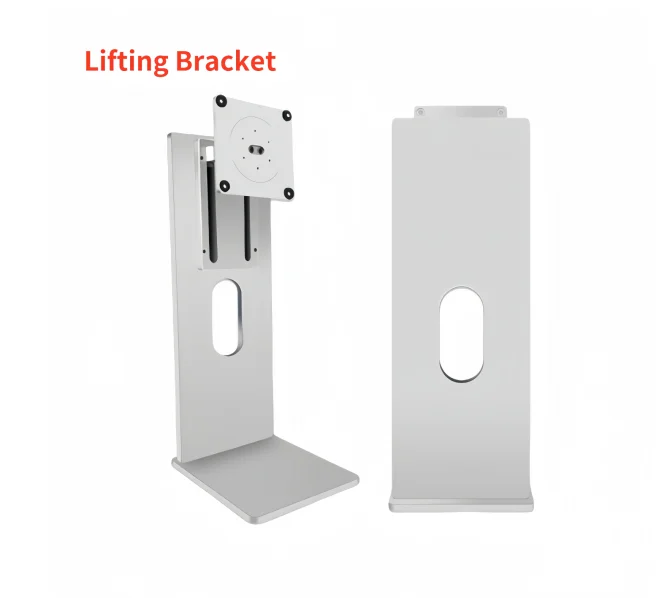
4-8kg Load-bearing Silver Multi-functional Medical Monitor Base Bracket Lifting And Rotating - Buy Factory Wholesale 24 27 32 34 Inches Monitor Lift Swivel Stand Desktop Computer Screen Vesa Bracket desktop Computer Full Set Used 22-27 Inch New Compu
4-8kg Load-bearing Silver Multi-functional Medical Monitor Base Bracket Lifting And Rotating - Buy Factory Wholesale 24 27 32 34 Inches Monitor Lift Swivel Stand Desktop Computer Screen Vesa Bracket desktop Computer Full Set Used 22-27 Inch New Computer Monitor Rotatable Vertical Lift Stand Base...
Mine works well with my LG 6K's 6 kg weight, but I'm not entirely sure what weight it's optimized for. I've read it supports up to 8 kg, and the Pro Display XDR is 7.5 kg, but some other sites list the weight support up to 7 kg. I think the one you linked may work up to 10 kg so it may be more appropriate for the XDR, but it's also considerably more expensive. Nonetheless, given the similarities of these stands, I think my experience may be a useful surrogate. I have my review of it in the link above, in the LG UltraFine 6K thread.
Note that I believe that for both your linked stand and my stand, there is only one tilt hinge (along with rotation support and height adjustment), at the VESA mount. Although yours looks like it has a second hinge at the back, AFAIK that isn't a real hinge and just is made to look like one to copy the Apple stand.
EDIT:
Ha. I see you already read that review. 😀
daveedjackson
macrumors 6502
Exactly the same here. Mine has shown exactly this as of last week. I’m having a huge argument with Apple at the moment, as I have to put it through a consumer rights claim (my Apple care expired) and due to accessory care not being registered to an Apple ID I had no idea it had expired or was even close. Support on the phone (senior level) told me it would be covered under consumer law, in fact made a point of telling me multiple times, made the appointment. And the Apple Store verified the issue, and when it went to the manager to approve the repair he outright refused essentially breaking the law. The law is pretty clear, they can’t refuse under consumer law, it’s faulty; I had provided evidence that it’s not just my unit thankfully via the internet and users like you reporting the issue. And now in the process of filing legal papers to take them to court because of that refusal to repair it without a £2500 charge to me. Apple product, premium product, premium price should really have more life than 3 years. Or Apple should tell customers it fails after 3 years. Also argument is if they know people are reporting the issue why didn’t they contact me advising there is a known issue while i did have my care plan.Need help here, I bought my XDR maybe 2 years ago, everything works perfectly, only until recently like one week ago, it is showing a dimmed edge with extra bright side followed by darker area. I attached a picture here. I tried to connect to a different Mac, it still showing up. it looks like extra bright left side with a dimmed edge. of course I don't have apple care, been using the display for like 3 years. it suddenly developed this issue. everything else works fine. Booked an appointment with apple, what are their policies on this defect? anyone? I don't want to pay a dime fixing it for sure, I paid enough when I bought it. if this is only a 3 years product, that really makes me feel disappointed....
Either way it’s made me super angry.
Last edited:

Hey XDR Pro folks--the display has continued to hold on to the top of the market. Another WWDC inbound here, with a potential new model coming. Any feedback on this?
Like others, my XDR fell out of Applecare unexpectedly, and while it is functioning just fine I would consider liquidating at this point to pick up whatever Apple might bake into a new version. Hopefully the old pro stand compatible!
Another question:
Is anyone using their XDR with a KVM / display switch? There seem to be two options people were using as of fall 2025. I topped the thread focused on it here. Please reply here or over there if you have feedback.
Like others, my XDR fell out of Applecare unexpectedly, and while it is functioning just fine I would consider liquidating at this point to pick up whatever Apple might bake into a new version. Hopefully the old pro stand compatible!
Another question:
Is anyone using their XDR with a KVM / display switch? There seem to be two options people were using as of fall 2025. I topped the thread focused on it here. Please reply here or over there if you have feedback.