
Got a tip for us?
Let us know
Become a MacRumors Supporter for $50/year with no ads, ability to filter front page stories, and private forums.
Running 2 x Monitors from MacBook Pro DVI Out?
- Thread starter Craigy
- Start date
- Sort by reaction score
You are using an out of date browser. It may not display this or other websites correctly.
You should upgrade or use an alternative browser.
You should upgrade or use an alternative browser.
Soon...
There is a PCMCIA Video Card that enables two external monitors with powerbooks (http://www.villagetronic.com/e_pr_vtbook.html) and I would bet there will EVENTUALLY be an ExpressCard 34 version, but I have neither heard nor seen anything about it.
There is a PCMCIA Video Card that enables two external monitors with powerbooks (http://www.villagetronic.com/e_pr_vtbook.html) and I would bet there will EVENTUALLY be an ExpressCard 34 version, but I have neither heard nor seen anything about it.

Josias
macrumors 68000
Not true Makosuke. There have been 453 threads on this, and every time I have sent a link, leading to an adapter, which makes it possible to drive two monitors through one plug.
I would only advise you to do this on the MacBook Pro though, sonce it support 3840x2400 at max (Duallink DVI), which is two 1920x1200 displays, or two 23" ACD's. Since the MacBook only has a Singlelink DVI plug, it will only support half resolution (1920x1200), which is why I only would go dual external monitors with MBP.
In your case with two 24" Dell monitors, get a MacBook Pro, and this adapter. The X1600 will run the two Dell screens, plus the MBP's internal display, but you will have to max out the RAM to 2 GB, otherwise this will be at bad ass speeds.
I would only advise you to do this on the MacBook Pro though, sonce it support 3840x2400 at max (Duallink DVI), which is two 1920x1200 displays, or two 23" ACD's. Since the MacBook only has a Singlelink DVI plug, it will only support half resolution (1920x1200), which is why I only would go dual external monitors with MBP.
In your case with two 24" Dell monitors, get a MacBook Pro, and this adapter. The X1600 will run the two Dell screens, plus the MBP's internal display, but you will have to max out the RAM to 2 GB, otherwise this will be at bad ass speeds.
Well, ain't that an interesting doodad.
I wasn't wrong in saying "one monitor per port", since that's all the spec supports, but I wasn't counting on an external box that basically makes two monitors pretend to be one big one from the output's perspective. Neat idea for uber-widescreen use, or laptops without the option of a second port.
It seems like it'll be a tad awkward, since the menu bar is going to stretch across both screens (since the MacOS will see them as one, it can't treat one as the "main" screen like with a standard dual-monitor setup). I suppose Matrox could release a driver for the MacOS to get around this, but being that they've never even made Mac versions of any of their cards, I'm not seeing this happening any time soon.
I wasn't wrong in saying "one monitor per port", since that's all the spec supports, but I wasn't counting on an external box that basically makes two monitors pretend to be one big one from the output's perspective. Neat idea for uber-widescreen use, or laptops without the option of a second port.
It seems like it'll be a tad awkward, since the menu bar is going to stretch across both screens (since the MacOS will see them as one, it can't treat one as the "main" screen like with a standard dual-monitor setup). I suppose Matrox could release a driver for the MacOS to get around this, but being that they've never even made Mac versions of any of their cards, I'm not seeing this happening any time soon.

Josias said:Not true Makosuke. There have been 453 threads on this, and every time I have sent a link, leading to an adapter, which makes it possible to drive two monitors through one plug.
I would only advise you to do this on the MacBook Pro though, sonce it support 3840x2400 at max (Duallink DVI), which is two 1920x1200 displays, or two 23" ACD's. Since the MacBook only has a Singlelink DVI plug, it will only support half resolution (1920x1200), which is why I only would go dual external monitors with MBP.
Triplehead2go is VGA ONLY (NO DVI), has a max resolution of 3840 x 1024 pixels (NOT 1200), and treats 2 monitors as one device, so you'd have the doc split etc.
I've waited for months to find a solution to the problem listed above, but so far there isn't anything reasonable that will drive 2xhi res monitors in DVI from a macbook pro, so much for the 'pro'. An expresscard vid card would be perfect, but as far as I know nobody is even in development of such a thing (vtbook will not be produced in expresscard format).
whyrichard
macrumors 68000
You could always put the dock on the left side/right side :-/. Regardless, if you aren't going to have a Main screen and secondary, I don't really see the point in having two monitors. Most likely windows would be stretched and skewed, and it would be really akward as suggested.
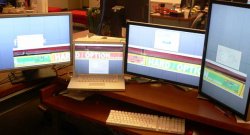
Ahh, leave it to Magma to make the Magic happen. I was wondering in the back of my mind if they had any current-gen products, but kept forgetting to actually look it up.
That is one heck of a setup you've got going there. Wish I could afford that kinda hardware, although in truth I don't know what I'd do with it even if I could.
That is one heck of a setup you've got going there. Wish I could afford that kinda hardware, although in truth I don't know what I'd do with it even if I could.
I wonder if this will drive 2 monitors:
http://www.belkin.com/highspeeddock/
It says DVI "or" VGA, but doesn't say that it won't.
Anybody know for sure?
http://www.belkin.com/highspeeddock/
It says DVI "or" VGA, but doesn't say that it won't.
Anybody know for sure?

Spanky Deluxe
macrumors 603
I now have multiple monitors working from my MacbookPro pro using the Magma ExpressBox1 Pro along with a NVidia GeForce 7300GT. It's not a cheap solution but it is the first I've seen working with each monitor treated as such by osx.
Wow, that is impressive!! Although for the cost of that thing + the cost of a monitor, I think I'd rather get an iMac!!

kdum8
macrumors 6502a
I now have multiple monitors working from my MacbookPro pro using the Magma ExpressBox1 Pro along with a NVidia GeForce 7300GT. It's not a cheap solution but it is the first I've seen working with each monitor treated as such by osx.
Hey Screen,
that's pretty cool. In the pic your four monitors are acting as just one big screen, but can you get them to be individual screens, each with its own windows?
I was originally looking at hooking up 2 HD monitors to a MBP using the Matox Double/Triple Head2Go device but I didn't realise that it is just one big stretched screen instead of two independent ones....🙁
Spanky Deluxe
macrumors 603
Hey Screen,
that's pretty cool. In the pic your four monitors are acting as just one big screen, but can you get them to be individual screens, each with its own windows?
I was originally looking at hooking up 2 HD monitors to a MBP using the Matox Double/Triple Head2Go device but I didn't realise that it is just one big stretched screen instead of two independent ones....🙁
His setup is using each screen as an individual screen. The Matrox Double/Triple Head2Go solutions which makes the computer see two/three screens as one big screen. By using an external PCIe 7300GT card, he's running two screens off the 7300GT's two DVI connectors, one screen off the DVI connector on his MBP and of course the MBP screen. OS X would recognise the fact that it has a total of four screens to play with.
kdum8
macrumors 6502a
His setup is using each screen as an individual screen. The Matrox Double/Triple Head2Go solutions which makes the computer see two/three screens as one big screen. By using an external PCIe 7300GT card, he's running two screens off the 7300GT's two DVI connectors, one screen off the DVI connector on his MBP and of course the MBP screen. OS X would recognise the fact that it has a total of four screens to play with.
OK thanks for that. Question now is, where can I get a PCI 7300GT card and how much is it going to set me back, 😛
Spanky Deluxe
macrumors 603
OK thanks for that. Question now is, where can I get a PCI 7300GT card and how much is it going to set me back, 😛
The 7300GT card's not the expensive part, its only about $100-$150. The expensive part is the Magma ExpressBox1 Pro he's using. That'll set you back $749 according to their website.
I wouldn't really say its worth it at that cost since 2 x 20" ACDs + 1 x 7300 GT + 1 x Magma ExpressBox1 Pro = $2097, which is quite a bit more than a 30" ACD. Or put another way, its the same cost as buying a 20" iMac + a 20" ACD.
Belkin Highspeed docking station
This would do the trick if they supported Mac OS X: http://www.belkin.com/highspeeddock/
I've sent them a support request asking about Mac support
This would do the trick if they supported Mac OS X: http://www.belkin.com/highspeeddock/
I've sent them a support request asking about Mac support
kdum8
macrumors 6502a
This would do the trick if they supported Mac OS X: http://www.belkin.com/highspeeddock/
I've sent them a support request asking about Mac support
Interesting device, how would this give you two external monitors though? Do you mean one monitor off the MBP's DVI out and one from the HUB?
Interesting device, how would this give you two external monitors though? Do you mean one monitor off the MBP's DVI out and one from the HUB?
Yes. I assume that would actually work. I assume you could have one monitor on the 'High Speed Dock' (Or maybe two if the driver and hardware supports both the VGA AND DVI ports simultaneously), the MacBook's built in display, plus a monitor on the MacBook's DVI out.
That makes 3 (possibly four?) monitors. Although only two (Possibly three?) externals and really large monitors. Two large monitors is enough to satisfy most geek's screen real estate desires.
Please correct me if I'm wrong and this wouldn't work. I'd hate waste $300 + shipping and import taxes on that device if it doesn't work.
Of course all of that is dependent on Belkin releasing a driver for Mac OS X...
kdum8
macrumors 6502a
The two monitor solution
This would be the ideal product except for the lack of ExpressCard 34 compatibility. Does anyone out there make an adaptor from ExpressCard 34 to PCMCIA? Maybe it would work then....
There is a PCMCIA Video Card that enables two external monitors with powerbooks (http://www.villagetronic.com/e_pr_vtbook.html) and I would bet there will EVENTUALLY be an ExpressCard 34 version, but I have neither heard nor seen anything about it.
This would be the ideal product except for the lack of ExpressCard 34 compatibility. Does anyone out there make an adaptor from ExpressCard 34 to PCMCIA? Maybe it would work then....

robbieduncan
Moderator emeritus
kdum8
macrumors 6502a
Matrox now have a Triple-Head-2-Go with DVI support. You can read a review here...
That's nice, but the Triple-Head-2-Go just makes one big screen over several monitors NOT several independent ones so it isn't really a solution for many people...