Got a tip for us?
Let us know
Become a MacRumors Supporter for $50/year with no ads, ability to filter front page stories, and private forums.
Studio Display and Studio Display XDR Get Firmware Update
- Thread starter MacRumors
- Start date
- Sort by reaction score
You are using an out of date browser. It may not display this or other websites correctly.
You should upgrade or use an alternative browser.
You should upgrade or use an alternative browser.
questionwonder
macrumors regular
If I buy two, will music come from both monitors? I just read somewhere that it won't!
Additionally, I currently use Kanto Ora desktop speakers, would I be able to have music/sound coming from the speakers and both monitors at once? That's kinda what I would want and expect.
Additionally, I currently use Kanto Ora desktop speakers, would I be able to have music/sound coming from the speakers and both monitors at once? That's kinda what I would want and expect.

Stangs55
macrumors 6502a
Nope. Just one.
I had the same question before I picked up two XDRs….but I can confirm, audio is only out of one.
Some internet sleuthing shows that there are some janky workarounds to make it happen….but nothing baked in.
I had the same question before I picked up two XDRs….but I can confirm, audio is only out of one.
Some internet sleuthing shows that there are some janky workarounds to make it happen….but nothing baked in.


tothemoonsands
macrumors 6502a
Nope. Just one.
I had the same question before I picked up two XDRs….but I can confirm, audio is only out of one.
Some internet sleuthing shows that there are some janky workarounds to make it happen….but nothing baked in.
Check out Loopback by Rogue Amoeba (https://rogueamoeba.com/loopback/)
It takes a couple minutes (less than 5) to set up one time. Drag left channel audio to the L/R on the left XDR, drag right channel audio to the L/R on the right XDR. Close app, select your new sound output in settings ("Multi-Display Output"). Done. Works perfectly.
I have two XDRs too and I've experimented with the different combos. I definitely prefer/recommend splitting up each channel of audio and dedicating a full XDR to all of the speakers on there.
I'm not affiliated with this software at all, and it isn't exactly cheap at around $100 but it is 100% worth it, very useful in many cases.
Last edited:
If I buy two, will music come from both monitors? I just read somewhere that it won't!
Additionally, I currently use Kanto Ora desktop speakers, would I be able to have music/sound coming from the speakers and both monitors at once? That's kinda what I would want and expect.
I use loopback from rogue amoeba, but you can also create an aggregate device in osx. I’m trying to get loopback to add gain per channel so we can make a real sound stage. Nothing as yet tho :/

mightysashiman
macrumors member
Try SoundSource. Does MacOS at least see a separate audio output device? If so, define an output group, and try outputting to it.Nope. Just one.
I had the same question before I picked up two XDRs….but I can confirm, audio is only out of one.
Some internet sleuthing shows that there are some janky workarounds to make it happen….but nothing baked in.
it's a separate updateNevermind it showed up.

guci0
macrumors member
Will test adaptive mode! DCPEXT1 PANIC 🙏 on 120Hz works without.It’s version 26.4 build 23E246 on my Studio XDR. File size was 2.19GB. After rebooting, the update took just over 4 minutes to install.
It only showed up for me after updating my machine to macOS 26.4.
I just installed it so I have not had time to see if the only bug I encountered on 26.3 firmware was fixed (black screen when switching presets).
My initial testing shows that preset switching is wicked fast now. You might even dare say… snappier! I feel like the preset bug wasn’t always an issue though so will continue to use it for the next day or two and see what happens.
Updated, no panics.
Last edited:

tenthousandthings
Contributor
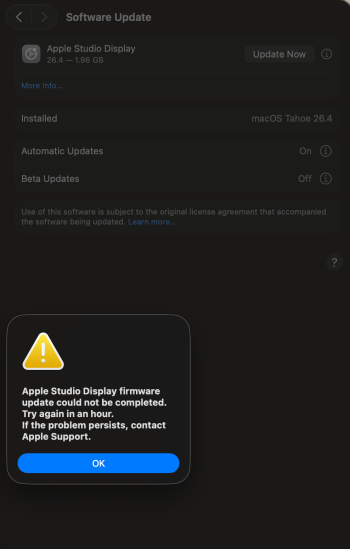
I gather there's no Apple page on this update. I see it, but it's not happening for me on a Studio Display XDR, I get the following error message, even after waiting an hour. I'm currently on an M1 Mini so maybe it can't do it?

Crash0veride
macrumors regular
I was just contemplating opening a return for mine after multiple system crashes a day, hopefully this fixes things. Never keep a device on the promise of a future update.
raveelement
macrumors newbie
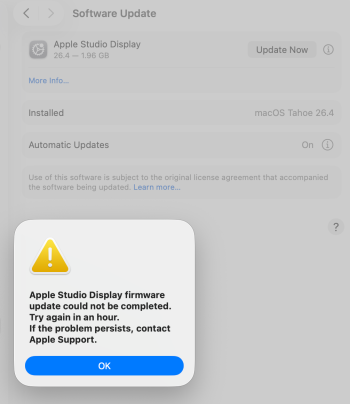
im getting the same thing on studio m4 max, i got it to progress by turning off power for 30 seconds and rebooting computer but its still stuck and wont complete the update. we are entering an era where we may need to update even our monitors with every other mac os x update, so frustratingI gather there's no Apple page on this update. I see it, but it's not happening for me on a Studio Display XDR, I get the following error message, even after waiting an hour. I'm currently on an M1 Mini so maybe it can't do it?
View attachment 2616664
Attachments
ScorpioPotato
macrumors newbie
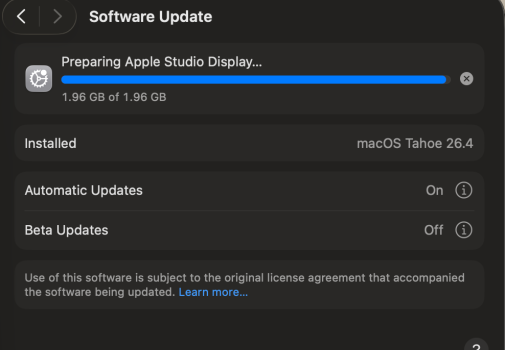
I am in the same boat as you since yesterday. This is on an M4 Pro.I gather there's no Apple page on this update. I see it, but it's not happening for me on a Studio Display XDR, I get the following error message, even after waiting an hour. I'm currently on an M1 Mini so maybe it can't do it?
View attachment 2616664
mightysashiman
macrumors member
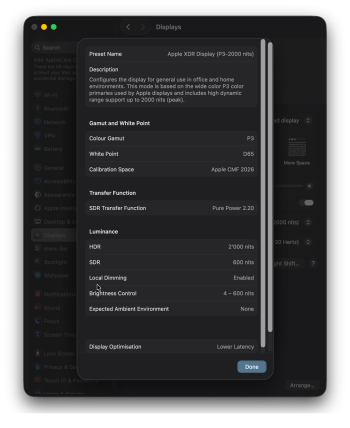
Can people confirm the details screen for any given colour preset for this screen (doesn't happen for an MB internal screen), accessible by clicking on the little ℹ️ right to the preset list in the customise preset pane, has a weird UI issue: it has 2 competing vertical scroll bars stacked together on the right edge.
ScorpioPotato
macrumors newbie
The progress bar goes up to about 85% on my system, and then bails and shows the "Apple Studio Display firmware update could not be completed. Try again in an hour. If the problem persists, contact Apple Support." error.im getting the same thing on studio m4 max, i got it to progress by turning off power for 30 seconds and rebooting computer but its still stuck and wont complete the update. we are entering an era where we may need to update even our monitors with every other mac os x update, so frustrating
raveelement
macrumors newbie
I honestly think its apple related and will resolve itself, ive read many instances about update problems to studio displays that update eventually so i’m keeping my hopes upThe progress bar goes up to about 85% on my system, and then bails and shows the "Apple Studio Display firmware update could not be completed. Try again in an hour. If the problem persists, contact Apple Support." error.

btrach144
macrumors 68040
I am not seeing that. Tried a couple of presets on my Studio XDRCan people confirm the details screen for any given colour preset for this screen (doesn't happen for an MB internal screen), accessible by clicking on the little ℹ️ right to the preset list in the customise preset pane, has a weird UI issue: it has 2 competing vertical scroll bars stacked together on the right edge.
mightysashiman
macrumors member
so weird. this is how mine looks like:I am not seeing that. Tried a couple of presets on my Studio XDR
View attachment 2616795
Attachments
btrach144
macrumors 68040
Did you reboot? I wonder if dark mode is part of it?so weird. this is how mine looks like:
ScorpioPotato
macrumors newbie
I honestly think its apple related and will resolve itself, ive read many instances about update problems to studio displays that update eventually so i’m keeping my hopes up
I agree. I would ordinarily give it a few days to resolve itself but, in this case, I would like to try the new firmware to confirm if it resolves the DCP kernel panic issue. If not, it will need to be returned very soon.
On a related note, I noticed that others have posted screenshots of this update, and the update size is listed as 2.19 GB. Your screenshot reads 1.96 GB, which is the same as what I am seeing.
Last edited:
Syrianos82
Cancelled
Anyone got experience or advice for calibration?
Workflow to optimize is a new Studio XDR next to an LG Ultrafine and a canon TC20 small plotter for design drawings/plans.
X-rite Studio is to make print profiles but it can not go above 1000 nits, a Calibrate pro or plus can handle the studio XDR but doesn't calibrate prints.
What options are available?
🤗
Workflow to optimize is a new Studio XDR next to an LG Ultrafine and a canon TC20 small plotter for design drawings/plans.
X-rite Studio is to make print profiles but it can not go above 1000 nits, a Calibrate pro or plus can handle the studio XDR but doesn't calibrate prints.
What options are available?
🤗
mightysashiman
macrumors member
yeah reboot numerous times, also same in light mode. It's just such a weird issue.Did you reboot? I wonder if dark mode is part of it?
mightysashiman
macrumors member
In the week I have had it, using it on a 14"M3Max through 26.4RC and then 26.4Stable (before and after FW update), 0 issues. Seems I'm part of the lucky ones for once. 😅So far, I haven’t had a crash today where i used to get it 2-3 times a day.
I already got a return label from Apple….