Become a MacRumors Supporter for $50/year with no ads, ability to filter front page stories, and private forums.
Good use. I replaced the rage in my B&W with a flashed Radeon 7000pci a few years back so have nothing better to do with the rage than stick it in one of my pci powermacs for multi monitor support.
One of these days I will put my 7000 PCI into my old dell and flash it for the same use. I put a rage 128 in my 8500 and was going to put this one in that system as an option for another monitor for xpostfacto, but I can't get that tool to load 10.0, 10.2, or 10.3 for the life of me.

In trying various ways, I am reminded how much I HATE .sit files and anything related to stuffit. Honestly one of the tools / processes that made my using a Mac in the 90s stop, until OS X reached 10.2 . I have 5 versions on my local server (Powermac G5) and it is random which version works, or what doesn't.

Version 16 on modern macs is complete garbage, never had any luck opening older or newer files with it.
 
tempImagev4H9hz.png


Taking the 840av's prime spot for a bit, is my 8500 (G3 450 upgraded) tower as I work to get applications loaded back onto it.

About a year ago I tried to install MacOS X using Xpostfacto and corrupted my boot disk. Simple fix as I am using ZuluSCSI and have 4 virtual SCSI drives on a single SD card. I simply needed to pop it out and restore the image file that I had stored on my G5.

As opposed to doing that, I decided to create 2 new images and do a clean install of MacOS 9, and install what I wanted. While connected to the AppleVision, I installed newer AV applications and did some minor calibration changes to the monitor.

Also installed a USB / Firewire card so I don't have to use a roller ball mouse (sorry for those that like them) with this computer anymore. System uses Firewire 400 and USB for new stuff, and get to use an old clicky Apple standard keyboard with orange alps switches.

To this day, one of my favorite keyboards to type on. This setup (while not an 840av) brings bak so much nostalgia. Audio on the 1710av is still amazing to this day!
 
Sorry for a bit of thread hijack, but I think my attempt at Bonslack installer guts finally coming together, so I am asking what kind of wired networking hardware people have in their real powermacs? I think lspci nowadays list kernel driver for given device, so if you ran Linux - can you post line from lspci where it says what kind of driver it uses?
From a late 2005 PowerMac G5:

Code:
0001:05:04.0 Ethernet controller: Broadcom Inc. and subsidiaries NetXtreme BCM5780 Gigabit Ethernet (rev 03)
    Subsystem: Apple Inc. Device 0085
    Kernel driver in use: tg3
    Kernel modules: tg3
 
From a late 2005 PowerMac G5:

Code:
0001:05:04.0 Ethernet controller: Broadcom Inc. and subsidiaries NetXtreme BCM5780 Gigabit Ethernet (rev 03)
    Subsystem: Apple Inc. Device 0085
    Kernel driver in use: tg3
    Kernel modules: tg3


Can you test new livecd?


45 Mb. just Slackware installer with added tg3 module (and bunch of broadcom modules, and firewire!). But I still might be missing some *firmware* .. if your card uses any - can you post filename? (full linux firmware pkg is ..well, several hundred mbs compressed, a but too big for my taste!)

edit:typos
 
Don't worry, I did opt/bootstrap for the curl I made. Not my first rodeo. I think I will install with the prefix opt/claws so as not to conflict with existing Macports/PowerPC Ports installs. This is also why it will take probably 3 weeks, as I will have to bootstrap everything in the new prefix on a Powerbook.


Okay, I will start on making an installer for claws-mail this weekend (I assume this is most desired, as it has a GUI and is from 2025). Check back end of January/start of February, building everything from source on a Powerbook takes a long time.

With the state of Tiger (needing fallbacks for stuff like bash), it is not completely trivial. The upside is you learn enough to be helpful and become a contributor quicker than if you used an OS where 'sudo port install' worked all the time. And some people don't want to have Xcode or gcc installed, understandably (lot of disc space).

There are prebuilt binary archives for Tiger here: powerbookg4e.pagekite.me
And @Matias_ has prebuilt binaries for Leopard.
@barracuda156 has a massive number of prebuilt binaries for Snow Leopard.
This covers how to use binary archives, but feel free to message me or ask on a related thread if it is unclear: https://trac.macports.org/wiki/archives
Honestly, I hadn't really touched a command line before starting to use Macports in May 2025. I got a Powerbook with Tiger because I wanted Hypercard and a decent web browser on the same OS. I had only used System 7 and Windows prior to Tiger (and I still am confused by Windows Powershell lol).
I need some help with macports/powerpcports; I've hit a wall.

First: can I use your precompiled software from powerbookg4e.pagekite.me on my tiger imac g5? Does compiled on g4 or g5 matter?

I managed to get macports 2.10.7 installed and xcode 2.5. Using macports in the default state kind of worked. I got like 2 packages installed and then the rest said they required prerequisites and wouldn't install.

I then tried to configure to use your precompiled software and had to give up. I made the private key, put the published public key in the same directory. I added the pagekite site to the archive_sites.conf and to rsync on sources.conf. I also commented out the default macports rsync. Port sync and port install fail for me, "synchronization of the local ports tree failed doing rsync".

I think I've skipped a step or typed something wrong.

I mainly used this guide:
macports wiki/howto/ShareArchives2

I appreciate any guidance y'all can give me!
 
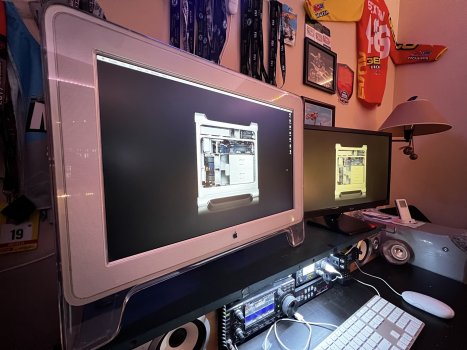
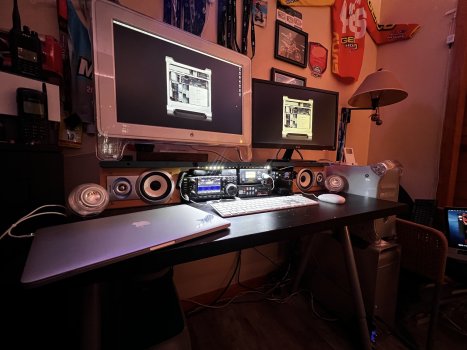
Ended up solving my ADC adapter problem. For less money than the adapters you can get on ebay, I picked up a 23" Cinema display locally today (Craigslist is still worth searching) and modified my desktop setup to support it, and my older LG.

IMG_0765.jpeg


IMG_0763.jpeg

G5 can now run dual monitors and the ATI rage pro 128 can go back to one of my earlier PPC systems.
 
I need some help with macports/powerpcports; I've hit a wall.

On a general note, unless you have reasons to stick with 10.4, you will have an easier life with 10.5 or 10.6. At least until/unless someone makes a dedicated fork for Tiger.

First: can I use your precompiled software from powerbookg4e.pagekite.me on my tiger imac g5? Does compiled on g4 or g5 matter?

In a general case no, unless the builds are done with +native or +G4 variants. Even then they should work fine, just perhaps not as fast as they could have.
You can find all ports with a given variant like this:
Code:
port -v installed | grep native
Then you can rebuild those (if you wanna keep +native):
Code:
sudo port -v -n upgrade --force ${portname}
or (if you switch from +G4 to +G5):
Code:
sudo port -v -n upgrade --enforce-variants ${portname} -G4 +G5
etc.

I then tried to configure to use your precompiled software and had to give up. I made the private key, put the published public key in the same directory. I added the pagekite site to the archive_sites.conf and to rsync on sources.conf.

It sounds like you are doing something wrong here. sources.conf deal with where to get portfiles (in a form of an archive), not pre-built packages archives.

I also commented out the default macports rsync.

This should NOT be done, if we are talking about sources.conf. Unless you provide a complete replacement of the whole of ports tree locally or remotely and set that as [default]. I am sure it is not what you want to do.

Port sync and port install fail for me, "synchronization of the local ports tree failed doing rsync".

It is expected to fail, if I understood correctly what changes to configs were made. Configs normally have sensible defaults and are expected to “just work”. (Neither MacPorts nor us are immune to bugs, so something could be actually wrong, in which case a bug report is helpful.)
When you need to change/add something to configs, it is a good idea to keep changes to the minimum actually required. Adding a site with pre-built packages required adding it to archive_sites.conf (and if the key for it does not yet exist, then add it to pubkeys.conf), nothing else.
 
Ended up solving my ADC adapter problem. For less money than the adapters you can get on ebay, I picked up a 23" Cinema display locally today (Craigslist is still worth searching) and modified my desktop setup to support it, and my older LG.

View attachment 2597717


View attachment 2597718

G5 can now run dual monitors and the ATI rage pro 128 can go back to one of my earlier PPC systems.
Ahh wow there’s a lot to love in this pic. From the 23 ACD to the ham rig to the book ends to the gen3 iPod. Very nice set up 🙂
 
  • Like
Reactions: 840quadra
I need some help with macports/powerpcports; I've hit a wall.

First: can I use your precompiled software from powerbookg4e.pagekite.me on my tiger imac g5? Does compiled on g4 or g5 matter?

I managed to get macports 2.10.7 installed and xcode 2.5. Using macports in the default state kind of worked. I got like 2 packages installed and then the rest said they required prerequisites and wouldn't install.

I then tried to configure to use your precompiled software and had to give up. I made the private key, put the published public key in the same directory. I added the pagekite site to the archive_sites.conf and to rsync on sources.conf. I also commented out the default macports rsync. Port sync and port install fail for me, "synchronization of the local ports tree failed doing rsync".

I think I've skipped a step or typed something wrong.

I mainly used this guide:
macports wiki/howto/ShareArchives2

I appreciate any guidance y'all can give me!
My apologies for only seeing this now.
Do not make your own private key. You only need the public key (attached)
Nothing should be commented out on sources.conf

(You can add a line to sources.conf to tell it where the PowerPC ports repo is, but wait on that until the other issues are sorted)

Let me see if I can explain better. Feel free also to PM me and I can try to offer more support even over the phone if that is more helpful.
Pubkey is attached, I had to add a .txt extension so it would upload. You will need to remove that and save as .pem file (save as /opt/local/share/macports/local-pubkey.pem).
Relevant part of https://trac.macports.org/wiki/howto/ShareArchives2
Add the following to /opt/local/etc/macports/archive_sites.conf

name bonjour
urls http://powerbookg4e.pagekite.me/

A line indicating the location of the public key must also be added to /opt/local/etc/macports/pubkeys.conf. Something like:

/opt/local/share/macports/local-pubkey.pem

Thank you for trying on Tiger, it will never get better if no one tests/works on it. I am happy to provide support over phone or Discord if that might help.


Edit: I attached my /opt/local/etc/macports/archive_sites.conf as archive_sites.conf.txt
Just to show a working example
Also attaching my /opt/local/etc/macports/pubkeys.conf as pubkeys.conf.txt
The three files attached should be all that is needed. For testing purposes, you could try
sudo port -v -b install flex
And that should show whether the archive is being used.
If it isn't working, double check that powerbookg4e.pagekite.me is loading in the web browser, sometimes the Wi-fi it is hosted over is down. If the web site also isn't working, wait for me (or T-Mobile) to get wifi restored
 

Attachments

Last edited:
  • Like
Reactions: barracuda156
Ahh wow there’s a lot to love in this pic. From the 23 ACD to the ham rig to the book ends to the gen3 iPod. Very nice set up 🙂
Appreciate the comments. To me it still looks messy, but it is hard to not have chaos when you try to mix HAM radio with apple collecting. I like this setup better than my previous posted on PowerPC setups thread. monitors are more at eye height, and the configuration is tighter and more uniform.

I do wish the Cinema display had dual inputs, I like the ability to swap both monitors between the G4 and G5, but will have to single monitor the G4

This room also has a 2nd desk with triple monitors, and a cleaner / more modern setup for my main systems. I just roll back and forth between the two depending on what I am doing.
 
Appreciate the comments. To me it still looks messy, but it is hard to not have chaos when you try to mix HAM radio with apple collecting. I like this setup better than my previous posted on PowerPC setups thread. monitors are more at eye height, and the configuration is tighter and more uniform.

I do wish the Cinema display had dual inputs, I like the ability to swap both monitors between the G4 and G5, but will have to single monitor the G4

This room also has a 2nd desk with triple monitors, and a cleaner / more modern setup for my main systems. I just roll back and forth between the two depending on what I am doing.
It's kind of pricey, but if you can find some sort of ADC kvm, that would solve your problem. I am Aware of these guys who sell a ADC kvm right now but kinda pricey for a hobby - still a cool piece of gear though if you are into ADC monitors (I am 🙂 ). IOGEAR used to make the GCS602 ... there's another one I was thinking of but Im experiencing a brain malfunction at the moment and cant recall the manufacturer lol but man something like that would be perfect for your set up right there.

I used to run two 23inch ADC cinema displays next to each other (one for the G5 Im typing this on now and the second for my QS) and a generic kvm for USB kb/m and then some bookshelf monitors on each side. That was a pretty cool set up. I'll dig up a pic of that set up later. Ahh here we go - was playing hide n seek on my NAS. This was around 2016ish before I was using the kvm for kb/m.

Two monitors.jpg


Kind of miss the simplicity of my setup at that point.
.
.
.
Well crud now I can't find my generic kvm I used to use for that LOL. I must have that thing out on/in the garage bench now.
 
Last edited:
It's kind of pricey, but if you can find some sort of ADC kvm, that would solve your problem. I am Aware of these guys who sell a ADC kvm right now but kinda pricey for a hobby - still a cool piece of gear though if you are into ADC monitors (I am 🙂 ). IOGEAR used to make the GCS602 ... there's another one I was thinking of but Im experiencing a brain malfunction at the moment and cant recall the manufacturer lol but man something like that would be perfect for your set up right there.

I used to run two 23inch ADC cinema displays next to each other (one for the G5 Im typing this on now and the second for my QS) and a generic kvm for USB kb/m and then some bookshelf monitors on each side. That was a pretty cool set up. I'll dig up a pic of that set up later. Ahh here we go - was playing hide n seek on my NAS. This was around 2016ish before I was using the kvm for kb/m.

View attachment 2597844

Kind of miss the simplicity of my setup at that point.
.
.
.
Well crud now I can't find my generic kvm I used to use for that LOL. I must have that thing out on/in the garage bench now.
That setup looks nice and clean! Reminds me of a past setup I had with dual Asus 23" 4K monitors for my cMP systems on the other side of the room.

Not sure if I will down the route of getting a KVM as this setup is working fine for me now as I generally don't wish to drive 2 monitors with the G4. it does okay with 1 at a higher resolution. it has a 5200 in it now so it does run CI and Quartz without too much lag.

I have a simple hidden USB extension cable that I swap between the G4 and G5 for keyboard (I may get a USB switcher), and often run mouse only when either G4 or G5 is doing encoding work.


Been typing and browsing on both systems more than I expected. The G5 still feels quite quick despite being ~23 years old! G4 isn't doing bad either. Mine isn't a true QS. it is a Digital audio board (Dual 533) inside a quicksilver case. I purchased and built that system ages ago, the case, logic board, and power supply were all former apple spares that were eventually liquidated.

The G4 case still has plastic protectors on the CD-ROM doors lol.
 
If you wish, I can add your contact on the website (I guess, not the phone number, but something safe).
Thank you for the kind offer, if I ever have a safe way to be contacted (not the phone number), I will take you up on that offer. Unfortunately my main email has my name attached, or I would use that 🙁.
 
My apologies for only seeing this now.
Do not make your own private key. You only need the public key (attached)
Nothing should be commented out on sources.conf

(You can add a line to sources.conf to tell it where the PowerPC ports repo is, but wait on that until the other issues are sorted)

Let me see if I can explain better. Feel free also to PM me and I can try to offer more support even over the phone if that is more helpful.
Pubkey is attached, I had to add a .txt extension so it would upload. You will need to remove that and save as .pem file (save as /opt/local/share/macports/local-pubkey.pem).
Relevant part of https://trac.macports.org/wiki/howto/ShareArchives2
Add the following to /opt/local/etc/macports/archive_sites.conf

name bonjour
urls http://powerbookg4e.pagekite.me/

A line indicating the location of the public key must also be added to /opt/local/etc/macports/pubkeys.conf. Something like:

/opt/local/share/macports/local-pubkey.pem

Thank you for trying on Tiger, it will never get better if no one tests/works on it. I am happy to provide support over phone or Discord if that might help.


Edit: I attached my /opt/local/etc/macports/archive_sites.conf as archive_sites.conf.txt
Just to show a working example
Also attaching my /opt/local/etc/macports/pubkeys.conf as pubkeys.conf.txt
The three files attached should be all that is needed. For testing purposes, you could try
sudo port -v -b install flex
And that should show whether the archive is being used.
If it isn't working, double check that powerbookg4e.pagekite.me is loading in the web browser, sometimes the Wi-fi it is hosted over is down. If the web site also isn't working, wait for me (or T-Mobile) to get wifi restored

I ran sudo port -v -b install flex and it appears to query to the pagekite archive, but port seems to want an older version of dependencies than what you have available. I'm unsure if it is skipping over because the version isn't exactly the same or if it even is truly connecting to the server.

macports tiger archive no connect.png


Also with tiger support dropping, it may be a better use of my time to get on 10.6 and take advantage of the work by barracuda156 on getting software to build.
 
I ran sudo port -v -b install flex and it appears to query to the pagekite archive, but port seems to want an older version of dependencies than what you have available. I'm unsure if it is skipping over because the version isn't exactly the same or if it even is truly connecting to the server.

View attachment 2598157

Also with tiger support dropping, it may be a better use of my time to get on 10.6 and take advantage of the work by barracuda156 on getting software to build.
It appears you connected from the server but the version Macports provides is older than the one PowerPC ports provides. You can always install those dependencies from source on Macports (provided they haven't broken them). Just do
sudo port -v install ld64-97
then
sudo port -v -b install flex
For anything where PowerPC ports has a newer version you will need a PowerPC ports repository to access that newer version as a binary because I don't have enough disc space to keep all older versions.
You could grab the PowerPC ports archive https://github.com/macos-powerpc/powerpc-ports/releases/tag/2025.12
And then add a line to sources.conf pointing to that folder (once unzipped).
I had not heard that Tiger community support was being dropped from PowerPC ports (@barracuda156 is that happening? I hope not). Support was dropped almost a year ago from Macports. However, if there aren't those of us in the community providing PRs and support to PowerPC ports for Tiger, it will never get better.
If 10.6.8 fits your needs better, then by all means use it. I am not in the business of convincing anyone to use Tiger.
In my mind, I think people go for different PowerPC operating systems as follows:
ARCHPower - Wants modern Firefox, has a G5
PowerPC Linux in general - Wants open source web browsers and other up to date open source software, does not need proprietary software.
10.6.8 - Wants up to date open source software other than web browsers, needs some proprietary software from roughly 2000-2011, can live without sleep
10.5.8 - Wants sleep, and reasonably up to date open source software other than web browsers, along with proprietary software from roughly 2000-2011.
10.4.11 - Needs proprietary software from roughly 1984-2010, and some open source software.
9.2.2 and earlier - Needs proprietary software from roughly 1984-2003, and needs it to work correctly.
MorphOS - Wants an up to date browser and email client, support, and possibly Amiga software/environment
(Sorry for not covering BSDs, I know little about them)
Go with whatever fits your needs, and have fun!

 
Last edited:
I ran sudo port -v -b install flex and it appears to query to the pagekite archive, but port seems to want an older version of dependencies than what you have available. I'm unsure if it is skipping over because the version isn't exactly the same or if it even is truly connecting to the server.

View attachment 2598157

Also with tiger support dropping, it may be a better use of my time to get on 10.6 and take advantage of the work by barracuda156 on getting software to build.

You need to add PPCPorts sources (and perhaps a number of custom ones for 10.4). Using official MacPorts ones won’t work.
 
(@barracuda156 is that happening? I hope not). Support was dropped almost a year ago from Macports. However, if there aren't those of us in the community providing PRs and support to PowerPC ports for Tiger, it will never get better.

No policy changes from my end. (No official support for 10.4 and no guarantees that it works, but no deliberate breaking either, and reasonable PRs are accepted and welcome.)

10.6.8 - Wants up to date open source software other than web browsers, needs some proprietary software from roughly 2000-2011, can live without sleep

Only if you develop, normal usage is on par with 10.5.8, with some advantages and some disadvantages.
 
No policy changes from my end. (No official support for 10.4 and no guarantees that it works, but no deliberate breaking either, and reasonable PRs are accepted and welcome.)


Only if you develop, normal usage is on par with 10.5.8, with some advantages and some disadvantages.
Thank you for confirming reasonable PRs are still accepted. I'm sure I will keep making more. I have QMPlay2-devel working with Youtube locally, but my patch set is messy so I will need to sort that before making a PR for it.
Off hand, I recall rust works on 10.6.8 and not 10.5.8, the same is true for viu, for different reasons. I'm sure there are other advantages to 10.6.8 on the open-source software front (possibly Tunnelblick).
 
Thank you for confirming reasonable PRs are still accepted. I'm sure I will keep making more. I have QMPlay2-devel working with Youtube locally, but my patch set is messy so I will need to sort that before making a PR for it.
Off hand, I recall rust works on 10.6.8 and not 10.5.8, the same is true for viu, for different reasons. I'm sure there are other advantages to 10.6.8 on the open-source software front (possibly Tunnelblick).

Most of the things that “only work” on 10.6.8 is just because nobody has taken the time to build or test on 10.5.8.

Most of the ports on 10.6.8 will work with minimal effort on 10.5.8. That’s not quite as true for Tiger because its’ SDK is much more simple and the kernel just isn’t as stable as Leopard. Threading is a nightmare on Tiger and POSIX compliance is iffy (it is on Leopard too, but not quite as bad.)
 
View attachment 2597378

Taking the 840av's prime spot for a bit, is my 8500 (G3 450 upgraded) tower as I work to get applications loaded back onto it.

About a year ago I tried to install MacOS X using Xpostfacto and corrupted my boot disk. Simple fix as I am using ZuluSCSI and have 4 virtual SCSI drives on a single SD card. I simply needed to pop it out and restore the image file that I had stored on my G5.

As opposed to doing that, I decided to create 2 new images and do a clean install of MacOS 9, and install what I wanted. While connected to the AppleVision, I installed newer AV applications and did some minor calibration changes to the monitor.

Also installed a USB / Firewire card so I don't have to use a roller ball mouse (sorry for those that like them) with this computer anymore. System uses Firewire 400 and USB for new stuff, and get to use an old clicky Apple standard keyboard with orange alps switches.

To this day, one of my favorite keyboards to type on. This setup (while not an 840av) brings bak so much nostalgia. Audio on the 1710av is still amazing to this day!

Incredible setup! I lusted over the 1710av for the longest time. The 8500 has always held a special place in my heart too. I had a 7500 in college but loved the look of the 8500 case so much, I bought a case piece by piece and eventually had a bastard version of one.

If you ever decide to part with yours, name the price and I'll buy it straight away. 😉
 
  • Love
Reactions: 840quadra
Most of the things that “only work” on 10.6.8 is just because nobody has taken the time to build or test on 10.5.8.

Not really. There are also some objective constraints like missing libdispatch in 10.5 etc. Sure enough, with a lot of time invested it is possible to rewrite the code to use mach semaphores, modify coreaudio code etc. Is it gonna be actually done? Not in a general case.
Python bug on 10.5 is this, welcome to fix.

Most of the ports on 10.6.8 will work with minimal effort on 10.5.8.

Not sure about minimal.
 
Not really. There are also some objective constraints like missing libdispatch in 10.5 etc. Sure enough, with a lot of time invested it is possible to rewrite the code to use mach semaphores, modify coreaudio code etc. Is it gonna be actually done? Not in a general case.
Python bug on 10.5 is this, welcome to fix.


Not sure about minimal.
Just an outside perspective as a developer getting acquainted to this ecosystem: I would have no problem moving to Snow Leopard PPC if it was more stable - the networking issues, sleep problems, toolchain issues (extra patching required) and broken features like SMB sharing are deterring me from using it as a daily driver.

It doesn't seem to me like there's a clear plan or goal that these issues will be fixed at any point in time, so while you're correct that `libdispatch` is helpful to have and there are features I would like to use in 10.6, to me there is no point in having working software only on 10.6 if these issues are going to remain.

This is why I use 10.5.8. I'm sure there will be a point in the future where I am writing shims to put in place of `libdispatch` calls - but this reality is far, far worse on Tiger, where threads fall apart under load and you're spending hours to compile only to debug ghosts because anything event driven wants to throw a fit.

In the meantime, anything I'm porting is Leopard-first, and should pretty much work out of the box on Snow Leopard - I think this is pretty efficient.
 
Register on MacRumors! This sidebar will go away, and you'll see fewer ads.