

Got a tip for us?
Let us know
Become a MacRumors Supporter for $50/year with no ads, ability to filter front page stories, and private forums.
What have you done with an early Intel recently?
- Thread starter Project Alice
- Start date
- Sort by reaction score
You are using an out of date browser. It may not display this or other websites correctly.
You should upgrade or use an alternative browser.
You should upgrade or use an alternative browser.


ToniCH
macrumors 65816
Don't share your Product ID to the net. And I know it is different to product key but it is still unique for your installation and important when dealing with MS.Here's mine.

Certificate of Excellence
macrumors 68020
Just installed MX25.1 on my kiddos 09 iMac. It’s stuck at El Cap and it’s parental controls dont work well at all so making the switch to get a better handle on where they can go, what they can see, how long etc.
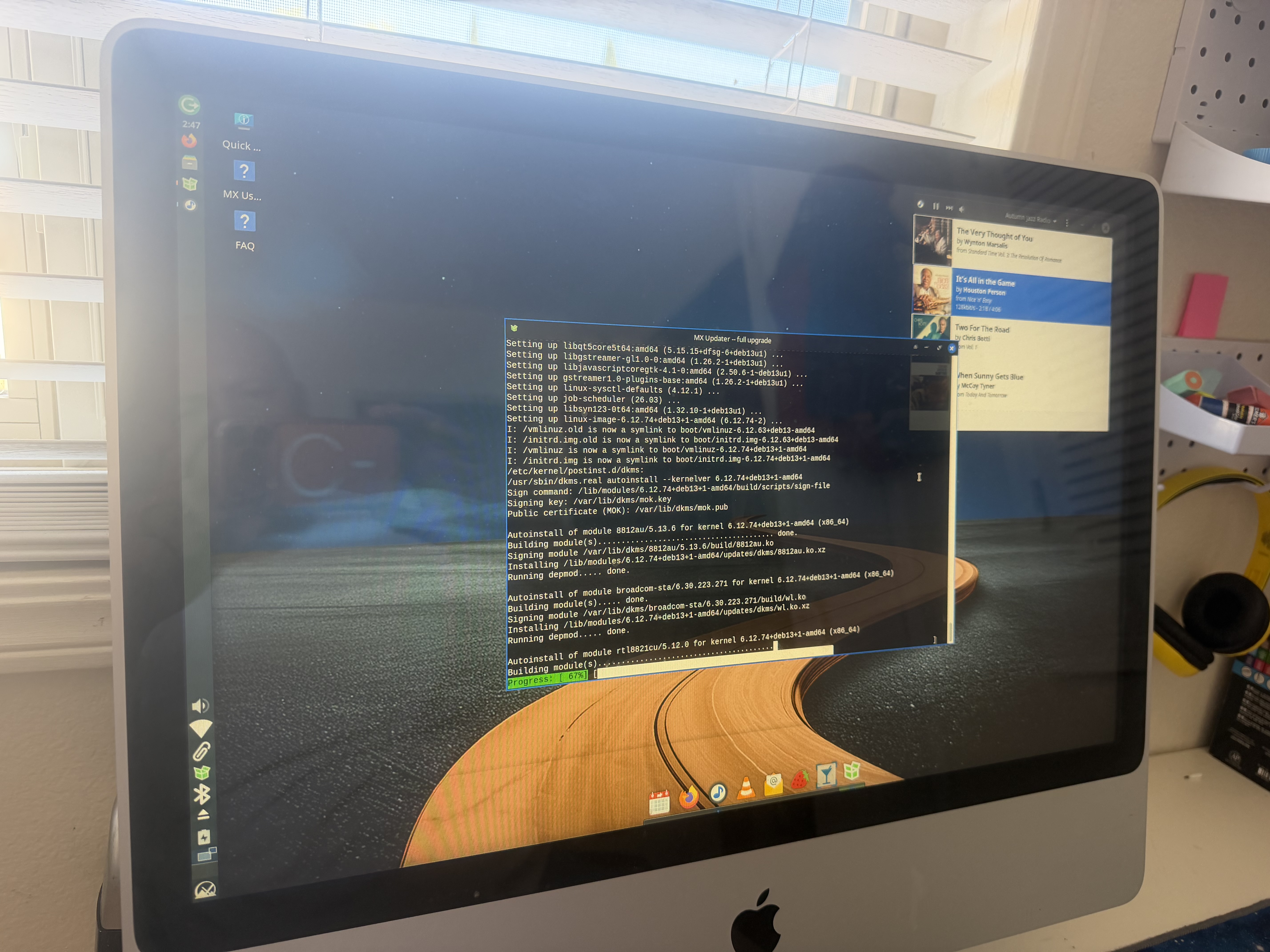
Currently updating which always takes a minute lol but like every other Mac I’ve put this on, it’s an utterly painless experience - loves me some MX for that 🙂 Ultimately I think it will be a better experience for them though and easier more controllable for us to put up guardrails when they explore online (oldest is in 3rd and middle is in Kinder).
+ MX is fully anti-age verification so I want to continue to support them and that position because what Meta, California, Illinois and Colorado are doing is fundamentally horrendous.
Currently updating which always takes a minute lol but like every other Mac I’ve put this on, it’s an utterly painless experience - loves me some MX for that 🙂 Ultimately I think it will be a better experience for them though and easier more controllable for us to put up guardrails when they explore online (oldest is in 3rd and middle is in Kinder).
+ MX is fully anti-age verification so I want to continue to support them and that position because what Meta, California, Illinois and Colorado are doing is fundamentally horrendous.

boswald
macrumors 68040
Did you get the Lacie Rugged SSD from the Apple Store? I am considering a 2TB HDD for Time Machine.Thought I would share my Boot Camp install too, mainly used for gaming purposes. It is a minimal install of Windows 10 IoT Enterprise LTSC booting externally via a 500GB LaCie Rugged Thunderbolt SSD on my 2013 iMac. Security updates are good until 2032. 😀
View attachment 2623814

Gloomy
macrumors regular
Yes I got it from the Apple Store (Edinburgh Princes Street) many years ago. Originally it was a 1TB HDD inside which I used for Time Machine, but I replaced it with a Crucial SATA SSD for this Windows install.Did you get the Lacie Rugged SSD from the Apple Store? I am considering a 2TB HDD for Time Machine.
Despite mine being a Thunderbolt 1 connection it still tops out at around 450MB/s read and write, so plenty fast enough for booting into Windows 10 when needed.

Amethyst1
macrumors G3
That's because it uses a SATA III connection inside so it's at the mercy of the PCIe-to-SATA controller, not the Thunderbolt-to-PCIe controller (~900-1000 MB/s).Despite mine being a Thunderbolt 1 connection it still tops out at around 450MB/s read and write, so plenty fast enough for booting into Windows 10 when needed.

Minghold
macrumors 6502a
Buy every one you see. At a certain point, the last school will dump their last batch on recyclers, and prices will skyrocket. Nobody wants the silicons; they have fast processors offset by slower OSes, and it's a nightmare for the average inattentive person to transfer ownership or install any non-Apple apps that aren't subscription-model.Mojave/Intel continues to be the gift that keeps on giving!
Certificate of Excellence
macrumors 68020
TL;DR If you're running MX25 on a legacy Intel Macintosh and you're getting an ACPI boot error + whacko max fans, boot with systemd & reset your SMC to fix this issue, then verify with lm-sensors in xfce Terminal.
I have been experiencing an ACPI boot error with uncontrolled max fans on a late 2009 24" imac. I was able to get this under control and I believe what worked was this:
1. switch from sysvinit to systemd via MXtweak and reboot
2. Powerdown and unplug holding the powerbutton for 30 seconds to reset this old imacs SMC
3. Reboot into gui & voila, ACPI errors & blasting fans are gone.
Now around this highly distilled list, there was a frenetic and chaotic mess of me trying to think through what was going on. Some other things in between these steps that I did, included installing lm-sensors+Psensor to make sure that my cpu & gpu temps were ok so the max fans were not stemming from that (which they were fine - excellent infact as I repasted both a few month back). I then tried to install CoolerControl and get it to work on MX25. Initially, I could install the Debian package however it would not work once installed with sysvinit and I was unable to get it to work despite next steps on their website. Anyhow, CC told me that it was unhappy with sysvinit so I ultimately switched to systemd. This absolutely got CoolerControl up and running but like lm-sensors, it too did not see the fans, just my gpu & cpu. In addition just in case there was some need for it (to see the fan/sensors), I installed liquidctl but fyi it did nothing as its primary function is for lcs systems and was a complete waste of time; me just grasping at straws really. After much fussing and leveraging lm-sensors, I noticed it continually would not see any of my fans/sensors outside of the gpu/cpu and I know those temps were solid so after some additional research I thought there must be some issue with MX talking with the logicboard and was trying to figure out what broken system was causing this; enter pram/smc. I read where a mint user was also having issues with their fans and a smc reset fixed this for them, so as a last ditch effort, I tried this as well and low and behold, it worked! - well I assume that is what fixed it anyhow lol.
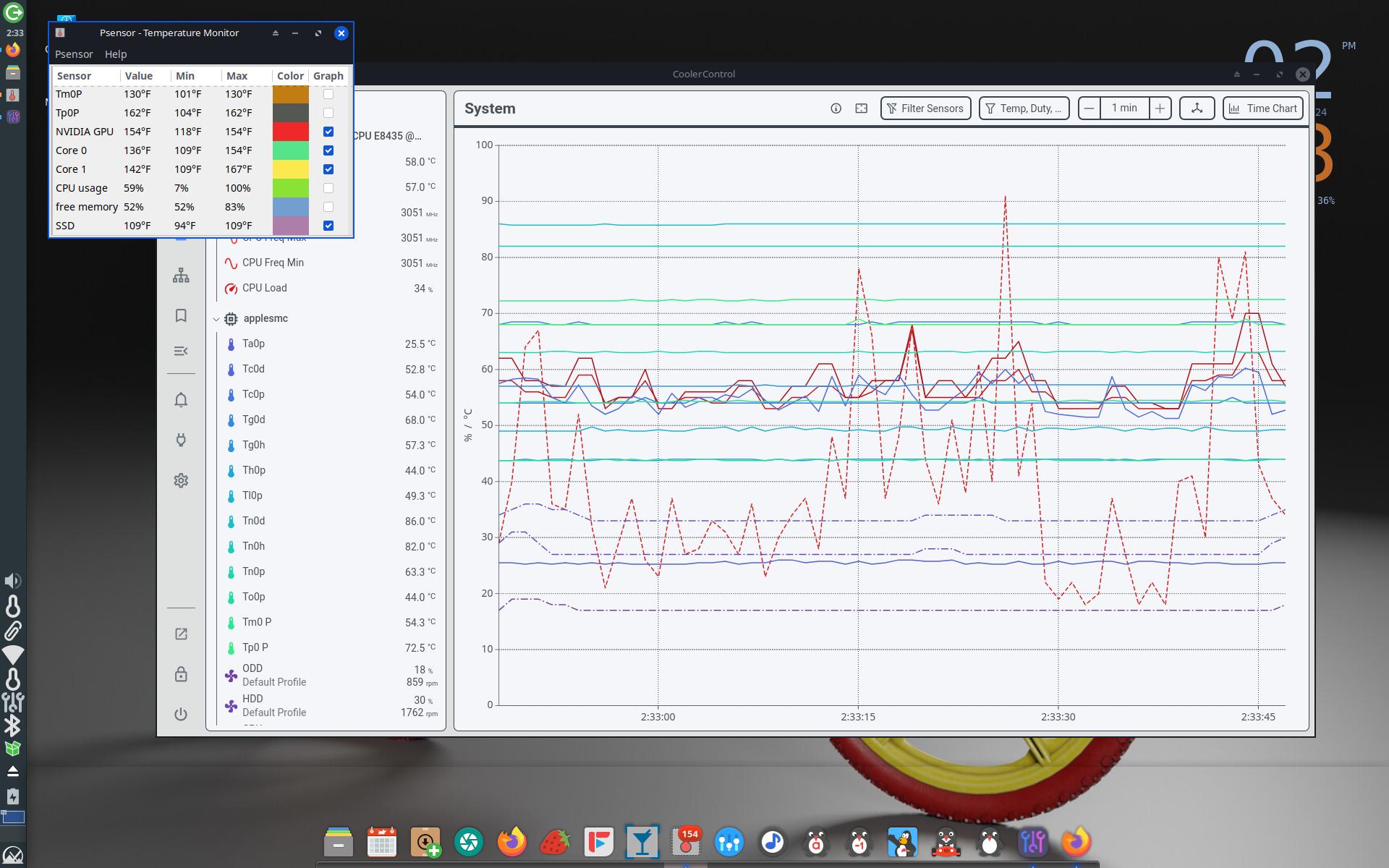
All sensors aboard!
I have been experiencing an ACPI boot error with uncontrolled max fans on a late 2009 24" imac. I was able to get this under control and I believe what worked was this:
1. switch from sysvinit to systemd via MXtweak and reboot
2. Powerdown and unplug holding the powerbutton for 30 seconds to reset this old imacs SMC
3. Reboot into gui & voila, ACPI errors & blasting fans are gone.
Now around this highly distilled list, there was a frenetic and chaotic mess of me trying to think through what was going on. Some other things in between these steps that I did, included installing lm-sensors+Psensor to make sure that my cpu & gpu temps were ok so the max fans were not stemming from that (which they were fine - excellent infact as I repasted both a few month back). I then tried to install CoolerControl and get it to work on MX25. Initially, I could install the Debian package however it would not work once installed with sysvinit and I was unable to get it to work despite next steps on their website. Anyhow, CC told me that it was unhappy with sysvinit so I ultimately switched to systemd. This absolutely got CoolerControl up and running but like lm-sensors, it too did not see the fans, just my gpu & cpu. In addition just in case there was some need for it (to see the fan/sensors), I installed liquidctl but fyi it did nothing as its primary function is for lcs systems and was a complete waste of time; me just grasping at straws really. After much fussing and leveraging lm-sensors, I noticed it continually would not see any of my fans/sensors outside of the gpu/cpu and I know those temps were solid so after some additional research I thought there must be some issue with MX talking with the logicboard and was trying to figure out what broken system was causing this; enter pram/smc. I read where a mint user was also having issues with their fans and a smc reset fixed this for them, so as a last ditch effort, I tried this as well and low and behold, it worked! - well I assume that is what fixed it anyhow lol.
All sensors aboard!
Last edited:
Minghold
macrumors 6502a
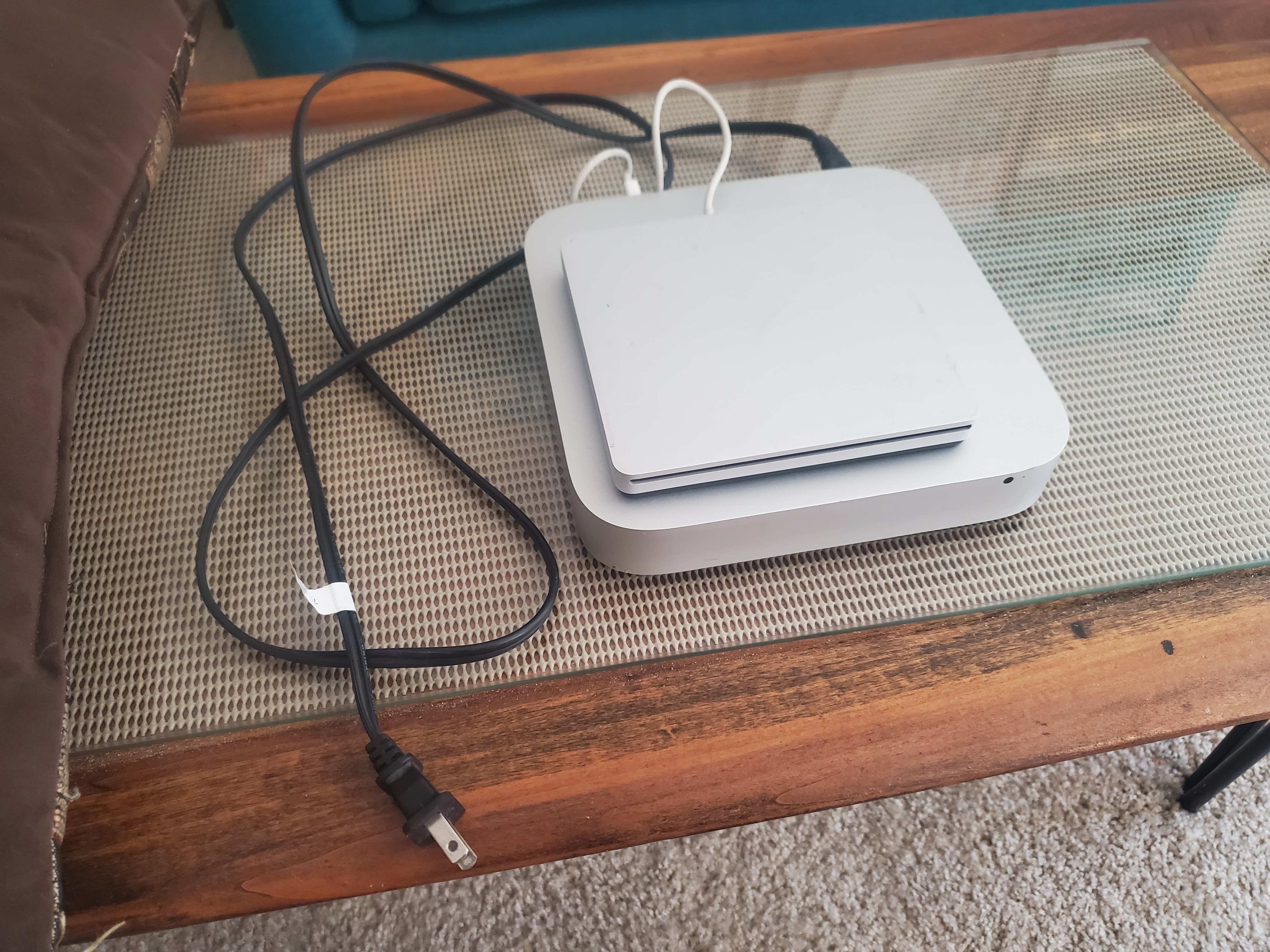
Latest treasure hauls off FBM: picked up a 2011 21" iMac for $10, with keyboard and mouse. OS wasn't booting and mouse batteries "green" but too weak, and they didn't know how to deal with it. I later messaged to ask if he had anything else for sale, and he said he had a 16gb/500ssd upgraded mini, which I bought for $20. His sister delivered it to the McD rendezvous with a rare Apple external optical drive and original LONG black two-prong power cable (these are *always* missing at the recyclers). Later the same day, I picked up a late-2013 Mac Pro "trash-can", my first ever, for $100 (retailed $2,999) -- it came with its original box and styrofoam inserts.
Buy every Intel-era Mac you can right now. They're giving 'em away like candy at a parade.
Buy every Intel-era Mac you can right now. They're giving 'em away like candy at a parade.
Last edited:
DCBassman
macrumors 65816
If only that were true over here...Buy every Intel-era Mac you can right now. They're giving 'em away like candy at a parade
boswald
macrumors 68040
Great find, Ming. I need to start doing what you're doing so I can learn what makes Macs tick.Latest treasure hauls off FBM: picked up a 2011 21" iMac for $10, with keyboard and mouse. OS wasn't booting and wifi mouse batteries green but too weak, and they didn't know how to deal with it. I later messaged to ask if he had anything else for sale, and he said he had a 16gb/500ssd upgraded mini, which I bought for $20. His sister delivered it to the McD rendezvous with a rare Apple external optical drive and original LONG black two-prong power cable (these are *always* missing at the recyclers). Later the same day, I picked up a late-2013 Mac Pro "trash-can", my first ever, for $100 -- it came with its original box and styrofoam inserts.
Buy every Intel-era Mac you can right now. They're giving 'em away like candy at a parade.
View attachment 2624744
Minghold
macrumors 6502a
The batteries in that "dead" mouse were Eniloop rechargeables -- and those things are stoopid expensive. Put 'em in my 20yo Panasonic AA recharger, and they were topped in a few hours. Put them in my electric shaver.Great find, Ming. I need to start doing what you're doing so I can learn what makes Macs tick.
boswald
macrumors 68040
Off-topic, but screw it: Is that person in your avatar Anton LaVey?The batteries in that "dead" mouse were Eniloop rechargeables -- and those things are stoopid expensive. Put 'em in my 20yo Panasonic AA recharger, and they were topped in a few hours. Put them in my electric shaver.
Minghold
macrumors 6502a
Max von Sydow, as Ming the Merciless in 1980's Flash Gordon.Off-topic, but screw it: Is that person in your avatar Anton LaVey?

bobesch
macrumors 68020
After the Upgrade of my daily drivers (mid2012 15"MBP9,1 and 2013 13"MBA6,2)
to OCLP/Sonoma (3 Volumes: Mojave32bit, OCLP/Sonoma; MyData)
I had fun to install, run and configure Linux on the very same type of machines.
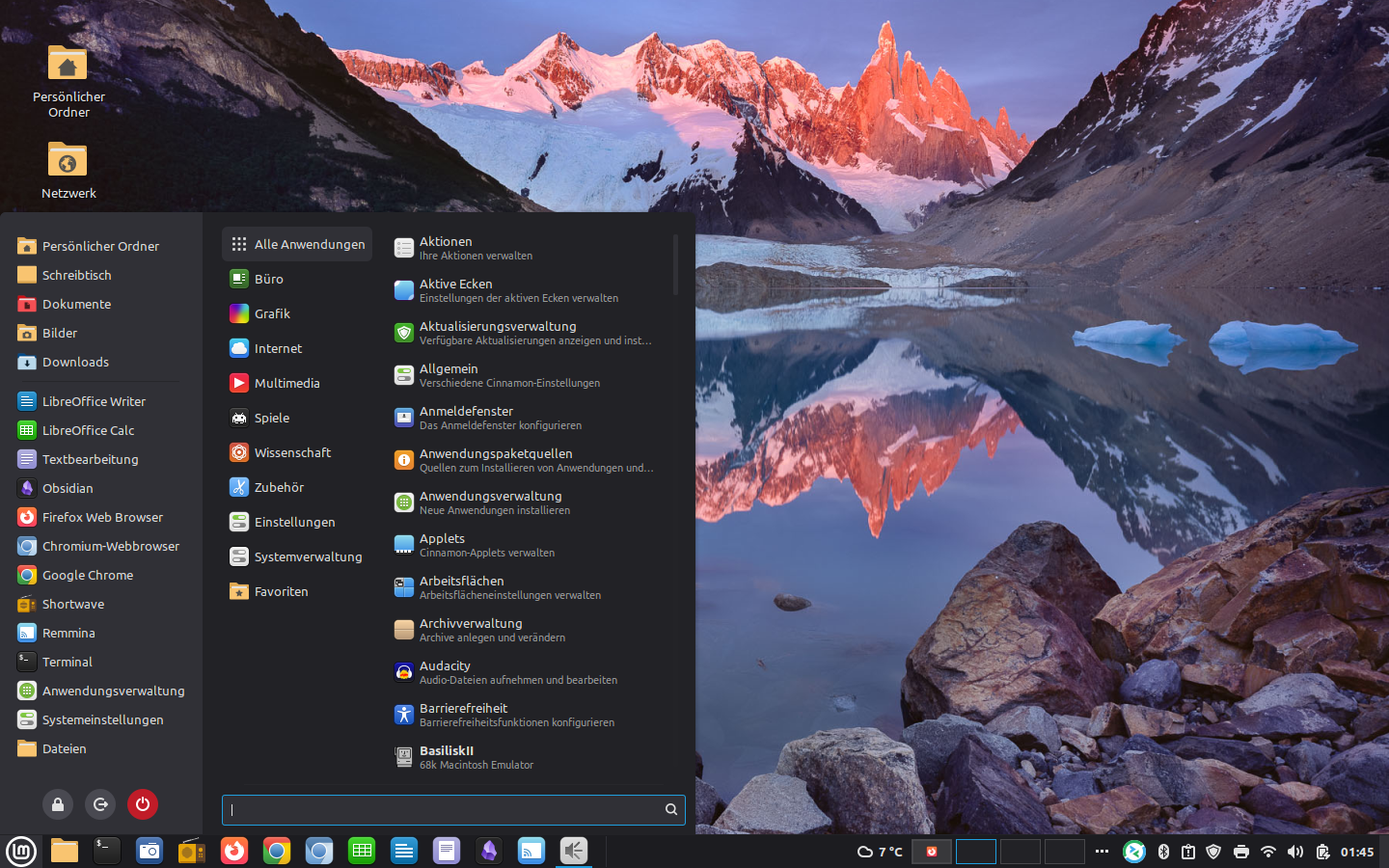
For the MBP9,1 LMDE7 proofed to be my favorite choice,
on the MBA6,2 I'm quite fond of Ubuntu24.04LTE.
On both machines/Linux-configurations Cam, WLAN, multi-finger gestures and VPN-connectivity are fully working,
which was on top of my list of requirements (not met by some other distros).
Scanning/OCR/PDF-filing, Backup/Restore-routines and VirtualMachines are still on my todo-list.
So I'm quite happy that there will be an afterlife for these fine legacy machines.
Using VPN/RDP to connect to my Win-network in the office, using File/ScreenSharing to my local Macs
enabled me to use the Linux-MacBooks as my main hubs for remote-working, email, (libre-)office, Video-streaming,
Web-browsing etc.
Here's my LMDE7-configuration on he MBP9,1
to OCLP/Sonoma (3 Volumes: Mojave32bit, OCLP/Sonoma; MyData)
I had fun to install, run and configure Linux on the very same type of machines.
For the MBP9,1 LMDE7 proofed to be my favorite choice,
on the MBA6,2 I'm quite fond of Ubuntu24.04LTE.
On both machines/Linux-configurations Cam, WLAN, multi-finger gestures and VPN-connectivity are fully working,
which was on top of my list of requirements (not met by some other distros).
Scanning/OCR/PDF-filing, Backup/Restore-routines and VirtualMachines are still on my todo-list.
So I'm quite happy that there will be an afterlife for these fine legacy machines.
Using VPN/RDP to connect to my Win-network in the office, using File/ScreenSharing to my local Macs
enabled me to use the Linux-MacBooks as my main hubs for remote-working, email, (libre-)office, Video-streaming,
Web-browsing etc.
Here's my LMDE7-configuration on he MBP9,1
Certificate of Excellence
macrumors 68020
I have been fine tuning MX25 on my boy's early 2009 24" Imac 9,1. The point as spoken to earlier is to create a safe environment and employ basic Parental controls within MX25.1 due to limitations of El Cap. To this end, most recently I figured out how to create SSBs in MX using Firefox's FireSSB add-on. This works incredibly well; the only drawback being that FireSSB was built by a non-english speaker and as such their English language resources translation are .. interesting to decipher haha 😀 Still, glad they are there and the add on is great. It allows me to create standalone access to some of my younger kids (2.5 & 6.5y/o) favorite to-dos (Epic online books, PBS kids tv and games etc.) without access to a FF address bar or any browsing tools that could get them outside their guard rails and into the grown up internet.
I also picked up a cheap pair of used Logitech Logi speakers at the goodwill for $5 bucks. If there was one sore point with MX its that audio while working fine, has zero EQ, so audio can sound extremely harsh and not treat speakers well. I have fixed this with Easy Effects+PipeWire's easyeffects effect bundle that includes an excellent 32 band EQ. I noticed on not so great Jazz recordings I stream via Pithos for example that the speakers would distort badly around 571 hertz, so with this handy app+ EQ, I have easily been able to roll that back a bit and create an excellent sound and save that as an automatically loaded preset upon opening the app which I added to autostart when anyone boots with Pithos, Freetube, FF all set to leverage EE. So now the kids have some very nice sound for $5 bucks and my time figuring out a gui EQ.
Lastly, I technically havent employed this quite yet as I am unsure if I want to drive this from my router or if I want to employ it only for this computer at this time but I think I have settled on OpenDNS FamilyShield which is a modifiable but designed to be highly plug and play DNS filter to keep my kids from malicious and adult content (especially my oldest 8.75 y/o who has limited browsing access for school) and for my own ease sacrificing less time investment in set up and management. Anyways, I need to think a bit more on how exactly I want to employ this but will get on with it next week I think once I decide on next steps.
I also picked up a cheap pair of used Logitech Logi speakers at the goodwill for $5 bucks. If there was one sore point with MX its that audio while working fine, has zero EQ, so audio can sound extremely harsh and not treat speakers well. I have fixed this with Easy Effects+PipeWire's easyeffects effect bundle that includes an excellent 32 band EQ. I noticed on not so great Jazz recordings I stream via Pithos for example that the speakers would distort badly around 571 hertz, so with this handy app+ EQ, I have easily been able to roll that back a bit and create an excellent sound and save that as an automatically loaded preset upon opening the app which I added to autostart when anyone boots with Pithos, Freetube, FF all set to leverage EE. So now the kids have some very nice sound for $5 bucks and my time figuring out a gui EQ.
Lastly, I technically havent employed this quite yet as I am unsure if I want to drive this from my router or if I want to employ it only for this computer at this time but I think I have settled on OpenDNS FamilyShield which is a modifiable but designed to be highly plug and play DNS filter to keep my kids from malicious and adult content (especially my oldest 8.75 y/o who has limited browsing access for school) and for my own ease sacrificing less time investment in set up and management. Anyways, I need to think a bit more on how exactly I want to employ this but will get on with it next week I think once I decide on next steps.
Last edited:
Minghold
macrumors 6502a
Why you should not install Catalina (or higher), or leave raw-install Mojave*, on any Mac with a rotational drive. The random skitter pattern writes of the APFS file-system are designed to ease wear-leveling concerns on SSDs, but it is murder on the mechanical read-write arms of rotational drives, and even causes faster wearing of the SSD component of Fusion drives (which were previously sheltered for mainly app-launching reads under HFS+), especially under a greatly increased telemetry load via MDS_stores. Apple knew this, and chose not to tell its customers when offering APFS-default operating systems; I call it "vandalescence".
This customer machine (late-2013 21.5" iMac) was caught early enough to not need drive replacement. Boot time dropped from over three minutes (Catalina) to one minute (Mojave-optimized, with MRT, MDS_stores, and Reportcrash disabled). 5400rpm 1TB drive was approximately half full; all documents (music, photos, other User files, etc) were recovered, SIP was disabled, and the drive wiped to erase APFS partitions and replace with MacOSExtended-journaled), and then a Mojo master was cloned over, and documents restored to a second partition. It took over four hours to back up the massively fragmented user files, but only one hour to copy them back: HFS+ is very efficient doing mass writes.
*On rotational- or Fusion-drive machines, Mojave clean-installs, which are default APFS, should be Carbon Copy Cloned into a MacOS Extended-journaled (HFS+) partition.
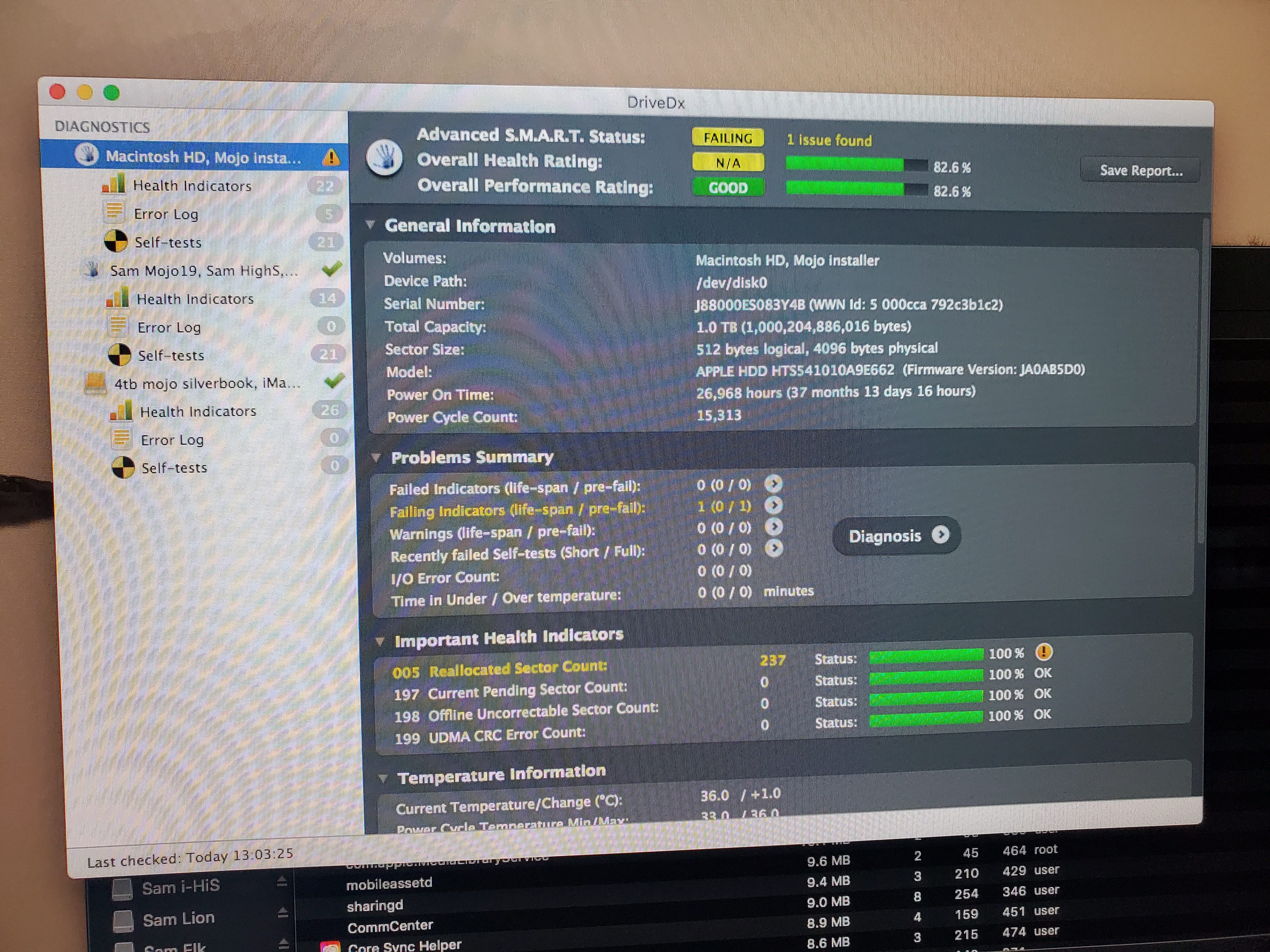
This customer machine (late-2013 21.5" iMac) was caught early enough to not need drive replacement. Boot time dropped from over three minutes (Catalina) to one minute (Mojave-optimized, with MRT, MDS_stores, and Reportcrash disabled). 5400rpm 1TB drive was approximately half full; all documents (music, photos, other User files, etc) were recovered, SIP was disabled, and the drive wiped to erase APFS partitions and replace with MacOSExtended-journaled), and then a Mojo master was cloned over, and documents restored to a second partition. It took over four hours to back up the massively fragmented user files, but only one hour to copy them back: HFS+ is very efficient doing mass writes.
*On rotational- or Fusion-drive machines, Mojave clean-installs, which are default APFS, should be Carbon Copy Cloned into a MacOS Extended-journaled (HFS+) partition.
Last edited:
boswald
macrumors 68040
Thank you for the interesting post. I always learn something new from you.Why you should not install Catalina (or higher), or leave raw-install Mojave*, on any Mac with a rotational drive. The random skitter pattern writes of the APFS file-system are designed to ease wear-leveling concerns on SSDs, but it is murder on the mechanical read-write arms of rotational drives, and even causes faster wearing of the SSD component of Fusion drives (which were previously sheltered for mainly app-launching reads under HFS+), especially under a greatly increased telemetry load via MDS_stores. Apple knew this, and chose not to tell its customers when offering APFS-default operating systems; I call it "vandalescence".
This customer machine (late-2013 21.5" iMac) was caught early enough to not need drive replacement. Boot time dropped from over three minutes (Catalina) to one minute (Mojave-optimized, with MRT, MDS_stores, and Reportcrash disabled). 5400rpm 1TB drive was approximately half full; all documents (music, photos, other User files, etc) were recovered, SIP was disabled, and the drive wiped to erase APFS partitions and replace with MacOSExtended-journaled), and then a Mojo master was cloned over, and documents restored to a second partition. It took over four hours to back up the massively fragmented user files, but only one hour to copy them back: HFS+ is very efficient doing mass writes.
*On rotational- or Fusion-drive machines, Mojave clean-installs, which are default APFS, should be Carbon Copy Cloned into a MacOS MacOS Extended-journaled (HFS+) partition.
View attachment 2625852
DCBassman
macrumors 65816
All-but-unused wired Cherry Mac-specific keyboard: £3 from a charity shop in Shipton Abbott Looe yesterday.

Nightphase
macrumors member
I've got a Mac Mini server (Macmini4,1) from work last week. It has 8GB of RAM and one 500GB SSD and 500GB HDD.
I installed both Mavericks and High Sierra on the SSD for dualboot and using the HDD for data.
It has broken temperature sensor, so the fan kicks up at max RPM if i don't use Mac Fan Control, it's annoying at boot, but it gets quieter afterwards.
I installed both Mavericks and High Sierra on the SSD for dualboot and using the HDD for data.
It has broken temperature sensor, so the fan kicks up at max RPM if i don't use Mac Fan Control, it's annoying at boot, but it gets quieter afterwards.

JulianStaples
macrumors regular
£25 Mac Pro sit rep.
How it started:
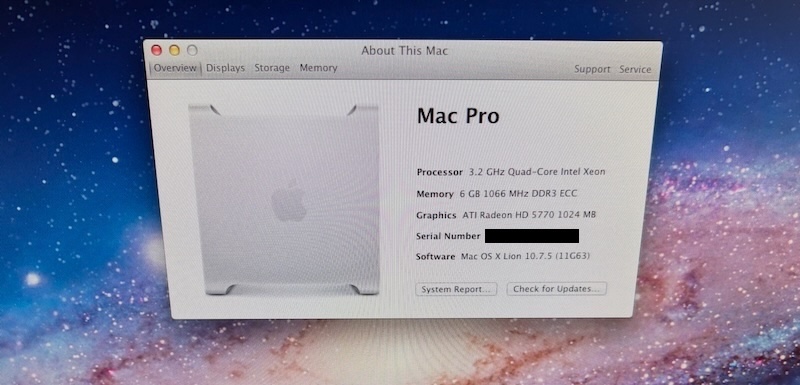
How it's going:
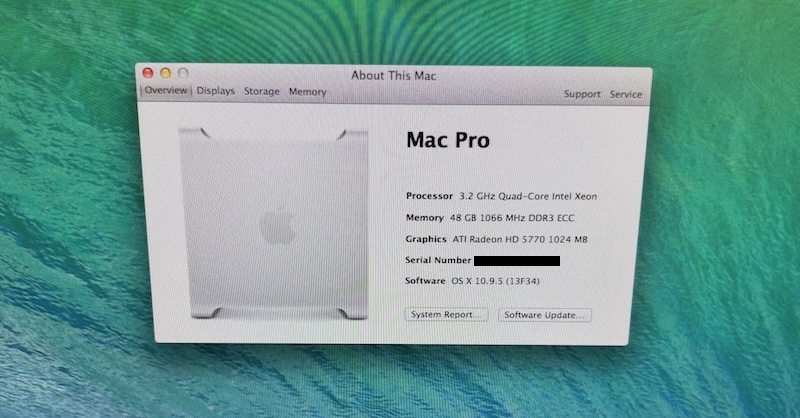
😀
Reclaimed 500GB SSD as the main boot drive now as well. Need to add the old 1TB HDD that was running Lion back into another tray and reformat as an extra storage drive. And after doing a lot of reading in the Mac Pro forum, I have an appropriate metal GPU on the way, at which point I can hopefully boost up to Mojave.
Still have half an eye out for a cheap dual CPU tray, but for the time being this is turning into enough of a beast. 😎
How it started:
How it's going:
😀
Reclaimed 500GB SSD as the main boot drive now as well. Need to add the old 1TB HDD that was running Lion back into another tray and reformat as an extra storage drive. And after doing a lot of reading in the Mac Pro forum, I have an appropriate metal GPU on the way, at which point I can hopefully boost up to Mojave.
Still have half an eye out for a cheap dual CPU tray, but for the time being this is turning into enough of a beast. 😎
Gloomy
macrumors regular
Which GPU did you decide on? 7x the memory plus an SSD will definitely help. Lovely machine, congrats again!£25 Mac Pro sit rep.
How it started:
View attachment 2626410
How it's going:
View attachment 2626412
😀
Reclaimed 500GB SSD as the main boot drive now as well. Need to add the old 1TB HDD that was running Lion back into another tray and reformat as an extra storage drive. And after doing a lot of reading in the Mac Pro forum, I have an appropriate metal GPU on the way, at which point I can hopefully boost up to Mojave.
Still have half an eye out for a cheap dual CPU tray, but for the time being this is turning into enough of a beast. 😎
JulianStaples
macrumors regular
Which GPU did you decide on? 7x the memory plus an SSD will definitely help. Lovely machine, congrats again!
Went with a cheap GTX 680 on eBay which is apparently a pull from an identical MP 2012 model. Not clear if it is flashed or not, but I can always try to do that if I'm feeling brave. 😊
Gloomy
macrumors regular
I believe the GTX680 has about a 250% overall performance boost over the 5770. Good choice 👍Went with a cheap GTX 680 on eBay which is apparently a pull from an identical MP 2012 model. Not clear if it is flashed or not, but I can always try to do that if I'm feeling brave. 😊
Minghold
macrumors 6502a
It took me many, many years to track down the solution, but you do *not* need a "metal" GPU to run Mojave on *any* Mac; you need the kexts (drivers) that Apple stripped out (i.e., the ones High Sierra had). The only real requirement is a 64bit processor (C2D or higher). I've successfully set up dosdude1 + OCLP 0.43 patch versions of Mojave for 2009-2011 iMacs, and so on, and once finished they don't require the OCLP EFI bootloader and can be CCC-cloned endlessly.And after doing a lot of reading in the Mac Pro forum, I have an appropriate metal GPU on the way, at which point I can hopefully boost up to Mojave.
Procedure I use: Boot externally from an existing compliant OS Recovery Partition to disable SIP and erase/partition the internal drive. Reboot to compliant OS and CCC5 clone* a Mojave install over. Reboot into a Dosdude1 patch partition for Mojave, and run post-install. Now reboot into Mojave; it will launch,* but have a blue-skewed color palette and lack hardware-acceleration on several categories of machines (notably '09-'11 dvd iMacs). *
Then (and only then) run OCLP 0.43 version (no later) and apply rootpatches; making sure to manually checkbox hardware-acceleration (which for some some odd reason isn't default) in settings. (You do not need to create the EFI boot patch.) This should fix lingering issues and provide a fully functional Mojave on your non-metal Mac.
(*If it does NOT launch, or the clone shows excessive memory-consumption in Activity Monitor, try a 2nd cloning pass with Get Backup Pro 3, then a 3rd with CCC5 again.)
Last edited: