I got bluetooth keyboard and mighty mouse free with mine. I only seem to use the mouse when Im using the keyboard, because the touchpad is closer to the built in keyboard when Im using that, so end up not using the mouse


Got a tip for us?
Let us know
Become a MacRumors Supporter for $50/year with no ads, ability to filter front page stories, and private forums.
What kind of Mouse do you use for your MB ?
- Thread starter alex000it
- Start date
- Sort by reaction score
You are using an out of date browser. It may not display this or other websites correctly.
You should upgrade or use an alternative browser.
You should upgrade or use an alternative browser.
I just got rid of my Logitech 2.4 wireless and picked up a RocketFish Bluetooth "Apple" mouse. Looks very similar to the Mighty Mouse but way more comfortable in the hand (I also had a Mighty Mouse for about a week and HATED IT!). The RocketFish one has enough of a slope to it that it fits great in my palm and the scroll wheel and two button setup worked perfect right out of the box. The local Best Buy had them in their Apple section of stuff next to a new Targus one just for Macs that looked pretty sweet also but it was not Bluetooth so I went with the RocketFish...glad I did.

At my desk, logitech G5 - great for having the pefect feel during long gaming sessions
When I travel - Logitech VX Nano - perfectly small
Though I will say the new trackpad is really awesome to the point where I will leave the Nano in the bag when I do quick email checks
When I travel - Logitech VX Nano - perfectly small
Though I will say the new trackpad is really awesome to the point where I will leave the Nano in the bag when I do quick email checks

 )
)
Logitech v270 Bluetooth because as much as i like the VX, I don't like the fact that it requires a receiver.
At home I now use a wired Mighty Mouse and Alu. Apple keyboard. On the go I have a Logitech V470 BT mouse. Compared to the other BT mice I bought and returned due to poor performance( BT mighty mouse, Razer Proclick mobile) it has so far performed the best. I also tried out a Logitech VX Nano but didn't like how the wheel wasn't a button, and the fact that I had to use Logitech Control Center to program the auxiliary buttons.


Based in this forum I got a Microsoft Bluetooth 5000 mouse for Mac. I am a first time Mac user after decades of using PC's as a proud owner of a new to Mac with my new Alu Mac.
I want to map the side button to be the "Back" button. Can anyone tell me how to do that? I went to the Microsoft website but apparently there is no Mac driver for this mouse.
I want to map the side button to be the "Back" button. Can anyone tell me how to do that? I went to the Microsoft website but apparently there is no Mac driver for this mouse.

I just use the trackpad... Multi-touch is so freaking awesome.
2 finger: scroll, zoom, rotate, right click
3 finger: swipe, back, forward
4 finger: expose, show desktop
Plus it is so silky smooth... and BIG. I don't think I'll ever use a mouse with this new MB.
Agreed. The trackpad IS that good.
That's what I'm doing. I thought I was alone in that, tough. Guess not. Indeed, the new clickpad is awesome! Before I got my MacBook, I was also looking for mice to get for it. But since I got it, I don't even want a mouse anymore. It's truly great; it is indeed that good.I'm really liking the new trackpad. I find myself using it even when I'm at my desk.
Mighty Mouse Frustration
I bought a new MacBook Pro along with the wired Mighty Mouse. Less than 30 days later, the scroll ball has already stopped working. Any recommendations on what to do? I use the mouse a lot versus the trackpad.
I' could replace the mouse with the same model or get the wireless Mighty Mouse. I'm also considering the Microsoft 5000 mouse and the Logitech VX470.
Any recommendations. I need to purchase ASAP as I have to return the original Mighty Mouse for a refund.
I'm leaning toward the wireless Mighty Mouse, but I assume I can expect the same issues.
I bought a new MacBook Pro along with the wired Mighty Mouse. Less than 30 days later, the scroll ball has already stopped working. Any recommendations on what to do? I use the mouse a lot versus the trackpad.
I' could replace the mouse with the same model or get the wireless Mighty Mouse. I'm also considering the Microsoft 5000 mouse and the Logitech VX470.
Any recommendations. I need to purchase ASAP as I have to return the original Mighty Mouse for a refund.
I'm leaning toward the wireless Mighty Mouse, but I assume I can expect the same issues.


I bought a new MacBook Pro along with the wired Mighty Mouse. Less than 30 days later, the scroll ball has already stopped working. Any recommendations on what to do? I use the mouse a lot versus the trackpad.
I' could replace the mouse with the same model or get the wireless Mighty Mouse. I'm also considering the Microsoft 5000 mouse and the Logitech VX470.
Any recommendations. I need to purchase ASAP as I have to return the original Mighty Mouse for a refund.
I'm leaning toward the wireless Mighty Mouse, but I assume I can expect the same issues.
you dont need to replace it. just roll it really fast on your clothing or a damp cloth.

I bought a new MacBook Pro along with the wired Mighty Mouse. Less than 30 days later, the scroll ball has already stopped working. Any recommendations on what to do? I use the mouse a lot versus the trackpad.
I' could replace the mouse with the same model or get the wireless Mighty Mouse. I'm also considering the Microsoft 5000 mouse and the Logitech VX470.
Any recommendations. I need to purchase ASAP as I have to return the original Mighty Mouse for a refund.
I'm leaning toward the wireless Mighty Mouse, but I assume I can expect the same issues.
same here ,mine went about 3 months after buying it ,so no replacement , I found online tricks(via google) to get it working again .
I tried using methylated spirit on it ( v small amount). use anything that will dissolve gunk -dj mixer fader cleaner might be good...whatevers about really ?
I just put a little on a cloth and turned the mouse upside down then rubbed the track ball in every direction for a few minutes.
works for a while , till it gets gunked up again , once it didn't work & I took it apart , quite nice inside actually , there are 4 wheel type affairs round the trackball which you need to remember which way they went in , just clean those and put the thing back together that kept it going longer .
I did need to crack the case open with a fine blade which surprisingly caused no damage , I just spotted a very very small amount of super glue on when re building , this way if I have to open it again it's easier .
About every two months I need to clean it out , usually with the 'meths' method .
bottom line , get refund and don't buy another .
rj
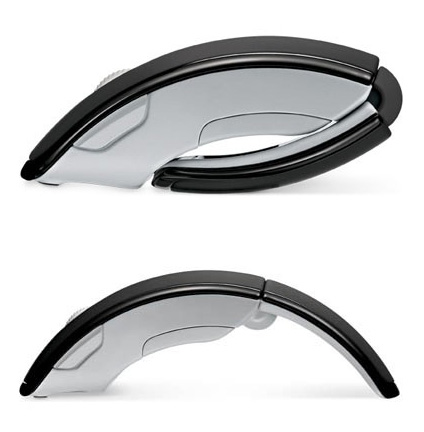
I just bought an Arc also and I am really enjoying it.
I didnt realize it at the time, but the gray and black color scheme matches the new macbook really well.
Attachments

Bought a new Logitech VX Revolution.
Working really smoothly, loving every moment so far.
Heres my unboxing video / first impressions for those who are interested.
Working really smoothly, loving every moment so far.
Heres my unboxing video / first impressions for those who are interested.
I have 2 mighty mice. 1 broke after I tried to clean it. I had to crack it open. The 2nd one's scroll wheel is becoming unreliable. Worst mouse I've ever bought.
Bought a VX Nano after reading the recommendations in this thread. I'm absolutely delighted with it. The receiver uses a USB port but it's rare when I need to use both ports, and it's so small!!
Bought a VX Nano after reading the recommendations in this thread. I'm absolutely delighted with it. The receiver uses a USB port but it's rare when I need to use both ports, and it's so small!!

Bought a VX Nano after reading the recommendations in this thread. I'm absolutely delighted with it. The receiver uses a USB port but it's rare when I need to use both ports, and it's so small!!
I switched to a VX Nano too and couldn't be happier. Out of all the mice I searched on google, the VX Nano is one of the few that has almost overwhelmingly positive user reviews and anecdotes. This thing performs better than my WIRED gaming mouses on my desktop.
Register on MacRumors! This sidebar will go away, and you'll see fewer ads.