Yes, Michael was the representative. The tracking just today (after many days of no activity) updated to "On the way to UPS, the truck has been loaded and is expected to be unloaded and scanned on February 23 local time".I received a similar 8-12 days shipping quote via UPS, but ended up being around 21 days (and a different carrier was used instead of UPS). Were you dealing with Tcoior's rep. Michael Liu?

Got a tip for us?
Let us know
Become a MacRumors Supporter for $50/year with no ads, ability to filter front page stories, and private forums.
Why aren't people considering the Tcolor L32660
- Thread starter citivolus
- Start date
- Sort by reaction score
You are using an out of date browser. It may not display this or other websites correctly.
You should upgrade or use an alternative browser.
You should upgrade or use an alternative browser.
Attaching pictures of the display.
Mind that camera in complete dark overblows the backlight imperfections.
Attached a black screen with a light from a lightbar for comparison
Mind that camera in complete dark overblows the backlight imperfections.
Attached a black screen with a light from a lightbar for comparison
Attachments
-
 IMG_20260222_203313.jpg75.4 KB · Views: 126
 -
 IMG_20260222_203248.jpg47.8 KB · Views: 107
 -
 IMG_20260222_203414.jpg119.4 KB · Views: 115
 -
 IMG_20260222_203331.jpg194.8 KB · Views: 120
 -
 IMG_20260222_203209.jpg216.6 KB · Views: 136
 -
 IMG_20260222_203529.jpg562.7 KB · Views: 140
 -
 IMG_20260222_202835 (1).jpg568.6 KB · Views: 137

That would make sense ... when I enabled it in via my mac's display settings (without enabling it on the monitor's OSD menu) the colors were brutal ... it was like the color disappeared and almost went to all greyscale.@moomoon "HDR mode - looks really washed out."
Have you got the Tcolor OSD Other>HDR toggled to on? As well as your Mac's System Settings>Display>HDR.
It may be like this MediaTek 4K monitor's OSD.
View attachment 2607160
Thanks, they look nice now. Not sure if better than SDR.@moomoon "HDR mode - looks really washed out."
Have you got the Tcolor OSD Other>HDR toggled to on? As well as your Mac's System Settings>Display>HDR.
It may be like this MediaTek 4K monitor's OSD.
View attachment 2607160
Certainly, I got a SW slider now to control SDR brightness now from Display settings (Win11).
This is really helpful and certainly a way to avoid a coil whine.
fantathesodaman
macrumors member
I reached out to the rep, Michael Liu regarding the coil whine/buzzing issue and he's flat out denying that it exists even after providing posts from this forum and an Alibaba review. He went onto say it's either a software issue or MacBook causing the noise lol. I messaged him 2 days ago and he said he would send a video that disputes the claims, but when I received no video and asked earlier today he told me to ask the person who raised the question to provide video. Seems unprofessional and he doesn't seem to care.
Attachments


Funny, I had a new message from Michael today in my email's inbox and when checking on Alibaba once I was back home my entire correspondence/thread with him from previous back and forth chats was gone (I didn't bother contacting him when I returned the monitor). Basically he's lying ... I adjusted the brightness only via the monitor's hardware controls and the whine was evident, and that's before installing/trying to adjust brightness with lunar.I reached out to the rep, Michael Liu regarding the coil whine/buzzing issue and he's flat out denying that it exists even after providing posts from this forum and an Alibaba review. He went onto say it's either a software issue or MacBook causing the noise lol. I messaged him 2 days ago and he said he would send a video that disputes the claims, but when I received no video and asked earlier today he told me to ask the person who raised the question to provide video. Seems unprofessional and he doesn't seem to care.
On another note, Tcoior should really update the imagery used in their Alibaba L32660 listing since the monitor definitely has a thicker bottom bezel vs. what the listing shows (at least the video they include shows it, but still a little shady to not show it in the pictures).
EDIT: I tested using a 2020 Macbook M1 Air, btw ... the same computer that worked just fine when plugged into the Kuycon G32P.
Last edited:

pommac
macrumors newbie
Perhaps Mr. Liu should inspect it using a Fluke ii915, in case the Chinese New Year celebrations have affected his hearing:I reached out to the rep, Michael Liu regarding the coil whine/buzzing issue and he's flat out denying that it exists even after providing posts from this forum and an Alibaba review. He went onto say it's either a software issue or MacBook causing the noise lol. I messaged him 2 days ago and he said he would send a video that disputes the claims, but when I received no video and asked earlier today he told me to ask the person who raised the question to provide video. Seems unprofessional and he doesn't seem to care.
fantathesodaman
macrumors member
Just wanted to report back that Michael Liu sent a useless video back completely ignoring my instructions.
He connected an old MacBook to the monitor and all you hear is the fan noise from it. I literally asked him to have a microphone next to the monitor only and record as he's slowly adjusting the monitor's brightness. Attached is the video he sent.
He connected an old MacBook to the monitor and all you hear is the fan noise from it. I literally asked him to have a microphone next to the monitor only and record as he's slowly adjusting the monitor's brightness. Attached is the video he sent.
That's disappointing. I think for anyone looking to purchase the Tcoior as long as you're ok with the whining at certain brightness levels (since it's been documented 3 separate times on this thread) then it's still a decent option. For me I'll wait and see what Apple has to offer regarding a new 32" display, but I'm not getting my hopes up (the dream has always been a 32" iMac but the likelihood of that is about as high as me winning the lottery).Just wanted to report back that Michael Liu sent a useless video back completely ignoring my instructions.
He connected an old MacBook to the monitor and all you hear is the fan noise from it. I literally asked him to have a microphone next to the monitor only and record as he's slowly adjusting the monitor's brightness. Attached is the video he sent.
View attachment 2607330
fantathesodaman
macrumors member

Yikes! His reply might hurt with future Tcoior sales, that's for sure.After replying to the supplier, he went onto insult me, so for those that may have been still interested in this monitor despite the issues I'd recommend against it.
Thanks all for the feedback. Tbh, even more than the noticeable whine, that light bleed showing in the pictures posted by moomoon are pretty disappointing!
The bleed is a bit overblown by the smartphone camera. A little backlight (a lamp) and is barely visible. Porbably not A grade.
On the other hand the contrast and clarity are stunning though. This looks like 2000:1 contrast panel rather than standard 1000:1. Perhaps effect exacerbated by lack of coating.
Attaching two images, you can still see the bleed on this OLED test images (deepest blacks next to fully staturated colours).
On the other hand the contrast and clarity are stunning though. This looks like 2000:1 contrast panel rather than standard 1000:1. Perhaps effect exacerbated by lack of coating.
Attaching two images, you can still see the bleed on this OLED test images (deepest blacks next to fully staturated colours).
Attachments


pommac
macrumors newbie
Glossy monitors usually look better than matte ones because they don’t scatter the light coming from the pixels. A glossy surface is smooth, so contrast stays higher, blacks look deeper, colors look more saturated, and text appears sharper.The bleed is a bit overblown by the smartphone camera. A little backlight (a lamp) and is barely visible. Porbably not A grade.
On the other hand the contrast and clarity are stunning though. This looks like 2000:1 contrast panel rather than standard 1000:1. Perhaps effect exacerbated by lack of coating.
Attaching two images, you can still see the bleed on this OLED test images (deepest blacks next to fully staturated colours).
A matte (anti-glare) coating slightly diffuses light to reduce reflections, but it also diffuses the image itself. That can make blacks look a bit gray and fine details slightly less crisp, especially on high-PPI 6K displays.
Mine arrived today. Bought it on 07.02 and it was sent the same day, so two weeks to get to Poland. I didn’t pay any taxes or customs duties at this point and I didn’t get any info about it (DAP package so at least I should pay VAT 23%).
Pros:
∙ mine doesn’t whine (or I can’t hear it) after changing brightness via OSD
∙ OSD came already in English
∙ build quality
∙ price (in my country ASUS is 2.5x more expensive than what I have paid, but will see if some tax info will come in)
∙ glossy and 6K
Cons:
∙ stand (mentioned already, a little bit to weak)
∙ harsh smell (I don’t know if it’s glue or foam that it came with)
My main priority was sharpness of text and glossy, so for me it gets the job done.
EDIT: There is a whine but only at 75-76 brightness and really really quiet. It seems like it goes away after 4/5 seconds. Later I will provide images of screen glow.
Pros:
∙ mine doesn’t whine (or I can’t hear it) after changing brightness via OSD
∙ OSD came already in English
∙ build quality
∙ price (in my country ASUS is 2.5x more expensive than what I have paid, but will see if some tax info will come in)
∙ glossy and 6K
Cons:
∙ stand (mentioned already, a little bit to weak)
∙ harsh smell (I don’t know if it’s glue or foam that it came with)
My main priority was sharpness of text and glossy, so for me it gets the job done.
EDIT: There is a whine but only at 75-76 brightness and really really quiet. It seems like it goes away after 4/5 seconds. Later I will provide images of screen glow.
Last edited:
After finally getting the monitor after 23 days, here are some initial thoughts and numbers:
Assembly was easy, build quality is solid, can't see any stuck or dead pixels on EIZO's monitor test.
Usb c connection to mac works and charges at 90W, Displayport works to my PC (used my own cables
, not the ones they provided)
Ran it through DisplayCal with a x-rite i1 Display pro, the panel can achieve basically 100% of sRGB, 99+% DCI P3 and around 86% Adobe RGB coverage. Could only get it to around 350 nits peak brightness when testing in the white point calibration window during DisplayCal calibration. It does do the advertised 1:1500 contrast ratio.
I landed on the following OSD settings when dialing it for 6500K whitepoint:
Brightness 35 (around 120 nits)
R 47
G 48
B 49
The coil whine issue is there from around brightness setting 20 to 70, but it is so quiet that I barely hear it. That being said, I can see how it can bother some people, and this is a 800$ monitor after all.
The glossy panel looks absolutely great, and everything is very sharp. It is nice to see Macbook pro level clarity on a 32 inch monitor (coming from a 27 inch 1440p).
The panel does suffer from poor backlight performance. I ran it through DisplayCal's uniformity test, and you can see in the linked image that the panel does get considerably dimmer towards the edges. I can't comment on how noticeable this is in everyday use since I haven't had enough time yet with the monitor to say.
Some subjective thoughts: Coming from mini-led and oled displays, the Tcoior with it's edge light backlight does need some getting used to, but my initial feeling is that the combination of the glossy screen, good color performance, big size and great clarity outweigh the lacking backlight performance.
Assembly was easy, build quality is solid, can't see any stuck or dead pixels on EIZO's monitor test.
Usb c connection to mac works and charges at 90W, Displayport works to my PC (used my own cables
, not the ones they provided)
Ran it through DisplayCal with a x-rite i1 Display pro, the panel can achieve basically 100% of sRGB, 99+% DCI P3 and around 86% Adobe RGB coverage. Could only get it to around 350 nits peak brightness when testing in the white point calibration window during DisplayCal calibration. It does do the advertised 1:1500 contrast ratio.
I landed on the following OSD settings when dialing it for 6500K whitepoint:
Brightness 35 (around 120 nits)
R 47
G 48
B 49
The coil whine issue is there from around brightness setting 20 to 70, but it is so quiet that I barely hear it. That being said, I can see how it can bother some people, and this is a 800$ monitor after all.
The glossy panel looks absolutely great, and everything is very sharp. It is nice to see Macbook pro level clarity on a 32 inch monitor (coming from a 27 inch 1440p).
The panel does suffer from poor backlight performance. I ran it through DisplayCal's uniformity test, and you can see in the linked image that the panel does get considerably dimmer towards the edges. I can't comment on how noticeable this is in everyday use since I haven't had enough time yet with the monitor to say.
Some subjective thoughts: Coming from mini-led and oled displays, the Tcoior with it's edge light backlight does need some getting used to, but my initial feeling is that the combination of the glossy screen, good color performance, big size and great clarity outweigh the lacking backlight performance.
Attachments

Last edited:
pommac
macrumors newbie
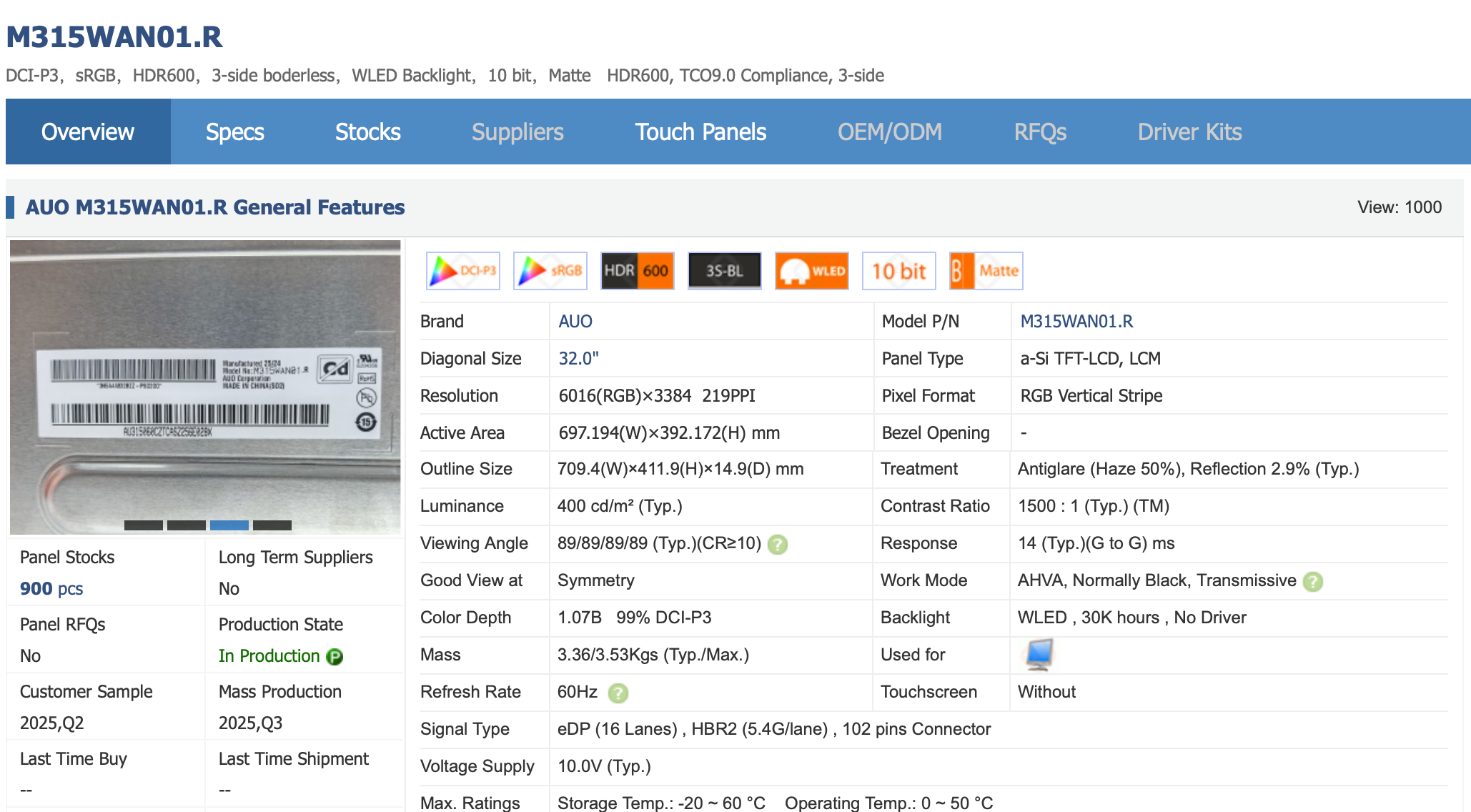
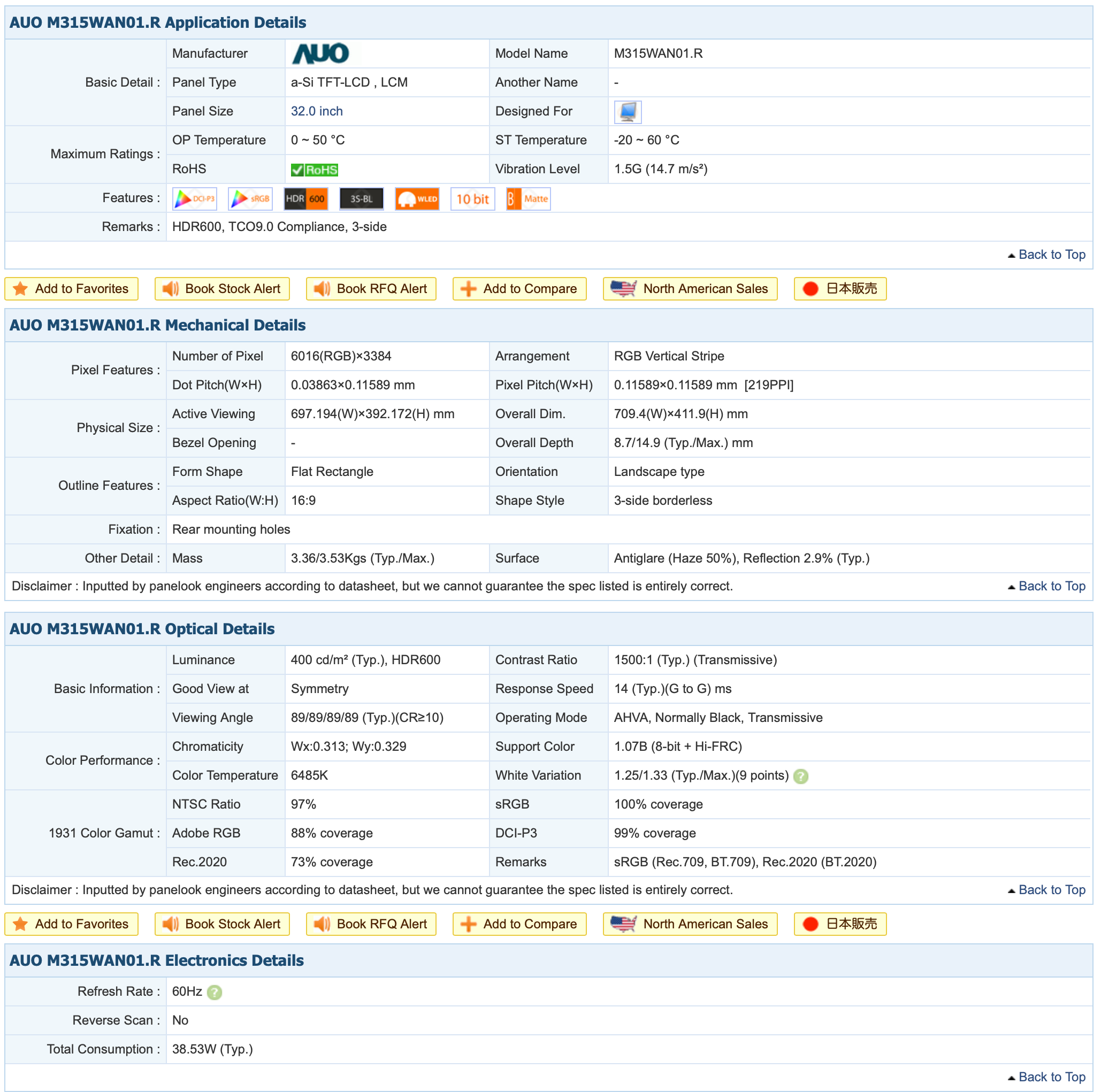
I wonder if this might be the panel that was used?
 www.panelook.com
104.219.172.33 - Please verify yourself to continue
Yes, based on my own digging it seems very likely. That is the same panel family used by the ASUS ProArt PA32QCV and Acer ProCreator PE320QXTI wonder if this might be the panel that was used?
View attachment 2609128View attachment 2609127104.219.172.33 - Please verify yourself to continue
The timeline of when that specific AUO panel went into mass production matches the timeframe when these lower cost 32 inch 6K monitors became available.
Also, the results rtings got on the Asus are almost identical to what I was able to measure on the Tcolor https://www.rtings.com/monitor/reviews/asus/proart-display-6k-pa32qcv
Last edited:
Can someone with this display please test the PBP capability, ideally with a Mac and a Windows laptop? Wondering what resolutions are available to each. Also are there any other options besides 50% split?
My use case is that I need to use my (locked down) Windows laptop alongside my MacBook. I currently use my Pro Display XDR and a USB-C switch to jump back and forth. It is clunky taking about 10 seconds to switch and for the desktop to settle down. Also it is obviously one computer or the other, so not having both available means I am less productive. Now that Apple has played its hand, I am thinking again about getting the Tcolor to put side by side with my Pro Display XDR until better options are available.
My use case is that I need to use my (locked down) Windows laptop alongside my MacBook. I currently use my Pro Display XDR and a USB-C switch to jump back and forth. It is clunky taking about 10 seconds to switch and for the desktop to settle down. Also it is obviously one computer or the other, so not having both available means I am less productive. Now that Apple has played its hand, I am thinking again about getting the Tcolor to put side by side with my Pro Display XDR until better options are available.
There is nothing indicating PBP capabilities in the OSD menuCan someone with this display please test the PBP capability, ideally with a Mac and a Windows laptop? Wondering what resolutions are available to each. Also are there any other options besides 50% split?
My use case is that I need to use my (locked down) Windows laptop alongside my MacBook. I currently use my Pro Display XDR and a USB-C switch to jump back and forth. It is clunky taking about 10 seconds to switch and for the desktop to settle down. Also it is obviously one computer or the other, so not having both available means I am less productive. Now that Apple has played its hand, I am thinking again about getting the Tcolor to put side by side with my Pro Display XDR until better options are available.
Oh wow, I had just assumed it could do that. Well that doesn’t make this any easier.There is nothing indicating PBP capabilities in the OSD menu
@citivolus Looking at the posted screenshots of the Kuycon 6K G32P’s OSD, that doesn’t seem to have any PiP/PbP options either.
Only the DiY 5K R1811/R1820 has them… 😀
Only the DiY 5K R1811/R1820 has them… 😀
thanks--my DiY R1811 has it and thought the Tcolor and Kuycon had similar firmware so I had assumed they could do PBP as well 🙁@citivolus Looking at the posted screenshots of the Kuycon 6K G32P’s OSD, that doesn’t seem to have any PiP/PbP options either.
Only the DiY 5K R1811/R1820 has them… 😀