I should receive my L32660 by Feb. 20th so I'll make sure to test for the issue as well.I was in contact with the seller and provided a video upon request. They promised to investigate the issue, but I haven’t received any further response so far.

Got a tip for us?
Let us know
Become a MacRumors Supporter for $50/year with no ads, ability to filter front page stories, and private forums.
Why aren't people considering the Tcolor L32660
- Thread starter citivolus
- Start date
- Sort by reaction score
You are using an out of date browser. It may not display this or other websites correctly.
You should upgrade or use an alternative browser.
You should upgrade or use an alternative browser.
@EugW "I also much prefer the idea of the Tcolor's buttons over the Kuycon's remote."
Hmm. I have both on my DIY 5K monitor, and 95% of the time I use the remote.
The problem is that the buttons have an interface logic that is not really logical or intuitive - like lots of Chinese low price devices...
The remote is also a bit fiddly, but it still has basic 'remote logic'.
Hmm. I have both on my DIY 5K monitor, and 95% of the time I use the remote.
The problem is that the buttons have an interface logic that is not really logical or intuitive - like lots of Chinese low price devices...
The remote is also a bit fiddly, but it still has basic 'remote logic'.

Runar3
macrumors newbie
Any news? This sounds (pun intended) like the last remaining issue stopping me from buying the display myself.I was in contact with the seller and provided a video upon request. They promised to investigate the issue, but I haven’t received any further response so far.


pommac
macrumors newbie
I haven’t heard anything further from the seller, but it seems this whining noise is less of a bug and more of a feature with many PWM-based monitors. I’ve also come across discussions online suggesting that PWM can be a real pain to the eyes, sometimes even triggering migraines for sensitive users. The safest approach is probably to keep the monitor brightness at maximum and dim it without dimming it, meaning using software dimming instead, for example with apps like BetterDisplay or MonitorControl.Any news? This sounds (pun intended) like the last remaining issue stopping me from buying the display myself.
fantathesodaman
macrumors member
fantathesodaman
macrumors member

nlited
macrumors member
Hi all! How does it compare to Kuycon G32P? Particulary in terms of pixel response time, ghosting and scrolling blur. Would be grateful for any feedback on this! Apparently the Kuycon looks like a more rational choice for me as there is official reseller with showroom and warranty service in my city.
Received my L32660 today and unfortunately I've started a return/refund process with Alibaba, mainly due to same whining issue at certain brightness levels that @pommac is experiencing ... very noticeable at the 70% brightness level I use (it does go away at 85+ %, however).
A few notes:
A few notes:
- fit/finish is decent but not as good as Kuycon (but in all fairness the tcoior is half the price)
- panel had no issues with dead/stuck pixels, colors looked good, peak brightness might not be enough for those in a brighter environment (this is compared to my 2017 27" iMac at 100% when testing/comparing, but I only use iMac at around 50%)
- screen's glass layer had a bit of a noticeable overlap lip on one edge, and glass layer had a spot near the corner where it looked like it had a bit of separation (if I'm being uber-picky)
- stand doesn't do a good job at locking in the monitor's rotation position ... seems a little loose, and is easy to bump/tilt the monitor a little bit off its setting. Kuycon stand was much better quality for sure
Last edited:
Sorry you have to deal with this but I appreciate your detailed feedback…Received my L32660 today and unfortunately I've started a return/refund process with Alibaba, mainly due to same whining issue at certain brightness levels that @pommac is experiencing ... very noticeable at the 70% brightness level I use (it does go away at 85+ %, however).
A few notes:
I'll see what Alibaba has to say about my return/refund request.
- fit/finish is decent but not as good as Kuycon (but in all fairness the tcoior is half the price)
- panel had no issues with dead/stuck pixels, colors looked good, peak brightness might not be enough for those in a brighter environment (this is compared to my 2017 27" iMac at 100% when testing/comparing, but I only use iMac at around 50%)
- screen's glass layer had a bit of a noticeable overlap lip on one edge, and glass layer had a spot near the corner where it looked like it had a bit of separation (if I'm being uber-picky)
- stand doesn't do a good job at locking in the monitor's rotation position ... seems a little loose, and is easy to bump/tilt the monitor a little bit off it's setting. Kuycon stand was much better quality for sure
It's a bit of a bummer but still worth a try for the price I suppose.Sorry you have to deal with this but I appreciate your detailed feedback…
@just!ns
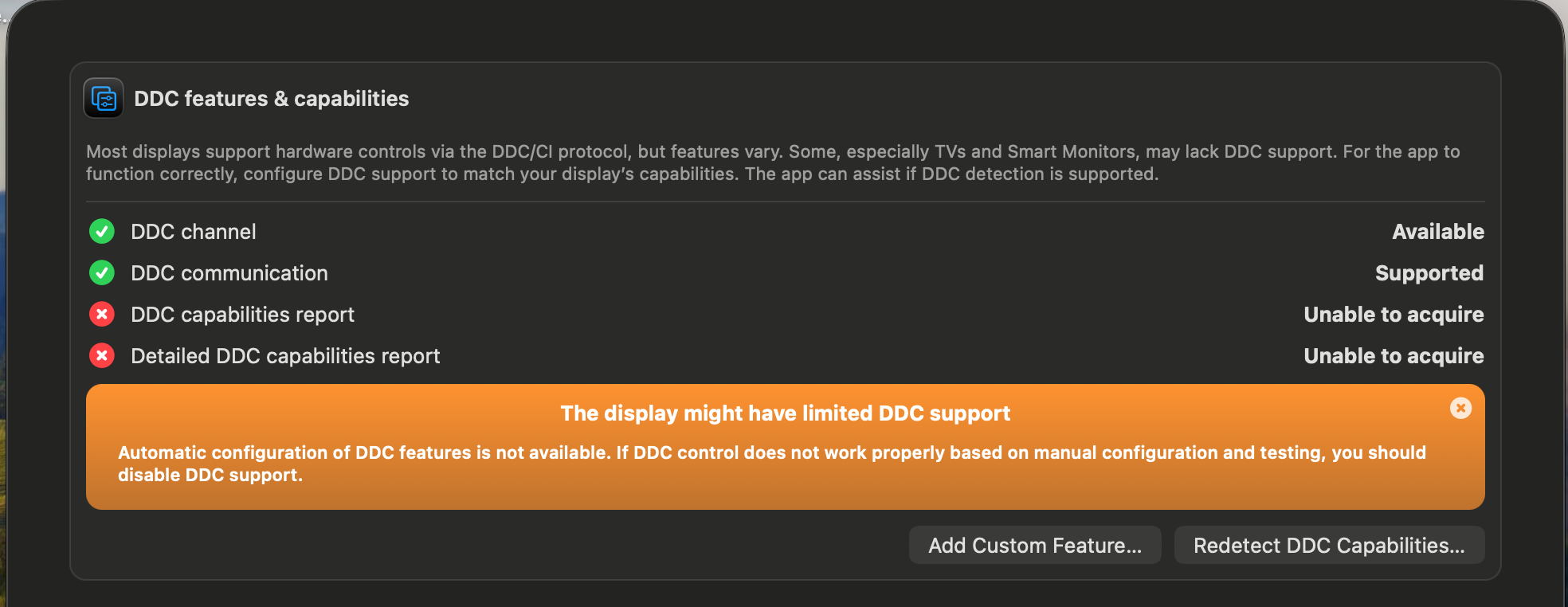
Have you tried using Better Display to control the Brightness?
This may or may not work, as it may well be the monitor’s firmware is not compatible with DDC control.
 forums.macrumors.com
There is an option for Device Control in BD’s drop down menu, and you will get a report if the monitor is compatible.
Even if it is not compatible BD may still allow software brightness control.
Or it might give partial control, which can usually be improved.
Could you also show us some screenshots of the OSD please.
At the moment it’s all guesswork. 😏
Have you tried using Better Display to control the Brightness?
This may or may not work, as it may well be the monitor’s firmware is not compatible with DDC control.
DIY 5k Monitor - success :-)
Bingoooo, got it to work now...Thanks so much for the help Paul. You are correct, I had to go into "Device Control" then navigate to "Configure DDC Controls" and just turned off the toggle for "brightness". Can confirm now adjusting brightness from keyboard fully functions along with Volume. All...
forums.macrumors.com
There is an option for Device Control in BD’s drop down menu, and you will get a report if the monitor is compatible.
Even if it is not compatible BD may still allow software brightness control.
Or it might give partial control, which can usually be improved.
Could you also show us some screenshots of the OSD please.
At the moment it’s all guesswork. 😏
Last edited:

Alameda
Contributor
Does anyone know: If I order this in the United States, how much import fee is added? Or is this the full price I pay?This 6K display looks very interesting but doesn't seem to be getting much attention. Wondering what I am missing?
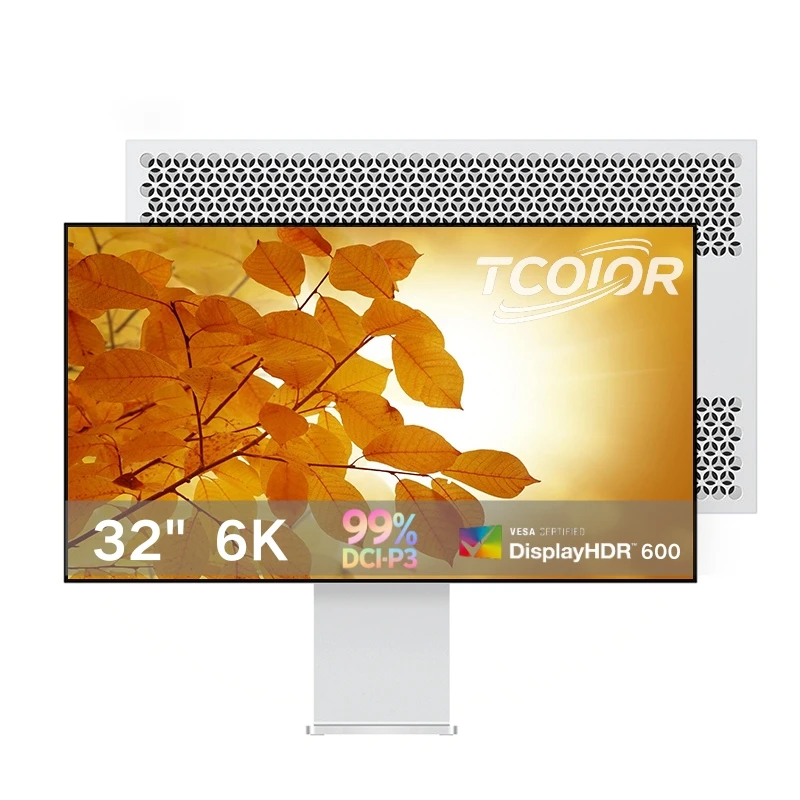
Tcoior Ultra Clear Gaming Display 32inch 6k Aluminum Ips Flat Screen Monitor Retina Display 60hz Lcd Monitors For Design Office - Buy Lcd Monitors led Monitor nano Ips Panel flat Screens built-in Speakers Monitor monitor For Home usb Monitors busines
Tcoior Ultra Clear Gaming Display 32inch 6k Aluminum Ips Flat Screen Monitor Retina Display 60hz Lcd Monitors For Design Office - Buy Lcd Monitors led Monitor nano Ips Panel flat Screens built-in Speakers Monitor monitor For Home usb Monitors business Display fhd Monitor monitor Retina Display...www.alibaba.com
As the price continues to drop on Alibaba (currently $688 plus shipping), I am considering getting one to put next to my Pro Display XDR for a dual setup. Thoughts?
Alameda
Contributor
LG does not make LCD panels, only OLED.This model uses an AUO panel (and not an LG panel) based on my correspondence with Alibaba a few days ago ... it's glossy vs. matte which is a perk: https://www.alibaba.com/product-detail/Color-Accurate-6k-Monitors-32-Inch_1601525173783.html

EugW
macrumors P6
That is not correct. Although LG has drastically reduced LCD display manufacturing, it still makes some.LG does not make LCD panels, only OLED.
For example, the LCD panel in the LG 6K (and other 6144x3456 monitors) is an LG manufactured one.
I used Lunar ... @pommac has a detailed summary as to what causes the whine. Wouldn't be such an issue if I used the monitor at max brightness but I rarely ever do.@just!ns
Have you tried using Better Display to control the Brightness?
This may or may not work, as it may well be the monitor’s firmware is not compatible with DDC control.
Here's a list of panels LG Display currently makes: https://www.panelook.com/bramodlist.php?st=&pl=&so_attr=&brands[]=79&production_state=1&best=0LG does not make LCD panels, only OLED.
Alameda
Contributor
Here's a list of panels LG Display currently makes: https://www.panelook.com/bramodlist.php?st=&pl=&so_attr=&brands[]=79&production_state=1&best=0

End of an era: LG Display officially sells off last LCD TV panel factory
Chinese makers have now all but taken over
 www.flatpanelshd.com
Alameda
Contributor
I do not think so. Perhaps it is made by TCL in a former LG factory and perhaps it is an LG design; that I do not know.That is not correct. Although LG has drastically reduced LCD display manufacturing, it still makes some.
For example, the LCD panel in the LG 6K (and other 6144x3456 monitors) is an LG manufactured one.
End of an era: LG Display officially sells off last LCD TV panel factory
Chinese makers have now all but taken over
www.flatpanelshd.com
EugW
macrumors P6
Can you post a video or audio clip with the whine? If audible in regular usage, that would probably be a deal breaker for me too. Also, can you post pictures of the overlapping edge, etc.?Received my L32660 today and unfortunately I've started a return/refund process with Alibaba, mainly due to same whining issue at certain brightness levels that @pommac is experiencing ... very noticeable at the 70% brightness level I use (it does go away at 85+ %, however).
A few notes:
I'll see what Alibaba has to say about my return/refund request.
- fit/finish is decent but not as good as Kuycon (but in all fairness the tcoior is half the price)
- panel had no issues with dead/stuck pixels, colors looked good, peak brightness might not be enough for those in a brighter environment (this is compared to my 2017 27" iMac at 100% when testing/comparing, but I only use iMac at around 50%)
- screen's glass layer had a bit of a noticeable overlap lip on one edge, and glass layer had a spot near the corner where it looked like it had a bit of separation (if I'm being uber-picky)
- stand doesn't do a good job at locking in the monitor's rotation position ... seems a little loose, and is easy to bump/tilt the monitor a little bit off its setting. Kuycon stand was much better quality for sure
You're confusing LG LCD TV panels with LG LCD monitor panels. BTW, it appears you didn't read your own link:I do not think so. Perhaps it is made by TCL in a former LG factory and perhaps it is an LG design; that I do not know.
End of an era: LG Display officially sells off last LCD TV panel factory
Chinese makers have now all but taken over
flatpanelshd said:LG Display continues to produce LCD panels on a smaller scale for IT devices.
Attached image and audio ... glass overlap is only an issue on one side, for audio you'll need to crank the volume (you can hear the whine vary based on my changing the brightness level via trackpad).Can you post a video or audio clip with the whine? If audible in regular usage, that would probably be a deal breaker for me too. Also, can you post pictures of the overlapping edge, etc.?
Attachments

pommac
macrumors newbie
The monitor is DDC-compatible, but via DDC you can only adjust the same settings that are available through the OSD. With BetterDisplay it’s also possible to use software dimming (Brightness (Software)), but the option is not enabled by default:@just!ns
Have you tried using Better Display to control the Brightness?
This may or may not work, as it may well be the monitor’s firmware is not compatible with DDC control.
DIY 5k Monitor - success :-)
Bingoooo, got it to work now...Thanks so much for the help Paul. You are correct, I had to go into "Device Control" then navigate to "Configure DDC Controls" and just turned off the toggle for "brightness". Can confirm now adjusting brightness from keyboard fully functions along with Volume. All...
There is an option for Device Control in BD’s drop down menu, and you will get a report if the monitor is compatible.
Even if it is not compatible BD may still allow software brightness control.
Or it might give partial control, which can usually be improved.
Could you also show us some screenshots of the OSD please.
At the moment it’s all guesswork. 😏
Alameda
Contributor
I ordered one. The price was $650 but with shipping and their estimated import duties it came to $1,079. That is quite a jump above the $650 price, so I decided that I’ll buy an ASUS instead.
Yes, this screen is a lot prettier, but only from the back. My desk faces a wall so no-one will ever see the beautiful machined aluminum.
Yes, this screen is a lot prettier, but only from the back. My desk faces a wall so no-one will ever see the beautiful machined aluminum.
EugW
macrumors P6
Thanks for posting those. The glass overlap wouldn't really bother me.Attached image and audio ... glass overlap is only an issue on one side, for audio you'll need to crank the volume (you can hear the whine vary based on my changing the brightness level via trackpad).
As for the whine, I don't hear it at all, and I tried both with my speakers and AirPods at maximum volume. I just hear an intermittent light tapping noise. However, I have older ears, and have some hearing loss at the higher frequencies (which is common for my age). Is it a high-pitched whine? Cuz that would explain why I'm not hearing it.
If it is indeed a high-pitched whine, it could also explain why it would pass QA, if the the inspectors are older and also have some high frequency hearing loss.
I have to crank the volume to hear it (recorded on my iPhone). What's funny is as I was just getting into testing I had an 80s/90s retro-videos channel running on the tv in the next room ... at first I thought it was something weird with the TV signal but then I remembered @pommac's mention of the whine and sure enough that's what I was hearing.Thanks for posting those. The glass overlap wouldn't really bother me.
As for the whine, I don't hear it at all, and I tried both with my speakers and AirPods. I just hear an intermittent light tapping noise. However, I have older ears, and have some hearing loss at the higher frequencies (which is not unusual for my age). Is it a high-pitched whine? Cuz that would explain why I'm not hearing it.
If the issue was just the glass overlap I'd be ok with it, but add on a loose stand and then the constant noise and that was enough for me to return it. Alibaba was very quick to approve the return process and also provided the shipping label so I'm dropping it off at Canada Post today.