Become a MacRumors Supporter for $50/year with no ads, ability to filter front page stories, and private forums.
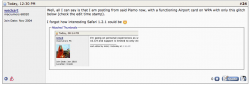
Well, all I can say is that I am posting from said Pismo now, with a functioning Airport card on WPA with only this glitch below (check the edit time stamp).

I forgot how interesting Safari 1.2.1 could be 🙂

The 3:16 AM is because of different time zones
 

Attachments

  • Screen Shot 2014-10-05 at 3.09.35 PM.png
    Screen Shot 2014-10-05 at 3.09.35 PM.png
    94.6 KB · Views: 134
I'm back in my apartment for the week and I brought an Apple Pro Mouse and the matching Wired Keyboard with me.

Without a working VGA or ADC display at hand for now, I was unable to be 100% of its working state, even through the Mac chime was very reassuring.

Today I plugged in the keyboard and mouse and started it up and waited a minute or so for it to boot.

When I pressed the sound volume keys I got the usual "pop...Pop...POp...POP!" OSX makes when increasing volume. The disc drive also ejected when I hit the media eject key.

It seems to be working perfectly! I have no idea what version of OSX it's running, but I brought my OS 9 and Tiger discs up with me anyway.

Next thing is to get a monitor. On the advise of you guys I'm gonna ask at the office to see which professor took the ADC Display and contact him to find out if he/she took it thinking it was DVI and now has no use for it.

Damn, if I got my hands on that monitor too, it would be the greatest free find of my life! 😛
 
Even if you can't get the Apple display, keep your eye on the discard pile as 15-17" 4:3 flat panels are pretty quickly going out of style as larger widescreen displays become more standard. At least around here, generic ones(Dell, Gateway, etc) show up with some regularity and I've probably put back a dozen or so in the past few months.

For "serious" computing I too prefer a nice widescreen display, but the smaller LCDs are light, don't take up much space, and don't use much power so they are great for use with a secondary computer. I've switched out the CRTs on all of my older Macs without integrated displays(going all the way back to my 7100/66-with the correct DB-15 to VGA adapter) for flat panels for all of the above reasons.
 
I scored my Dual 1GHz this summer that had the original sticker still on the SuperDrive! Bought it from a kid for $25 yet he had no clue what he was selling. 2x80GB HDD from the factory, AirPort, SCSI card, among a few other things then there is the fact that is the dual 1GHz, rarest of the models!

Image

Hey Gavin, for some reason I never thought about telling you about my Quicksilver! I bought mine off CL; It's in the original box with all the accessories (even the hefty, $$$$ receipt xD), as well as a 17" Studio Display (LCD) in its original box. I noticed that mine has the sticker on the drive as well; It also has a sticker on the Pro keyboard which, if I can remember, tells the user about the eject button, since the previous PowerMacs had always had buttons right on the drives. Really nifty, but I wish it was a better model. It's an original 867Mhz model. I forget how much RAM it has. Sadly the thing is about as loud as my MDD and currently it and the monitor sit in their boxes. If only I had room to put it on display.
 
Good news everyone! (In Professor Farnsworth's Voice)

I tracked down the professor who took the ADC Cinema Display and it turns out it was one of my lecturers. I sent him an email and apparently he has a small museum of some sort on campus. He invited me to see it tomorrow. I would genuinely like to see this UCD computer history museum and perhaps have a chat with him on the topic.

But best of all, was that he said I could have the monitor for my Quicksilver if I would "put it to good use"! 😉

Well I don't know about you, but hooking it up to a DP 1GHz Quicksilver as part of my college PowerPC setup, as well as a member of my growing collection in the years to come, I'd say that was the best life it could hope for 😛
 
Maybe you could trade the professor something from your collection for the ADC display.

I was actually thinking something along those lines. I feel a little bad about taking it for nothing. I have a few little trinket he might have interest in.

The Classic II is also probably my least beloved Mac of my collection. Seeing as it's not 100% working (takes 20 minutes to boot), it may do well as a display model in such a museum.
 
Good news everyone! (In Professor Farnsworth's Voice)

I tracked down the professor who took the ADC Cinema Display and it turns out it was one of my lecturers. I sent him an email and apparently he has a small museum of some sort on campus. He invited me to see it tomorrow. I would genuinely like to see this UCD computer history museum and perhaps have a chat with him on the topic.

But best of all, was that he said I could have the monitor for my Quicksilver if I would "put it to good use"! 😉

Well I don't know about you, but hooking it up to a DP 1GHz Quicksilver as part of my college PowerPC setup, as well as a member of my growing collection in the years to come, I'd say that was the best life it could hope for 😛

Teachers/professors are great to get into contact with over this stuff! Why, I decided to show my photography teacher pictures of my Mac collection, and what do you know... turns out he has two Macintosh Classic IIs, a funky European(?) Apple Design keyboard in its box, (as well as one keyboard+ mouse for the Classics) and a Macintosh LC... Although there is no need to since he saved them from the school's trash two years ago, he wants to see if the school will de-commission the items; he said he will give them to me if all goes well. Cool thing is that he told me to email him the pictures of my collection to show to the school as proof. Hopefully they will take notice of my collection and may think twice before throwing away classic Macs! I semi-patiently wait as I stare at the cupboard in the darkroom on occasion...

----------

You're lucky enough to even get a plentiful supply of old pentinum dells 🙁
I got a bunch of Pentium 4 desktops from my school's e-waste. Surprisingly, old P4 computers are being sold for 25-50 dollars on eBay! I need to get around to listing them...
 
Moar Booty!

I met with the professor today on the top floor of the science hub building where I've never been and it's all PhD's in glass offices. He welcomed me, not knowing I was supposed to be in the middle of a programming tutorial xD.

He had his modern office adorned with old Apple stuff. There was about 3 Titanium PowerBooks, a white iBook, a Clamshell iBook and a PowerBook 140 all neatly arranged in patterns on the windows ledge. He had the 21" Blueberry Studio CRT Display on one desk hooked up to another PowerBook G4. He also had 2 PowerMac 8500's. Non Apple products included an original Sinclair Microcomputer and a VT101 Terminal! (resting nicely on the two 8500's as pillars :L)

Anyway, he talked about what he used to use back in the day (He's only in early 50's). His first was a 512K, then an SE and then a Quadra, of which he used for years and talked about what a reliable machine it always was for him. He deeply regretted throwing out the 512K and SE in the 90's.

Anyway, having no ADC machine at his disposal he was happy to give me the Studio Display! I offered to give him my Classic II and he said he'd be happy to take it if I didn't want it in the future.

I hauled the monitor with me through two lectures until I could get back to my apartment. There was a good few "Ohhh what's that?" and "Is it really made by Apple?" from other students. I also felt pretty swagging' carrying it though campus to get home. I felt like a thief 😀.

IMG_6984.JPG

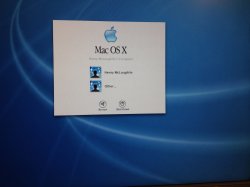
I got it home and hooked it up (after a quick wipe down) and fired up the Quicksilver. Booted straight to an OSX 10.X login screen. I can't yet tell which OS. It could be 10.3 or 10.4. However, it turns out that it used to belong to one of my OTHER lecturers as I can see his name on the login screen!.

IMG_6981.JPG

I sent him an E-Mail asking for the password or else I would just install tiger and wipe it all. He is my algorithmic problem solving lecturer so I joked in the email that his password hint "basil" had not given enough information to derive an algebraic expression 😛. I await his reply before I wipe it, so until tomorrow I'll just leave it alone. I know it fully works now, and I'm itching to mess around and see what it can do.

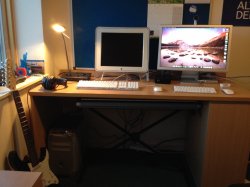
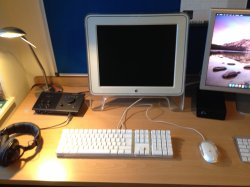
I also now have a beautiful looking PowerPC desktop system for the grand total of $0. I'm rather pleased with myself I can tell you. As far as college bedroom setups go, I'm doing pretty well! 😀

IMG_6983.JPG
 
Last edited:
I met with the professor today on the top floor of the science hub building where I've never been and it's all PhD's in glass offices. He welcomed me, not knowing I was supposed to be in the middle of a programming tutorial xD.

He had his modern office adorned with old Apple stuff. There was about 3 Titanium PowerBooks, a white iBook, a Clamshell iBook and a PowerBook 140 all neatly arranged in patterns on the windows ledge. He had the 21" Blueberry Studio CRT Display on one desk hooked up to another PowerBook G4. He also had 2 PowerMac 8500's. Non Apple products included an original Sinclair Microcomputer and a VT101 Terminal! (resting nicely on the two 8500's as pillars :L)

Anyway, he talked about what he used to use back in the day (He's only in early 50's). His first was a 512K, then an SE and then a Quadra, of which he used for years and talked about what a reliable machine it always was for him. He deeply regretted throwing out the 512K and SE in the 90's.

Anyway, having no ADC machine at his disposal he was happy to give me the Studio Display! I offered to give him my Classic II and he said he'd be happy to take it if I didn't want it in the future.

I hauled the monitor with me through two lectures until I could get back to my apartment. There was a good few "Ohhh what's that?" and "Is it really made by Apple?" from other students. I also felt pretty swagging' carrying it though campus to get home. I felt like a thief 😀.


I got it home and hooked it up (after a quick wipe down) and fired up the Quicksilver. Booted straight to an OSX 10.X login screen. I can't yet tell which OS. It could be 10.3 or 10.4. However, it turns out that it used to belong to one of my OTHER lecturers as I can see his name on the login screen!.


I sent him an E-Mail asking for the password or else I would just install tiger and wipe it all. He is my algorithmic problem solving lecturer so I joked in the email that his password hint "basil" had not given enough information to derive an algebraic expression 😛. I await his reply before I wipe it, so until tomorrow I'll just leave it alone. I know it fully works now, and I'm itching to mess around and see what it can do.

I also now have a beautiful looking PowerPC desktop system for the grand total of $0. I'm rather pleased with myself I can tell you. As far as college bedroom setups go, I'm doing pretty well! 😀


That is 10.2 Jaguar there
 
  • Like
Reactions: tevion5
Just from the font on the login dialogue it looks like Jaguar to me. Panther already had a thicker font without serifs.

Easy way to tell - is the boot up screen the typical light grey one with a black apple in the middle or is it a dark grey with a Happy Mac and a spinning beachball in the top left corner? If the latter, then it is almost certainly Puma. The QS 2002 shipped with 10.1.4.
 
Just from the font on the login dialogue it looks like Jaguar to me. Panther already had a thicker font without serifs.

Easy way to tell - is the boot up screen the typical light grey one with a black apple in the middle or is it a dark grey with a Happy Mac? If the latter, then it is almost certainly Puma. I cannot imagine anyone using Cheetah for any reason as almost nothing ran on that.

The background on login screen is Jaguar Aqua Blue
 
I did not know this was possible...

Out of boredom I put in the Tiger install disk and booted up. It is indeed OS X 10.2 on the HDD.

I got into system profiler too and to my delight I discovered that it is maxed out to 1.5GB RAM! 😀

However, I noticed a password reset utility 😵

I gave this a go and to my surprise it reset the professor's old password! I was able to get in to his desktop and see all his files. The thing is like a time capsule from 2005 with all his documents EVERYWHERE all over the desktop, his email all there but a decade out of date, and even Netscape Navigator in the dock.

It is also set up with special network settings for the campus staff ethernet and whatnot. Shame I don't have ethernet in my campus accommodation here... xD

In any case, I logged off promptly and didn't pry very far into potentially personal stuff. He replied to my email a minute ago and I'll have a chat with him tomorrow after his lecture.
 
Last edited:
I had a similar experience with the Clamshell I bought. This was sold in a house clearance of sorts. It appears that the laptop was found in the back of some storage area and seemingly hadn't been touched in over a decade. I found all the essays, theses and work files of the former student owner along with a fair bit of paper documentation including the PC World sales receipt (£1649 - ouch!). Even though she had Office '98 installed she preferred to do all of her work in Appleworks.

There was also a copy of Photoshop and Illustrator licensed to someone else, entirely. 😀

All in all, it felt like opening a grave.
 
I too have had the experience of finding somewhat "personal" files on computers. With professors' computers, they're often recommendation letters, evaluations, and sometimes even grades and other more "confidential" stuff.

If the original owner is someone I know, I will generally dump all the stuff onto a CD, DVD, or flash drive and hand it back over to them-then clear it all off the computer. If I don't know the owner, I usually just dump it all.

Incidentally, buying old computers has also made me VERY self conscious about what I leave behind when I get rid of a computer. If I'm passing it along to someone else, I generally do a wipe and reinstall of whatever OS it was running. If I'm just disposing of it, I generally pull the drive and keep it or at least just do a complete clean wipe of it.
 
The professor actually wanted me to retieve what was on it!

Apparently he only used it for 3 years before the university gave him, I kid you not, a G5 Quad with dual 30" ACD's. That is some budget right there...

And the best part that you PPC folks will love, is that he was using that setup up until last month! 😛 he only now replaced it woth the newest Mac Pro with dual 27" Thunderbolt Displays. Again, that budget...

Anyway, because he got the G5 so soon after getting this quicksilver, it had been sitting under a desk for a decade without being touched. It only got around to being tossed recently before I nabbed it.

I backed up the contents by an ethernet cable transfer to my MBP. I then wiped it and clean installed Tiger from retail disks. I downloaded the restore disks from Macintosh Garden and will use the OS9 restore CD to make a fresh install of that as soon as I burn the image.

I was surprised by the performance! It runs Tiger WAYYY smoother than my 800MHz iMac G4, which is maxed out to 1GB Ram.

I installed TenFourFox and Monolingual. I just need to wait for the AirPot card and USB 2.0 PCI card to arrive and my new college PPC setup will be fully ready for action! 😀
 
Apparently he only used it for 3 years before the university gave him, I kid you not, a G5 Quad with dual 30" ACD's. That is some budget right there...


And the best part that you PPC folks will love, is that he was using that setup up until last month! 😛 he only now replaced it woth the newest Mac Pro with dual 27" Thunderbolt Displays. Again, that budget...


Anyway, because he got the G5 so soon after getting this quicksilver, it had been sitting under a desk for a decade without being touched. It only got around to being tossed recently before I nabbed it.



Will you get the G5 soon?
 
Register on MacRumors! This sidebar will go away, and you'll see fewer ads.