
Become a MacRumors Supporter for $50/year with no ads, ability to filter front page stories, and private forums.
Status
The first post of this thread is a WikiPost and can be edited by anyone with the appropiate permissions. Your edits will be public.

Nullcaller

macrumors member
Original poster
By this point, most of you probably already know that the Late 2005 PowerMac G5 (along with the Quad) actually supports far more memory than the measly 16GB which is purportedly the limit for it. Now, apparently, some 4GB DDR2 sticks might work in it without performing any OpenFirmware magic whatsoever, but not all of them. And to get them working, @sasho648 came up with a few lines of Forth code which, upon pasting them into OpenFirmware, will properly initialize the sticks.

Now, I always knew that running more than 16GB of memory in a PowerMac G5 was technically possible. But what I personally didn't know is just how easy it actually is. It appears that you don't need any special 'mac-friendly' RAM or even that much technical knowledge, just a few magic numbers and some free time to enter them into OpenFirmware.

What OpenFirmware actually is, in large part, is a neat way to modify hardware description passed to the operating system kernel on boot. This hardware description is a tree-like structure called OpenFirmware Device Tree. The funny thing is, this is quite an open standard, and one still in very wide use today. If you have an Android phone, chances are, it uses the same old Device Tree specification to pass hardware description to the Linux kernel, which works under the hood of Android. Time is a flat circle.

But enough with the history lessons. What we're going to do is modify the 'memory' node of the device tree, which describes the memory layout of the system. More specifically, the 'reg' property of the 'memory' node, which defines how the physical address space of each individual RAM stick is mapped onto the physical address space of the whole system. Or, at least, that's my understanding of it, which seems to make sense.

Getting your current memory mapping configuration

First of all, boot into OpenFirmware and enter the following commands:

Code:
dev /memory
.properties

This will display all the properties of the 'memory' node, which is directly under the root node, '/'. One of the properties will be called 'reg' and it will look a bit like this:

Code:
00000000 00000000 40000000
00000000 40000000 40000000
00000001 00000000 80000000
00000001 80000000 80000000
00000002 00000000 80000000
00000002 80000000 80000000
00000000 00000000 00000000
00000000 00000000 00000000

Making sense of the memory mapping configuration

Now, if you were to take the door off of my G5, remove the front fan assembly, and look at how the RAM sticks are physically situated in the machine, my RAM configuration would look a bit like this:

Code:
4GB (slot 4A)
2GB (slot 3A)
2GB (slot 2A)
1GB (slot 1A)
----
1GB (slot 1B)
2GB (slot 2B)
2GB (slot 3B)
4GB (slot 4B)

OpenFirmware, however, does not count RAM slots from top to bottom, it counts them from the center outwards, as numbered in the braces. So, to OpenFirmware, my RAM configuration looks a little bit like this:

Code:
1GB (slot 1A)
1GB (slot 1B)
2GB (slot 2A)
2GB (slot 2B)
2GB (slot 3A)
2GB (slot 3B)
4GB (slot 4A)
4GB (slot 4B)

And that is what we see in the 'reg' property, if we squint and look hard enough:

Code:
00000000 00000000 40000000   //1GB (slot 1A)
00000000 40000000 40000000   //1GB (slot 1B)
00000001 00000000 80000000   //2GB (slot 2A)
00000001 80000000 80000000   //2GB (slot 2B)
00000002 00000000 80000000   //2GB (slot 3A)
00000002 80000000 80000000   //2GB (slot 3B)
00000000 00000000 00000000   //4GB (slot 4A)
00000000 00000000 00000000   //4GB (slot 4B)

Each line of the 'reg' property contains: two 32-bit integers which are combined into one 64-bit integer to get the offset at which the address space of the RAM stick will be mapped into the physical memory address space of the machine, and a 32-bit integer which indicates the size of the RAM stick address space which is going to be mapped. Now, this is not the actual size of the RAM stick. It's simply how much of it we want to map into the machine address space.

One additional thing to note is that OpenFirmware spits out and interprets these values in hexadecimal notation, which is why 1 GB is 40000000 bytes: 40000000 bytes (hex) = 4 * 16 ^ 7 bytes (decimal) = 1,073,741,824 bytes (decimal) = 1*1024*1024*1024 bytes (decimal).

But we also see that the 4GB sticks aren't being mapped. My best guess as to why is that the size which they want to map into the machine address space exceeds the limit of the 32-bit integer. They want to map 00000001 00000000 bytes, at which point probably OpenFirmware freaks out in one way or another and the result is zero mapped bytes.

We're going to fix this by overwriting the reg property and manually mapping a little bit less than the full 4GB onto the address space.

Coming up with corrected memory mapping configuration

There seem to be some rules as to how you're supposed to do this. For example, OpenFirmware automatically maps my two 1GB sticks into the first two gigabytes of the physical address space, but then it skips two gigabytes and maps the two 2GB sticks into the second four gigabyte region of the address space. If you then try to manually 'fix' that, the system will crash at some point when booting the OS.

My best guess is that it can't map more than two sticks to any contiguous four gigabyte region. But to be safe, it's easier to just put your smallest RAM sticks into the first slots, like I did, and use the values which OpenFirmware automatically generates for you instead of experimenting. Do feel free to experiment, though.

But anyways, for me the proper 'reg' property looks something like this:

Code:
00000000 00000000 40000000
00000000 40000000 40000000
00000001 00000000 80000000
00000001 80000000 80000000
00000002 00000000 80000000
00000002 80000000 80000000
00000003 00000000 F0000000
00000004 00000000 F0000000

Now, to make reading hex math easier on your eyes, from this point on, I'm going to be putting random spaces inside numbers, like this: 4000 0000. This is meant to read 40000000. Keep this in mind.

You can see from my configuration that I've mapped the first 4GB stick right after where the last 2GB stick ends (2 8000 0000 + 8000 0000 = 3 0000 0000 in hex), I've limited the size of the stick to 3.75GB (F000 0000 as opposed to full 1 0000 0000), and I've skipped 1000 0000 bytes in between the 4GB sticks. This makes for nice alignment and less bugs. This is pretty much the configuration @sasho648 got working back in the day.

I find that it is easiest to count in terms of gigabytes. As we've already established, 4000 0000 bytes (hexadecimal notation) is 1 GB. This means that 8000 0000 bytes (hex) is 2 GB, 1 0000 0000 bytes (hex) is 4 GB and F000 0000 bytes (hex) is 3.75 GB.

Also, 2000 0000 bytes (hex) is 512 MB, 1000 0000 bytes (hex) is 256 MB, 800 0000 bytes (hex) is 128 MB, and so on.

Now, I've recently been testing a slightly different configuration:

Code:
00000000 00000000 40000000
00000000 40000000 40000000
00000001 00000000 80000000
00000001 80000000 80000000
00000002 00000000 80000000
00000002 80000000 80000000
00000003 00000000 FF000000
00000004 00000000 FF000000

Here, more of the RAM stick is utilized. I don't know whether it will work with Mac OS, but it works with my Gentoo install. No memtester errors, no crashes, everything as stable as can be. With this configuration, the system should be able to utilize everything but the last 16MB of each of the 4GB sticks, which to me seems both fine and more reasonable than 'the last 256MB' (as is the case in the previous configuration).

My assumption is that the current theoretical memory maximum for the G5 (28 GB) can be reached with the following configuration (this configuration is untested, as I currently do not have the RAM to test it):

Code:
00000000 00000000 80000000   //2GB (slot 1A) -- required to boot into OpenFirmware
00000000 80000000 80000000   //2GB (slot 1B) -- required to boot into OpenFirmware
00000001 00000000 FF000000   //4GB (slot 2A)
00000002 00000000 FF000000   //4GB (slot 2B)
00000003 00000000 FF000000   //4GB (slot 3A)
00000004 00000000 FF000000   //4GB (slot 3B)
00000005 00000000 FF000000   //4GB (slot 4A)
00000006 00000000 FF000000   //4GB (slot 4B)

And if you can find a pair of 4GB memory sticks which get recognized by the PowerMac G5 without OpenFirmware trickery, the theoretical maximum goes up to 32 GB.

Now the question is, how do you actually overwrite the reg property?

Applying new memory mapping configuration

First, remove spaces and newlines from your desired configuration, so that it looks like one continuous string:

Code:
0000000000000000400000000000000040000000400000000000000100000000800000000000000180000000800000000000000200000000800000000000000280000000800000000000000300000000FF0000000000000400000000FF000000

We will refer to this string of as <configuration>.

Now, simply enter the following code into OpenFirmware, taking care to replace <configuration> with your configuration string:

Code:
dev /memory
" "(<configuration>)" encode-bytes " reg" property

You can then verify that you've entered the configuration correctly by re-entering the code from the begginning:

Code:
dev /memory
.properties

If you see that you've made a mistake, you can use up/down arrow keys to go back to the command with the mistake and edit it. Verify again, and, when you're ready, simply type in mac-boot to continue normal boot. If you prefer to select the OS before booting, enter multi-boot instead.

Final words

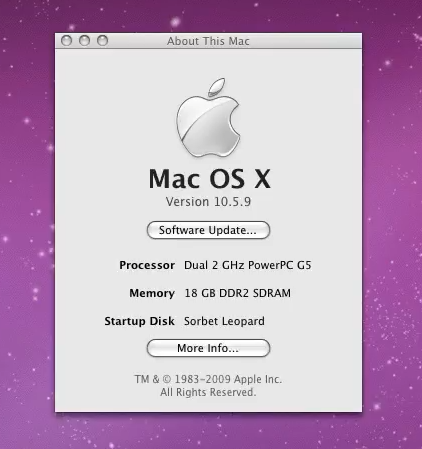
As for me, after going through these steps, I've been able to get pretty much the full 18GB I have in the system working with Gentoo Linux I've been experimenting with as of late. Not that I need it, per se, but it is both fun and absolutely ridiculous.
Good luck!
 
Last edited:
I think that having a guide like this will be useful down the line. Not least to myself, when I inevitably forget all about how I did any of this 2-3 years down the line and want to repeat it. I am planning on editing the guide to add stuff about automating the magic number entering and maybe expanding the calculations section a little bit. Also, screenshots, lots of screenshots. I think there are also some other values you should edit for Mac OS. Feel free to add to the guide yourself, if you want to. This is a WikiPost.
 
Haha, I was actually thinking about this not too long ago when revisiting the 4.5GB iMac G5 thread and wanted to see its viability. Unfortunately, I'm too broke to do it myself. Cool to see it's possible.
 
Code:
00000003 00000000 FF000000
00000004 00000000 FF000000

Could you split the 4 GB DIMMs into a couple of 2 GB allocations like this:
Code:
00000003 00000000 80000000
00000003 80000000 80000000
00000004 00000000 80000000
00000004 80000000 80000000

As for me, after going through these steps, I've been able to get pretty much the full 18GB I have in the system working with Gentoo Linux I've been experimenting with as of late. Not that I need it, per se, but it is both fun and absolutely ridiculous.
How does the difference between using F0000000 and FF000000 appear in Linux?
Have you tried it with Mac OS X?

Which Power Mac G5 model do you have?
What version of Open Firmware?

My Power Mac Quad G5 uses U4 (UniNorth 4?) which is actually a "IBM CPC945 Bridge and Memory Controller" (you can download the manual). You should examine the registers of that to see if the DIMMs are setup correctly.

The CPC945 manual says:
64 GB max capacity using 4 pairs of 8 GB double-sided DIMMs. (Only 62 GB addressable due to 2 GB I/O hole.)

It responds to memory write and read requests in the ranges 0x000000000 through 0x07FFFFFFF (0 to ‘2 GB-1’) and 0x100000000 through 0xFFFFFFFFF (4 GB to ’64 GB-1’).

Too bad I can't use the 64 GiB RAM from my Mac Pro 2008 in my Quad G5 🙁
 
  • Like
Reactions: Nullcaller
Here's info from my Quad G5:

Code:
/memory@0,0
PROPERTIES:
available               pseudo=00003000 7f5ed000

bank-names              000000ff
                        64 bit Bank0/J6700/J6800/front
                        64 bit Bank1/J6700/J6800/back
                        64 bit Bank2/J6900/J7000/front
                        64 bit Bank3/J6900/J7000/back
                        64 bit Bank4/J7100/J7200/front
                        64 bit Bank5/J7100/J7200/back
                        64 bit Bank6/J7300/J7400/front
                        64 bit Bank7/J7300/J7400/back

bank-sizes              20000000
                        00000000
                        40000000
                        40000000
                        40000000
                        40000000
                        40000000
                        40000000

device_type             memory

dimm-info               8008080d 0a604000 053d5000 82100000 0c041801 02000150
                        5000003c 283c2d40 25371022 3c1e1e00 003c6980 1e280000
                        00000000 00000000 00000000 000012c7 2cffffff ffffffff
                        08344854 46333236 3441592d 35334542 31202001 0005427e
                        0f488200 00000000 00000000 00000000 00000000 00000000
                        00000000 00000000 8008080d 0a604000 053d5000 82100000
                        0c041801 02000150 5000003c 283c2d40 25371022 3c1e1e00
                        003c6980 1e280000 00000000 00000000 00000000 000012c7
                        2cffffff ffffffff 08344854 46333236 3441592d 35334542
                        31202001 0005427e 0f488000 00000000 00000000 00000000
                        00000000 00000000 00000000 00000000
                        ... 00000400 bytes total

dimm-speeds             PC2-4200U-444
                        PC2-4200U-444
                        PC2-4200U-444
                        PC2-4200U-444
                        PC2-4200U-444
                        PC2-4200U-444
                        PC2-4200U-444
                        PC2-4200U-444

dimm-types              DDR2 SDRAM
                        DDR2 SDRAM
                        DDR2 SDRAM
                        DDR2 SDRAM
                        DDR2 SDRAM
                        DDR2 SDRAM
                        DDR2 SDRAM
                        DDR2 SDRAM

name                    memory
ram-bus-width           00000080
ram-layout-architecture 00000001

ram-map                 00000002 00000000  20000000
                        00000000 00000000  00000000
                        00000001 80000000  40000000
                        00000001 c0000000  40000000
                        00000000 00000000  40000000
                        00000000 40000000  40000000
                        00000000 00000000  40000000
                        00000000 40000000  40000000

reg                     00000000 00000000  20000000
                        00000000 00000000  00000000
                        00000000 20000000  40000000
                        00000000 60000000  20000000
                        00000001 00000000  60000000
                        00000001 60000000  40000000
                        00000001 a0000000  40000000
                        00000001 e0000000  40000000

slot-names              000000ff
                        DIMM0/J6700
                        DIMM1/J6800
                        DIMM2/J6900
                        DIMM3/J7000
                        DIMM4/J7100
                        DIMM5/J7200
                        DIMM6/J7300
                        DIMM7/J7400

My setup has optimal ram-layout-architecture of 1 (128 bit operation) instead of 2 (64 bit operation). This corresponds to the 64BitCfg bit of the MemBusCnfg register at 0xF80022D0 being set to 0.

My setup has optimal ram-bus-width of 0x80 (128-bit bus) instead of 0x40 (64-bit bus). This corresponds to the 64BitBus bit of the MemBusCnfg register at 0xF80022D0 being set to 0.

The dimm-info property has the i2c info from the SPD of each DIMM (0x80 bytes each x8). You can either use the info from this property or access the SPD directly via i2c.

The manual says:

7.14 Address Decode​

The Address Decode unit is controlled by:
  • the 64BitCfg and 64BitBus bits in the Memory Bus Configuration Register (MemBusCnfg 0xF80022D0)
  • the DIMM Configuration Registers (Dm0Cnfg 0xF8002200, Dm1Cnfg 0xF8002210, Dm2Cnfg 0xF8002220, Dm3Cnfg 0xF8002230)
  • the Memory User Configuration Register (UsrCnfg 0xF8002290)
 
  • Like
Reactions: Nullcaller
Haha, I was actually thinking about this not too long ago when revisiting the 4.5GB iMac G5 thread and wanted to see its viability. Unfortunately, I'm too broke to do it myself. Cool to see it's possible.

Hey, never say never. With enough luck, old electronics can always be acquired for the low price of 'free'
 
Could you split the 4 GB DIMMs into a couple of 2 GB allocations

My understanding is, it's one 'reg' property entry per one DIMM, so the other entries will likely get interpreted as other DIMMs, if at all.

Now, there's actually a property in the root of the device tree (dev /), called #size-cells, which allows you to adjust how many cells are used to encode the sizes. It's set to 1 by default, which is why we're hitting the 32-bit integer limit.

Theoretically, you can change it to 2. Then, you'll have the entire 64 bits to encode RAM stick size. Problem is, if my understanding is right, you'll have to also go through the rest of the device tree and painstakingly correct the rest of the nodes, because it doesn't only affect the memory node.

But, you know, there's definitely fun to be had in that direction.

How does the difference between using F0000000 and FF000000 appear in Linux?

More RAM. I'll try and get the screenshots for you, but I think it's an additional 512MB. 256MB per memory stick, as discussed in the post. Not critical by any means, compared to the additional 1.75 GB per stick you're getting with 4GB sticks over 2GB sticks. But with enough 4GB sticks, you'd be giving up a total of 1.5GB. FF00 0000 reduces that to 16MB per stick, for a far more reasonable 96MB given up max.

Have you tried it with Mac OS X?

Not thoroughly, no. It does boot, though. Says it has '17.97 GB DDR2 SDRAM' in About This Mac. Doesn't list the 4GB memory sticks in System Profiler, but I think you have to work some additional magic for that to happen, which I skipped since I only really cared about getting it to work in Linux at the moment. I do plan on doing some shenanigans with Mac OS, though.

Which Power Mac G5 model do you have?

The Late 2005 DC 2.0 GHz

What version of Open Firmware?

5.2.7f1 built on 09/30/05 at 15:31:03

The CPC945 manual says

Ah, so that's why it skips those 2 gigabytes after the first 2 gigs. They are already mapped to I/O, so no bueno. Thanks! I'll have to do some experimentation and update the guide.

Here's info from my Quad G5

Thank you! I'll study it when I have more time. Interesting that you have an odd 1.5 GB stick in there. I've always thought you had to install sticks in matched pairs with G5s. Apparently not, however. Again, I'll have to study and add to the guide.
 
Just little add while this thread is on top:

Apparently, _some_ 8 chip DDR2 sticks from Kingston (all ram on one side, markings says kvr533D2N4/512) and Hanya NT512T64U88A0-BY-37B ) do not work in my 2.0Ghz Dual Core G5! No chime, no nothing!
 
No chime, no nothing!

Before writing the guide, I had to rearrange the RAM sticks on my G5.

My G5 is a bit finicky with RAM, though. I've had issues with it before where it wouldn't recognize a few RAM banks until I reseated the RAM in them. I think the solder joint issue is starting to get to it, so I'm minimizing my interaction with the memory slots not to make it worse.

But at some point, while I was trying to get it to detect all 8 sticks of RAM in my configuration, it did exactly this with only the RAM sticks it had worked with before in it.

It turned on, fans spinning relatively quietly, then I think they ramped up at some point. No chime, no beeps, no blinky lights. I turned it off, reseated the RAM, and the issue went away.

I also have a different G5 which I attempted to desolder a socket from with the help of a very bad no good preheater, and it went from being three beeps memory issue borked to being no beep no chime jet engine borked. I mean, it was borked anyway, so no harm done, really. I'm still kinda sad about it, though.

So, all in all, it might be one of those memory/solder joint issues plaguing G5s.

In that case, to try and fix it, you'll have to put the board on a very good infrared preheater, make sure it is evenly heated, using the correct preheat cycle, and touch up the old solder joints with some lead solder. Better yet, use one of those vacuum solder pumps and resolder the slots to the board using lead solder, so that none of the very bad no good lead-free solder remains. Also, you should let it cool down slowly, by gradually decreasing preheater temperature. Otherwise, I'm told bad things happen to it.

This has a chance of success, but if the issue is with the board itself or if the board does not like the thermal shock and dies, you're out of luck.
 
By this point, most of you probably already know that the Late 2005 PowerMac G5 (along with the Quad) actually supports far more memory than the measly 16GB which is purportedly the limit for it. Now, apparently, some 4GB DDR2 sticks might work in it without performing any OpenFirmware magic whatsoever, but not all of them. And to get them working, @sasho648 came up with a few lines of Forth code which, upon pasting them into OpenFirmware, will properly initialize the sticks.

Now, I always knew that running more than 16GB of memory in a PowerMac G5 was technically possible. But what I personally didn't know is just how easy it actually is. It appears that you don't need any special 'mac-friendly' RAM or even that much technical knowledge, just a few magic numbers and some free time to enter them into OpenFirmware.

What OpenFirmware actually is, in large part, is a neat way to modify hardware description passed to the operating system kernel on boot. This hardware description is a tree-like structure called OpenFirmware Device Tree. The funny thing is, this is quite an open standard, and one still in very wide use today. If you have an Android phone, chances are, it uses the same old Device Tree specification to pass hardware description to the Linux kernel, which works under the hood of Android. Time is a flat circle.

But enough with the history lessons. What we're going to do is modify the 'memory' node of the device tree, which describes the memory layout of the system. More specifically, the 'reg' property of the 'memory' node, which defines how the physical address space of each individual RAM stick is mapped onto the physical address space of the whole system. Or, at least, that's my understanding of it, which seems to make sense.

Getting your current memory mapping configuration

First of all, boot into OpenFirmware and enter the following commands:

Code:
dev /memory
.properties

This will display all the properties of the 'memory' node, which is directly under the root node, '/'. One of the properties will be called 'reg' and it will look a bit like this:

Code:
00000000 00000000 40000000
00000000 40000000 40000000
00000001 00000000 80000000
00000001 80000000 80000000
00000002 00000000 80000000
00000002 80000000 80000000
00000000 00000000 00000000
00000000 00000000 00000000

Making sense of the memory mapping configuration

Now, if you were to take the door off of my G5, remove the front fan assembly, and look at how the RAM sticks are physically situated in the machine, my RAM configuration would look a bit like this:

Code:
4GB (slot 4A)
2GB (slot 3A)
2GB (slot 2A)
1GB (slot 1A)
----
1GB (slot 1B)
2GB (slot 2B)
2GB (slot 3B)
4GB (slot 4B)

OpenFirmware, however, does not count RAM slots from top to bottom, it counts them from the center outwards, as numbered in the braces. So, to OpenFirmware, my RAM configuration looks a little bit like this:

Code:
1GB (slot 1A)
1GB (slot 1B)
2GB (slot 2A)
2GB (slot 2B)
2GB (slot 3A)
2GB (slot 3B)
4GB (slot 4A)
4GB (slot 4B)

And that is what we see in the 'reg' property, if we squint and look hard enough:

Code:
00000000 00000000 40000000   //1GB (slot 1A)
00000000 40000000 40000000   //1GB (slot 1B)
00000001 00000000 80000000   //2GB (slot 2A)
00000001 80000000 80000000   //2GB (slot 2B)
00000002 00000000 80000000   //2GB (slot 3A)
00000002 80000000 80000000   //2GB (slot 3B)
00000000 00000000 00000000   //4GB (slot 4A)
00000000 00000000 00000000   //4GB (slot 4B)

Each line of the 'reg' property contains: two 32-bit integers which are combined into one 64-bit integer to get the offset at which the address space of the RAM stick will be mapped into the physical memory address space of the machine, and a 32-bit integer which indicates the size of the RAM stick address space which is going to be mapped. Now, this is not the actual size of the RAM stick. It's simply how much of it we want to map into the machine address space.

One additional thing to note is that OpenFirmware spits out and interprets these values in hexadecimal notation, which is why 1 GB is 40000000 bytes: 40000000 bytes (hex) = 4 * 16 ^ 7 bytes (decimal) = 1,073,741,824 bytes (decimal) = 1*1024*1024*1024 bytes (decimal).

But we also see that the 4GB sticks aren't being mapped. My best guess as to why is that the size which they want to map into the machine address space exceeds the limit of the 32-bit integer. They want to map 00000001 00000000 bytes, at which point probably OpenFirmware freaks out in one way or another and the result is zero mapped bytes.

We're going to fix this by overwriting the reg property and manually mapping a little bit less than the full 4GB onto the address space.

Coming up with corrected memory mapping configuration

There seem to be some rules as to how you're supposed to do this. For example, OpenFirmware automatically maps my two 1GB sticks into the first two gigabytes of the physical address space, but then it skips two gigabytes and maps the two 2GB sticks into the second four gigabyte region of the address space. If you then try to manually 'fix' that, the system will crash at some point when booting the OS.

My best guess is that it can't map more than two sticks to any contiguous four gigabyte region. But to be safe, it's easier to just put your smallest RAM sticks into the first slots, like I did, and use the values which OpenFirmware automatically generates for you instead of experimenting. Do feel free to experiment, though.

But anyways, for me the proper 'reg' property looks something like this:

Code:
00000000 00000000 40000000
00000000 40000000 40000000
00000001 00000000 80000000
00000001 80000000 80000000
00000002 00000000 80000000
00000002 80000000 80000000
00000003 00000000 F0000000
00000004 00000000 F0000000

Now, to make reading hex math easier on your eyes, from this point on, I'm going to be putting random spaces inside numbers, like this: 4000 0000. This is meant to read 40000000. Keep this in mind.

You can see from my configuration that I've mapped the first 4GB stick right after where the last 2GB stick ends (2 8000 0000 + 8000 0000 = 3 0000 0000 in hex), I've limited the size of the stick to 3.75GB (F000 0000 as opposed to full 1 0000 0000), and I've skipped 1000 0000 bytes in between the 4GB sticks. This makes for nice alignment and less bugs. This is pretty much the configuration @sasho648 got working back in the day.

I find that it is easiest to count in terms of gigabytes. As we've already established, 4000 0000 bytes (hexadecimal notation) is 1 GB. This means that 8000 0000 bytes (hex) is 2 GB, 1 0000 0000 bytes (hex) is 4 GB and F000 0000 bytes (hex) is 3.75 GB.

Also, 2000 0000 bytes (hex) is 512 MB, 1000 0000 bytes (hex) is 256 MB, 800 0000 bytes (hex) is 128 MB, and so on.

Now, I've recently been testing a slightly different configuration:

Code:
00000000 00000000 40000000
00000000 40000000 40000000
00000001 00000000 80000000
00000001 80000000 80000000
00000002 00000000 80000000
00000002 80000000 80000000
00000003 00000000 FF000000
00000004 00000000 FF000000

Here, more of the RAM stick is utilized. I don't know whether it will work with Mac OS, but it works with my Gentoo install. No memtester errors, no crashes, everything as stable as can be. With this configuration, the system should be able to utilize everything but the last 16MB of each of the 4GB sticks, which to me seems both fine and more reasonable than 'the last 256MB' (as is the case in the previous configuration).

My assumption is that the current theoretical memory maximum for the G5 (28 GB) can be reached with the following configuration (this configuration is untested, as I currently do not have the RAM to test it):

Code:
00000000 00000000 80000000   //2GB (slot 1A) -- required to boot into OpenFirmware
00000000 80000000 80000000   //2GB (slot 1B) -- required to boot into OpenFirmware
00000001 00000000 FF000000   //4GB (slot 2A)
00000002 00000000 FF000000   //4GB (slot 2B)
00000003 00000000 FF000000   //4GB (slot 3A)
00000004 00000000 FF000000   //4GB (slot 3B)
00000005 00000000 FF000000   //4GB (slot 4A)
00000006 00000000 FF000000   //4GB (slot 4B)

And if you can find a pair of 4GB memory sticks which get recognized by the PowerMac G5 without OpenFirmware trickery, the theoretical maximum goes up to 32 GB.

Now the question is, how do you actually overwrite the reg property?

Applying new memory mapping configuration

First, remove spaces and newlines from your desired configuration, so that it looks like one continuous string:

Code:
0000000000000000400000000000000040000000400000000000000100000000800000000000000180000000800000000000000200000000800000000000000280000000800000000000000300000000FF0000000000000400000000FF000000

We will refer to this string of as <configuration>.

Now, simply enter the following code into OpenFirmware, taking care to replace <configuration> with your configuration string:

Code:
dev /memory
" "(<configuration>)" encode-bytes " reg" property

You can then verify that you've entered the configuration correctly by re-entering the code from the begginning:

Code:
dev /memory
.properties

If you see that you've made a mistake, you can use up/down arrow keys to go back to the command with the mistake and edit it. Verify again, and, when you're ready, simply type in mac-boot to continue normal boot. If you prefer to select the OS before booting, enter multi-boot instead.

Final words

As for me, after going through these steps, I've been able to get pretty much the full 18GB I have in the system working with Gentoo Linux I've been experimenting with as of late. Not that I need it, per se, but it is both fun and absolutely ridiculous.

Good luck!
Hi

Thanks for the guide on this. I am a bit confused here so wanting to clarify. Does it mean that the max ram possible on a late 2005 G5 can be 32GB? Any guidance on what brand/type of ram will work or not work?

Many thanks

Michael
 
Hi.

Does it mean that the max ram possible on a late 2005 G5 can be 32GB?

At this moment, I am unsure whether max possible RAM is 28GB or 32GB. I remember seeing people claim that 4GB sticks would just straight up work with their G5, to the point where they couldn't even find a stick of RAM that wouldn't.

However, I only have two 4GB DDR2 sticks at the moment, and I can confirm they don't work without the OpenFirmware magic described in the guide.

So, like, ¯\_(ツ)_/¯

If those natively-working 4GB sticks aren't fairy tales, the max is 32GB. If they are, then it's 28GB.

Any guidance on what brand/type of ram will work or not work?

Not really, no. The ones I've bought would supposedly work on some AMD platforms, but not with Intel ones, so they were marked as "AMD-only". So chances are that similar "AMD-only" sticks will work. However, the sample size is 1. I will most certainty buy more in the next 3-9 months, then I'll report my findings. I think the ones I have are from a weird Chinese brand called 'Kllisre', though, and they're marked PC2-6400U.
 
Last edited:
Hi.


At this moment, I am unsure whether max possible RAM is 28GB or 32GB. I remember seeing people claim that 4GB sticks would just straight up work with their G5, to the point where they couldn't even find a stick of RAM that wouldn't.

However, I only have two 4GB DDR2 sticks at the moment, and I can confirm they don't work without the OpenFirmware magic describes in the guide.

So, like, ¯\_(ツ)_/¯

If you those natively-working 4GB sticks aren't fairy tales, the max is 32GB. If they are, then it's 28GB.


Not really, no. The ones I've bought would supposedly work on some AMD platforms, but not with Intel ones, so it was marked as "AMD-only". So chances are that similar "AMD-only" sticks will work. However, the sample size is 1. I will most certainty buy more in the next 3-9 months, then I'll report my findings. I think the ones I have are from a weird Chinese brand called 'Kllisre', though, and they're marked PC2-6400U.
ok so your sticks are non-ECC unbuffered type?

I just wonder if it's worth even trying to find 8GB dimms to try out 😛
 
My understanding is, it's one 'reg' property entry per one DIMM, so the other entries will likely get interpreted as other DIMMs, if at all.
My understanding is, by the time the reg property is created by Open Firmware, the memory controller has been completely programmed. The only reason Linux should be looking at the reg property is to see what physical address ranges the RAM has been mapped to. Therefore, it shouldn't matter how many entries it contains.
I would give it a try.
I would also check the DIMM configuration registers to make sure they've been configured correctly.

You can search Linux source code to find out how it uses the reg property.

5.2.7f1 built on 09/30/05 at 15:31:03
I've attached my dumps of ExceptionTable/Start, HWInit, Open Firmware (assembly and Forth parts), lspci, dump-device-tree, and notes.

It appears the DIMM Configuration Registers are programmed in HWInit (search for regex [ ]22[0123]0\b[ ] in relation to lis .*,0xF800)

I just wonder if it's worth even trying to find 8GB dimms to try out 😛
Do 8 GB DDR2 DIMMs exist? There exist DDR2 adapters that accept DDR3 or SO-DIMM sized DIMMs...
 

Attachments

  • Like
Reactions: Nullcaller
I know this is a bit off topic (though related!) question to ask… is any of the OpenFirmware manipulation of dev /memory relevant to the DLSD G4 PowerBooks? These recognize 2GB sticks in either of the two memory slots but not both slots if one is populated with a 2GB module.

I know there is another thread about this with attempts to get over 2GB recognized in those PowerBooks but this thread has a bit different underpinnings it seems…
 
My understanding is, by the time the reg property is created by Open Firmware, the memory controller has been completely programmed. The only reason Linux should be looking at the reg property is to see what physical address ranges the RAM has been mapped to. Therefore, it shouldn't matter how many entries it contains.

You're completely right! It works!

18G.png

Configuration is as follows:

Code:
00000000 00000000 40000000
00000000 40000000 40000000
00000001 00000000 80000000
00000001 80000000 80000000
00000002 00000000 80000000
00000002 80000000 80000000
00000003 00000000 80000000
00000003 80000000 80000000
00000004 00000000 80000000
00000004 80000000 80000000
 
Last edited:
  • Like
Reactions: srp
These recognize 2GB sticks in either of the two memory slots but not both slots if one is populated with a 2GB module.

Haven't seen a PBG4 in my life, let alone a DLSD, and I'm not in any way familiar with the architecture, but if I were to take wild guess, might it be due to a similar 2 GB I/O hole in the physical address space? If you have 2 gigabytes of RAM and 2 gigabytes of I/O-mapped addresses, you've exhausted the full 4 GB physical address space of a 32-bit system.

I mean, I don't know if the I/O hole is indeed two whole gigabytes in size on G4s, that'd perhaps be a little bit silly, so even if that's the case, you might be able to reclaim some of the second 2 GB stick with OpenFirmware hackery, depending on I/O hole size and whether or not the second 2 GB stick actually gets mapped to the physical address space by the memory controller.

But yeah, that's my completely unsubstantiated guess.
 
You're completely right! It works!

View attachment 2633423
Configuration is as follows:

Code:
00000000 00000000 40000000
00000000 40000000 40000000
00000001 00000000 80000000
00000001 80000000 80000000
00000002 00000000 80000000
00000002 80000000 80000000
00000003 00000000 80000000
00000003 80000000 80000000
00000004 00000000 80000000
00000004 80000000 80000000
This is badass! Time to dust off my MATLAB seismic wave simulator... 😉
 
  • Love
Reactions: Nullcaller
Do 8 GB DDR2 DIMMs exist? There exist DDR2 adapters that accept DDR3 or SO-DIMM sized DIMMs...

I'm just finding this out, apparently you can actually buy used 8GB PC2-5300P modules, which should theoretically fit the PMG5 slots...

Ladies. Gentlemen. I'm inclined to think this changes things.
 
Funny when I first saw this thread, my brain assumed you were talking about M5… anyway, are you folks finding practical applications for a quad g5 with large RAM? How does it compare to a modest intel or M1? I’m asking seriously not giving you guys a hard time, I like that you’re keeping older gear useful.
 
I'm just finding this out, apparently you can actually buy used 8GB PC2-5300P modules, which should theoretically fit the PMG5 slots...

Ladies. Gentlemen. I'm inclined to think this changes things.
A quick google search seems to suggest 8gb sticks only exist in buffered dimm format which the G5 doesn't seem to support... too bad
 
I mean, I don't know if the I/O hole is indeed two whole gigabytes in size on G4s, that'd perhaps be a little bit silly, so even if that's the case, you might be able to reclaim some of the second 2 GB stick with OpenFirmware hackery, depending on I/O hole size and whether or not the second 2 GB stick actually gets mapped to the physical address space by the memory controller.
Remember that at the end of the Power Mac era, some GPUs had 512 MB BARs. In the 2 GB I/O hole, you could maybe connect two of them since the first 512 MB partition at 0x80000000 is probably used by the I/O controller, and the last 512 MB partition at 0xE0000000 is used by the memory controller (at 0xF8000000) and ROM (at 0xFFF00000).
 
Haven't seen a PBG4 in my life, let alone a DLSD, and I'm not in any way familiar with the architecture, but if I were to take wild guess, might it be due to a similar 2 GB I/O hole in the physical address space? If you have 2 gigabytes of RAM and 2 gigabytes of I/O-mapped addresses, you've exhausted the full 4 GB physical address space of a 32-bit system.

I mean, I don't know if the I/O hole is indeed two whole gigabytes in size on G4s, that'd perhaps be a little bit silly, so even if that's the case, you might be able to reclaim some of the second 2 GB stick with OpenFirmware hackery, depending on I/O hole size and whether or not the second 2 GB stick actually gets mapped to the physical address space by the memory controller.

But yeah, that's my completely unsubstantiated guess.
Is there a similar manual (to the CPC945 mentioned above) for the last rev PowerBook G4 which could tell us about an I/O hole? Or perhaps someway to get OpenFirmware to tell us?

I might have a couple of DDR2 2GB modules I could play with from an early MacBook Pro…
 
Is there a similar manual (to the CPC945 mentioned above) for the last rev PowerBook G4 which could tell us about an I/O hole? Or perhaps someway to get OpenFirmware to tell us?

I might have a couple of DDR2 2GB modules I could play with from an early MacBook Pro…
Gather some info from the PowerBook G4 by connecting to Open Firmware using telnet.
https://forums.macrumors.com/thread...l-work-in-a-beige-power-macintosh-g3.2303689/
Get this info:
Code:
dev / ls unselect-dev " devalias" evaluate " printenv" evaluate dump-device-tree words
Also do the lspci for Open Firmware described in the first post of that link or here:
https://tinkerdifferent.com/threads/erics-apple-network-server-700-tinker-log.3987/post-41227

The info will tell us which memory controller is used and some other useful info. Then we can look at the memory controller documentation to tell you why you won't be able to get more than 2 GiB of RAM...
 
  • Like
Reactions: eastone
Register on MacRumors! This sidebar will go away, and you'll see fewer ads.