I looked at the forum, if I'm not mistaken you had K5A5 memory for MBP 16 M3 Pro and LB Tool programmer, right?I would go with a variant, you can renew again. I made a mistake before and has written 3 of 4 chips.
Because one was broken. Without the option, to delete them, it’s pretty much money you will waste.
I just checked for resistance <50 ohm. For the „beep“ directly after soldering between 0.9v and GND there will be a beep. Just let it cool down. After 5 min should be >50 ohm that’s fine

Got a tip for us?
Let us know
Become a MacRumors Supporter for $50/year with no ads, ability to filter front page stories, and private forums.
Apple Silicon Soldered SSD Upgrade Thread
- Thread starter dosdude1
- WikiPost WikiPost
- Start date
-
- Tags
- apple silicon nand upgrade
- Sort by reaction score
You are using an out of date browser. It may not display this or other websites correctly.
You should upgrade or use an alternative browser.
You should upgrade or use an alternative browser.
- Status
- The first post of this thread is a WikiPost and can be edited by anyone with the appropiate permissions. Your edits will be public.

jep. same with 16" mbp m2 pro but there really expensive right now, bought them at ali für 55 now there 75 and up

Minghold
macrumors 6502a
You may also see this error if, during a DFU restore attempt, the target device spontaneously boots. (Some macbooks will do this halfway through the restore-write, and I have the sneaking hunch it's yet another cloaked artificial-obsolescence gimmick, one specifically tailored to stymie Apple Configurator 2 DFU recoveries.)Error:Gave up waiting for device to transition from RestoreOS state to BootedOS state.
Anyone found solution to erase and prepare used Hynix (3T1D, 3T2D, etc) banks to install on MacBook? Ive found at dosdude ftp only blank firmware for kioxia K5A* nands
Also ive treid to move without format or erase 1tb config 4x3T1D from m2pro to m3pro and it doesn't flash firmware on m3pro, but after return to m2pro - it flashes as usual
Also ive treid to move without format or erase 1tb config 4x3T1D from m2pro to m3pro and it doesn't flash firmware on m3pro, but after return to m2pro - it flashes as usual
Last edited:
Willybecher
macrumors newbie
Hi All,Modellname: MacBook Air
Modell-Identifizierung: MacBookAir10,1
Modellnummer: Z1240000MD/A
Chip: Apple M1
Gesamtanzahl der Kerne: 8 (4 Leistung und 4 Effizienz)
Speicher: 8 GB
Gerätename: APPLE SSD AP0256Q
Medienname: AppleAPFSMedia
Art des Mediums: SSD 128GB
I managed to source 2 x H23B8T85 Chips and the correct stencil for reballing. So this will be my test object and if sucessfull my wife will have 2TB of storage on her M1 Air.
I just purchased a MBP M3 pro with 36GB RAM and only 512GB of SSD, though it’s in prestine condition and shure will serve me good on Programming, llm Computing and editing in Adobe Premiere… anyway afaik from this thread the M3pro will only run with 4 chips and probably there are missing components on the board, can anyone confirm if on the M3pro 512Gb it’s more than just 4 chips to swap?
Picture of the ssd chips for that M1 Air, still not sure if I’ll give it a try or Sell the chips again, as Seemann hard to source still in Europe …
GabrieleCano
macrumors newbie
Hi, I've got your same MacBook model, and I bought 2xK5A8 that were sold to me as compatible for this model of macs (A3113/A3114). Were you able to do the upgrade with 2xK5A8 NAND, or opted for K6B2?Hi all! Just double checking the right chips to get for an A3114 (MacBook Air M3 15"). It currently has 512GB, looking to upgrade it to 2TB.
First of all is it definitely K6B2 NANDs that are needed for this model? Or are K5A8 NAND chips compatible? Secondly if anyone has a recommendation for where to get them (e.g. a specific vendor on Aliexpress or etc) that would be greatly appreciated. Thank you.
Have any of you managed to upgrade the A3114 with K5A8?
Thank you!

Sauve Mon Mac
macrumors member
Yes it worksHi, I've got your same MacBook model, and I bought 2xK5A8 that were sold to me as compatible for this model of macs (A3113/A3114). Were you able to do the upgrade with 2xK5A8 NAND, or opted for K6B2?
Have any of you managed to upgrade the A3114 with K5A8?
Thank you!
Minghold
macrumors 6502a
Agreed. This was a pure planned-obsolence move on Apple's part. In a few years, these machines will already be worth less on the used market than pre-T2 models with upgradeable drives, and procedures like this will be relegated to thought exercises of what-if.Nice work, but nothing i would like to do at home.

prageethk
macrumors member
I just finished my 4th upgrade. Up to now I was only tackling up to 2TB upgrades on the 2021 M1 Pro models. I took it to the next level by going for 4TB this time. I had to solder hunderds of components (mouser). Tedious job. On A2485 board this time.
After almost 8 hours of work, I'm finally up and running and typing this post on the machine. The first time, the DFU restore got terminated at NAND_firmware. Had to take out all NAND and do it again. Was found out to be a bad solder joint under UN600. How I knew? - on JCID P15 all other NAND were showing as not factory, while UN600 was showing as factory (general state).
By the way, on the first OSX install the disk speed test - writes were way slower. They were jumping up and down between 1500 MB/s vs 3000 MB/s.
The ~7000 MB/s write speeds were achieved after below procedure.
Recovery > Terminal > umount disk3 all partitions
Then dd if=/dev/zero of=/dev/rdisk3 bs=1M
DFU restore
By the way, the pricing of the NAND has gone significantly high. On Aliexpress 230 AUD for brand new KICM223 / 195 AUD for KICM229.
Special thanks go to @dosdude1 on all his YouTube guides, forum posts and his willingness to share info with all of us.
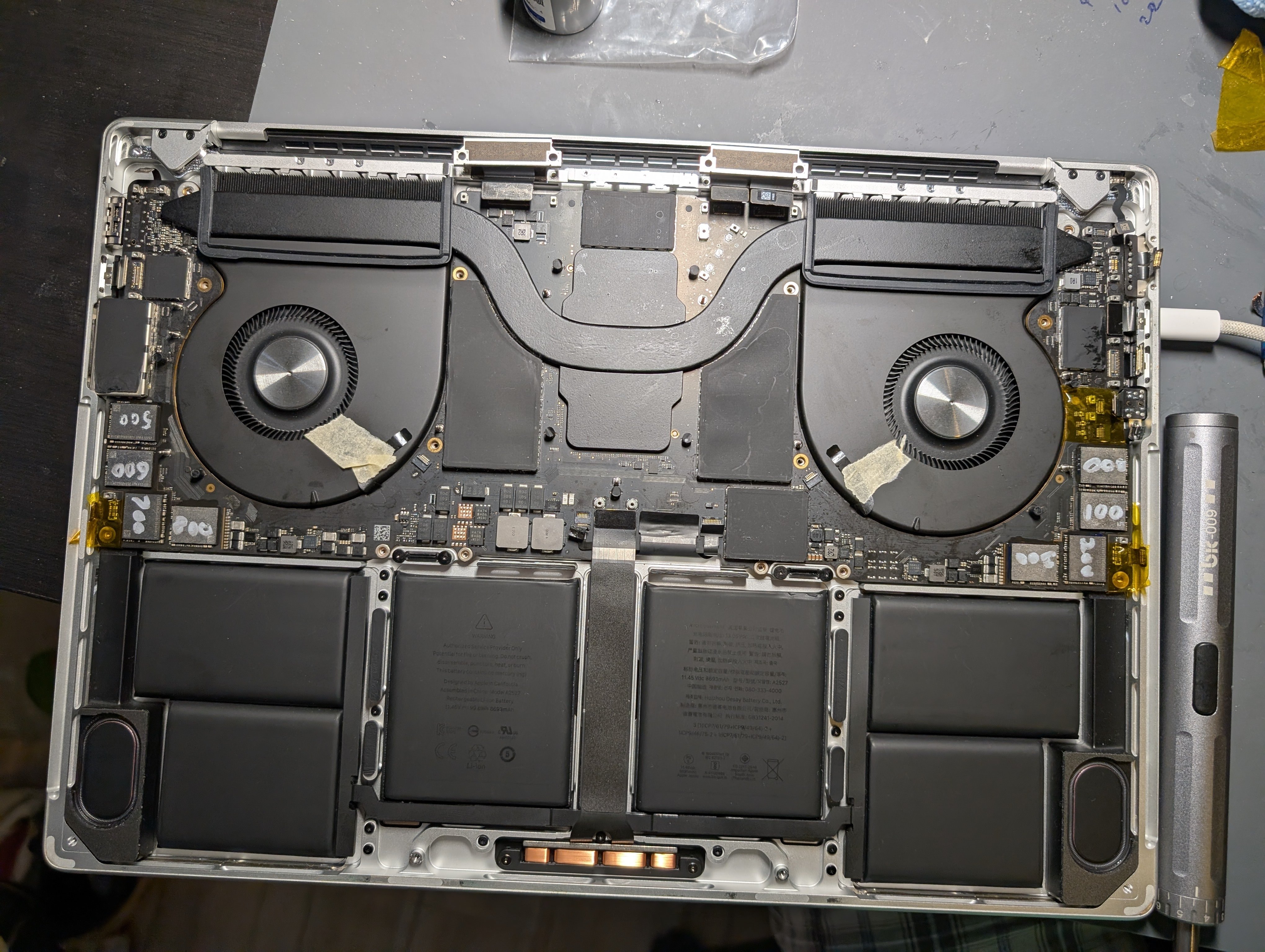
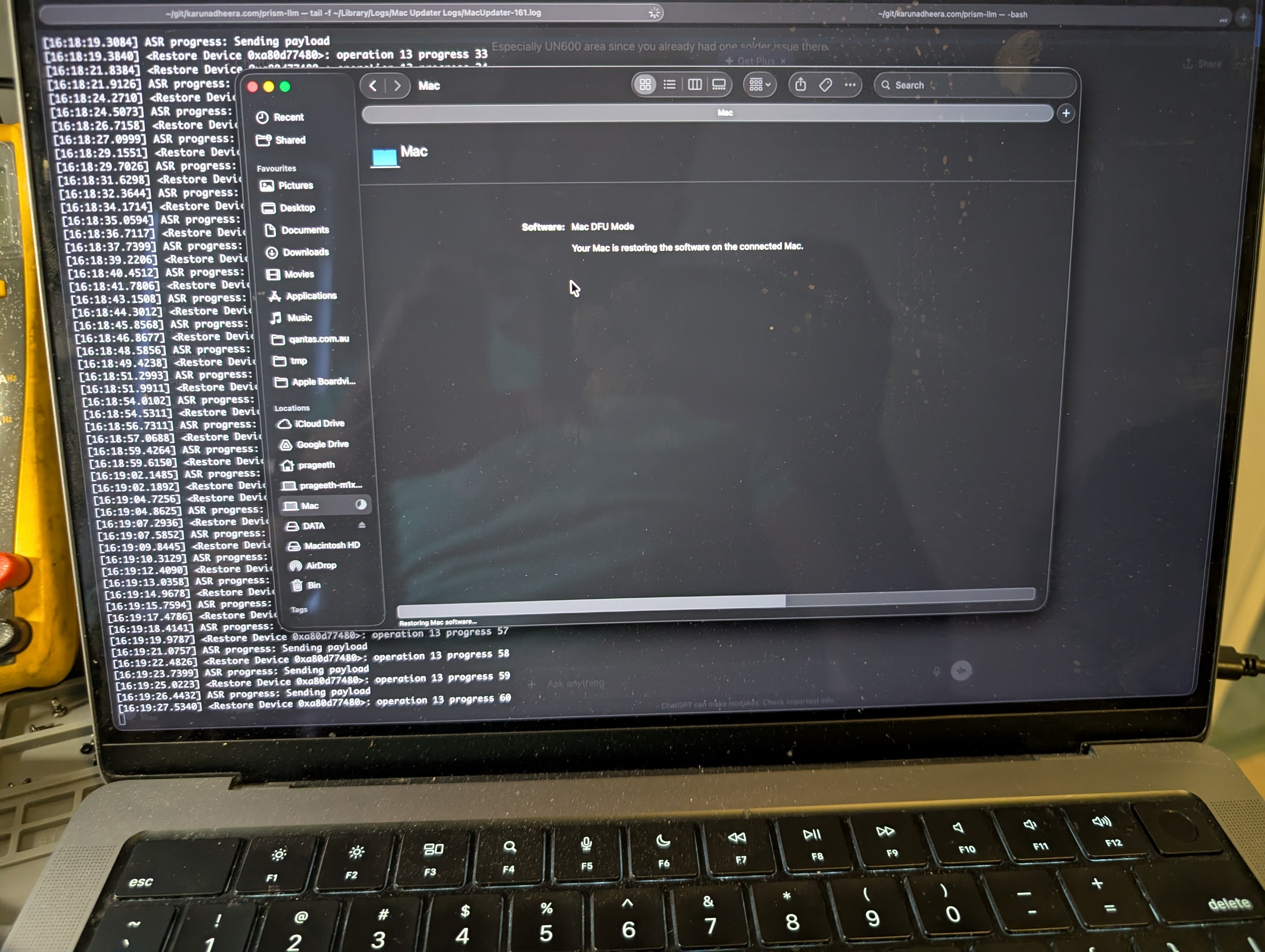

After almost 8 hours of work, I'm finally up and running and typing this post on the machine. The first time, the DFU restore got terminated at NAND_firmware. Had to take out all NAND and do it again. Was found out to be a bad solder joint under UN600. How I knew? - on JCID P15 all other NAND were showing as not factory, while UN600 was showing as factory (general state).
By the way, on the first OSX install the disk speed test - writes were way slower. They were jumping up and down between 1500 MB/s vs 3000 MB/s.
The ~7000 MB/s write speeds were achieved after below procedure.
Recovery > Terminal > umount disk3 all partitions
Then dd if=/dev/zero of=/dev/rdisk3 bs=1M
DFU restore
By the way, the pricing of the NAND has gone significantly high. On Aliexpress 230 AUD for brand new KICM223 / 195 AUD for KICM229.
Special thanks go to @dosdude1 on all his YouTube guides, forum posts and his willingness to share info with all of us.
Hi all apologies if this has been covered, but im looking to get the m5 max with a 2tb ssd, and currently have an m1 max with a 4tb ssd. is it possible to swap these out before i sell the m1 max? I want to keep the 4tb ssd as they're so insanely expensive. let me know if this is even feasible. thanks!
prageethk
macrumors member
No you can't.Hi all apologies if this has been covered, but im looking to get the m5 max with a 2tb ssd, and currently have an m1 max with a 4tb ssd. is it possible to swap these out before i sell the m1 max? I want to keep the 4tb ssd as they're so insanely expensive. let me know if this is even feasible. thanks!
Hi everyone, I'm new to the forum and I'm fascinated.Yes K5A5 definitely works for 1tb.
What do you advice to use as hot air station?
I'd like the cheapest possible able to do the job correctly. Is the 858D from aliexpress suitable (around 30-40€) ?
I've done some upgrades on Intel, M1, and M2 MacBooks.
Right now I have a MacBook Air A3240 that I want to upgrade to 1TB.
My question is:
I have K5A5 NAND flash memory extracted from an iPhone.
If I install it, I probably won't get a successful process. Right?
I'm asking because of the bin file format. Since they're iPhone flash memory, they probably have a bin file that's not compatible with the MacBook.
Would I have to use a MacBook A3240 bin file to achieve this 1TB configuration with the NAND flash extracted from the iPhone?
prageethk
macrumors member
M1 vs M5 uses SSD nand chips with different pin layout. They are not compatible. I don't know where you can find replacement SSD for M5 generation at this time. Even the SSDs from M4 are different I guess even though the same layout.or is it better to just source the 4tb ssd and swap it out after i get the m5 max?
Hello everybody,
I'm currently in the process of upgrading my MBP M1 A2338, 256gb to 2tb. But I think we've hit the point of critical mass in nand's prices. It went absolutely crazy in the last few days, I've contacted many many sellers and they either don't have the chips or the prices are very high. Around 350 USD for 2tb and 270 USD for 1tb.
So my question is the following :
I've seen somewhere that the M1 macs use the same nands as the Iphone 13, if that's correct, does that mean I could use 2 x 1tb iphone 13 nands to upgrade the storage of my M1 ?
I know there are config
I'm currently in the process of upgrading my MBP M1 A2338, 256gb to 2tb. But I think we've hit the point of critical mass in nand's prices. It went absolutely crazy in the last few days, I've contacted many many sellers and they either don't have the chips or the prices are very high. Around 350 USD for 2tb and 270 USD for 1tb.
So my question is the following :
I've seen somewhere that the M1 macs use the same nands as the Iphone 13, if that's correct, does that mean I could use 2 x 1tb iphone 13 nands to upgrade the storage of my M1 ?
I know there are config

randomblame
macrumors newbie
SDSFGJLKH was supposedly supported by the lb h7 but it will not read them says pcie error it says the same on my kicm225 chip the 232 reads and the h23b1t82d pair reads this software is not very intuitive

fiximac
macrumors newbie
Hello everyone, first of all, thanks to @dosdude1 for the information provided. I bought a pair of memory chips from AliExpress for a MacBook Pro A2338 M1. The chips I received are H23B4T84K7AEQ, marked N00 and N100 respectively, each with 512GB.
I installed them in the position indicated by the seller, but they didn’t work. I get errors like 4014 or other types of errors. The memory is detected correctly with P15, so I think a proper dump might be missing, but the seller is not responding. Can anyone here help me?
update : I reinstalled the original memory chips in the Mac and it powers on without any issues. Thanks everyone.
I installed them in the position indicated by the seller, but they didn’t work. I get errors like 4014 or other types of errors. The memory is detected correctly with P15, so I think a proper dump might be missing, but the seller is not responding. Can anyone here help me?
update : I reinstalled the original memory chips in the Mac and it powers on without any issues. Thanks everyone.
Attachments


hi there, I have replaces the hands again for my wife's m3 mba15" but now I am getting error 130c.ffff which points to the trackpad (was working before perfectly). I installed another one which is tested working, but same issue. maybe somebody could have a look at my log? and point me to the correct direction?
Attachments
randomblame
macrumors newbie
found a chip combo not listed in the front page m1 a2338 board suposedly 512gb with two hynix chips h23b2588h7aeq-bc 039y and h23b2t83g7aeq-bc 036y ah it's on https://logi.wiki/index.php/MacBook_NAND_List though and a few more missing combinations as well
prageethk
macrumors member
Try the iPhone 13 menu under P15. Use format NAND option.Hello everyone, first of all, thanks to @dosdude1 for the information provided. I bought a pair of memory chips from AliExpress for a MacBook Pro A2338 M1. The chips I received are H23B4T84K7AEQ, marked N00 and N100 respectively, each with 512GB.
I installed them in the position indicated by the seller, but they didn’t work. I get errors like 4014 or other types of errors. The memory is detected correctly with P15, so I think a proper dump might be missing, but the seller is not responding. Can anyone here help me?
update : I reinstalled the original memory chips in the Mac and it powers on without any issues. Thanks everyone.
Hello guys, I'm processing to upgrade my MacBook air m4 13" base model to 1tb ssd.
I've removed both chips and it was pretty hard, I had to bump the temperature to 420°c and it still took some time.
2 small components popped, it was an hassle but I've managed to solder them back.
However a 3rd one popped and I can't find it, can you confirm me if the component is required or not ? It's a brown one similar to the one 3 positions on the left from the missing one.
Are m4 air schemas available yet? Can we say if it's useful or not without them?
I've removed both chips and it was pretty hard, I had to bump the temperature to 420°c and it still took some time.
2 small components popped, it was an hassle but I've managed to solder them back.
However a 3rd one popped and I can't find it, can you confirm me if the component is required or not ? It's a brown one similar to the one 3 positions on the left from the missing one.
Are m4 air schemas available yet? Can we say if it's useful or not without them?
Attachments

Last edited:
I've tried to edit my post and it made another one, can't find a button to delete it!
I'm having a mental breakdown, I would really appreciate any help!
I've pointed the component on the full motherboard here
I'm having a mental breakdown, I would really appreciate any help!
I've pointed the component on the full motherboard here
Attachments

Last edited:
Sauve Mon Mac
macrumors member
Test it with continuity mode : probably a 1.2 or 0.9v condensator so you are fine.
One end is ground ? And the other ?
One end is ground ? And the other ?
prageethk
macrumors member
Missing this capacitor won't stop the board from working. Probably needed for stability but not mandatory.Hello guys, I'm processing to upgrade my MacBook air m4 13" base model to 1tb ssd.
I've removed both chips and it was pretty hard, I had to bump the temperature to 420°c and it still took some time.
2 small components popped, it was an hassle but I've managed to solder them back.
However a 3rd one popped and I can't find it, can you confirm me if the component is required or not ? It's a brown one similar to the one 3 positions on the left from the missing one.
Are m4 air schemas available yet? Can we say if it's useful or not without them?