Become a MacRumors Supporter for $50/year with no ads, ability to filter front page stories, and private forums.
But that will disable all updates, including those for Sequoia and XProtect.
I set the rules in their own group so I can temporarily disable them while I do a Sequoia update or run this to update xprotect manually:
Bash:
sudo xprotect version && sudo xprotect check && sudo xprotect update
 
You create a rule to block connections for /System/Library/PrivateFrameworks/MobileSoftwareUpdate.framework/Support/softwareupdated
But that will disable all updates, including those for Sequoia and XProtect.

Little Snitch 5 Help - Configuration - Create and edit rules
https://help.obdev.at/littlesnitch5/lsc-edit-rules
Protecting against malware in macOS
https://support.apple.com/en-euro/guide/security/sec469d47bd8/web
Thank you so much! I will pin this message for december, when the 'Defer90' runs out. I do hope there will be another trick to fake that your Macbook is not Tahoe capable or divert this update.

Time for some LTS versions Apple... I mean, I'm willing to try everything, but Tahoe?! Nope.
 
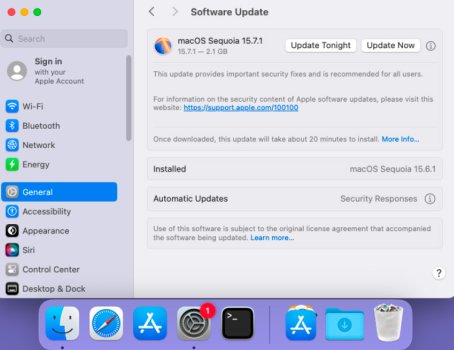
@GH1852 The notification badge problem seems to have been partially solved. It’s now displayed in the Dock for 15.7.1 on macOS 15.6.1, but not when opening System Preferences, below Apple Account.
softwareupdate_red_badge.jpg
 
Hey. I just downgrade to 15.7.1 and use your defer. Just want to say thanks you for your defer. 🙌🙌
I hope I can actually continue to use it after 90 days without annoying update to 26 annoying
 
  • Love
Reactions: turbineseaplane
In Sequoia (I like 15.4.1) it looks like using the profile will defer the Tahoe notice. And blocking with (little snitch or Lulu) can remove the anoying badge for further Sequoia updates.
 
  • Love
Reactions: turbineseaplane
Hey. I just downgrade to 15.7.1 and use your defer. Just want to say thanks you for your defer. 🙌🙌
I hope I can actually continue to use it after 90 days without annoying update to 26 annoying

You can do another deferral at that time.

That's my plan. I want nothing to do with Tahoe anytime soon.
 
Sadly the LS block on /System/Library/PrivateFrameworks/MobileSoftwareUpdate.framework/Support/softwareupdated is not working. I got the 15.7.1 update badge showing back up again today. It must be something else calling home.

It's an anoyance thats all.
 
  • Like
Reactions: katbel
When I booted up this morning no bandge 🤔

Thanks bogdanw, I will try the NoBubble profile.
 
For those seeing the notification badge, please mention what profiles you have installed (Defer90, SoftwareUpdate, NoBubbleNew), what updates appear in System Settings, and post the result of

Code:
defaults read ~/Library/Preferences/com.apple.systempreferences.plist

To delete the notification badge, until what caused it happens again, run:

Code:
defaults delete ~/Library/Preferences/com.apple.systempreferences.plist AttentionPrefBundleIDs; killall Dock

Terminal must have Full Disk Access.
 
Yesterday I installed Sequoia, but just after the first restart I noticed that it was downloading more than 4.7GB
As soon as I applied the Defer90 days (Thanks @bogdanw 💗 ) it stopped.
I looked for invisible files that big and found two files buried in my disk .
Preboot disk- 8A41F6.....-cryptex1-current
and in current folder
os.dmg and os.clone.dmg both 5.97GB each with yesterday creation date, as I installed Sequoia
Are they essential or just a leftover of Tahoe or whatever my computer was downloading?
In case can I delete them, if yes how?
 
I looked for invisible files that big and found two files buried in my disk .
Preboot disk- 8A41F6.....-cryptex1-current
and in current folder
os.dmg and os.clone.dmg both 5.97GB each with yesterday creation date, as I installed Sequoia
Are they essential or just a leftover of Tahoe or whatever my computer was downloading?
In case can I delete them, if yes how?
You should’t see the Preboot volume. Have you tried restarting your Mac?

Those dmg files should be there, you should not delete them.
 
  • Like
Reactions: katbel
You should’t see the Preboot volume. Have you tried restarting your Mac?

Those dmg files should be there, you should not delete them.
Thanks ☺️
I see the Preboot only when I look for invisible files with a specific search app, it’s not mounted.
I’ll leave those .dmg and forget about them.

After the initial installation my available disk space went from + 50GB ~ to - 50GB ~ after few hours?
Is it normal? It never happened to me in previous Systems installations
 
Thanks ☺️
I see the Preboot only when I look for invisible files with a specific search app, it’s not mounted.
I’ll leave those .dmg and forget about them.

After the initial installation my available disk space went from + 50GB ~ to - 50GB ~ after few hours?
Is it normal? It never happened to me in previous Systems installations

Funny thing. I reboot every day. Today is the first day I notice the Preboot volume appearing in my sidebar of QSpace Pro. It is not there in Finder's sidebar.
 
After the initial installation my available disk space went from + 50GB ~ to - 50GB ~ after few hours?
Is it normal? It never happened to me in previous Systems installations
Check /System/Library/AssetV2. macOS might have downloaded "Apple Intelligence"
https://forums.macrumors.com/thread...ut-still-taking-up-5-45gb-of-storage.2448369/

The Preboot volume is mounted in /System/Volumes/Preboot and can be opened in Finder → “Go to a folder by entering its pathname” https://support.apple.com/guide/mac...pecific-folder-on-mac-mchlp1236/15.0/mac/15.0
 
  • Like
Reactions: katbel
Thanks for the link to the Apple Intelligence: my folder is 8.8 GB, not using it!
What’s the terminal command for deleting the folders in AssetsV2?
Do I need to delete every folder or I can delete AssetsV2 in one command?


The first screenshot was taken at 11 am
The second one 3 hours later.
Difference is 43GB ~ Purgeable changed too
But the Used capacity didn’t change that much, compared, less than 1GB
Size difference.png
 
Last edited:
@bogdanw
What’s the terminal command for deleting the folders in AssetsV2?
Do I need to delete every folder or I can delete AssetsV2 in one command?


I tried in recovery mode rm -R and the directory, but I got the file is Read Only
 
  • Love
Reactions: katbel
I Deferred it by 27 years:
Code:
<?xml version="1.0" encoding="UTF-8"?>
<!DOCTYPE plist PUBLIC "-//Apple//DTD PLIST 1.0//EN" "http://www.apple.com/DTDs/PropertyList-1.0.dtd">
<plist version="1.0">
<dict>
    <key>PayloadContent</key>
    <array>
        <dict>
            <key>PayloadDisplayName</key>
            <string>Restrictions</string>
            <key>PayloadIdentifier</key>
            <string>com.apple.applicationaccess.DD0E3FCB-7C48-4CC3-8E92-C42C90B00484</string>
            <key>PayloadType</key>
            <string>com.apple.applicationaccess</string>
            <key>PayloadUUID</key>
            <string>DD0E3FCB-7C48-4CC3-8E92-C42C90B00484</string>
            <key>PayloadVersion</key>
            <integer>1</integer>
            <key>enforcedSoftwareUpdateMajorOSDeferredInstallDelay</key>
            <integer>9999</integer>
            <key>forceDelayedMajorSoftwareUpdates</key>
            <true/>
        </dict>
    </array>
    <key>PayloadDisplayName</key>
    <string>Untitled</string>
    <key>PayloadIdentifier</key>
    <string>iMazing-Profile-Editor.F25F1FEC-9D76-40C8-81F2-C89CE0A50C41</string>
    <key>PayloadType</key>
    <string>Configuration</string>
    <key>PayloadUUID</key>
    <string>F25F1FEC-9D76-40C8-81F2-C89CE0A50C41</string>
    <key>PayloadVersion</key>
    <integer>1</integer>
</dict>
</plist>
 
  • Like
Reactions: katbel
Register on MacRumors! This sidebar will go away, and you'll see fewer ads.