Become a MacRumors Supporter for $50/year with no ads, ability to filter front page stories, and private forums.
I Deferred it by 27 years:
Code:
<?xml version="1.0" encoding="UTF-8"?>
<!DOCTYPE plist PUBLIC "-//Apple//DTD PLIST 1.0//EN" "http://www.apple.com/DTDs/PropertyList-1.0.dtd">
<plist version="1.0">
<dict>
    <key>PayloadContent</key>
    <array>
        <dict>
            <key>PayloadDisplayName</key>
            <string>Restrictions</string>
            <key>PayloadIdentifier</key>
            <string>com.apple.applicationaccess.DD0E3FCB-7C48-4CC3-8E92-C42C90B00484</string>
            <key>PayloadType</key>
            <string>com.apple.applicationaccess</string>
            <key>PayloadUUID</key>
            <string>DD0E3FCB-7C48-4CC3-8E92-C42C90B00484</string>
            <key>PayloadVersion</key>
            <integer>1</integer>
            <key>enforcedSoftwareUpdateMajorOSDeferredInstallDelay</key>
            <integer>9999</integer>
            <key>forceDelayedMajorSoftwareUpdates</key>
            <true/>
        </dict>
    </array>
    <key>PayloadDisplayName</key>
    <string>Untitled</string>
    <key>PayloadIdentifier</key>
    <string>iMazing-Profile-Editor.F25F1FEC-9D76-40C8-81F2-C89CE0A50C41</string>
    <key>PayloadType</key>
    <string>Configuration</string>
    <key>PayloadUUID</key>
    <string>F25F1FEC-9D76-40C8-81F2-C89CE0A50C41</string>
    <key>PayloadVersion</key>
    <integer>1</integer>
</dict>
</plist>
If it works I will do it too! 27 years is the minimum 😄
 
I Deferred it by 27 years:
Code:
<?xml version="1.0" encoding="UTF-8"?>
<!DOCTYPE plist PUBLIC "-//Apple//DTD PLIST 1.0//EN" "http://www.apple.com/DTDs/PropertyList-1.0.dtd">
<plist version="1.0">
<dict>
    <key>PayloadContent</key>
    <array>
        <dict>
            <key>PayloadDisplayName</key>
            <string>Restrictions</string>
            <key>PayloadIdentifier</key>
            <string>com.apple.applicationaccess.DD0E3FCB-7C48-4CC3-8E92-C42C90B00484</string>
            <key>PayloadType</key>
            <string>com.apple.applicationaccess</string>
            <key>PayloadUUID</key>
            <string>DD0E3FCB-7C48-4CC3-8E92-C42C90B00484</string>
            <key>PayloadVersion</key>
            <integer>1</integer>
            <key>enforcedSoftwareUpdateMajorOSDeferredInstallDelay</key>
            <integer>9999</integer>
            <key>forceDelayedMajorSoftwareUpdates</key>
            <true/>
        </dict>
    </array>
    <key>PayloadDisplayName</key>
    <string>Untitled</string>
    <key>PayloadIdentifier</key>
    <string>iMazing-Profile-Editor.F25F1FEC-9D76-40C8-81F2-C89CE0A50C41</string>
    <key>PayloadType</key>
    <string>Configuration</string>
    <key>PayloadUUID</key>
    <string>F25F1FEC-9D76-40C8-81F2-C89CE0A50C41</string>
    <key>PayloadVersion</key>
    <integer>1</integer>
</dict>
</plist>
Does it work now? 😂
 
1765685558653.png


This works...just installed, no more update for MACOS 26 shows up...

Thanks for your great work
 
I Deferred it by 27 years:
Code:
<?xml version="1.0" encoding="UTF-8"?>
<!DOCTYPE plist PUBLIC "-//Apple//DTD PLIST 1.0//EN" "http://www.apple.com/DTDs/PropertyList-1.0.dtd">
<plist version="1.0">
<dict>
    <key>PayloadContent</key>
    <array>
        <dict>
            <key>PayloadDisplayName</key>
            <string>Restrictions</string>
            <key>PayloadIdentifier</key>
            <string>com.apple.applicationaccess.DD0E3FCB-7C48-4CC3-8E92-C42C90B00484</string>
            <key>PayloadType</key>
            <string>com.apple.applicationaccess</string>
            <key>PayloadUUID</key>
            <string>DD0E3FCB-7C48-4CC3-8E92-C42C90B00484</string>
            <key>PayloadVersion</key>
            <integer>1</integer>
            <key>enforcedSoftwareUpdateMajorOSDeferredInstallDelay</key>
            <integer>9999</integer>
            <key>forceDelayedMajorSoftwareUpdates</key>
            <true/>
        </dict>
    </array>
    <key>PayloadDisplayName</key>
    <string>Untitled</string>
    <key>PayloadIdentifier</key>
    <string>iMazing-Profile-Editor.F25F1FEC-9D76-40C8-81F2-C89CE0A50C41</string>
    <key>PayloadType</key>
    <string>Configuration</string>
    <key>PayloadUUID</key>
    <string>F25F1FEC-9D76-40C8-81F2-C89CE0A50C41</string>
    <key>PayloadVersion</key>
    <integer>1</integer>
</dict>
</plist>

Does the 27 year deferral actually work?

This is the most exciting news, potentially, I've seen in a while.
 
Does the 27 year deferral actually work?
Apple about enforcedSoftwareUpdateMajorOSDeferredInstallDelay:
"This restriction allows the administrator to set the number of days to delay a major software upgrade on the device. When this restriction is in place, the user sees a software upgrade only after the specified delay after the release of the software upgrade. This value controls the delay for forceDelayedMajorSoftwareUpdates.
Available in macOS 11.3 and later. Deprecated in macOS 26 and later.
Default: 30
Minimum: 1
Maximum: 90"

As macOS is full of bugs these days, an unsupported value might confuse it to not show Tahoe.
But it’s a slim chance and it would be a bug, not a feature.
Last year:
I tried 0, 360, 1000, deleting <integer>90</integer> and <integer></integer>, the last one gives a profile error on install.
As @katbel said above, we’ll know in 48 hours.
 
Apple about enforcedSoftwareUpdateMajorOSDeferredInstallDelay:
"This restriction allows the administrator to set the number of days to delay a major software upgrade on the device. When this restriction is in place, the user sees a software upgrade only after the specified delay after the release of the software upgrade. This value controls the delay for forceDelayedMajorSoftwareUpdates.
Available in macOS 11.3 and later. Deprecated in macOS 26 and later.
Default: 30
Minimum: 1
Maximum: 90"

As macOS is full of bugs these days, an unsupported value might confuse it to not show Tahoe.
But it’s a slim chance and it would be a bug, not a feature.
Last year:

As @katbel said above, we’ll know in 48 hours.

For fun I tried to change the value to 900 in the code, not in iMazing Profiler but in TextEdit
I didn’t get errors when I installed the extra profile with a different name, kept the good one anyway.
 
  • Like
Reactions: bogdanw
Running softwareupdate --list-full-installers in Terminal now shows
* Title: macOS Tahoe, Version: 26.2, Size: 16975578KiB, Build: 25C56, Deferred: YES
* Title: macOS Tahoe, Version: 26.1, Size: 16890687KiB, Build: 25B78, Deferred: YES
* Title: macOS Tahoe, Version: 26.0.1, Size: 16550558KiB, Build: 25A362, Deferred: YES
* Title: macOS Tahoe, Version: 26.0, Size: 16550645KiB, Build: 25A354, Deferred: NO
 
Running softwareupdate --list-full-installers in Terminal now shows
* Title: macOS Tahoe, Version: 26.2, Size: 16975578KiB, Build: 25C56, Deferred: YES
* Title: macOS Tahoe, Version: 26.1, Size: 16890687KiB, Build: 25B78, Deferred: YES
* Title: macOS Tahoe, Version: 26.0.1, Size: 16550558KiB, Build: 25A362, Deferred: YES
* Title: macOS Tahoe, Version: 26.0, Size: 16550645KiB, Build: 25A354, Deferred: NO
Same here
Screenshot 2025-12-14.jpg

Why the main systems are not Deferred but luckily don’t show up?
My goes all the way to Ventura!
 
I still had defer90.mobileconfig installed on my MBP running Sonoma, and up to now Software Update has been offering Sequoia but suppressing Tahoe. That changed this afternoon, with Tahoe 26.0 being offered (and no mention of Sequoia). After removing defer90.mobileconfig, Tahoe 26.2 is offered, and the output of softwareupdate --list-full-installers shows that nothing is deferred.
 
  • Like
Reactions: katbel and bogdanw
I still had defer90.mobileconfig installed on my MBP running Sonoma, and up to now Software Update has been offering Sequoia but suppressing Tahoe. That changed this afternoon, with Tahoe 26.0 being offered (and no mention of Sequoia). After removing defer90.mobileconfig, Tahoe 26.2 is offered, and the output of softwareupdate --list-full-installers shows that nothing is deferred.
Thank you for confirming, that exactly what it’s supposed to happen.

As Apple doesn’t push updates/upgrades to all Macs and regions at the same time, some of us will see Tahoe 26.0 sooner then others.

When Tahoe 26.0 will appear on my Mac mini M4, I’ll:
- remove the defer profile
- keep the SoftwareUpdate.mobileconfig profile that disables automatic updates
- install the NoBubbleNew.mobileconfig profile if the Tahoe notification appears in the Dock
- run the commands to set the notification to 2035 if the Tahoe notification appears in the Notification Centre

SoftwareUpdate.mobileconfig https://forums.macrumors.com/threads/defer-tahoe-for-90-days.2465304/post-34117211

NoBubbleNew.mobileconfig https://forums.macrumors.com/thread...ore-sequoia-for-90-days.2436999/post-33628256

Set MajorOSUserNotificationDate to 2035
Code:
defaults write ~/Library/Preferences/com.apple.SoftwareUpdate.plist MajorOSUserNotificationDate -date "2035-01-01 00:00:00 +0000"

Temporary delete the notification in the Dock
Code:
defaults delete ~/Library/Preferences/com.apple.systempreferences.plist AttentionPrefBundleIDs; killall Dock

Terminal must have Full Disk Access.
 
Today I’ve updated my MBA M1 from Sequoia 15.7.2 to 15.7.3 and no sign of Tahoe.

My Mac mini M4 with Sequoia 15.7.3 shows the same: “Your Mac is running the latest software update allowed by your organization”.

I have the Defer90.mobileconfig profile (90 days) installed on both.
 
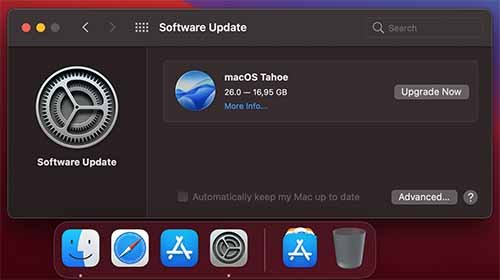
Same profile, same MBA M1, but now booted with Big Sur (11.7.10), shows Tahoe 26.0.

Tahoe26.0.jpg

It appears that Apple is now pushing Tahoe towards devices that support it, but run older macOS versions, mainly those that no longer receive updates (Big Sur, Monterey, Ventura).

Sonoma is n-2 and should still receive security updates, but maybe Apple is not so keen on working on it :)
 
Thanks for the link to the video. The presenter concludes that you should always run the most current version of macOS if you want to increase the chances that known security flaws will actually be patched. I'm not convinced that "most security patches" is the metric I want to maximize :)
 
  • Like
Reactions: katbel and trusso
Register on MacRumors! This sidebar will go away, and you'll see fewer ads.