
Got a tip for us?
Let us know
Become a MacRumors Supporter for $50/year with no ads, ability to filter front page stories, and private forums.
[Guide] Success! Install 10.8 on old unsupported Mac
- Thread starter hackerwayne
- Start date
- Sort by reaction score
You are using an out of date browser. It may not display this or other websites correctly.
You should upgrade or use an alternative browser.
You should upgrade or use an alternative browser.

QuarterSwede
macrumors G4

gleepskip
macrumors 65816
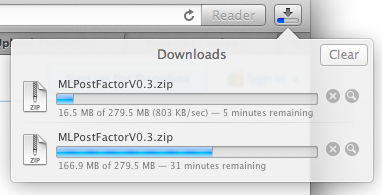
1anyone have a torrent of v0.3 yet? This download speed is freaking awful.
Last edited:
QuarterSwede
macrumors G4
Now that's more like it. Thanks!How about dropbox? MLPostFactorV0.3.zip
I'll upload a torrent and seed it as I'm not installing this tonight so you don't blow your bandwidth limit.
Installed V0.3. DiskUtility works again. Unfortunately iCloud sync (documents on iCloud won't appear in their respective programs "Open" dialog, and documents can't be uploaded to iCloud) and Messages still don't work.
Any ideas before I downgrade back to Lion?
I've already tried forcing a redownload of my iCloud docs (delete Mobile.xxxx folder and the ubiquity folder).
The funny thing is when I log into my iCloud account to manage the storage, the computer can see the documents.
Any ideas before I downgrade back to Lion?
I've already tried forcing a redownload of my iCloud docs (delete Mobile.xxxx folder and the ubiquity folder).
The funny thing is when I log into my iCloud account to manage the storage, the computer can see the documents.
QuarterSwede
macrumors G4
Hopefully I created this correctly and will be able to seed. First torrent creation attempt!
MLPostFactor v0.3 Torrent
MLPostFactor v0.3 Torrent
gleepskip
macrumors 65816
Hopefully I created this correctly and will be able to seed. First torrent creation attempt!
MLPostFactor v0.3 Torrent
So far, not working. No peers for me.
QuarterSwede
macrumors G4
Yeah, I'm not sure why.So far, not working. No peers for me.
MLPF 0.3 Slow Download
Uploaded MLPF 0.3 to my server (without dl speed restriction) : https://twitter.com/mlforall/status/343159038365802496
Uploaded MLPF 0.3 to my server (without dl speed restriction) : https://twitter.com/mlforall/status/343159038365802496

Needleroozer
macrumors regular
Uploaded MLPF 0.3 to my server (without dl speed restriction) : https://twitter.com/mlforall/status/343159038365802496
Well, I managed to download the MLPostFactor Downloader app (from the link provided in MLforAll's post). Then I opened it and ran it. It proceeded to start a Safari download. Now I've finished the Safari download, and Archive Utility is giving me the error message in the first attachment.
<quote>
Unable to expand "MLPostFactorV0.3.zip" into "Downloads". (Error 2 - No such file or directory.)
</quote>
When I went to Terminal and ran unzip, I got the error in the second attachment.
<quote>
Archive: MLPostFactorV0.3.zip
End-of-central-directory signature not found. Either this file is not
a zipfile, or it constitutes one disk of a multi-part archive. In the
latter case the central directory and zipfile comment will be found on
the last disk(s) of this archive.
unzip: cannot find zipfile directory in one of MLPostFactorV0.3.zip or
MLPostFactorV0.3.zip.zip, and cannot find MLPostFactorV0.3.zip.ZIP, period.
</quote>
Maybe I'm doing something wrong, but I can't think of it or get the file to unzip. Any ideas?
Attachments


Last edited:
server:~ thyago$ /System/Library/PrivateFrameworks/Apple80211.framework/Versions/A/Resources/airport -s
SSID BSSID RSSI CHANNEL HT CC SECURITY (auth/unicast/group)
Bukake 7c:d1:c3:af:54:1f -30 6 Y US WPA2(PSK/AES/AES)
Bukake 7c:d1:c3:af:54:20 -34 149,+1 Y US WPA2(PSK/AES/AES)
Hmm. No different than mine as far as protocols go. The airport code should be the same in your devices and mine.
Only thing I can think of to try is to nuke your network preferences. Couple of ways to do that, best is to just google it and follow whichever one makes the most sense to you.
If you don't want to go with that nuclear option, at least go into your wifi settings (Preferences / Network / Wifi / Advanced) and delete all of the preferred networks (including yours) so it's clear. Then try again.
----------
Maybe I'm doing something wrong, but I can't think of it or get the file to unzip. Any ideas?
Looks like you got a corrupted download. I haven't seen a formal post of the md5 for the download, but here's what mine is. If yours doesn't match, you're probably corrupted. Can someone else confirm the hash?
BlackBook😀ATA me$ openssl md5 MLPostFactorV0.3
MD5(MLPostFactorV0.3)= 77b8f847fdfe507ef457323da52f28f3
This is exactly the same problem as I have just had. Tried multiple times with the same outcome. (Trying to boot into the EFI partition and getting stuck on the Apple spinning wheel.)
Specs:
MP 1,1
3.0Ghz Quad
13GB RAM
HD 5770
Multiple HD's
Lion 10.7.5
Anybody else with this problem?
Agreed. Same thing here.
Mac Pro 1,1
3GHZ Quad
8GB RAM
Radeon HD 5770
Lion 10.7.5

Agreed. Same thing here.
Mac Pro 1,1
3GHZ Quad
8GB RAM
Radeon HD 5770
Lion 10.7.5
read post #1
Lovin it
Fantastic solution 🙂 thanks for all your hard work. Question now is ... whats the best way to tidy up the debris? Rather than recreate all the apps on my mac its understanding the best way to managing things like iTunes, word etc and off course all those new partitions.
Fantastic solution 🙂 thanks for all your hard work. Question now is ... whats the best way to tidy up the debris? Rather than recreate all the apps on my mac its understanding the best way to managing things like iTunes, word etc and off course all those new partitions.
poljustley
macrumors newbie
Been following this thread for quite a bit now but just signed up for an MR account today to say:
a) thank you @mlforall and hackerwayne for everything you've done. Is there any way I can donate?
b) I have downloaded MLPostFactor 0.3. I also have Install OS X Mountain Lion.app but I'm fairly sure it's only 10.8.0 . Can I install this and then update to 10.8.4 using the standard Software Update? (by the way, I am currently on Lion, Late 2006 MBP)
I'm sure there's a guide coming soon but I just need to know do I need to source a "10.8.4 Install OS X Mountain Lion.app" or not.
Thanks!
a) thank you @mlforall and hackerwayne for everything you've done. Is there any way I can donate?
b) I have downloaded MLPostFactor 0.3. I also have Install OS X Mountain Lion.app but I'm fairly sure it's only 10.8.0 . Can I install this and then update to 10.8.4 using the standard Software Update? (by the way, I am currently on Lion, Late 2006 MBP)
I'm sure there's a guide coming soon but I just need to know do I need to source a "10.8.4 Install OS X Mountain Lion.app" or not.
Thanks!
SirRichard
macrumors newbie
Successfully managed to install ML 10.8.4 on my MacPro1,1 with upgraded Radeon HD 3870. Only problem was the -- already mentioned -- unexpected "success" and hang after install. Ran MLPF after that and managed to boot ML. Cool. 🙂
What I experienced was that the UI is very slow. Safari lags (not flickering) as hell, opening a finder window reminds me at my old PowerBook G4 -- performance-wise. Seems that ML is somehow using some kind of "generic SVGA/XVGA driver", not HW acceleration. A single web page in Safari made the whole Mac completely unresponsive.
What is really sad -- and this seems to be unresolvable while using the DP1 32 bit kernel I think -- is that tools like "purge" (which is definitely needed on a 4GB machine) don't work.
What I experienced was that the UI is very slow. Safari lags (not flickering) as hell, opening a finder window reminds me at my old PowerBook G4 -- performance-wise. Seems that ML is somehow using some kind of "generic SVGA/XVGA driver", not HW acceleration. A single web page in Safari made the whole Mac completely unresponsive.
What is really sad -- and this seems to be unresolvable while using the DP1 32 bit kernel I think -- is that tools like "purge" (which is definitely needed on a 4GB machine) don't work.
grangerardo
macrumors newbie
Yeah! MacBook3,1 (C2D late 2007), so far flawless on 10.8.4!
- iCloud ok
- iMessage ok
- NO glitches/flickering with Safari (6.0.5)
- X3100 Dual monitor ok
- AFP & Bonjour ok (Synology NAS and Epson MFP)
I had one hiccup when installing, after MLPF on Install (only <1GB applied to Install partition), did not see Install (EFI Boot) on restart. For me solutions was to once activate the original Apple OSX 10.8 Install App from within Lion, which off course failed, and after that the MLPF installation was ok (about 7GB applied to Install partition), and I could see the EFI Boot partition on reboot.
Wayne and ML4ALL, thanks so much!!!!! 😀😀😀😀
Hi!!, can tell me how to install it??. I've tried to install mlpf 0.3 and osx 10.8.3, but I cant to access to the system updates like 10.8.2, 10.8.3 or 10.8.4. I only can install the base system 10.8.0.
Can you help me?.
Thanks!!
indiecraig
macrumors member
Does the new V 0.3 support FTP sharing?
I can connect to ms NAS FTP Server but I can't copy any files in it!
Premission are set right!
Is SMB still not supported?
Best wishes from Germany
Anttila
I'm getting the same behaviour when connecting to an FTP server. Can't open or copy any files and can't write new files.
Without FTP and SMB I can't use the shared drive on my router. Any suggestions?
Many thanks.
purge not working for me either, so I'm using Memory Clean (bottom of page) instead.What is really sad -- and this seems to be unresolvable while using the DP1 32 bit kernel I think -- is that tools like "purge" (which is definitely needed on a 4GB machine) don't work.
Hi,
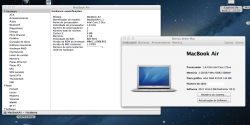
While most of the procedure ran smoothly (besides the "system does not reboot after installation"-problem) I have no audio and the transparent-dock-problem which was also known with MLPostFactor 0.2.
Thank you!)
----------
Well, I sorted out a list of things ...
1. Let's start with audio: It's been a hardware fault (at least kind of). An internal riibbon cable snapped off it's port while I disconnected my external drives for some precautious reasons. I think it was a bit loose after I disassembled my Mini for an eSata Hack (simply replacing the ATA-DVD-Drive for an ATAtoSATA expansion bay with a connected cable to the outside). I reconnected it and sound is back.
2. The transparent dock thing ... often enough said: run these two lines in terminal:
defaults write com.apple.dock hide-mirror -bool yes
killall Dock
and it's back.
3. Bluetooth disappeared on my iMac after the first reboot and files some crash reports (as the one from the pal some sides back). That's a simple one. Time Machine restored a newer but not compatible BlueD from my Backup. Just boot into your install partition, reapply MLPostFactor, launch Disc Utility from there, fix permissions, reboot and voila. Bluetooth back working, no more crash reports.
4. Screen Sharing. My Mac Mini provides just a black screen to all my other macs. Even the VNC from my iPad only gets black. If I move the mouse or type something on the remote machine, the Mini shows all reactions like Mouse Movement and so on. But you have to do it blind. No more ideas on that right now. A working solution is using Teamviewer. That one is working flawlessly. (BTW: Screen Sharing on my iMac with ATI X1600 works well, just the Mini and it's GMA don't).
5. (I never had these problems) iCloud, Messages and so on work on both of my machines like a dream. My way to go (for those with problems, please try it that way):
a) create a current Time Machine Backup
b) download OSX Installer 10.8.4 from the App Store
c) grab your MLPostFactor 0.3 - copy
d) plug an empty 8GB-USB-Thumbdrive into your Mac running Lion 10.7.5 or higher and create a bootable Thumbdrive using MLPostFactor
e) boot your Mac from the Thumbdrive
f) launch Disc Utility and erase the target partition
g) install 10.8.4
h) when the system will reboot, just launch MLPostFactor from the Utilities-Menu and apply the patch to your installation
i) reboot into 10.8.4, create a new user (I always call him SETUP) and finish the First-Start-Assistant (by choosing later on the request to migrate) including iCloud-Setup
j) Lauch Migration Assistant and restore your Time Machine Backup
k) reboot into your USB-Drive and reapply MLPostFactor (repairing Permissions from Disc Utility there does no harm but is recommended)
l) reboot into a fully running 10.8.4 (where you might delete the setup user)
That's it.
(and by the way, always check your cables first 🙂 )

ftalbot
macrumors member
Hi!!, can tell me how to install it??. I've tried to install mlpf 0.3 and osx 10.8.3, but I cant to access to the system updates like 10.8.2, 10.8.3 or 10.8.4. I only can install the base system 10.8.0.
Can you help me?.
Thanks!!
The procedure is on the first page. Download the 10.8.4 combo update (google it). Run MLPF, select 10.8.4 and your Install partition. Then, run the combo update. When your MacBook restarts, hold the alt key and select your Install partition. Then, select MLPF in the "Utilities" (?) menu. Select 10.8.4 and your main partition. Reboot et voilà!
I'm getting the same behaviour when connecting to an FTP server. Can't open or copy any files and can't write new files.
Without FTP and SMB I can't use the shared drive on my router. Any suggestions?
Many thanks.
No problems with ftp mount here. Try it this way and see if it gives any errors. You may have to change the ftp:// to ftp://username:password@device/. Mounting by finder worked fine for me as well.
BlackBook:Volumes me$ mkdir /Volumes/test
BlackBook:Volumes me$ mount_ftp ftp://ftp.microsoft.com/ /Volumes/test/
BlackBook:Volumes me$ ls /Volumes/test/
KBHelp PSS Services deskapps
MISC Products Softlib developr
MISC1 ResKit bussys peropsys
----------
I'm sure there's a guide coming soon but I just need to know do I need to source a "10.8.4 Install OS X Mountain Lion.app" or not.
Thanks!
Life will be much easier if you use a 10.8.4 install image. If you're properly licensed, that typically means just going into the app store and hitting download again and it'll pull the latest version.
Update: Ok, to be fair, if you don't have another supported machine handy, clicking download isn't really an option. Is this something that could be tricked into working with an smbios update of the machine ID? Even if it's a set, reboot, download, put back type thing? I suspect this then starts bordering on the hackintosh type discussion, but if it allows folks to purchase and get a valid license, I think it's valid.
Last edited: