

I made a macOS app called LockLines. It is a small utility for designing formatted lock screen messages that fit the real macOS lock screen message area.
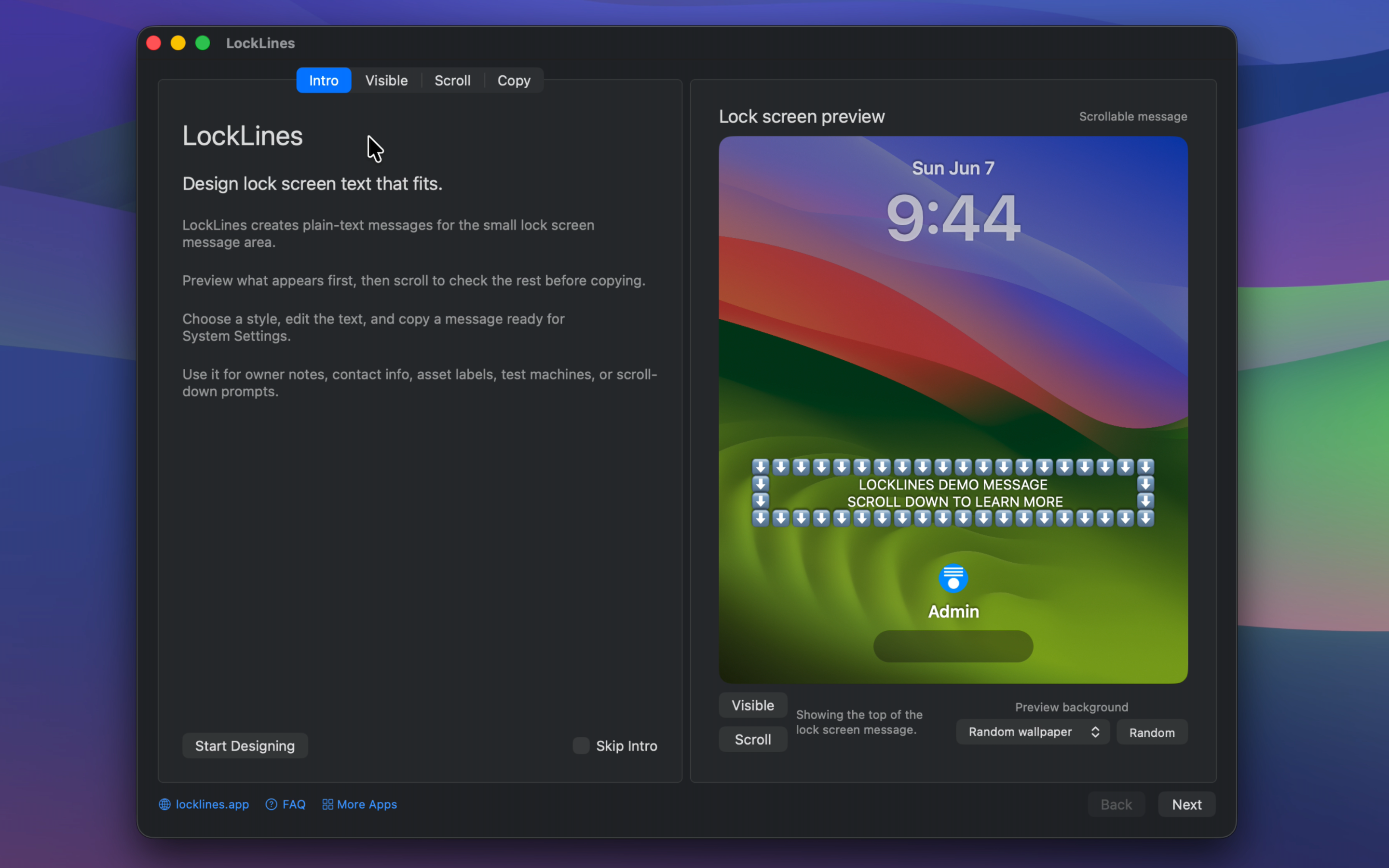
I have been using macOS lock screen messages for a long time. I like that a locked Mac can still show useful information before login, such as owner info, return instructions, asset labels, repair notes, lab machine warnings, or a short message for someone who finds the device.
The problem is that the lock screen message field is small and it does not use a monospaced font. If you try to make ASCII-style layouts, borders, centered text, arrows, boxes, or a clear "scroll down" prompt, it can look correct while typing but break once it appears on the real lock screen.
LockLines solves that by generating plain-text messages designed around the actual lock screen layout. I built it by testing hundreds of lines on a real Mac lock screen and measuring how they render, so the preview is as close as possible to what appears after locking the Mac.
The workflow is simple:
Then the scrollable part can contain the actual contact details and return instructions. Someone who finds the Mac can scroll down and read it, but the private contact information is not exposed at a glance.
Other possible uses:
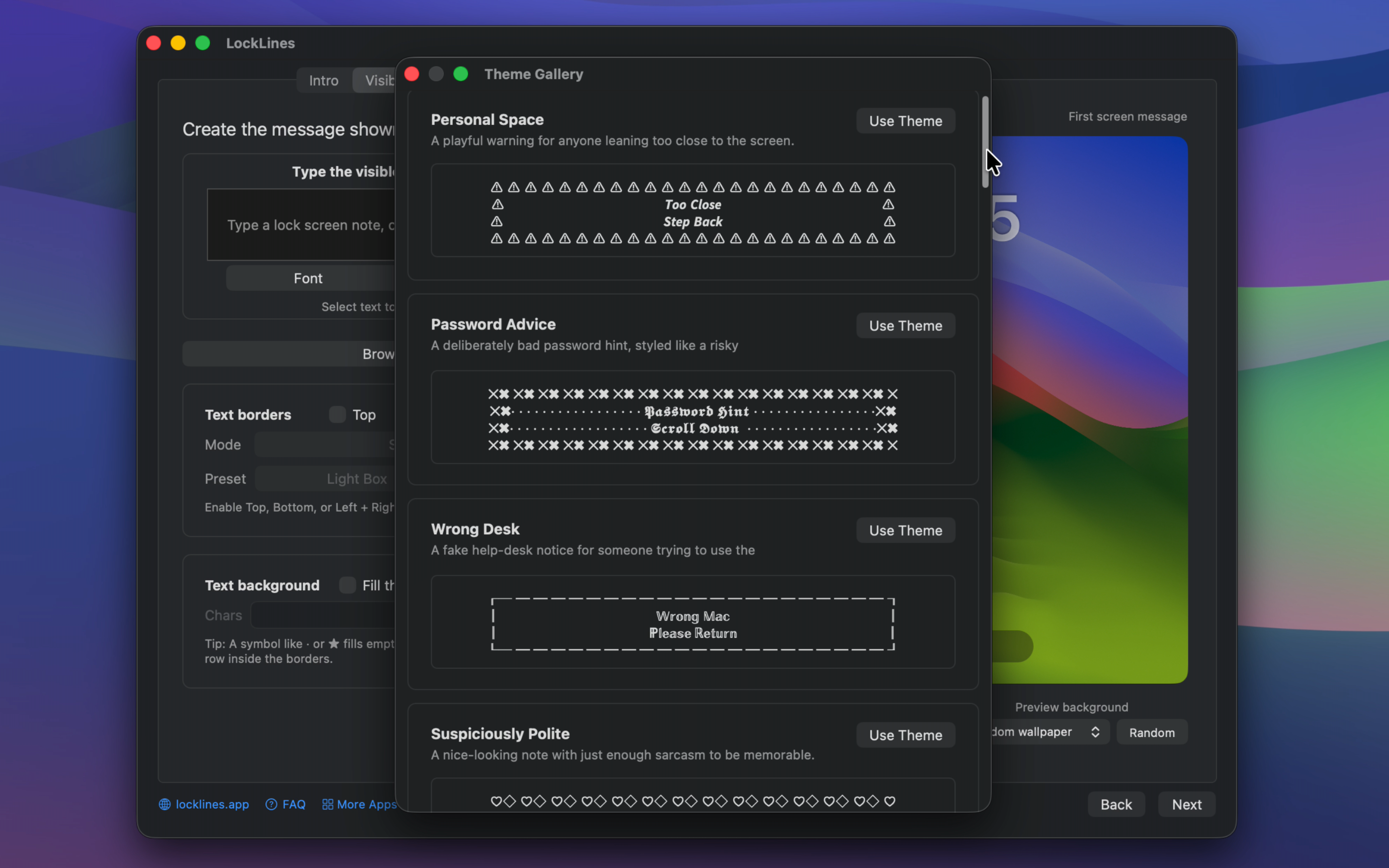
LockLines supports repeated-character borders, styled box borders, background fill, separate visible and scroll sections, and a copy screen for the final output.
It does not change the wallpaper, install profiles, run a background service, or require a network connection. It only generates text that you copy into the standard macOS Lock Screen settings.
LockLines supports macOS 14 and later. Earlier macOS versions are not supported because their lock screen message field is much narrower, which makes this kind of precise layout design impractical.
The app is available on the Mac App Store.
Website: https://locklines.app
Mac App Store: https://apps.apple.com/app/apple-store/id6772349545
I am open to feedback and feature requests, especially useful lock screen message templates and edge cases where the preview could be improved. If something does not fit the real lock screen exactly, the most useful report would be the text, border settings, and macOS version.
I have been using macOS lock screen messages for a long time. I like that a locked Mac can still show useful information before login, such as owner info, return instructions, asset labels, repair notes, lab machine warnings, or a short message for someone who finds the device.
The problem is that the lock screen message field is small and it does not use a monospaced font. If you try to make ASCII-style layouts, borders, centered text, arrows, boxes, or a clear "scroll down" prompt, it can look correct while typing but break once it appears on the real lock screen.
LockLines solves that by generating plain-text messages designed around the actual lock screen layout. I built it by testing hundreds of lines on a real Mac lock screen and measuring how they render, so the preview is as close as possible to what appears after locking the Mac.
The workflow is simple:
- Write the first visible lock screen message
Add scroll-down details below it - Preview the visible and scrollable states
- Copy the generated plain-text message
- Paste it into the standard macOS Lock Screen settings
Markdown (GitHub flavored):
⬇️⬇️⬇️⬇️⬇️⬇️⬇️⬇️⬇️⬇️⬇️⬇️⬇️⬇️⬇️⬇️⬇️
⬇️  IF FOUND, PLEASE SCROLL DOWN  ⬇️
⬇️     OWNER CONTACT IS BELOW     ⬇️
⬇️⬇️⬇️⬇️⬇️⬇️⬇️⬇️⬇️⬇️⬇️⬇️⬇️⬇️⬇️⬇️⬇️
Then the scrollable part can contain the actual contact details and return instructions. Someone who finds the Mac can scroll down and read it, but the private contact information is not exposed at a glance.
Other possible uses:
- Owner contact notes
- "If found, scroll down" messages
- School or office asset labels
- Test machine labels
- Conference or demo machines
- Repair intake notes
- Lab devices
- Shared Macs
- Return instructions
- Reward notes
LockLines supports repeated-character borders, styled box borders, background fill, separate visible and scroll sections, and a copy screen for the final output.
It does not change the wallpaper, install profiles, run a background service, or require a network connection. It only generates text that you copy into the standard macOS Lock Screen settings.
LockLines supports macOS 14 and later. Earlier macOS versions are not supported because their lock screen message field is much narrower, which makes this kind of precise layout design impractical.
The app is available on the Mac App Store.
Website: https://locklines.app
Mac App Store: https://apps.apple.com/app/apple-store/id6772349545
I am open to feedback and feature requests, especially useful lock screen message templates and edge cases where the preview could be improved. If something does not fit the real lock screen exactly, the most useful report would be the text, border settings, and macOS version.
Last edited:
