Become a MacRumors Supporter for $50/year with no ads, ability to filter front page stories, and private forums.

Busowsky

macrumors newbie
Original poster
Hi everyone,
I am writing to share a highly destructive behavior I just experienced with iCloud Drive, and I want to warn anyone using it for professional archiving.
Important context: I deliberately DID NOT use the Apple Photos app to manage these files. I kept my proprietary camera RAW files (.NEF for Nikon, .CR2/.CR3 for Canon) as raw, loose files structured inside standard Finder folders synced via iCloud Drive, specifically to avoid Apple's photo compression or optimization messes.
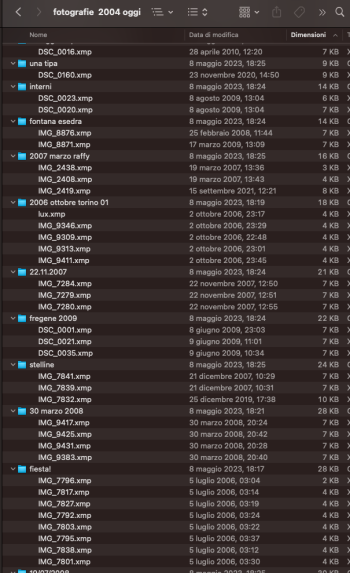
Here is what happened: After a massive iCloud sync lockup, I checked my photography archive folders. iCloud's "Optimize Mac Storage" algorithm completely deleted and wiped out the actual RAW image files from the folders. However, it selectively left behind the small .xmp sidecar files (the development metadata from Lightroom/Camera Raw).
Now, my subfolders are completely orphaned: I have the text files containing my editing notes, but the actual native digital negatives are entirely gone from both my local drive and the cloud.
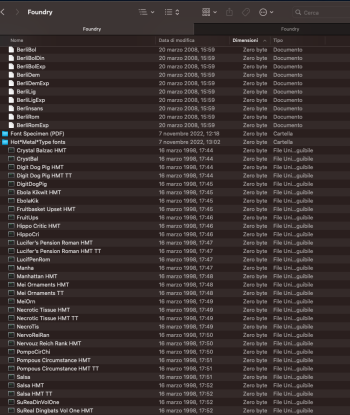
Additionally, iCloud managed to destroy my legacy files in the same run: in my typography folders, it completely stripped the Resource Forks from old 90s PostScript Type 1 fonts, reducing them to 0-byte ghost files with corrupted/random timestamps (verified via Terminal using xattr -l, which shows only Finder user tags left, no com.apple.ResourceFork).
I have escalated this to an Apple Senior Advisor and demanded an engineering review, because a paid backup/cloud service silently deleting proprietary binary files while leaving only text sidecars is criminal.
Has anyone else encountered this selective deletion of native RAW files within iCloud Drive standard folders? Is there any hidden terminal command or script that could force a recovery from iCloud's backend, or is this data lost forever?
Thanks for your insights.


Screenshot 1: The legacy fonts completely emptied to 0 bytes.(Qui inserisci l'immagine Screenshot 2026-05-26 alle 12.47.32.png)As you can see, the metadata points to 1992 and 1998, but the files are completely gutted at zero bytes. xattr -l on terminal confirmed that the com.apple.ResourceFork is entirely missing, leaving only the Finder user tags.
Screenshot 2: Proprietary RAW files completely wiped, only .xmp text files remaining.(Qui inserisci l'immagine Screenshot 2026-05-26 alle 14.09.52.jpg)This is my Finder folder structure inside iCloud Drive. The .NEF and .CR2 camera negatives have been silently eliminated by the system, leaving the .xmp sidecars completely alone in the subfolders.

 

Attachments

  • Screenshot 2026-05-26 alle 14.21.33.png
    Screenshot 2026-05-26 alle 14.21.33.png
    316.7 KB · Views: 23
  • Screenshot 2026-05-26 alle 14.12.44.png
    Screenshot 2026-05-26 alle 14.12.44.png
    251.9 KB · Views: 15
iCloud doesn't sync any but a few select xattrs. If you put a file containing xattrs into the iCloud folder, it will still have them on the Mac you did this on, but that data never gets synced to iCloud, so any other Macs will not receive them, and if you resync the source Mac the data will be gone as well.

As for the data loss, that's what backups are for. iCloud is a service for syncing files, and a buggy one at that.
 
Thank you for the technical insight and the link to Oakley’s article—it actually explains the underlying mechanism perfectly and confirms that this is an architectural behavior rather than a random glitch.

Regarding the 'that's what backups are for' part, I completely agree on the importance of backups (which I obviously maintain). However, my point is more about the user experience and how this feature is presented to professionals:
  1. The Default Setting: 'Optimize Mac Storage' is enabled by default when setting up iCloud. Since the system actively encourages this setup, the user is led to assume that the background process is safe and non-destructive for all standard macOS file structures.
  2. The Meaning of Optimization: For a professional user, 'optimization' implies making storage more efficient while fully preserving the data's integrity. Finding out that the local eviction process permanently strips critical extended attributes (like com.apple.ResourceFork) or impacts linked workflows (RAW+XMP) feels like a major disconnect from what the word 'optimize' promises.
  3. Lack of Clear Warning: iCloud is a paid service integrated directly into the Finder. If its sync engine has known structural limitations with specific legacy metadata or multi-file professional archives, there should be a clear system warning. We shouldn't need to read advanced forensic blogs to know our assets might be compromised by a default background process.
Knowing why the system behaves this way is incredibly helpful, but it doesn't change the fact that a default, paid OS feature shouldn't act as a silent risk factor for professional data.

For transparency, I have just submitted a formal technical escalation with full documentation and screenshots to Apple Ireland (responsible for the European market). I will keep this thread updated as soon as I receive an official response from their engineering team.
 
Register on MacRumors! This sidebar will go away, and you'll see fewer ads.